Dark, Horror Color by Number
- 6.23K
- 4.7
- Installs
- 5.00M
- Price
- Free

Screenshots
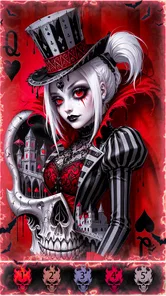

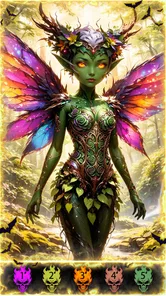
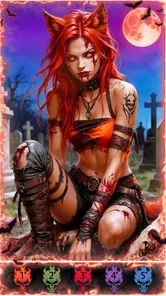
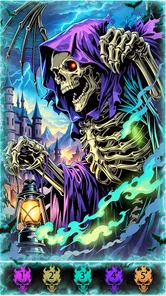
Analysis by Reviewed
I’d pick this game when I want a quiet activity with a slightly spooky mood, rather than a fast-paced challenge. Dark, Horror Color by Number turns horror-themed illustrations into tap-to-fill puzzles, so the appeal is less about drawing skill and more about watching a picture emerge one numbered patch at a time. It is a board game from Fancy Games Studio, and its Teen content rating makes it a better fit for older kids and adults than for very young children who might be unsettled by horror imagery.
Who gets the most from its format
I think this is a good match for someone who enjoys horror art but doesn’t necessarily want a horror game full of jump scares, pressure, or complicated controls. The numbered coloring makes the activity gentle in terms of interaction, while the subject matter supplies the atmosphere. That combination is useful if you like spooky imagery as a visual style, but would rather spend a few calm minutes filling in a picture than navigating a tense story.
It also suits people who want a small activity that can be paused naturally. A player waiting for a friend, taking a break between chores, or settling down with a phone before bed can make a little progress without arranging a game session with anyone else. I’d be more cautious about recommending it as a family choice: the Teen rating is a reminder to consider whether its horror illustrations are appropriate for the particular child, rather than assuming that coloring automatically makes the content child-friendly.
What the numbered format gives up
The guided palette and numbered spaces remove the blank-page problem, which can be a relief if choosing colors is the part of coloring you find tiring. The trade-off is that the app is not a substitute for a drawing tool or an open-ended coloring book. You follow the image’s structure instead of deciding where the shadows go or changing the whole mood with your own palette. If personal expression matters more to you than finishing a designed illustration, a free-drawing app or a conventional coloring app with unrestricted coloring is likely a better fit.
That difference also helps explain why I wouldn’t compare it too closely with strategic board games. There’s no reason to expect the planning, rivalry, or changing decisions that make a board-game match engaging. Here, the small reward is visual completion: a dark illustration gradually becomes clearer as its sections are filled. It is a narrow pleasure, but it can be exactly the right one when I don’t want another competitive challenge on my screen.
Practical choices before you settle in
One helpful habit is to decide how long you want to spend before opening a particularly detailed image. If you only have a minute, choose a small area and treat that as the whole session; if you have more time, work steadily through a color rather than bouncing between unfinished sections. This makes the activity easier to put down without feeling that you have left a complicated task in the middle.
I’d also keep the purchase side in mind when sharing the phone. The game is free to start, and optional in-app purchases range from $0.49 to $59.99 per item. That wide span makes it sensible to check the screen before approving a purchase, especially if a younger player is using the device. It doesn’t change the basic appeal of the coloring, but it is worth knowing before handing the phone over.
More From Our News Desk

 Instagram
Instagram’s Power Comes From Its Place in Your Phone
A close look at how Instagram turns Meta’s reach, recommendation systems and everyday camera habits into durable platform power—and what that costs users.

 Gmail
GmailGmail in a Busy Inbox: Who Benefits Most?
From first account to crowded workday, Gmail earns its place through dependable search and flexible sorting—but its best fit depends on how much inbox maintenance you can tolerate.

 Prime Video
Switching to Prime Video: What Changes in Your Viewing Routine
Prime Video can make a compelling second home for streaming, but switching means learning a different catalog, rental layer, and route from browsing to playback.

 Universal TV Remote Control
Universal TV Remote Control Works Best as a Reliable Backup
A phone remote earns its place through quick setup and reliable habits. Here is how to get more from Universal TV Remote Control—and where its limits show.

 Weather - By Xiaomi
Weather by Xiaomi Review: Clear at a Glance, Less Clear Up Close
Xiaomi’s weather app makes everyday forecasts quick to scan, but its calm surface can leave useful details and recovery paths harder to find than they should be.

 X
XX Under Pressure: Can It Recover When Posting Goes Wrong?
A resilience-focused review of X, examining setup, mistaken posts, interruptions, weak connections, and the gaps that matter when recovery needs to be dependable.
Latest News



What the coloring rhythm feels like
The basic loop is easy to understand: choose an illustration, match a number to its color, and fill the corresponding spaces. That simplicity shapes the speed expectations. I wouldn’t approach it as a game that needs quick reactions or a high-performance device; the pleasure comes from steady progress. The game is free to start, with optional in-app purchases ranging from $0.49 to $59.99 per item, so I’d check purchase prompts carefully if a child will be using the phone.
Short sessions work best
For a brief break, I find number coloring easier to pick up than a traditional board game that depends on another player or a full round. A useful approach is to choose an image that looks manageable, finish a small area, then decide whether to continue. That gives the activity a natural stopping point instead of turning a relaxing moment into a chore. If you prefer to make your own marks, choose colors freely, or invent a composition from a blank canvas, this guided format will feel restrictive.
The horror theme also gives it a different mood from general coloring books. Haunted settings and uncanny figures can make the finished art feel more like a tiny illustrated scene than a purely decorative pattern. I’d use it when I want something atmospheric but low-pressure, not when I’m looking for a frightening game with suspenseful action. The numbered approach keeps the interaction calm even when the subject matter is dark.
When a picture gets busy
On a detailed image, the main trade-off is patience: small spaces take more attention, and repeatedly finding the right numbered areas can interrupt the flow. I’d work through one color at a time rather than hopping around the canvas; it is easier to see what remains and less likely to leave scattered gaps. Zooming in, if available in the image view, can help with tiny sections, but I wouldn’t assume every picture needs to be completed in one sitting. The game’s current version is 1.0.211, and it has a 4.7 average from around 43,000 ratings, with over 5 million installs.
For everyday use, picture a bus ride or a quiet wait before an appointment: I’d open a scene, fill a few matching spaces, and stop when I need to put the phone away. It suits that kind of fragmented attention better than a long strategy match. Compared with ordinary coloring apps, its dark subject matter is the distinctive draw; compared with board games built around planning or competition, it offers much less strategic depth. Those are different kinds of entertainment, so the right choice depends on whether you want atmosphere and repetition or decisions and rivalry.
When it may not be the right pick
If horror art is not your thing, the theme is a real limitation rather than a detail you can ignore. I’d also skip it if you want unrestricted coloring, original drawing tools, or a game that rewards quick thinking. Its 4.7 average and roughly 5,900 written reviews suggest a well-liked experience, but popularity cannot make a narrow theme suit everyone. The game first appeared on April 23, 2020, and supports Android 7.0 or newer; the minimum requirement is useful to know, though actual smoothness can still vary by device and by how much else is running.
Unleashing the Artist Within
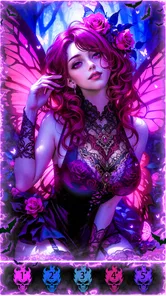
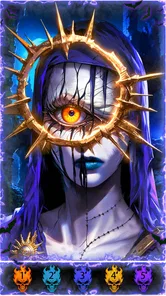
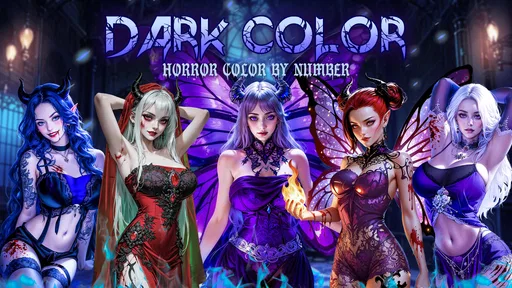
Imagine sitting down after a long day, ready to unwind. You open the app and are greeted with a selection of spooky, spine-chilling images waiting for your artistic touch. The Dark, Horror Color by Number app offers a unique variety of images, from haunted houses and eerie forests to ghostly figures and mysterious creatures. Each picture is a canvas of dark allure, waiting to be brought to life with colors.
A Simple Yet Thrilling Experience
At first, I was a bit skeptical about the whole color-by-number concept. I mean, how thrilling could it be? But let me tell you, the simplicity of tapping on a number and watching the dark hues fill the spaces is oddly satisfying. The app is incredibly user-friendly, with a straightforward interface that even a novice can navigate with ease. It’s a perfect blend of relaxation and excitement, as each completed picture feels like solving a little mystery.
What I particularly love is the selection of colors. The palette is specially curated to enhance the eerie feel of each illustration. Imagine painting a ghost with a chilling shade of blue or a vampire with deep crimson red. It’s like each color has a story of its own, adding to the haunting narrative of the artwork.
Why You’ll Love It
Now, why should you give this app a try? Well, aside from being a fantastic stress reliever, it’s a creative outlet that doesn’t demand much from you. You don’t need to be an artist to enjoy it. The app does the heavy lifting by guiding you through the process, allowing you to focus on the joy of coloring.
Moreover, the app is continuously updated with new images, so there's always a fresh haunt to tackle. It’s a great way to pass the time, especially if you’re into the horror genre. Plus, let’s not forget the satisfaction of sharing your completed masterpieces with friends. Watch their jaws drop as they admire your spooky creations!
Reliability, device fit, and a realistic expectation
For a tap-based coloring game, I’d judge performance mainly by whether the picture remains comfortable to work on during ordinary use, not by how quickly it can animate a scene. The format itself asks for deliberate taps and visual attention, so a brief pause to locate a small numbered patch is more noticeable than a lack of action. I wouldn’t choose it expecting a demanding test of a phone’s speed, and I also wouldn’t assume that every device will feel identical. Android 7.0 is the minimum listed system requirement, while the experience on an older or busy phone can still depend on its overall condition.
If an interruption pulls you away, the practical question is whether you can return to the same image and continue without losing your patience. I’d make a small trial run before committing to a very detailed picture: fill a few sections, leave the game, and see whether resuming feels straightforward on your device. That simple check is more useful than trying to predict performance from a phone’s age alone. It also helps you decide whether this is a comfortable activity for a commute or better saved for a settled moment at home.
Heavy-use moments and small workflow choices
The most demanding moments are likely to be visual rather than strategic: a crowded illustration, tiny spaces, or a session long enough for your eyes and tapping hand to tire. I’d treat those as signals to pause, switch to a less intricate picture, or work through one color at a time. That approach reduces the mental clutter of scanning many unfinished spots and gives each short session a clear purpose. If the display is small, choosing simpler-looking art is a sensible way to avoid turning a relaxing break into painstaking pixel hunting.
There is also a useful trade-off between completion and convenience. Finishing a whole image can feel satisfying, but the game doesn’t need to become a project you must complete in one sitting. I’d use it as a series of small returns: make progress while waiting, stop when attention shifts, and come back when the mood fits. This is especially helpful for anyone who likes the finished artwork but does not enjoy long stretches of repetitive tapping.
How it compares with other ways to unwind
Against a general coloring app, the clearest reason to choose this one is its horror-oriented visual identity, not a promise of broader artistic freedom. A standard coloring book may offer a wider mix of subjects, while a drawing app gives you more control over composition and color choices. Against a conventional board game, this is easier to use alone and in fragments, but it cannot offer the social back-and-forth or tactical decisions of a shared match. I’d pick it when I want a quiet, themed pastime and choose another option when I want to create something original or play with someone else.
That distinction matters when deciding whether the app belongs on your phone long-term. If you return to spooky art often, the narrow focus can make the experience feel coherent rather than limiting. If horror is only an occasional interest, it may work better as a short-lived diversion than as your main coloring app. The best reason to try it is a specific interest in eerie illustrations paired with a preference for guided, low-pressure interaction.
Final Thoughts
In a nutshell, Dark, Horror Color by Number is more than just a coloring app. It’s an experience that combines the soothing act of coloring with the thrilling world of horror. Whether you’re looking to unwind or simply want to explore your creative side in a new way, this app is a must-try. So, grab your virtual paintbrush and dive into this dark, colorful world. Who knows? You might just discover a new hobby!
Dark, Horror Color by Number Frequently Asked Questions
Who developed Dark, Horror Color by Number, and how established is it?
Dark, Horror Color by Number is made by Fancy Games Studio. It has reached over five million installs, with around 43,000 ratings and 5,900 written reviews. Those figures suggest that many players have tried it, while the reviews can offer a sense of how others find its coloring experience. If you enjoy dark-themed art, you may want to browse recent player feedback before deciding whether its style suits you.
What kind of images can I expect to color in Dark, Horror Color by Number?
The game centers on coloring pictures with a dark, horror-inspired style, making it a natural fit for players who enjoy eerie artwork and spooky themes. Its store description also calls it a gothic color app and mentions summer and beach coloring, so the overall selection may include more than frightening scenes. If you prefer a particular mood, consider that mix before downloading.
What is Dark, Horror Color by Number about?
Dark, Horror Color by Number is a unique coloring app that brings a spine-chilling twist to traditional color-by-number games. It immerses users in a dark and eerie atmosphere, featuring horror-themed images that you can bring to life with colors. The app offers a creative outlet for horror enthusiasts and those looking to explore their artistic side in a thrilling way.
Is Dark, Horror Color by Number suitable for children?
Dark, Horror Color by Number is primarily designed for adults and older teens who enjoy horror themes. The images can be quite intense and may not be suitable for young children. Parents are advised to review the content and determine its appropriateness for their child, considering the app's focus on horror and dark imagery. It has a Teen content rating, which is a useful starting point when deciding whether it is appropriate for a younger player.
Does Dark, Horror Color by Number require an internet connection?
While Dark, Horror Color by Number can be enjoyed offline once downloaded, an internet connection is required for initial installation and for accessing additional content or updates. This makes it convenient for users to enjoy the app on the go without worrying about constant connectivity, but they should plan ahead for any content updates.
Pros
- Engaging and relaxing coloring experience.
- Variety of dark
- horror-themed images.
- Simple and intuitive user interface.
- Regular updates with new content.
- Enhances creativity and focus.
Cons
- Ads can be intrusive and frequent.
- Limited features in the free version.
- Some images may be too mature for kids.
- Color palette options are limited.
- Requires internet for full functionality.