ClassicBoy Pro - Game Emulator
- 854.00
- 3.9
- Installs
- 1.00M
- Price
- Free

Screenshots
Analysis by Reviewed
ClassicBoy Pro is the kind of Android arcade game I open when I want to revisit older console and handheld games without keeping several separate apps installed. Developed by PortableAndroid, it presents itself as an all-in-one retro emulator, with tools for scanning ROMs, organizing playlists, and launching classic games from one place. That sounds simple, but the real appeal is the way it turns a scattered collection into something closer to a personal game shelf.
My first impression was practical rather than flashy. This is not trying to imitate a modern game with cinematic menus or a new visual identity. Its personality comes from the material it handles: familiar pixel art, compact sound effects, old-school title screens, and the slower process of choosing what to play. The app is free to download, rated for Everyone, and has passed the one-million-install mark, so it clearly serves a broad audience rather than a tiny group of enthusiasts.
That broad reach does not mean it is effortless for every player. An emulator is only useful when the games, controller setup, and device configuration all cooperate. I found the strongest experience came from treating ClassicBoy Pro as a library manager as much as a player. Once the collection was arranged sensibly, moving from one classic to another felt much more natural than searching through unrelated files or switching between individual emulator apps.
How ClassicBoy Pro turns old games into one playable library
The first setup tells you what kind of app this is
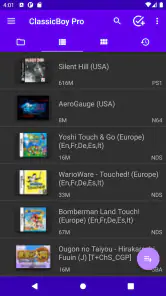
The opening experience is shaped by discovery. Instead of presenting a single built-in game, the app expects me to bring my own ROM files and let it scan them. That makes the first session less immediate than downloading a standalone arcade title, but it also gives the app a clear purpose: it is a front end for a personal collection. The scan-and-playlist approach is especially helpful when files have accumulated in different folders over time.
I recommend starting with a small, tidy folder rather than pointing the scanner at every storage location at once. A focused first scan makes it easier to spot naming problems, duplicate entries, or games that have been placed in the wrong directory. After that, playlists become more useful because they can reflect how I actually play: short sessions, role-playing games, two-player favorites, or games I am currently revisiting.
This is one of the less obvious strengths of ClassicBoy Pro. The app is not merely a row of emulator buttons. It can reduce the mental friction between deciding to play and reaching the right title. For someone with a large ROM collection, that organizational layer may matter more than the emulator label itself.
There is also a legal responsibility that should not be ignored. ClassicBoy Pro provides the player and library tools; it is not a reason to download copyrighted games from random websites. I would use it with ROMs I am entitled to use and keep the collection organized locally. That approach also makes troubleshooting easier, because I know exactly which files I added and where they came from.
Art direction comes from the games, not the shell
The visual mood depends heavily on the original software being played. ClassicBoy Pro does not need to impose a new art style over those games, and I think that restraint works. Pixel edges, limited color palettes, chunky sprites, and old menu screens remain the focus. The surrounding interface mainly needs to get out of the way, and when it does, the contrast between modern phone hardware and older game design becomes part of the charm.
That also means the app cannot rescue a game whose presentation has aged badly. Some classics still communicate clearly with a few colors and strong silhouettes; others can look cramped on a tall touchscreen. I found that screen orientation and display size influence the experience almost as much as the game itself. A title designed for a wide television may feel comfortable in landscape, while a handheld-style game can be easier to read in portrait.
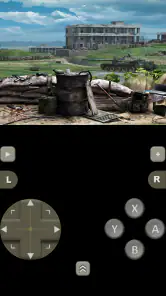
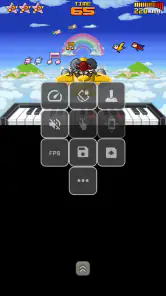
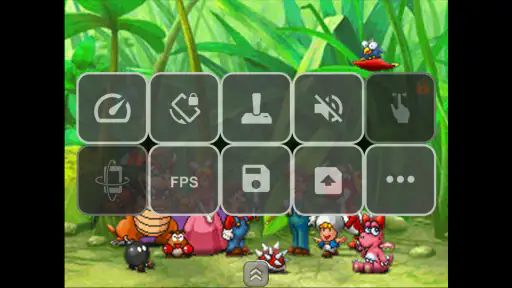
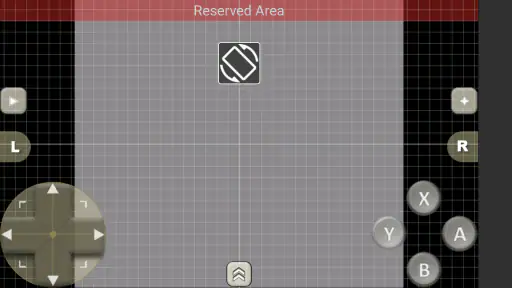
For a better visual result, I would avoid judging a game after only a few seconds with the default layout. Move the virtual controls away from the most important part of the screen, enlarge them only as much as needed, and leave enough room to see status bars or text. The right balance is not always the largest button arrangement. Oversized controls can cover the very pixel art that makes these games readable.
The best visual improvement is often a cleaner control layout, not a stronger filter. Retro effects can be pleasant, but they can also soften small text or make already-busy scenes harder to read. I prefer to begin with a clear image, then adjust the presentation only when a particular game benefits from it.
Sound gives the library its emotional glue
Classic games often rely on sound more than their simple graphics suggest. A short confirmation tone, a repeating stage melody, or a sharp hit effect can define the mood of an entire session. Because ClassicBoy Pro brings different generations of games into one place, its soundscape changes constantly, yet that variety is part of the experience. One moment can feel bright and playful; the next can be tense, strange, or deliberately sparse.
The app works best when I treat audio as part of the pacing rather than background noise. Older games frequently use repetition, so a soundtrack that feels charming during a ten-minute session may become tiring during a longer one. Lowering the volume slightly, taking breaks between stages, or switching to a different title can preserve the appeal instead of turning a memorable loop into irritation.
Sound also exposes the difference between emulation and original hardware. Timing, device speakers, headphones, and the individual game all affect how convincing the result feels. I would not expect every title to sound identical to a childhood console connected to a television. Still, when the response is stable, the familiar music and effects do a remarkable job of restoring the intended atmosphere.
Pacing is controlled by the library, not by one campaign
ClassicBoy Pro has no single story arc or fixed progression that tells me what to do next. Its pacing comes from my choices. I can play a quick arcade-style round, settle into a longer adventure, or jump between several games when one becomes too demanding. The playlist system supports that rhythm because it lets me prepare groups of games for different moods instead of browsing the entire collection every time.
This makes the app surprisingly suitable for everyday use. On a commute or during a short break, I can choose something familiar that does not require a long commitment. At home, I can return to a slower game and continue building a session around it. The important trade-off is that the app gives me freedom rather than guidance. Players who want a curated sequence, achievements, or a modern progression system may find the experience too open-ended.
I also noticed that switching games can weaken focus. The convenience of having many classics together can encourage constant sampling instead of finishing anything. My solution is to keep a small “active” playlist and move everything else into broader categories. That simple limit gives the collection a sense of direction while preserving the freedom that makes an emulator useful.
The controls decide whether nostalgia becomes playable
Touch controls are the biggest practical question for most phone users. They are convenient, but they cannot reproduce the physical separation and feedback of a real controller. Fast platform games, fighting games, and titles that demand diagonal movement can reveal this compromise quickly. I could manage slower games and menu-heavy adventures more comfortably than games built around rapid, precise inputs.
That does not make the touchscreen layout a failure. It means ClassicBoy Pro is more comfortable when the game and control method match. For casual sessions, virtual buttons are enough. For longer play or demanding action, a compatible physical controller can make the experience feel far more deliberate. I would decide based on the games I actually plan to play, not on the emulator’s general reputation.
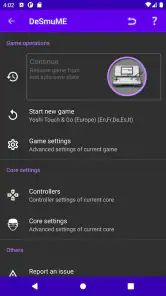
One useful habit is to test controls with a game that uses several button combinations before committing to a long session. If the buttons overlap the action or the thumb position feels awkward, changing the layout early is much easier than adapting after repeated mistakes. I also prefer separate profiles for games with very different control needs, when the available configuration makes that practical, rather than forcing one arrangement to serve everything.
Another trade-off is portability. A phone is always close at hand, but its screen and touch surface are still compromises. ClassicBoy Pro is therefore strongest as a flexible companion for short and medium sessions, while a dedicated handheld or console may be better for someone who wants a consistently physical, living-room-style experience.
What the current build means for prospective users
The current version is 7.3.6, and the app requires Android 5.0 or later. That minimum makes it accessible to many older Android devices, although actual comfort will depend on the phone’s screen, storage arrangement, and controller support. I would not choose a device solely because it meets the minimum operating-system requirement; emulator use is much more pleasant when the interface remains responsive and the display gives the game enough room.
ClassicBoy Pro has an average rating of 3.9 from roughly ten thousand ratings, with more than eight hundred written reviews. I read that overall signal as “useful but not universally frictionless.” It has enough reach to show that the concept works for many people, yet the rating also suggests that setup, compatibility, controls, or expectations can affect satisfaction. An emulator is unusually sensitive to those details because the app is only one part of the complete experience.
The free entry point is a major advantage for curious players. I can explore the library workflow before deciding whether it belongs in my regular rotation. There are in-app purchases ranging from $1.49 to $8.99 per item, so I would check the purchase screen carefully and decide whether any optional upgrade is worthwhile for my own use. The important point is that the basic decision is low-risk: install it, organize a small collection, and see whether the controls and presentation suit me.
Where it beats separate emulator apps
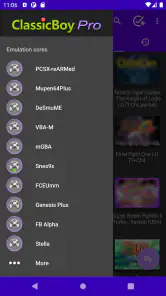
Compared with installing a different emulator for every platform, ClassicBoy Pro feels less fragmented. One library, one general discovery process, and playlists that collect games by mood or system are easier to manage than a phone full of separate icons. This is particularly helpful for someone who remembers a game but not the exact platform, because browsing a unified collection can be quicker than checking several apps.
The compromise is specialization. A dedicated emulator may offer a more focused interface for one system or a particular style of game. If I care deeply about fine-tuning a single platform, a specialist tool may feel cleaner and more predictable. ClassicBoy Pro earns its place through breadth and convenience, not by promising that every individual game will receive the same level of attention as it would inside a narrowly focused app.
It also compares differently with official re-releases. An official collection usually offers a polished, legally packaged experience with consistent controls and presentation. ClassicBoy Pro offers flexibility for a personal library, but that flexibility requires more responsibility and more setup. I would choose the official route when I want zero configuration; I would choose this app when I value bringing multiple parts of my existing collection together.
Who should install it, and who should skip it
I recommend ClassicBoy Pro to Android users who already have a lawful ROM collection, enjoy sampling older games, and want a central place to scan and arrange them. It is also a good fit for someone who likes adjusting the way a library is presented rather than accepting a fixed storefront. The app’s arcade category is a little misleading if interpreted too narrowly: its real value is the broad retro-playing workflow, not a single arcade game with one score loop.
I would be more cautious if you want instant play with no file management, modern achievements, online social features, or a guaranteed controller feel. People who dislike configuring touch buttons may become frustrated quickly. Likewise, anyone expecting a new game with original worlds, contemporary art direction, and a carefully authored campaign should look elsewhere. ClassicBoy Pro preserves older experiences; it does not replace them with a new one.
For a realistic daily scenario, imagine having twenty minutes before dinner. I would open the app, choose a small playlist of short-session favorites, and start with a game that works comfortably in portrait or landscape on the phone. If I had a longer evening, I would switch to a focused playlist and pair the device with a physical controller. That distinction keeps the app enjoyable: I use it as a flexible doorway into different moods, not as one enormous backlog that demands attention all at once.
My final view of the atmosphere and the fit
ClassicBoy Pro succeeds when convenience supports the character of the games instead of flattening it. The art remains defined by pixel-era limitations, sound supplies much of the emotional identity, and pacing comes from the player’s choice of title and playlist. The app’s most meaningful contribution is the bridge between those separate experiences: scanning, organizing, and launching them without forcing me to maintain a collection of unrelated tools.
My reservation is equally clear. The quality of the session depends on files, controls, screen layout, and personal expectations. Touch input can weaken demanding action, setup is less immediate than a standalone game, and a unified library can tempt me to browse endlessly. These are not small details, but they are manageable if I approach the app as a customizable retro shelf rather than a finished modern game.
PortableAndroid’s free game is worth trying if you want a practical Android home for classic gaming and are willing to do a little organizing. I would begin with a modest collection, test a few different control styles, build playlists around real playing habits, and judge the experience after those adjustments. For me, that is where the app finds its strongest mood: not in pretending the past was simpler, but in making older games easy to return to on today’s device.
Pros
- Supports multiple classic console systems in one app.
- Customizable on-screen controls improve playability on touchscreens.
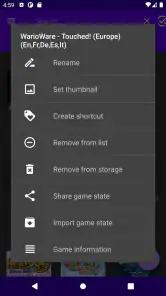
- Save states let you pause and resume games almost anywhere.
- Controller support provides a more authentic gaming experience.
- Offers useful features such as cheats
- shaders
- and fast-forwarding.
Cons
- Performance can vary depending on the emulated system and device.
- Some advanced features may require the Pro version or extra setup.
- Touch controls can feel cramped during fast-paced games.
- Compatibility is not equally reliable across every supported console.
- Users must provide their own legally obtained game files.

- Category
- Arcade
- Version
- 7.3.6