150+ Classic Card Games Pack
- 11.10K
- 4.4
- Installs
- 5.00M
- Price
- Free
Screenshots




Analysis by Reviewed
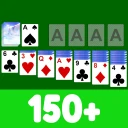
I spent time with 150+ Classic Card Games Pack as a collection for quiet, low-pressure card sessions, and its biggest appeal became clear quickly: it gives me many familiar formats in one place instead of asking me to install a separate app for every game. It is a free card game from Classic Card Game, built around traditional solo favorites such as Solitaire, Spider, and FreeCell, with offline play making it especially convenient when I want something that works without depending on a connection.
This is not the kind of game I would recommend to someone looking for a story, competitive matchmaking, or a dramatic reward loop. Its pleasure is more practical. I open it for a short break, choose a ruleset I already understand, and play at my own pace. The wide selection also gives the collection more staying power than a single-format solitaire app, although having so many choices can make the experience feel less focused. The real question is whether you value variety and familiar card routines more than presentation, novelty, or a tightly directed progression system.
How the collection turns familiar games into a daily habit
I find that this collection suits a shared household device best when everyone treats it as a casual game shelf, not a shared record of personal progress. One person can enjoy a familiar Solitaire round while another tries Spider or FreeCell, and offline play makes it handy during a quiet wait or a trip. That flexible routine also makes it worth thinking about who is using the device and what each player expects from the app.
Early goals are simple, but that is part of the appeal
The first useful goal is not a trophy or a complicated unlock. It is finding the games that match my mood. A quick Solitaire round works when I want a straightforward puzzle, while Spider or FreeCell gives me a different kind of concentration. Because the collection includes many classic formats, I can move from one ruleset to another without learning a completely new control scheme or changing apps.
That creates an immediate sense of direction for new players. Rather than wondering what to do next, I can begin with the most recognizable option and gradually test other variations. The early learning curve is therefore gentle: understand the basic card movement, observe how the layout responds, and decide which formats deserve more time. For someone returning to card games after years away, this is less intimidating than entering a modern game built around unfamiliar mechanics.
There is also a useful distinction between learning a game and mastering it. The collection makes the first step approachable, but the long-term goal comes from improving decisions: exposing hidden cards at the right moment, preserving useful spaces, and avoiding moves that leave a layout impossible to recover. Those are meaningful goals even when the app does not surround them with a large narrative or elaborate reward structure.
Progress feels personal rather than heavily staged
My sense of progress comes from recognizing patterns and making fewer careless moves. In a traditional card game, a successful round is its own small result. I do not need a long campaign to feel that a session mattered, especially when I am playing offline during a commute, in a waiting room, or at the end of the day when I want something calm.
More From Our News Desk

 Gmail
GmailGmail in a Busy Inbox: Who Benefits Most?
From first account to crowded workday, Gmail earns its place through dependable search and flexible sorting—but its best fit depends on how much inbox maintenance you can tolerate.

 Prime Video
Switching to Prime Video: What Changes in Your Viewing Routine
Prime Video can make a compelling second home for streaming, but switching means learning a different catalog, rental layer, and route from browsing to playback.

 Universal TV Remote Control
Universal TV Remote Control Works Best as a Reliable Backup
A phone remote earns its place through quick setup and reliable habits. Here is how to get more from Universal TV Remote Control—and where its limits show.

 Weather - By Xiaomi
Weather by Xiaomi Review: Clear at a Glance, Less Clear Up Close
Xiaomi’s weather app makes everyday forecasts quick to scan, but its calm surface can leave useful details and recovery paths harder to find than they should be.

 X
XX Under Pressure: Can It Recover When Posting Goes Wrong?
A resilience-focused review of X, examining setup, mistaken posts, interruptions, weak connections, and the gaps that matter when recovery needs to be dependable.

 Clash of Clans
Clash of Clans Is Won Between the Battles
Its raids are quick; its community is a long-term project of coordination, teaching, rivalry, and shared responsibility—with all the friction that entails.
Latest News



This design also makes the collection easy to revisit. A player can spend a week favoring Solitaire, then switch to FreeCell when the first format starts to feel routine. That change of rules provides a fresh mental challenge without requiring a new account, a new download, or a new genre. In my experience, this variety is more valuable than a superficial progression track because it changes how I think rather than merely adding another item to collect.
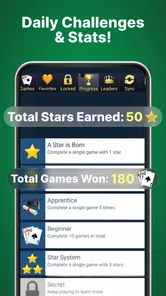
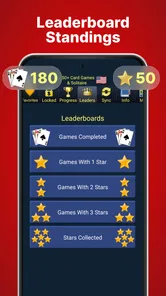
The trade-off is that players who expect visible unlocks, character upgrades, or a clearly staged journey may find the progress signals understated. The collection is closer to a shelf of card tables than a campaign with a destination. I would not choose it if my main motivation were watching a meter fill or unlocking content through a structured sequence. I would choose it when I want the satisfaction to come from playing better.
The difficulty curve depends on the format I choose
One of the collection’s strengths is that difficulty does not have to rise in a single straight line. I can stay with an approachable Solitaire layout, move to Spider for a more demanding planning exercise, or use FreeCell when I want to think several moves ahead. That lets me adjust the mental workload to the time and attention I have available.
This matters in everyday use. If I have only a few minutes, I do not want to spend that time being punished by a difficult setup. If I am settled at home and want deeper concentration, a more strategic format is a better fit. The variety functions almost like a difficulty selector, even though the games themselves remain distinct rather than being steps in one unified ladder.
Still, this approach can feel uneven. A player may jump from a comfortable round into a format that demands much more planning and interpret the change as an abrupt difficulty spike. The answer is to treat the collection as a menu, not a campaign. I recommend learning one format well before judging the entire app, because a game that feels too demanding may simply be a poor match for the moment.
Another practical tip is to avoid switching formats every few minutes if your goal is improvement. Staying with one game long enough to understand its recurring decisions makes the challenge more rewarding. Switching constantly is excellent for variety, but it can prevent the gradual pattern recognition that gives classic card games their depth.
Pacing works best when I control the session
The pacing is naturally flexible. There is no need to commit to a long play session, and the offline focus makes it suitable for small gaps in the day. I can play one round while waiting for an appointment, then return later when I have more time. That makes the collection feel more like a dependable pastime than an app demanding regular attention.
For me, this is where it differs from many modern mobile card games. Those alternatives often emphasize competition, timed events, energy limits, or frequent rewards. This collection is more relaxed. The tension comes from the layout and my own decisions, not from another player making a move or a countdown forcing me to rush. That is a genuine benefit for anyone who wants concentration without pressure.
There is a downside to the same calm design. Without a strong external reason to return, the app may not hold the attention of players who need constant novelty. The broad selection helps, but familiar card games remain familiar. If you already know exactly which solitaire format you like and rarely want anything else, a dedicated version may feel more direct and less cluttered.
What keeps me returning, and what does not
The main retention strength is convenience. A large collection in one app reduces friction, and offline play means I can use it in places where other games are less practical. I also like that the app can serve different moods: a quick, almost automatic round when I need to reset my attention, or a more deliberate session when I want a puzzle that rewards planning.
Its retention is therefore self-directed. I return because the games fit into my routine, not because I am worried about losing a streak or missing a limited-time reward. That makes the experience healthier for casual use, in my opinion. It is easy to put down when I need to, and easy to pick up again without remembering a complicated story or a large set of systems.
Some players may still notice the absence of stronger long-term objectives. If every session is judged only by whether I finish a layout, the experience can become repetitive. I found that setting my own targets helps: complete a format without rushing, reduce unnecessary moves, or spend a few sessions learning a game I normally ignore. These goals are modest, but they fit the nature of the collection better than pretending it is a progression-heavy game.
Free access and purchases deserve a careful look
The game is free to install, which makes trying the collection straightforward. That is important here because the value depends on whether the available formats suit your habits. I would rather explore a broad card library first than pay upfront for a style of solitaire I may not use.
There are in-app purchases ranging from $1.99 to $69.99 per item. That wide range means I would approach optional spending carefully and check the purchase details before confirming anything. For a player who only wants occasional offline card games, the free experience may be enough. Someone who spends a lot of time in the app may consider an upgrade worthwhile, but the decision should come from removing a genuine annoyance rather than buying simply because the collection is large.
Parents should also pay attention to the Teen content rating. Although the gameplay is based on traditional card formats rather than a story-driven adventure, the rating is still part of the app’s official positioning and should be considered before installing it for a younger player. On supported devices, the minimum operating system is Android 7.0, so older phones may not be suitable.
How it compares with dedicated solitaire apps
A dedicated Solitaire app can be better if you want one polished routine with minimal choice. It may feel faster to open, easier to understand, and more focused for daily play. This collection wins when I want alternatives without filling my device with several similar downloads. The convenience of moving between Solitaire, Spider, FreeCell, and other traditional formats is its clearest practical advantage.
Compared with competitive card games, it is also much less socially demanding. There is no need to wait for an opponent or maintain a particular performance level. That makes it a good choice for offline travel and quiet breaks, but a poor choice if your priority is live competition, rankings, or interaction with other players.
Compared with puzzle games built around levels and rewards, the collection asks more of the player’s own motivation. The challenge is in the card decisions, not in a carefully scripted sequence of increasingly elaborate stages. I see that as a strength for people who enjoy classic rules and a limitation for anyone who needs constant feedback to stay engaged.
Who should install it, and who should skip it
I would recommend it to someone who enjoys traditional card games, wants several formats in one place, and values the ability to play offline. It is particularly suitable for short sessions, relaxed evening play, and anyone who prefers self-paced puzzles over competitive pressure. The collection also makes sense for a returning card-game player who wants to sample different formats before committing to a dedicated app.
I would skip it if I wanted a story, social play, modern deck-building, or a highly visible achievement system. I would also look elsewhere if I already have a favorite solitaire app that does exactly what I need and I dislike browsing through extra options. Variety is the reason to choose this collection; without that interest, its breadth may feel unnecessary.
My verdict after using the full concept of the collection
Classic Card Game has made a sensible card package for players who want choice without pressure. The developer, Classic Card Game, has kept the focus on recognizable formats, and the app’s 4.4 average from around 60 thousand ratings suggests that many users find that approach worthwhile. It has also passed the five-million-install mark, which fits its role as an accessible, familiar mobile pastime rather than a niche experiment.
The current version is 7.48.0, and the important point for me is not the version label itself but the established nature of the collection. It feels designed for repeat use: open it, choose a format, play at your own pace, and leave when the session is over. That simplicity is its identity, not something it needs to disguise.
My final recommendation is to treat it as a flexible card-game shelf, not as a progression-driven adventure. Its early goals are easy to understand, its difficulty can be adjusted by changing formats, and its strongest retention feature is the convenience of having many familiar games available offline. The lack of a dramatic unlock path may disappoint players who need constant rewards, while the free entry and broad selection make it an easy choice for casual card fans.
I would install it for travel, waiting time, and evenings when I want a quiet puzzle that does not demand my full attention. I would not install it expecting social competition or a deep campaign. For the right player, that restraint is exactly why it works: the app gives me enough variety to keep classic card play fresh while leaving the pace, challenge, and reason to return in my hands.
150+ Classic Card Games Pack Frequently Asked Questions
Can I play different kinds of card games in one app?
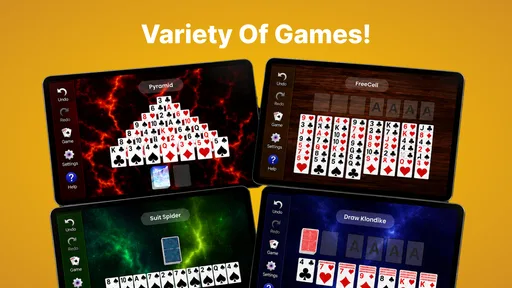
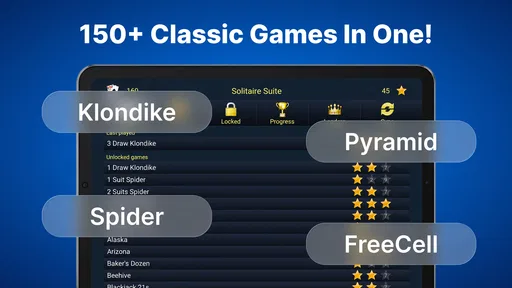
Yes. 150+ Classic Card Games Pack brings a wide variety of card games together, including familiar solitaire options such as Klondike, Spider, FreeCell, and Pyramid. The collection is intended for players who want to switch between classic variations without installing a separate app for each one. The selection and availability of individual games may vary by version.
What devices and software versions can run 150+ Classic Card Games Pack?
The game is available for Android devices that run Android 7.0 or later. Checking your device’s operating-system version before downloading can help avoid installation problems. The title is also offered for iOS, though compatibility requirements can differ between editions. As with any mobile game, performance may depend on your device, available storage, and software configuration.
What is 150+ Classic Card Games Pack?
150+ Classic Card Games Pack is a collection of traditional solitaire and other card games gathered into one mobile application. It is designed for players who enjoy familiar games such as Klondike, Spider, FreeCell, Pyramid, and similar variations. The exact selection can differ by version, so checking the current game list on the app store is recommended before downloading.
Does 150+ Classic Card Games Pack work offline?
The game is primarily intended for offline play, which makes it convenient for travel, commutes, or situations without a reliable internet connection. Most individual card games can generally be started without an active connection, although advertisements, updates, analytics, cloud features, or other optional services may require internet access. Availability can depend on the installed version and device settings.
Is 150+ Classic Card Games Pack free to download?
The application is free to download, but it also offers optional in-app purchases priced from $1.99 to $69.99 per item. Free versions commonly include advertising or optional purchases that may remove ads, unlock additional features, or provide cosmetic and convenience options. Before installing, review the store listing carefully for pricing, subscriptions, supported payment methods, and whether the advertised number of games is fully available without payment.
Pros
- Includes over 150 classic card games in one app.
- Offline play makes it useful without an internet connection.
- Simple controls are suitable for casual players.
- Offers plenty of variety for solo card-game fans.
- Quick sessions work well for short breaks.
Cons
- The large game selection can feel difficult to navigate.
- Some games may have limited customization options.
- Visuals are functional but lack modern polish.
- Ads may interrupt gameplay in the free version.
- Not every included game may be familiar or clearly explained.