The Sims™ FreePlay
- 362.81K
- 4.3
- Installs
- 10.00M
- Price
- Free

Screenshots






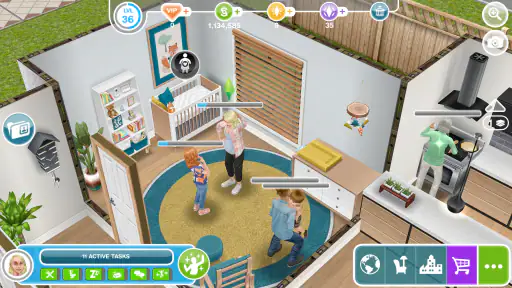

Analysis by Reviewed
When I want a life sim that lets me shape a character and home at my own pace, I find The Sims™ FreePlay easy to settle into. Its appeal is less about finishing a tight story and more about building a small virtual routine: deciding how a Sim looks, choosing what they do, and gradually making their surroundings feel personal. That makes it a different kind of mobile game from one I would open for a quick burst of action.
Reading the world and finding your way
The game’s familiar home-and-Sim layout makes its basic idea easy to grasp: create a character, shape a home, and guide everyday choices. I find that visual focus appealing, especially when I want a creative activity rather than a menu-heavy management game. Still, a busy screen can take attention, and the small scale of a phone display may make detailed decorating less comfortable than it would be on a larger screen. I would take a moment to explore the interface before committing to a long task, so the main actions become easier to spot.
Customization is also a useful reason to slow down rather than rush through setup. I like treating a Sim’s appearance and home as a small design project, making one clear choice at a time instead of trying to perfect everything in one sitting. That approach suits players who enjoy visual decisions but can feel fiddly for anyone who prefers quick, simple rounds.
First Impressions: A Miniature World of Possibilities
From the moment you launch The Sims™ FreePlay, you’re greeted with a sense of nostalgia, paired with a fresh mobile experience. The initial setup is seamless, allowing you to quickly jump into the game. You start by creating your unique Sim, customizing everything from hair color to outfit choices. It’s like playing God, but with a fun, quirky twist. The graphics are impressive for a mobile game, capturing the essence of the original Sims series with a touch of modern-day mobile aesthetics.
Motor and sensory comfort
This is a game built around visual interaction and repeated choices, so I would not describe it as effortless for every player. If precise tapping or prolonged screen use is uncomfortable, decorating a room in short bursts is more practical than attempting a long session. I also find it helpful to decide on a simple goal before opening the game—such as changing one outfit or arranging one area—because browsing options without a plan can turn a relaxing activity into a tiring one.
The real-time structure brings a different kind of friction: an action can continue while I am away, but that does not make the game a hands-off experience. Planning around a task is more satisfying than repeatedly checking in to hurry it along. Players sensitive to frequent visual activity, or anyone who needs a calmer screen experience, should try a brief session first and see whether the presentation feels comfortable.
Gameplay: Live Your Dream Life
One of the most captivating aspects of The Sims™ FreePlay is the sheer amount of activities you can engage in. Whether it’s throwing a party, going to work, or engaging in various hobbies, there’s always something to keep your Sim busy. The game operates in real-time, which means if your Sim is off to work for eight hours, that’s eight real hours. It’s both challenging and rewarding, requiring a bit of strategic planning, much like managing your own schedule.
More From Our News Desk

Weather by Xiaomi Review: Clear at a Glance, Less Clear Up Close

X Under Pressure: Can It Recover When Posting Goes Wrong?

Clash of Clans Is Won Between the Battles

Android Auto Makes the Case for Quieter Car Software

MobiOffice: Transforming Mobile Productivity with Seamless Integration

EA SPORTS FC™ Mobile Soccer: Redefining Mobile Sports Gaming
That timing makes it a better fit for people who enjoy checking on a continuing virtual routine than for players who want a complete story in one sitting. A practical rhythm is to start a longer activity when I already expect to be away from the game, then return when I have a spare moment. It turns waiting into part of the routine, though it also means the game is less appealing if I want every action to resolve immediately.
For example, I might open it during a quiet break, set a Sim off on a longer task, and spend that visit adjusting a small part of the home. Later, I can check back without needing to make the game the focus of my day. This works best when I treat progress as gradual. Spending to speed up tasks may be tempting when I am impatient, but waiting keeps the experience free and makes planning matter more.
Building with a plan
Building your dream home is another highlight. With an array of furniture, decor, and architectural options, you can let your creativity run wild. I spent hours just tweaking my Sim’s living room, trying to get the feng shui just right. The attention to detail in the design elements is commendable, making each house feel personalized and unique.
One trade-off I notice is that decorating can absorb more time than the life-simulation side if I keep changing direction. I get more out of it by choosing a loose theme first, then arranging the room around a few key items. That also makes it easier to stop and resume later without losing track of what I was trying to create. If building is the main attraction, this gives the game a different appeal from simulation titles focused more heavily on managing resources or completing a fixed narrative.
Social Aspects: Not Just a Solo Journey
What makes The Sims™ FreePlay stand out is its social component. You can connect with friends, visit their towns, and even form relationships between your Sims and theirs. It adds a layer of community interaction that’s both fun and engaging. Plus, the game frequently updates with seasonal events and new content, ensuring there’s always something fresh to explore.
The social side is most useful if I already have friends who play and want a shared reason to check in. If I would rather create privately, the home-building and personal routines still give me things to do; the game does not need to become a social obligation. Compared with a conventional single-player life sim, visiting other towns adds a community angle, while the real-time pace makes it less suited to someone seeking uninterrupted, self-contained play.
Playing in everyday situations
Because progress is tied to real time, I would avoid starting a demanding activity when I have only a few seconds and expect to finish it straight away. A better use is a brief check-in before a commute or during a break: make one choice, set up the next stretch of activity, and leave the game until a natural pause. That routine is convenient, but it depends on having access to the device again later and being comfortable with progress that unfolds gradually.
On the practical side, the game is free to start, and its optional in-app purchases range from $0.99 to $99.99 per item. I would decide in advance whether I am willing to spend before a wait feels frustrating; otherwise, a small delay can become a prompt to buy a shortcut. It is rated Teen, so it is worth checking whether that age guidance suits the person who will play. The game is from ELECTRONIC ARTS, has a 4.3 average from around one million ratings, and has passed ten million installs. It first arrived on February 14, 2012, and version 5.89.1 supports Android 5.0 and later.
Where the experience may not fit
The main limitation for me is the combination of waiting and optional spending. If I want a fast-paced game with immediate outcomes, this is not the one I would choose; a simulation with shorter rounds or a more direct progression loop may be a better match. Likewise, someone who dislikes repeated tapping, small-screen detail, or returning to a game throughout the day may find its central rhythm more like a chore than a comfort.
I would also keep expectations grounded when comparing it with the computer Sims games. The mobile format makes it easy to dip into a personal virtual neighborhood, but it does not offer the same uninterrupted feel I want from a long desktop session. Its strength is the portable routine and the freedom to personalize, not replacing every part of a larger simulation experience.
However, it’s worth noting that while the game is free to play, there are in-app purchases that can enhance your experience. Whether it’s buying new outfits or speeding up tasks, these purchases are entirely optional, but they do make the gameplay smoother. For those who prefer not to spend, patience is key, as progress can be a tad slow without the extra boosts.
Making the most of short visits
I get the most value from opening the game with one small intention rather than treating every visit as a chance to catch up on everything. A quick check can be enough to choose a next activity, make one design decision, or see whether I want to continue a room project. This is a useful approach on busy days because it keeps the game from turning into a checklist. It also helps me notice when I am playing for enjoyment and when I am only tapping because I feel I ought to keep progress moving.
For a household or shared device, I would think about whether the person playing wants a game that can be paused in practice, even though its activities continue on a real-time schedule. The world does not require constant attention, but a player who expects every visit to deliver an immediate payoff may feel stalled. Someone who enjoys returning to a familiar project after school, work, or other daily tasks is more likely to appreciate that slow-burn structure.
Choosing it over other simulation styles
Compared with mobile simulations built around short, self-contained rounds, this one asks for more patience and gives more room to personalize a character’s everyday life and living space. Against a story-led game, its open-ended routine can feel freeing because I am not simply following one fixed plot; the trade-off is that players who need a clear ending or a strong sequence of authored events may find the experience less focused. I would choose it for customization and ongoing play, not as my first pick for a tightly paced narrative or a quick competitive session.
There is also a meaningful difference between playing on a phone and settling in with a computer life sim. A larger display can make detailed visual work more comfortable, and a longer session can suit players who want to shape a world without interruptions. On mobile, the advantage is being able to check in around ordinary routines. If portability matters more than uninterrupted building, that exchange makes sense; if the small screen or frequent pauses get in the way, a computer-based alternative is the more comfortable choice.
Final Thoughts: A Pocket-Sized Sim World
Overall, The Sims™ FreePlay is a delightful adaptation of a classic, bringing the joy and complexity of The Sims to your mobile device. It’s perfect for both long-time fans of the series and newcomers looking to dip their toes into a virtual world of creativity and fun. While it might not fully replicate the depth of its PC counterparts, it offers a charming and engaging experience that’s sure to entertain.
So, if you’re ready to step into a world where you can be whoever you want and build the life of your dreams, The Sims™ FreePlay is just a download away. Trust me, you won’t be disappointed!
Who I think will enjoy it
I would recommend it to players who like creating characters, arranging rooms, and checking in on a world that develops over time. It is also a reasonable choice for someone curious about life simulations who wants to start without paying upfront. I would skip it if I needed quick conclusions, disliked waiting, or wanted a game that felt equally comfortable in very short bursts and long sessions.
An inclusive fit, with limits
For different abilities and routines, the most approachable way to play is to keep sessions flexible and goals small. The game offers plenty of visual creativity, but its reliance on tapping, screen detail, and real-time waits will not suit everyone equally. I see it as a pleasant pocket-sized simulation when its pace matches yours—not a universal fit, but a rewarding one for people who enjoy shaping a little digital life at their own speed.
The Sims™ FreePlay Frequently Asked Questions
Is The Sims™ FreePlay available on both Android and iOS?
The Sims™ FreePlay is a mobile simulation game intended for Android and iOS devices. Before downloading, check that your device meets the platform’s compatibility requirements and that you are using the correct app store for your device. The game’s mobile format makes it possible to manage Sims and their lives on a phone or tablet, though the experience depends on your device being able to run it.
What can I do in The Sims™ FreePlay?
The game centers on creating and customizing Sims’ lives. You can shape your characters, build homes, and guide Sims through different activities and life scenarios. It is a simulation experience rather than a game focused only on decorating: managing what your Sims do is part of the appeal. If you enjoy shaping characters and their surroundings over time, its central idea may be a good fit.
What age group is The Sims™ FreePlay suitable for?
The Sims™ FreePlay is rated Teen, so it may be best suited to older children and teenagers rather than very young players. It is a life-simulation game focused on creating Sims, customizing their lives, and building homes. Parents and guardians may want to consider the Teen rating and the game’s in-app purchases when deciding whether it is appropriate for a child.
Who develops The Sims™ FreePlay, and is it still a popular game?
The Sims™ FreePlay is developed by ELECTRONIC ARTS and has been available since February 14, 2012. It remains a widely played mobile simulation game, with over 10 million installs and an average rating of 4.3 from around 1 million ratings. Those figures suggest it has attracted a large audience, though whether its style suits you will depend on how much you enjoy managing Sims over time.
What is The Sims™ FreePlay and how does it differ from other Sims games?
The Sims™ FreePlay is a mobile version of the popular Sims franchise, offering a free-to-play experience on iOS and Android devices. Unlike the traditional Sims games that are often played on PC or consoles, FreePlay is designed for mobile gameplay with real-time progression. Players can create and customize their Sims, build homes, and live out various life scenarios, but the game operates in real-time, meaning tasks take hours or days to complete, reflecting actual time passage.
Pros
- Highly customizable characters.
- Engaging real-time gameplay.
- Regular updates with new features.
- Vibrant
- detailed graphics.
- Free to play with optional purchases.
Cons
- Requires constant internet connection.
- In-app purchases can be pricey.
- Progress can be slow without spending.
- Occasional bugs and glitches.
- Limited offline gameplay.
- Category
- Simulation
- Version
- 5.89.1