Stone Grass: Mowing Simulator
- 10.69K
- 4.3
- Installs
- 50.00M
- Price
- Free

Screenshots
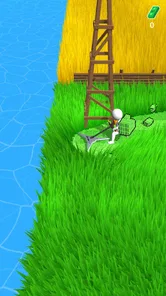
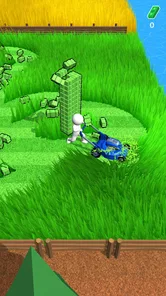
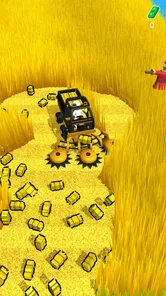
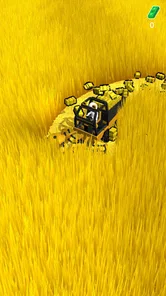
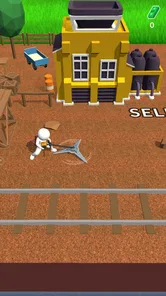
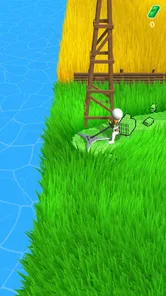
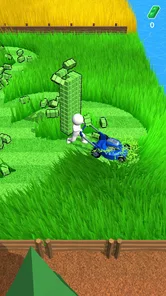
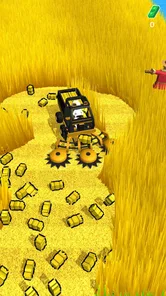
Analysis by Reviewed
I went into Stone Grass: Mowing Simulator expecting a quiet arcade game, and its appeal is easy to understand: there is something pleasing about clearing a patch of grass at an unhurried pace. It turns mowing into a simple phone activity, with no real-world equipment or yard work to manage. I’d think of it as a small, casual diversion rather than a detailed gardening or farming simulation.
Where the mowing loop can feel repetitive
The main activity is deliberately straightforward: move through grassy areas, gather what you cut, and work toward upgrades and new places. That makes the game easy to pick up when I have a few spare minutes, but it also means the basic rhythm can become familiar quickly. If you want a story, complex controls, or constant tactical decisions, this is probably not the arcade game I’d choose.
For me, the best way to approach that repetition is to treat each short session as a small task rather than expecting a big event every time I open the game. A brief play while waiting for a bus or taking a break suits the simple loop better than a long session if the repeated mowing starts to lose its charm. The satisfaction comes from steady clearing and progress, not from mastering a deep control system.
Setup checks and a comfortable routine
The controls are easy to learn, so I would start by playing at a relaxed pace and getting used to how movement feels on my own screen. If steering seems awkward, I’d check that my finger is not covering the area I need to see and try shorter, more deliberate swipes. That is a general touch-control adjustment, not a special trick, but it can make a simple game feel less fiddly.
Stone Grass is a free arcade game from Freeplay Inc, with optional in-app purchases priced from $0.99 to $99.99 per item. I’d treat spending as optional and decide first whether the ordinary mowing loop is enjoyable on its own. The game is rated Everyone, and its current version is 1.56.5; it requires Android 5.1 or later. Its 4.2 average from around 460,000 ratings and more than 50 million installs suggest broad reach, though popularity alone does not tell me whether its pace will suit you.
Getting back into a session
If a session feels stuck or input stops responding, I’d first pause and check the basics: whether the screen is registering touch, whether another app is interrupting play, and whether the game behaves normally after I close and reopen it. I’d avoid assuming every slowdown is caused by the game itself; device load or a temporary interruption can affect mobile play too. If the same problem keeps happening, noting when it occurs is more useful than repeatedly making random changes.
It also helps to separate a progress concern from a control concern. If movement works but progress feels slow, that may simply be the nature of a gradual mowing-and-upgrading loop; changing how I swipe will not make that design feel faster. If the controls themselves are unreliable, by contrast, I’d test touch response outside the game before deciding the mower is the problem. These small checks can save time and help me work out whether I need a different play rhythm or basic device troubleshooting.
More From Our News Desk

 Gmail
GmailGmail in a Busy Inbox: Who Benefits Most?
From first account to crowded workday, Gmail earns its place through dependable search and flexible sorting—but its best fit depends on how much inbox maintenance you can tolerate.

 Prime Video
Switching to Prime Video: What Changes in Your Viewing Routine
Prime Video can make a compelling second home for streaming, but switching means learning a different catalog, rental layer, and route from browsing to playback.

 Universal TV Remote Control
Universal TV Remote Control Works Best as a Reliable Backup
A phone remote earns its place through quick setup and reliable habits. Here is how to get more from Universal TV Remote Control—and where its limits show.

 Weather - By Xiaomi
Weather by Xiaomi Review: Clear at a Glance, Less Clear Up Close
Xiaomi’s weather app makes everyday forecasts quick to scan, but its calm surface can leave useful details and recovery paths harder to find than they should be.

 X
XX Under Pressure: Can It Recover When Posting Goes Wrong?
A resilience-focused review of X, examining setup, mistaken posts, interruptions, weak connections, and the gaps that matter when recovery needs to be dependable.

 Clash of Clans
Clash of Clans Is Won Between the Battles
Its raids are quick; its community is a long-term project of coordination, teaching, rivalry, and shared responsibility—with all the friction that entails.
Latest News



A gentle arcade choice, with clear limits
When you first fire up Stone Grass: Mowing Simulator, you’re greeted with a vibrant and colorful world that immediately sets a chill vibe. The game’s premise is delightfully simple: mow your way through lush landscapes, upgrade your gear, and unlock new terrains. It’s a clicker game, but it’s got that extra something that keeps you coming back for more.
Gameplay Mechanics
Let’s talk mechanics. The controls are straightforward, with intuitive tap-and-swipe actions that make the experience smooth and enjoyable. The game’s progression system encourages you to keep mowing, collecting grass, and upgrading your equipment. You start with a basic mower, but as you level up, you’ll find yourself wielding some seriously cool tools that make mowing a breeze.
One of the best parts? The game doesn’t rush you. You can take your time to explore every inch of the landscape, ensuring that no blade of grass is left uncut. It’s got that oddly satisfying element, where watching the grass disappear under your mower is strangely therapeutic.
Visual and Audio Delight
Visually, the game is a treat. The colors are vibrant, and the animations are smooth, making for a visually pleasing experience. The sound design is another highlight. The gentle hum of the mower and the satisfying crunch of the grass are perfect companions to the gameplay, enhancing the immersion without being overbearing.
Oh, and did I mention the soundtrack? It’s the perfect blend of relaxing tunes that make you feel like you’re in a serene garden, even if you’re just chilling on your couch. It’s the little things like these that elevate the game from a simple simulator to a full-blown relaxing experience.
Choosing a session that fits your day
A useful way to decide whether the game belongs on your phone is to match it to a real gap in your routine. If I have a short wait before an appointment, I can open it, make a little progress, and put it away without needing to hold a plot or a long sequence of objectives in my head. That makes it easier to return to than an arcade game that depends on precise timing or a run that feels wasted if it ends early.
It is less suited to moments when I need to keep my attention on something else. Even a relaxed game still asks me to steer and pay attention to where I’m going, so I wouldn’t treat it as a fully hands-off activity while walking, crossing a street, or doing another task. At home, it works better as a deliberate five-minute break than as background entertainment that I expect to play itself.
Small choices that make the loop work better
I’d avoid turning every session into a test of how quickly I can clear ground. A steady route across an area is easier to follow than constantly doubling back, and it lets me see the clearing progress without making the controls feel hectic. This is a practical way to keep the repetitive action satisfying: focus on a manageable patch, then decide whether I want another short round.
Upgrades are part of the appeal, but I would not assume that buying something is the only sensible way to make progress. First see how the normal loop feels and whether the improvements earned through play are enough for your preferred pace. Because optional purchases range widely in price, it is worth pausing at the purchase screen and checking exactly what is being offered before confirming anything, especially if a child is using the device.
Who this suits, and when I’d choose something else
I’d recommend it to someone who likes gentle, repeatable arcade play and wants a low-pressure way to fill short gaps in the day. For example, if I had a few minutes before dinner or while waiting for an appointment, I could clear some ground without needing to remember a complicated objective. The gradual progression gives those small sessions a sense of continuity, while the uncomplicated controls make it approachable for players who do not usually spend time with games.
Compared with a racing or action arcade game, this trades speed and challenge for a calmer, more repetitive routine. Compared with a deeper farming simulator, it keeps the focus on mowing rather than asking me to manage a broader set of activities. That narrow focus is both its identity and its limitation: if I want varied tasks, meaningful strategy, or a more demanding skill curve, I’d look elsewhere. Someone who enjoys tactile, incremental progress is much more likely to find the loop rewarding.
There is also a useful distinction between this and a traditional lawn-care or farming game. I would not choose it to plan a garden, learn about crops, or experience a realistic simulation of operating equipment. Its appeal is the repeated visual change as a patch gets cleared and the sense of gradual advancement. If that small payoff is what I’m after, the simplicity is a strength; if I want a detailed world with several systems to manage, it will feel too narrow.
When a hiccup may come from the phone
If touch input feels inconsistent, I’d test whether the same part of the screen responds normally elsewhere before changing how I play. A screen protector, an app interruption, or a device that is busy with other tasks can affect touch or smoothness in many mobile games. Closing background apps and reopening the game is a sensible first check, but I would avoid deleting anything or resetting the device as an early response to a brief problem.
For an installation or startup issue, I’d confirm that the device meets the Android 5.1 minimum and that the game has finished installing before trying again. The version number can help when describing a recurring issue to support, but it is not a reason to expect a particular fix by itself. On a shared or older phone, leaving some free working space and restarting the device when it is behaving unusually are ordinary maintenance steps, not guarantees that every problem will disappear.
What to expect from a free game
The free entry point makes it easy to try the central activity before deciding whether it is worth keeping. Still, “free” does not mean every optional purchase is trivial: the available in-app items span from under a dollar to prices approaching a hundred dollars. I’d treat any purchase as a separate decision, read the amount carefully, and use device-level purchase safeguards when children might play. There is no need to spend just to find out whether the mowing itself suits you.
The Everyone age rating makes the game broadly accessible, but that does not make every household choice automatic. If a younger player uses it, I’d set expectations about optional purchases and check the device’s purchase controls in advance. For adults, the same advice is simply good budgeting: decide what a small arcade game is worth to you before an upgrade offer catches your attention.
Practical verdict
The game was released on December 7, 2021, and its steady popularity makes it easy to see why the idea travels well: the basic action is immediately understandable. Still, I would not judge it by install numbers or ratings alone. I’d try it because the mowing itself sounds appealing, then decide whether the pace and repetition work for me. I would also keep purchases in perspective: the game is free to start, but optional items can become costly at the upper end of the listed range, so I’d check each purchase carefully rather than treating every upgrade as necessary.
In a world where gaming often means high-octane action and adrenaline-pumping challenges, Stone Grass: Mowing Simulator is a breath of fresh air. It's not just a game; it's a stress reliever, a slice of peace in a chaotic world. Whether you're a fan of simulation games or just looking for something to unwind with after a long day, this app is definitely worth a try.
So, if you’re ready to trade in your virtual guns and racing cars for a mower and a patch of grass, download Stone Grass: Mowing Simulator today. Trust me, your inner lawn-care enthusiast will thank you.
Stone Grass: Mowing Simulator Frequently Asked Questions
Is Stone Grass: Mowing Simulator suitable for younger players?
Stone Grass: Mowing Simulator is rated Everyone, making it suitable for a broad audience. Its central activity is driving a tractor to cut grass and harvest crops, so the premise is easy to understand. It is an arcade game with a casual, repetitive style rather than a story-heavy experience, which may appeal to younger players as well as adults looking for simple gameplay.
How much space or device performance should I consider before installing?
Before downloading, make sure your device meets the game’s operating-system requirement and has enough available storage for an installation. The minimum Android version is 5.1. Device performance can vary, so meeting the software requirement does not guarantee identical results on every phone or tablet. If your device is older or has limited free space, it is sensible to check those basics first.
Can I play Stone Grass: Mowing Simulator in short sessions?
The game’s straightforward focus on mowing grass and harvesting crops makes it easy to approach without learning a complicated premise first. That can suit players who want a casual arcade game to dip into when they have a little time. Its mowing-centered loop is repetitive by nature, though, so players who prefer varied objectives or a strong narrative may find it less engaging.
Who developed Stone Grass: Mowing Simulator, and what kind of game is it?
Stone Grass: Mowing Simulator is an arcade game from Freeplay Inc. Its simple premise centers on getting into a tractor to cut grass and harvest crops, making it a casual choice for players who enjoy straightforward, repetitive gameplay. The game is rated for Everyone, so its general presentation is suitable for a broad audience.
Will Stone Grass: Mowing Simulator run on my Android device?
The game’s minimum Android requirement is version 5.1, so check your device’s software version before downloading. If your phone or tablet meets that requirement, you can decide whether its mowing-focused arcade gameplay sounds appealing. A compatible operating system is the key detail to check first; performance can still vary depending on the device.
Pros
- Engaging gameplay mechanics
- Diverse levels and challenges
- Smooth and responsive controls
- Visually appealing graphics
- Frequent updates with new features
Cons
- Can become repetitive over time
- In-app purchases can be costly
- Requires internet connection
- Ads can be intrusive
- Limited customization options