Sticker GO!
- 5.57K
- 4.3
- Installs
- 1.00M
- Price
- Free

Screenshots
Analysis by Reviewed
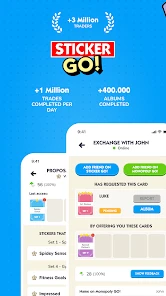
I’d approach Sticker GO! with one question in mind: do I want a companion for working through a Monopoly GO! sticker album, or am I looking for a standalone board game? That distinction shapes the whole experience. Its appeal is the small daily loop of checking what is missing, deciding what to do next, and returning when there is a reason to make more progress.
What the first check-in is really for
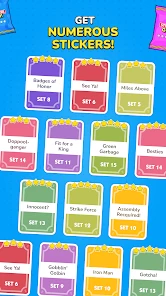
The useful first move is to treat the album as a planning screen, not as an invitation to browse without a goal. I’d look at which stickers I still need and make a short mental note before moving on. That way, the app gives me a clear next step rather than leaving me with a vague sense that I should keep tapping around.
This approach is especially handy for someone who already plays Monopoly GO! and wants a more organized way to think about album completion. If I’m only curious about the app, I’d first ask whether that collection goal matters to me. Without an interest in the album, the central reason to return is much weaker than it would be for an active player.
A small loop, not a long board-game session
The rhythm is different from a conventional digital board game. I’m not opening it primarily to play a complete match against another person or work through a self-contained puzzle. I’m checking progress, making a decision, and leaving with an idea of what I want to pursue. That makes it easier to fit into a spare moment, but it also means the experience can feel thin if I expect a substantial game session.
For example, I might check in while waiting for a bus, notice what is still missing, and then put my phone away until I have time to act on that information. The benefit is that the check-in can be brief and purposeful. The trade-off is that the app’s value depends on what I do with that information in connection with Monopoly GO!, rather than on a fresh round of play inside a standalone board game.
How I’d keep album progress focused
One practical habit is to decide on a narrow goal before browsing: identify a missing sticker, consider whether a trade makes sense, or simply check the daily reward and stop. I find that a short list of priorities keeps the collection from turning into aimless scrolling. It also makes it easier to tell whether a check-in has helped, even if I haven’t completed anything that day.
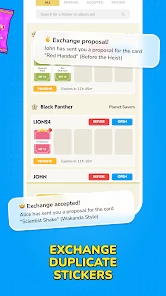
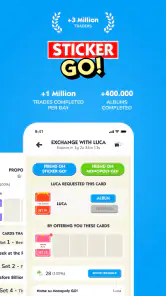
When I’m arranging a trade or looking through community activity, I’d keep the exact stickers I need in view and avoid making a deal just to feel busy. A trade is only useful when it moves the album toward something I actually want. That sounds obvious, but it is an easy distinction to lose when the activity around collecting starts to feel like progress by itself.
More From Our News Desk

Clash of Clans Is Won Between the Battles

Android Auto Makes the Case for Quieter Car Software

MobiOffice: Transforming Mobile Productivity with Seamless Integration

EA SPORTS FC™ Mobile Soccer: Redefining Mobile Sports Gaming

How Microsoft OneDrive Became a Mobile Productivity Giant

How Google Translate Breaks Language Barriers Effortlessly
Who gets the most from it
I’d recommend the app to Monopoly GO! players who enjoy collecting, have a particular album goal, and appreciate a daily reason to check their progress. It can also suit people who like coordinating with other players around stickers. Those users are more likely to find that the short check-in has a purpose beyond simply opening another app.
I’d be less keen to recommend it to someone who wants a quiet solo puzzle, a traditional board-game match, or a sticker maker for decorating messages. Those are different needs, and this app’s album-centered loop shouldn’t be mistaken for them. If I wanted a complete game to play on its own, I’d choose a conventional board-game app; if I wanted to make images for chats, I’d look for a dedicated sticker editor instead.
There is also a social trade-off. Community activity can make collecting feel less solitary, but it asks me to be selective about how much time I spend browsing and what I share or arrange. I’d use those features to support a concrete album goal, not assume that more social activity automatically means faster or better progress.
What returning should feel like
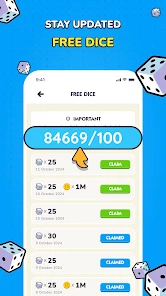
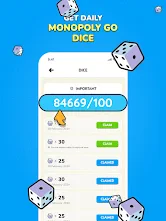
The loop works best when each visit has a simple action, a clear bit of feedback, and a reason to stop. I check the album, see what remains, decide what to pursue, and collect the daily dice reward. Then I leave until a new opportunity or a useful next step brings me back. That reset matters: the app feels more manageable when I don’t expect every visit to deliver a major breakthrough.
If progress is slow, I’d resist turning the daily reward into a promise that the album will finish quickly. It is a reason to check in, not a guarantee of a particular outcome. Keeping that expectation modest helps the routine stay pleasant. If I find myself opening the app without a goal and feeling annoyed that nothing significant changed, that is a sign to take a break rather than force another session.
How it compares with familiar alternatives
Compared with a standard board-game app, the focus here is less on playing a complete match and more on supporting a collection tied to Monopoly GO!. Compared with a general-purpose sticker tool, its purpose is not simply to create images for conversations. Those alternatives may be better choices if I want an independent game or creative editing; this one makes more sense when the album itself is what I care about.
That narrow focus is both its clearest strength and its main limitation. A player who is already invested in the album can appreciate having a place to organize attention around it. Someone who does not play Monopoly GO! may find that the app has little to offer beyond the idea of collecting. I would make that decision before downloading, rather than expecting its board-game category to mean a conventional board-game experience.
Sticker Wonderland: A Dive into the Features
Alright, picture this: a vast library of stickers at your fingertips. That’s exactly what Sticker GO! offers. From quirky animals to hilarious memes, the variety is endless. You know that feeling when you find the perfect sticker that just nails your mood? Yeah, this app gives you that joy on repeat.
Endless Creativity
One of the features I absolutely adore is the sticker creation tool. It’s like having a mini design studio right on your phone. You can whip up your own stickers using photos, text, and doodles. It’s super intuitive, meaning you don’t need to be a graphic designer to make something awesome.
For the album-focused experience, I find it useful to treat each check-in as a quick planning pause rather than an endless session. Before opening it, decide which missing stickers or trades you want to sort out; afterward, you can return to Monopoly GO! with a clearer idea of what you’re chasing. This small habit makes the daily dice reward feel connected to progress instead of just another notification to tap.
Seamless Integration
Let’s talk about how effortlessly Sticker GO! syncs with your messaging apps. Whether you’re team WhatsApp, Telegram, or even Messenger, this app has got you covered. It integrates seamlessly, letting you share your sticker creations without any hassle. It’s like they thought of everything!
A realistic use is checking your album during a spare moment—say, while waiting for a bus—then setting the game aside until you have time to act on what you found. Compared with a standard board game app, where the main draw is playing a self-contained match, this one is better understood as a companion to a collection goal. If you don’t play Monopoly GO! or don’t care about completing its album, the central reason to return may not mean much to you.
Community Vibes
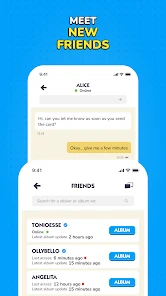
Another cool aspect is the community feature. You can join sticker groups or even follow other users to get inspired. It’s a bit like social media but purely for sticker lovers. I’ve found it’s a great way to discover new trends and even make a few online friends who share the same sticker obsession.
That social side can make progress feel less solitary, but it also asks for a little judgment: I’d keep track of exactly which stickers I need before browsing or arranging trades, so the activity stays focused on the album rather than turning into aimless scrolling. For a casual player, that’s a useful trade-off. Those who prefer a quiet, solo puzzle or a board game with no collection-management layer may be happier with a different kind of game.
And, here’s a little insider tip: look out for the seasonal sticker packs. They add a festive touch to your messages, making them more vibrant and fun. Trust me, your chats will never be the same.
Who Will Enjoy the Daily Loop?
The basic rhythm is simple: check the album, see what remains, work toward a completion goal, collect the daily dice reward, then come back when there’s another reason to make progress. I like that the next session has a clear purpose, but it can also make the app feel repetitive if you expect a full board game round every time you open it. A quick check-in is its strength; it isn’t necessarily a substitute for longer play.
It’s free to start, though optional in-app purchases range from $0.99 to $22.99 per item, so I’d decide in advance whether I’m comfortable spending money rather than treating purchases as necessary for progress. It’s rated for Everyone, has an average rating of 4.3 from around 47,000 ratings, and has been installed over a million times. The current version is 4.0.280, and it requires Android 6.0 or later.
So, if you’re ready to up your sticker game and add a splash of creativity to your conversations, Sticker GO! is your go-to app. It’s fun, easy to use, and endlessly entertaining. Give it a try, you might just find yourself wondering how you ever chatted without it!
My Take on the Loop
I’d recommend it to a Monopoly GO! player who enjoys seeing an album inch toward completion and likes a daily reason to check in. I’d skip it if you want an independent board game, a dedicated messaging-sticker maker, or a game that offers a fresh match each time you open it. For the right player, the appeal is the small cycle of checking, deciding what to pursue, and returning for another step—not the promise of a completely different experience every session.
Sticker GO! Frequently Asked Questions
Can I play Sticker GO! on both Android and iOS?
Sticker GO! is available for Android and iOS, so you can choose the version that matches your device. On Android, the game requires version 6.0 or later. It is a board game centered on completing your Monopoly GO! album and earning dice every day, making it most relevant to players who already enjoy that collecting-focused experience.
How much does Sticker GO! cost, and are there optional purchases?
Sticker GO! is free to download, so you can try the game without paying upfront. It also offers optional in-app purchases, priced from $0.99 to $22.99 per item. Those purchases are separate from the free download, so it is worth checking your device’s purchase settings if you share it with children or want to avoid accidental spending.
What age rating does Sticker GO! have?
Sticker GO! has an Everyone content rating, which makes it suitable for a broad audience. As with any mobile game, parents may want to consider how their child uses games and whether purchases are enabled on the device. The game includes optional in-app purchases, so reviewing purchase controls and discussing spending expectations can help families decide whether it is a good fit.
What is Sticker GO! and how does it work?
Sticker GO! is a board game by Ganko focused on completing your Monopoly GO! album. Its store summary highlights earning dice every day, making it a companion for players who enjoy collecting stickers and working toward album completion. The game is free to download, and its Everyone age rating makes it suitable for a broad audience. It has an average rating of 4.3 from around 47,000 ratings.
Is Sticker GO! suitable for children?
Sticker GO! has an Everyone content rating, so it is presented as suitable for a broad audience. Parents should still consider how their child uses mobile games and whether in-app purchases are enabled on the device. The game includes optional purchases, so checking purchase controls and discussing spending expectations can help families decide whether it is a good fit.
Pros
- Wide variety of stickers available
- Easy to use interface
- Regular updates with new content
- High-quality graphics
- Compatible with most messaging apps
Cons
- Contains ads in the free version
- Some stickers require in-app purchases
- Limited customization options
- Occasional app crashes
- Requires internet connection for updates

- Category
- Board
- Version
- 4.0.280