Kooply Run™: Play and Create!
- 281.00
- 4.1
- Installs
- 50.00M
- Price
- Free

Screenshots





Analysis by Reviewed
I can see Kooply Run: Subway Craft fitting into an ordinary shared-device moment: one person finishes a run while waiting for dinner, then hands the phone to someone else who wants to try a level. The appeal is easy to explain—the familiar quick movement of an endless runner paired with the chance to make and share levels—but that mix also means it suits players who enjoy experimenting, not only chasing a high score.
Getting Started with Kooply Run
From the moment I hit that download button, I was intrigued. The installation was smooth, and the app didn’t bombard me with those pesky permissions requests. Thank goodness! Once you fire it up, you’re greeted with a colorful and energetic interface that screams fun. The game takes inspiration from classic endless runners but with its own unique twist. You’re not just running; you’re crafting, dodging, and strategizing your way through a vibrant subway world.
Gameplay and Features
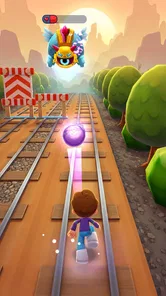
What sets Kooply Run: Subway Craft apart from the typical endless runner is the crafting element. As you zip through the subway tracks, you gather resources. These aren’t just any resources; they’re your tools to craft some pretty nifty items. Imagine being able to build your own boosters or create barriers to fend off those pesky obstacles. It’s like Minecraft meets Subway Surfers, and trust me, it’s as cool as it sounds.
The controls are intuitive. Swipe left, right, up, or down, and your character responds seamlessly. The graphics are vibrant, with a pixel-art style that’s both retro and refreshing. And the soundtrack? It keeps you pumped, making sure you’re always in the zone.
Making Room for Shared Play
On a household phone or tablet, I’d treat this as a pass-around game rather than assume each person has a separate, private setup. A short run is an easy turn to fit between chores or during a wait, while level creation gives a more patient player something to explore after the quick reflex challenge. Agreeing on whose turn it is—and whether someone may edit or replace a level—can prevent the small arguments that crop up when several people share one screen.
For a practical routine, I’d keep play sessions distinct: one person runs, another watches or suggests a route, then swap. If a younger player is creating levels, ask them to show what they built before another household member tries it. That simple handoff makes the creative side social without assuming the game provides household profiles, parental controls, or a special sharing workflow.
A realistic use for it is a quiet stretch while dinner is finishing: one person takes a run, another sketches an idea for a level aloud, and the next turn becomes a test of that idea. That kind of informal collaboration works best when everyone accepts that the device is shared and the turn itself is the boundary. I wouldn’t rely on the game to manage arguments about ownership; a quick household agreement is more dependable than assuming every creation or saved result belongs to a distinct player.
More From Our News Desk

 Gmail
GmailGmail in a Busy Inbox: Who Benefits Most?
From first account to crowded workday, Gmail earns its place through dependable search and flexible sorting—but its best fit depends on how much inbox maintenance you can tolerate.

 Prime Video
Switching to Prime Video: What Changes in Your Viewing Routine
Prime Video can make a compelling second home for streaming, but switching means learning a different catalog, rental layer, and route from browsing to playback.

 Universal TV Remote Control
Universal TV Remote Control Works Best as a Reliable Backup
A phone remote earns its place through quick setup and reliable habits. Here is how to get more from Universal TV Remote Control—and where its limits show.

 Weather - By Xiaomi
Weather by Xiaomi Review: Clear at a Glance, Less Clear Up Close
Xiaomi’s weather app makes everyday forecasts quick to scan, but its calm surface can leave useful details and recovery paths harder to find than they should be.

 X
XX Under Pressure: Can It Recover When Posting Goes Wrong?
A resilience-focused review of X, examining setup, mistaken posts, interruptions, weak connections, and the gaps that matter when recovery needs to be dependable.

 Clash of Clans
Clash of Clans Is Won Between the Battles
Its raids are quick; its community is a long-term project of coordination, teaching, rivalry, and shared responsibility—with all the friction that entails.
Latest News



For younger children, I’d keep the first session short and watch how they respond to the repeated-run structure. The bright arcade presentation can make it easy to ask for another attempt, while level building may stretch a quick break into a longer activity. A natural stopping point is to finish the current run and then hand over the device, rather than negotiate after someone has already started another round.
Setup, Accounts, and Coordination
The game is free to start, with optional in-app purchases priced from $0.49 to $99.99 per item, so I’d discuss purchase expectations before passing a device around. In particular, make clear whether the device owner needs to approve spending and avoid treating a child’s enthusiasm for an item as permission to buy it. This is a useful boundary for any shared game, especially when one payment method may be available to more than one person.
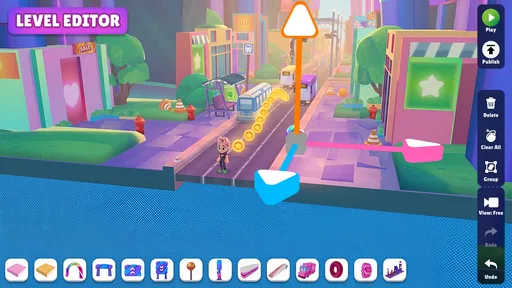
Level creation and sharing are a reason to coordinate, not a promise that every family member’s work will stay separate. I’d agree on a simple naming convention or take turns building, so it’s easier to recognize who made what. If keeping personal progress or creations apart matters to you, check how the game handles accounts and saved activity before making it the household’s main shared game; don’t assume one device automatically gives everyone an individual space.
That distinction matters if a parent and child both want to make levels. Before anyone invests time in a complicated design, decide whose turn it is to build and whether other players may change it. If preserving each person’s work is important, test the account and saving arrangement with a small, disposable creation first. It is a low-stakes way to learn how the setup behaves before a player becomes attached to a level.
I’d also separate permission to play from permission to spend. A child can be allowed to run or experiment with level creation without being allowed to make purchases. That boundary is especially useful when the phone is handed around casually, because a shared screen can make the device owner’s payment choices less obvious to another player. The game’s free starting point is convenient, but the optional purchase range makes a clear household rule sensible.
There’s a coordination trade-off in the creative side: it gives people a reason to talk about what they want to build, but it also creates more decisions than a basic runner. If everyone wants immediate turns, keep the session focused on playing. If one person is in a building mood, give them a separate stretch of time rather than asking the next player to wait through a design session. That small distinction helps the game serve both kinds of player without making each turn feel like a compromise.
Age and Trust
The game is rated Everyone, which makes it broadly suitable for a mixed-age household, but that label doesn’t replace an adult’s judgment about screen time, purchases, or online interactions. Its arcade format can encourage “one more run,” and the competitive side may matter to children differently than it does to adults. I’d set expectations around stopping points, particularly if a quick session is happening just before bedtime or another task.
KOOPLY is the developer, and the game has a 4.7 average from around 68,000 ratings, with over 10 million installs. Those figures suggest it has reached a large audience, though they don’t tell me whether its creative tools match every player’s preferences. It was released on March 14, 2024; the current version is 2.128.1 and it requires Android 6.0 or later. I’d check that requirement before installing on an older household device.
The Everyone age rating is a useful starting point for deciding whether it belongs on a family device, but I’d still make the first session a shared one. That gives an adult a chance to see whether the pace, competition, and creative activity feel appropriate for the particular child. It also lets the child learn the household rules at the same time: when to stop, whether spending is allowed, and how to treat another person’s turn or level.
For an older relative who prefers uncomplicated controls, the swipe-based running may be easier to pick up than a game with a dense menu of actions. The creative layer could be less immediately clear, though, so I’d introduce it after a few runs rather than expect a new player to understand every part at once. If someone finds fast reactions frustrating, watching a family member play or contribute an idea may be a more comfortable way to join in than taking a full turn.
Why You'll Love It
Now, I’m not one to get easily addicted to games, but this one had me hooked. There’s something incredibly satisfying about collecting resources and then using them to craft your way out of tricky situations. Plus, the challenges increase in complexity as you progress, keeping you on your toes. It’s not just about fast reflexes; it’s about strategy and foresight.
And let’s not forget the competitive edge. You can challenge friends or face off against other players globally. It adds a whole new layer of excitement when you know you’re not just playing against a machine.
The most useful way I’d approach the mix is to treat a run as a quick test, not just a score attempt. Pay attention to what causes trouble, then use the creative side to think about how a level can make that challenge more interesting. That shift gives the crafting and level-making a purpose beyond collecting or decorating: it encourages you to notice how a player experiences the route. It may not suit someone who wants pure reflex play, but it gives curious players a reason to look at the game from both sides.
For a short break, I’d avoid starting a level-making session if I only have a couple of minutes. A run fits the brief pause better; creation is more rewarding when there’s enough time to make a choice, try it, and see how it plays. This is a small but practical distinction, especially on a shared device: it keeps one player’s quick turn from becoming another person’s unexpected wait.
Who It Suits—and Where It Falls Short
Compared with a straightforward endless runner, this game asks for more than quick swipes: collecting resources and shaping levels add a creative decision between runs. That makes it a better fit for someone who likes tinkering and sharing homemade challenges. If you only want a clean, instantly repeatable score chase, a simpler runner may be a better match; crafting and creation can feel like extra work rather than a reward.
One useful approach is to alternate modes of attention: play a run when you have a minute, then save level-making for a time when you can focus. That keeps the creative tools from interrupting the pace if all you wanted was a quick arcade break. I’d also be prepared for the usual friction of a shared device: turns, purchase expectations, and clarity about who is using it matter more than the game’s colorful presentation suggests.
It is also a less natural choice for a household that expects every person to have a clearly private profile on one device. Shared play can be friendly and convenient, but individual ownership of progress or creations is a separate concern. If players are likely to be upset by having to coordinate access, or if separate personal spaces are a firm requirement, I’d choose a game whose account and save setup clearly matches that need rather than assume this one will.
For a household already comfortable with taking turns, it offers more variety than a runner built around repeating the same chase for a better result. A child can enjoy the movement, while an older player may be more interested in making a challenge for someone else. That difference is a strength when the group enjoys exchanging ideas, but a weakness when everyone wants the same kind of immediate, uninterrupted play.
One question a prospective player may have is whether the creative element is necessary to enjoy the game. I’d say the running is the straightforward entry point, while making and sharing levels is what gives it a distinct identity. You can approach it casually, but players who never want to tinker may get less from it than they would from a simpler arcade runner. Conversely, someone who likes designing challenges may find the creative side gives a reason to return after a run.
Another practical question is whether it makes sense for a short daily session. Yes, if you use the running portion as the brief activity and leave creation for a longer window. A third is whether it suits a family device: it can, provided everyone agrees on turns and purchase rules, and nobody assumes the game automatically separates each person’s work. Those expectations matter more than trying to make every member play in the same way.
The game is free to begin, which lowers the barrier to trying it, but I’d still treat purchases as a separate decision rather than part of the basic invitation to play. If you’re choosing it for a child, set that boundary before handing over the device. If you’re choosing it for yourself and don’t want optional spending in a game at all, that may be a reason to look for a different arcade experience.
Final Thoughts
In a world filled with endless mobile games, finding something that stands out can be tricky. But Kooply Run: Subway Craft does just that. It combines the thrill of an endless runner with the creativity of crafting, all wrapped up in an engaging package. Whether you’re a casual gamer or a hardcore enthusiast, this game offers something for everyone. So, if you’re looking to add a little adventure to your day, give it a go. You might just find yourself saying, “One more run!” every time you play.
For a household, I’d recommend it when people are happy to take turns and enjoy both running and making levels. I’d skip it if you need clearly separated individual spaces, want a runner with no creative layer, or prefer to avoid optional purchases altogether. Otherwise, it’s a lively free arcade choice, with enough variety to give different ages and play styles a reason to pass the device along.
My household verdict is that this works best as a shared activity with simple expectations, not as a hands-off solution for managing several players. Decide who is playing, who may make changes, and what the purchase boundary is; then the game’s mix of fast runs and level creativity has room to be fun. If the household wants a single-purpose runner, private progress for every player, or play with no spending decisions to discuss, another option will be less complicated. For everyone else, the blend of arcade movement and making a challenge for the next person is a particular reason to give it a try.
Kooply Run™: Play and Create! Frequently Asked Questions
How much storage space does Kooply Run: Subway Craft need?
Before downloading, it is worth checking that your device has enough free storage for the game and any updates. The amount required can vary by device and over time, so review the download details on your app store and make room if needed. Keeping some extra space available can also help avoid interruptions during installation or future updates.
What devices can run Kooply Run: Subway Craft?
Kooply Run: Subway Craft is available for Android and iOS. On Android, it requires Android 6.0 or later, so check your device’s operating-system version before installing. If you use an iPhone or iPad, look at the compatibility details in the relevant app store to make sure your particular device can run the current release.
Is Kooply Run: Subway Craft suitable for children?
Kooply Run: Subway Craft is rated Everyone, so its stated age classification is suitable for a broad audience. It is an arcade game built around running, avoiding obstacles, and collecting items, with quick reactions at the center of play. Parents may also want to consider that optional in-app purchases are available before letting children play.
What is Kooply Run: Subway Craft?
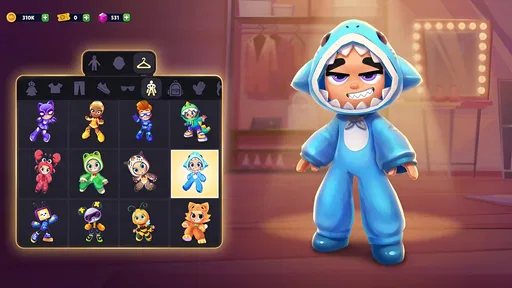
Kooply Run: Subway Craft is an exciting endless runner game available on Android and iOS platforms. Players navigate through subway tracks, dodging obstacles and collecting coins to unlock new characters and power-ups. The game combines fast-paced action with unique crafting elements, allowing players to create custom items to enhance their gameplay experience.
How do I play Kooply Run: Subway Craft?
In Kooply Run: Subway Craft, players control their character by swiping left or right to change lanes, swiping up to jump, and swiping down to slide under obstacles. The goal is to survive as long as possible while collecting coins and power-ups. As you progress, the game increases in speed and difficulty, challenging your reflexes and timing.
Pros
- Engaging gameplay with endless running fun.
- Colorful graphics and smooth animations.
- Intuitive controls easy for all ages.
- Variety of characters to unlock and play.
- Regular updates with new features.
Cons
- In-app purchases can be expensive.
- Ads can be intrusive at times.
- Limited background music variety.
- Requires internet for full functionality.
- Some levels can be repetitive.