Interior Color by Number Book
- 2.00
- 4.9
- Installs
- 5.00K
- Price
- Free
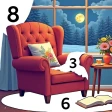
Screenshots
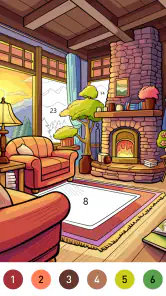


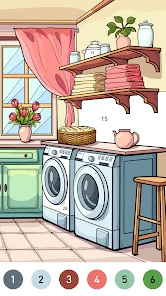
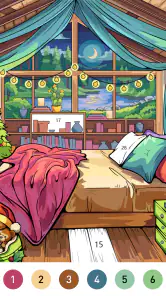

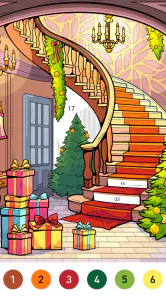
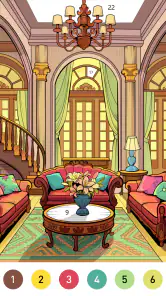
Analysis by Reviewed
I’d treat Interior Color by Number Book as a small creative break, not as a serious room-planning tool. Its appeal is the simple pleasure of filling in interior scenes and seeing a room take shape one color at a time. That makes it an easy game to pick up when I want a calm activity, though anyone hoping to plan an actual renovation should keep a separate design tool in mind.
What the pace feels like
The color-by-number format sets a gentle pace: choose an image, find the matching numbered areas, and work through the palette. I’d expect the main appeal to be steady, low-pressure progress rather than quick reactions or complicated rules. The game is free to start, and its board-game category is a useful clue to the kind of casual, structured play it offers.
For a short session, I’d choose a room image and finish a few sections rather than aim to complete everything at once. That gives the activity a natural stopping point, which is handy during a coffee break or while winding down. It also helps avoid turning a relaxing pastime into a repetitive task.
When you spend longer with it
Longer sessions are where the format can feel repetitive: matching numbers and filling bounded areas is the whole basic loop. The interiors give that loop a decorative theme, but the game is still coloring rather than a free-form room editor. If you want to make original layouts, move furniture around, or test exact combinations for your own home, a dedicated interior-design app is a better fit.
A practical way to enjoy it is to treat each finished image as a visual prompt, not a blueprint. I might notice that a warm wall color feels inviting beside cooler accents, then use that observation when browsing real paint samples. The colors are useful for inspiration, but a screen cannot tell me how a shade will look under my room’s lighting.
Latest News
Reliability and everyday use
I’d approach this as a straightforward casual game rather than a tool I depend on for important work. LoveColoring Game develops it, and the current version is 1.0.2. It has a 4.9 average from 32 ratings and over 5K installs, a positive early signal, though the small number of ratings and two written reviews make those figures less persuasive than a long track record would be.
If I were using it during a spare moment, I’d avoid relying on an unfinished session as a long-term project unless I had checked that my progress was still there after leaving the game. That is a sensible habit with any casual app, especially when switching between tasks. I also wouldn’t assume it can replace a saved design portfolio or a professional planning workflow.
Device fit and value
The minimum operating-system requirement is Android 7.0, so it can suit a range of Android devices that still meet that baseline. I would not infer from that alone how smoothly it runs on every phone, especially older or heavily loaded ones. If a picture feels fiddly on a smaller display, using a larger screen may make numbered areas easier to distinguish, provided the game is available on that device.
It is free to download, with optional in-app purchases ranging from $0.99 to $49.99 per item. I’d start without spending and see whether the available coloring experience is enough for my habits. Anyone who dislikes in-app purchase prompts or wants every option included upfront should check the purchase choices carefully before committing.
The game is rated Everyone, so its basic coloring premise is suitable for a broad audience. It is best for people who enjoy decorative scenes, simple guided activities, and experimenting with color without needing a blank canvas. It is less suitable for players looking for strategic board-game competition, realistic renovation planning, or a deep creative editor.
Released on Nov 27, 2024, this is a relatively new title, and I’d keep that context in mind when weighing its high average rating. The rating is encouraging, but it is not enough on its own to establish how it behaves across different devices or over extended play. For a free, low-stakes trial, that uncertainty is manageable; for a tool I needed to rely on daily, I’d want a longer history.
In practical terms, I can imagine opening it while waiting for dinner, coloring part of a room, then putting my phone away without needing to plan a whole session. That is a better match than expecting a full design project to emerge from one sitting. The main trade-off is clear: the guided format makes starting easy, but it limits how much control I have over the finished scene.
Choosing the right kind of creative break
The best audience is someone who likes decorating but wants the activity to stay simple. I can see it working for a person who saves room photos for inspiration, enjoys color palettes, or wants a quiet alternative to a fast-paced game. It asks for attention without asking me to invent an entire composition, which can be a relief when I have only a few minutes and no energy for a blank canvas.
That structure is also the key trade-off. A conventional coloring book may offer more freedom to choose every color, while a full interior-design simulator may let me arrange objects or build a room from scratch. This game sits between those options: the room subject gives the coloring a decorative focus, but the numbered areas keep the choices guided. I’d pick it when I want an easy route into a finished image, not when I want complete authorship.
For a realistic everyday use, imagine waiting for a pickup or sitting through a quiet stretch at home. I’d open a scene, work through a few clearly visible sections, and stop when I’m ready to put my phone away. I wouldn’t begin a picture right before I need to leave if I find unfinished work bothersome; the relaxing value comes from treating progress as optional, rather than turning completion into a deadline.
Small habits that make the format work better
I’d start with a scene that looks visually simple instead of choosing the busiest image first. This is not a claim about a special setting; it is a way to judge whether the numbered coloring loop suits me before investing a longer stretch. If I enjoy filling larger areas, I can continue. If tiny sections feel tiring, that is a useful sign that a different kind of coloring game would be more comfortable.
Another practical approach is to use the finished room as a prompt for one narrow question: do I like the contrast, the overall warmth, or the balance between colors? That keeps the activity useful without mistaking a preset picture for a trustworthy renovation preview. Before buying paint or furniture, I’d still check samples in the actual room and consider its daylight and lighting at different times.
I’d also keep spending separate from the decision to try it. Since optional purchases are available, I would first see whether the free experience gives me enough variety and enjoyment for short sessions. If I reach a point where I am tempted to pay, I’d pause and ask whether I want more coloring access or whether I am really looking for a design tool with capabilities this game is not meant to provide.
What to expect from performance
The game’s simple, tap-based premise suggests modest demands during ordinary play, but I would not promise smooth performance on every device. A busy phone, an older handset, or a small screen can change how comfortable any detailed coloring task feels. If taps seem imprecise, I’d try a less crowded image or a larger display before deciding that the whole format is a poor fit.
Reliability matters most if I plan to return to a picture over several sessions. I’d make a small test early: leave after a short try, come back, and see whether continuing feels straightforward. That is more useful than assuming every casual game handles interruptions in the same way. If I need guaranteed long-term storage for design work, I’d use a dedicated creative app and keep this one for low-stakes play.
There is also a difference between a slow moment and a genuinely demanding session. The game does not call for rapid reactions, so a little pause would be less disruptive than it would be in a competitive game. But if the screen becomes uncomfortable, the image feels too detailed, or the routine stops being relaxing, I’d take a break rather than push through. Its value is as an easy pastime, not as a task that needs to be completed.
Ever found yourself daydreaming about redecorating your living space but don't know where to start? Well, the Interior Color by Number Book app might just be the solution you've been looking for. This app brings a splash of creativity and a touch of design magic right to your fingertips. Let me take you through my experience with it.
Unleashing Your Inner Designer
Upon opening the app, you're greeted with an array of design templates that cater to various styles and tastes. Whether you fancy a rustic farmhouse vibe or a chic modern loft, there's something for everyone. The app’s user interface is incredibly intuitive, making it easy for anyone to dive right in and start designing.
How It Works
The premise is simple yet delightfully engaging. You choose a template and are presented with a grayscale version of a room. Your task? Bring it to life with color! The app uses a color-by-number system, which, let's be honest, brings back some nostalgic childhood memories. Each number corresponds to a color, and as you fill in the sections, your dream interior starts to take shape.
One of the coolest features is the app’s ability to simulate real-world color schemes. It’s like having a digital swatch book at your disposal. Plus, you can experiment with different textures and patterns, giving you a comprehensive design experience without lifting a paintbrush.
The Joy of Experimentation
What I love most about this app is the freedom it gives you to experiment. Not sure if that bold red will work in your living room? Try it out here first! It’s a fantastic way to test your design instincts before committing to real-world changes. The app even lets you save your favorite designs, so you can revisit and tweak them anytime.
The community aspect is another highlight. You can share your creations with other users, exchanging tips and getting inspired by their designs. It’s a vibrant community where creativity flows freely, and everyone supports each other's artistic journey.
Final Thoughts
In a nutshell, this is more than just an app; it's a playground for interior design enthusiasts. Whether you're a seasoned designer or someone just finding their style, this app offers a fun and engaging way to explore color and design concepts. So, if you're looking to inject some creativity into your day or find inspiration for your next home project, give this app a try. You might just discover a new passion for interior design!
So go ahead, unleash your creativity, and let the app guide you to your next great design idea.
Who should pass, and what I’d choose instead
I would skip it if my main goal were to draw from scratch, compare exact paint colors under real lighting, or plan furniture placement. Those jobs need tools that offer direct control over layouts, accurate reference colors, or project organization. This game’s guided coloring is more approachable, but that same simplicity means it cannot answer practical renovation questions or substitute for a measured room plan.
I’d also look elsewhere if I needed a deep strategy game. Its board-game classification should not be read as a promise of multiplayer competition or tactical turns; the appeal here is the orderly color-by-number activity. For a player who wants challenge through opponents, rules, and decisions, a traditional board-game app will be a more satisfying use of time.
For a child or a family member who enjoys calm visual activities, the Everyone age rating is reassuring as a broad content label, but I’d still keep an eye on any optional spending. The game is free to download, while purchases are available, so a parent may want to review purchase controls on the device before handing it over. That is a sensible precaution for any app with in-app purchases, not a reason to treat the coloring itself as complicated.
My performance verdict
Overall, I’d judge Interior Color by Number Book by whether its short, guided sessions feel pleasant on the device I have. It looks best suited to brief pauses, casual color exploration, and people who enjoy seeing an interior image gradually fill in. The low-pressure format is a strength when I want a clear next action; repetitive tapping and limited creative control are the costs.
Its early reception is encouraging, but I would keep expectations measured because the game is new and the pool of written feedback is small. I’d try it without spending, test how comfortable the pictures are to work on, and make sure returning to a partly completed image suits my routine. If those basics feel right, it can earn a place as a relaxing little coloring game. If I want a room planner, a blank-canvas art app, or a competitive board game, I’d choose one of those instead.
Interior Color by Number Book Frequently Asked Questions
Is Interior Color by Number Book free to download, and are there purchases inside the game?
Interior Color by Number Book is free to download, so you can try its coloring experience without paying upfront. The game also offers optional in-app purchases, with individual items priced from $0.99 to $49.99. If you prefer not to spend, check the purchase settings on your device before handing it to a child or another family member.
What is Interior Color by Number Book?
Interior Color by Number Book is a creative and relaxing app designed for users who enjoy coloring and interior design. The app offers a wide range of home interior illustrations that users can color by following a number guide. It's perfect for anyone looking to unwind while exploring their artistic side, with easy-to-use features and a variety of designs.
How does the coloring process work in the app?
The coloring process in Interior Color by Number Book is user-friendly. Each illustration is divided into numbered sections. Users simply select a color from the palette and tap on the corresponding numbered area on the illustration. This process helps users effortlessly create beautiful, vibrant designs without any prior artistic skills needed.
Is Interior Color by Number Book suitable for all ages?
Yes, Interior Color by Number Book is suitable for users of all ages. The app is designed to be intuitive and easy to navigate, making it accessible for children, adults, and seniors alike. Its calming and therapeutic nature makes it an ideal app for family use, allowing everyone to enjoy coloring various interior design themes together.
What types of interior designs are available in the app?
Interior Color by Number Book offers a diverse range of interior designs to color. Users can find illustrations featuring everything from cozy living rooms and elegant bedrooms to modern kitchens and chic bathrooms. The app regularly updates its library, providing new and exciting designs to keep users engaged and inspired.
Pros
- Easy-to-use interface for all ages
- Wide variety of designs to choose from
- Regular updates with new content
- Relaxing and stress-relieving activity
- Offline mode available for use without internet
Cons
- Contains ads that can interrupt experience
- Limited free designs; subscription needed
- Color palette can be limited
- No option to import personal designs
- May drain battery quickly on some devices

- Category
- Board
- Version
- 1.0.2