Infinite Word Search Puzzles
- 11.63K
- 4.7
- Installs
- 10.00M
- Price
- Free
Screenshots



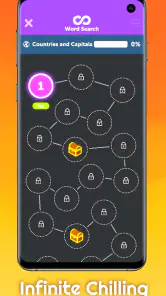

Analysis by Reviewed
My first recommendation to a new player is to treat Infinite Word Search Puzzles as a quick game to dip into, not a word course you need to prepare for. It is a free word game from Random Logic Games, LLC, with a 4.7 average from around 78,000 ratings and over 10 million installs. Rated for Everyone, it offers themed puzzles that let you pick a familiar subject and start scanning without first learning a complicated set of rules.
What to expect from your first puzzle
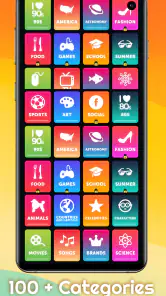
Word searches work best when the challenge is right in front of you: find a word, trace it on the grid, and move on. That straightforward loop makes this game handy while waiting for an appointment or filling a short break. There are more than 300 categories, so you can change subjects when one stops holding your attention instead of being stuck with a single theme.
I’d begin with a category you already know. That gives you a chance to get used to spotting words in the grid without also wondering whether an unfamiliar term belongs in the puzzle. Once you have the rhythm, try a less familiar topic for a small vocabulary stretch. It makes for a more satisfying first session than jumping between categories at random and deciding too quickly that the game is either too easy or too hard.
A simple route from install to success
After installing, pick a category and aim to finish one puzzle before exploring every menu. That small goal makes the first session feel rewarding and helps you judge whether the pace suits you. If you only have a couple of minutes, use one puzzle as a quick break; if you have longer, change categories to keep things fresh. The current version is 5.0.72, and the minimum operating-system requirement is 8.1.
One useful trick is to scan the grid in a consistent way instead of looking everywhere at once. Search for the first letter of a target word, then check nearby rows and columns before moving on. This reduces aimless scanning and helps when you’re in a noisy waiting room or can only give the game part of your attention. If a category feels frustrating, switching topics is a sensible reset, not a failure.
Getting Started with the Game
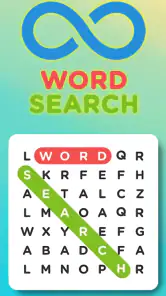
The setup process is a breeze. Once you download and install Infinite Word Search Puzzles, you’re greeted with a clean and intuitive interface. The app doesn’t waste time with unnecessary tutorials or ads, which is a refreshing change. You’re thrown right into the action, and honestly, that’s the way I like it!
Game Modes and Features
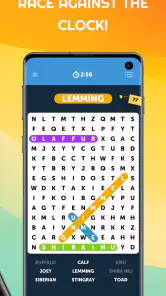
One of the standout features of this app is its variety of game modes. Whether you’re in the mood for a timed challenge or a more relaxed experience, there’s something for everyone. The app offers categories like animals, sports, and even a holiday theme. I found myself getting lost in the vast selection, trying out different categories and testing my vocabulary skills.
More From Our News Desk

Weather by Xiaomi Review: Clear at a Glance, Less Clear Up Close

X Under Pressure: Can It Recover When Posting Goes Wrong?

Clash of Clans Is Won Between the Battles

Android Auto Makes the Case for Quieter Car Software

MobiOffice: Transforming Mobile Productivity with Seamless Integration

EA SPORTS FC™ Mobile Soccer: Redefining Mobile Sports Gaming
For a realistic daily routine, I’d use a relaxed puzzle as a short reset between tasks, then save a more demanding session for a quiet evening. The distinction matters: a timed challenge can turn a calming word search into a test of speed, while an unhurried round is easier to pause when life interrupts. If your main goal is to build vocabulary systematically, a dedicated language-learning app is a better fit; this game is more about recognition, attention, and a pleasant mental break.
Compared with paper word-search books, the app is convenient when you’re away from home and want to change topics quickly. A printed puzzle can be easier on the eyes for a long session and doesn’t compete with phone notifications, though. I’d also avoid treating every session as a score chase: taking a moment to scan methodically is often more enjoyable than tapping quickly just to finish.
What if you’re unsure whether it suits your age group? Its Everyone rating makes it a broadly approachable choice, especially for someone who enjoys familiar word puzzles. Is it free to try? Yes, the game is free, though optional in-app purchases range from $0.99 to $49.99 per item, so I’d check purchase prompts carefully if a child is using the device. The game has been available since August 6, 2015, and its large audience is reflected in around 12,000 written reviews as well as its ratings.
There are trade-offs to keep in mind. The sheer choice of categories can make browsing feel like a task if you spend too long deciding, so I’d pick a theme before opening the game or simply stick with a favorite. Word searches also rely on visual scanning; if you want story, strategic decisions, or a strong sense of progression, a puzzle adventure or another word-game format will probably hold your interest longer. And when you need uninterrupted concentration, paper may be the more comfortable option.
Picking a category without getting stuck
The breadth of themes is useful only if it gets you into a puzzle rather than leaving you browsing. I’d make a tiny shortlist of subjects I actually enjoy—animals, sports, or a seasonal topic, for example—and choose from that instead of trying to inspect every option. This works particularly well when you’re opening the game during a short pause: the decision becomes part of the routine, not another thing to spend your break on.
A less obvious way to use the category choice is to match it to your energy. Familiar words are a comfortable choice when you’re tired or sharing the screen with someone younger; a new subject gives you more to notice when you want a little extra mental engagement. Neither choice needs to be a test of knowledge. If you don’t recognize a word, the game can still be enjoyable as a visual search, but it may not satisfy someone who expects every puzzle to teach and explain new vocabulary.
There is also a practical trade-off in switching topics often. Variety helps prevent the activity from feeling stale, but frequent changes can make it harder to settle into a steady scanning rhythm. I’d finish the current puzzle before changing category unless the theme is genuinely not working for me. That keeps the session tidy and makes it easier to tell whether the issue was the subject or simply a moment of distraction.
Making a short session feel satisfying
A useful everyday scenario is a delayed appointment: I’d choose one familiar category, silence the urge to browse around, and work through a puzzle at a comfortable pace. If I’m interrupted, I can stop rather than turning a five-minute wait into a commitment. For a commute, I’d only play when it’s safe to focus on the screen; word searching needs enough visual attention that it is not a good activity while walking through a busy area or doing anything else that requires awareness.
For a shared session, the game can provide an easy prompt: each person can look for a different target word or take turns scanning. That makes the puzzle a low-pressure activity rather than a competition, especially for mixed ages and word confidence. I would not assume every player wants a timer or a race, though. If someone finds speed stressful, keep the focus on finding words at their own pace and choose a topic they already recognize.
Another small technique is to use the word list as a plan instead of repeatedly sweeping the whole grid. Pick one target, look for its opening letter, and inspect plausible directions before moving to the next. If you lose your place, pause for a moment and restart with a new target rather than scanning the same region in a hurried loop. This is not a shortcut that makes every puzzle easy; it simply helps keep attention organized, especially on a small phone screen.
How it compares with other word games
Against a crossword, this is a more direct activity: you do not have to solve a clue before you can start searching. That makes it easier to pick up when you have limited time or want a lighter task. Crosswords are the better choice if you enjoy word meanings, general knowledge, and working out answers from hints. A word search instead rewards visual attention and recognition, so the two games scratch different itches even though both revolve around words.
Compared with a word-building game, the appeal here is that you are locating words rather than trying to make them from a set of letters or outscore another player. That can feel calmer and less dependent on quick decisions. On the other hand, players who want a strategic turn-by-turn challenge or a more obvious sense of improvement may find a word-building game more engaging. This one is most convincing when the simple search itself is what you want, not when you are looking for a larger competitive system.
Paper puzzle books remain a genuine alternative rather than an inferior version. They avoid phone distractions and can be more comfortable if you prefer a larger printed page, while the app is easier to carry and offers a broader range of themes in one place. I’d choose based on where and how I plan to play: the phone for quick access and subject changes, paper for a longer, quieter session away from notifications.
What to know before spending or settling in
The game is free to download, but it includes optional in-app purchases priced from $0.99 to $49.99 per item. I’d treat a purchase prompt as a reason to pause and decide whether it adds something I actually want, rather than assuming payment is needed to enjoy a word search. If a child uses the device, it is worth checking purchase settings beforehand; the Everyone rating describes its general content suitability, not whether every device purchase is automatically blocked.
One common point of confusion is expecting a word search to function like a lesson. Finding and recognizing words can be a pleasant vocabulary-adjacent activity, but it is not the same as structured instruction with explanations, practice plans, or feedback on language. I’d recommend it to someone who wants a light puzzle and a broad selection of themes. I’d steer a learner who needs deliberate study toward an app built around teaching, and a player who wants narrative goals toward a story-led puzzle game.
The other expectation worth setting is that a large collection does not automatically mean every category will feel equally interesting to every person. The variety gives you options, but personal taste still decides whether a session clicks. If browsing becomes the least enjoyable part, return to a known favorite and start playing. That simple habit gets you to the useful part of the game faster and makes it easier to decide whether its central loop is right for you.
What’s really cool about this app is the multiplayer mode. You can challenge your friends or random opponents online. It adds a competitive edge that makes the game even more addictive. I spent hours trying to beat my high score and climb up the leaderboard. It’s a real kick!
User Experience
User experience is where Infinite Word Search Puzzles really shines. The app’s design is sleek and visually appealing, with vibrant colors and crisp graphics. The controls are responsive, making it easy to select words and navigate the menu. I appreciated the lack of intrusive ads, which can be a major buzzkill in free apps. Instead, the app offers optional in-app purchases, which are reasonably priced.
My advice is to treat the first few sessions as a low-pressure test: try one familiar category, then another that sounds interesting, and notice whether you prefer taking your time or competing. If you enjoy the basic word-hunt loop, the breadth of themes gives you room to keep changing the flavor. If you find yourself wanting richer clues or a narrative reason to solve each puzzle, that is a useful sign to choose a different kind of game rather than forcing this one to be something it isn’t.
Who will get the most from it?
I’d recommend it to casual players who like clear goals, people who enjoy word searches but don’t want to carry a book, and anyone looking for a low-pressure way to fill a short wait. It can also work well as a shared activity when players agree to take turns or search at their own pace. The game’s appeal is in the immediate task and the ability to change themes, not in demanding long sessions or a detailed plan.
I’d suggest skipping it if you quickly tire of scanning letter grids, need a quiet screen-free break, or want a game built around story, tactics, or structured learning. It may also be a poor fit if you strongly dislike visual searching on a phone. The best test is simple: complete a puzzle in a familiar category and ask whether the search felt relaxing or tedious. If it felt like work, a different word-game format is likely a better match.
Final Thoughts
In a world full of mobile games, Infinite Word Search Puzzles stands out as a gem. It’s perfect for word enthusiasts and casual gamers alike. Whether you have a few minutes to spare or want to dive into a long gaming session, this app has something to offer. So, if you haven’t tried it yet, give it a go—you might just find your new favorite pastime!
Infinite Word Search Puzzles Frequently Asked Questions
Can I adjust the challenge level in Infinite Word Search Puzzles?
The game includes different difficulty levels, so players can choose a challenge that suits their experience and mood. That makes it approachable if you are new to word searches, while still offering room to test your skills as you become more familiar with the puzzles. The variety also helps make short, relaxed sessions feel different from a more demanding round.
How many puzzles and themes can I explore?
Infinite Word Search Puzzles highlights thousands of unique word-search puzzles across more than 300 categories. This gives you a broad selection of themes to explore, with plenty of opportunities to move to a different subject when you want a change. If you enjoy browsing varied topics rather than repeating one style of puzzle, the range is a notable part of the appeal.
What age group is Infinite Word Search Puzzles suitable for?
Infinite Word Search Puzzles is rated Everyone, making it suitable for a broad audience, including families looking for a word game to enjoy. Its familiar word-search format makes it approachable for casual players, while the range of categories and difficulty levels can give more experienced players a challenge. As with any game, parents can decide whether its features suit their child.
What is Infinite Word Search Puzzles?
Infinite Word Search Puzzles is a mobile application that offers a wide variety of word search puzzles. It provides endless entertainment with multiple categories and difficulty levels to challenge users of all ages. The game is available for Android and iOS, allowing players to enjoy classic word search puzzles or compete against others in multiplayer mode. Its store summary highlights thousands of unique puzzles across more than 300 categories.
Is Infinite Word Search Puzzles free to download and play?
Yes, Infinite Word Search Puzzles is free to download and play. However, it offers in-app purchases that can enhance the gaming experience. These purchases range from $0.99 to $49.99 per item. Players can enjoy the game without paying, while optional purchases provide additional choices for those who want them.
Pros
- Diverse puzzle categories keep gameplay engaging.
- Offers both single and multiplayer modes.
- Daily challenges provide fresh content.
- User-friendly interface enhances experience.
- Minimal ads ensure smooth play.
Cons
- Some puzzles feel repetitive over time.
- In-app purchases can be pricey.
- Limited free hints available.
- Occasional lag in multiplayer mode.
- No offline mode available.
- Category
- Word
- Version
- 5.0.72













