Color Master - Color by Number
- 3.90K
- 4.7
- Installs
- 5.00M
- Price
- Free

Screenshots


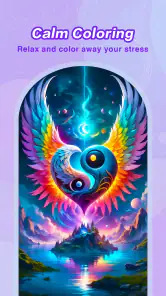
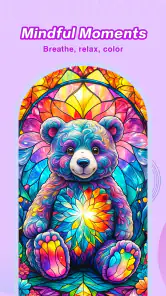


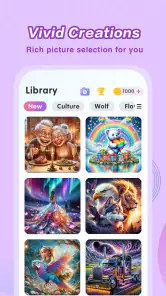
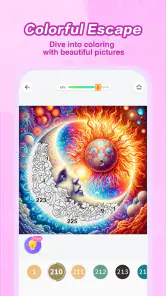
Analysis by Reviewed
I find Color Master - Color by Number works best when I treat it as a small, self-contained activity rather than a game I need to master. It gives me a picture to finish, a clear task to focus on, and an easy stopping point when I need to get back to the day. That combination makes it a practical choice for quiet moments, though it will not satisfy everyone looking for deeper strategy or a more demanding challenge.
Small goals make it easy to begin
The first useful goal is simply to choose an image and work through it at your own pace. There is no need to plan a drawing or decide which colors belong together: the numbered sections provide a clear next step. I find that makes it easier to start during a short break, when a more open-ended creative task might feel like too much effort. It is also a good fit for children who enjoy matching and spotting details, though an adult may need to help a younger player navigate the screen.
For a realistic everyday use, I would open a picture while waiting for an appointment or winding down after dinner, finish a few sections, then put the phone away. The activity gives that idle time a gentle focus without requiring art supplies or a long uninterrupted session. If you want a game built around fast rounds, competition, or a demanding win condition, this is a different kind of pastime; the appeal is steady completion rather than pressure.
Getting Started with Color Master
Once you download and open Color Master - Color by Number, you're greeted with a user-friendly interface that makes navigation a breeze. The app offers a wide array of categories to choose from, including animals, mandalas, landscapes, and more. The selection is so vast that it's nearly impossible not to find something that piques your interest. Simply select a picture, and you'll be ready to start coloring!
The joy of following the numbers
The process is straightforward: each image is divided into numbered sections, and all you have to do is match the numbers with the corresponding colors. It's a perfect blend of simplicity and satisfaction, watching a black-and-white outline transform into a vibrant masterpiece. The app's zoom feature allows for precision, ensuring even the tiniest sections are filled with color.
For small, hard-to-spot areas, I recommend zooming in before using a hint. That way, a hint can stay a backup for when I genuinely cannot locate a remaining section, rather than replacing the satisfying search. A practical trade-off is that detailed pictures reward patience but may be less comfortable on a small screen; simpler designs are a better choice when I only have a couple of minutes or do not want to concentrate closely.
One of the most delightful aspects of the app is its ability to cater to both novices and experienced colorists. Beginners can enjoy the stress-free experience of coloring by numbers, while more seasoned users can appreciate the intricate designs and the opportunity to experiment with different color palettes.
More From Our News Desk

Weather by Xiaomi Review: Clear at a Glance, Less Clear Up Close

X Under Pressure: Can It Recover When Posting Goes Wrong?

Clash of Clans Is Won Between the Battles

Android Auto Makes the Case for Quieter Car Software

MobiOffice: Transforming Mobile Productivity with Seamless Integration

EA SPORTS FC™ Mobile Soccer: Redefining Mobile Sports Gaming
Progress you can see
Progress here is visible in the picture itself: unfilled sections gradually give way to a finished image. That visual payoff is more meaningful than a complicated level system would be for someone opening the game to relax. The time-lapse video feature also gives a different view of that progress, letting me revisit how the image came together rather than only looking at the completed result.
Compared with a blank-canvas drawing app, this approach removes the pressure of inventing a composition and choosing every color. Compared with a paper coloring book, it is more convenient to pick up and put down, and zooming makes fine areas easier to reach. The flip side is that numbered coloring offers less freedom: if making an original drawing or choosing an entirely personal palette is the main goal, a drawing app or physical materials will be more rewarding.
Tools that support the coloring flow
What sets Color Master - Color by Number apart from other coloring apps is its unique features. The app updates its library regularly, ensuring fresh content is always available. Additionally, it offers a hint system for those tricky sections and a time-lapse video feature that lets you watch your coloring process from start to finish—a fantastic way to see your progress and share your creations on social media.
Those tools are most useful when treated as optional supports, not reasons to rush through every picture. I would save hints for a stubborn section and use the time-lapse when I have completed an image I am happy with. Anyone who prefers an entirely quiet, private activity may not care about sharing, and the social element is not essential to enjoy the basic coloring loop.
An in-app community adds a social dimension to the coloring experience. You can view and share artwork with fellow users, drawing inspiration from their creations and gaining feedback on your own. This community aspect fosters a sense of camaraderie among users, making the app more than just a solo activity.
Who enjoys the pace—and who may not
Coloring Game Studio@RabiGame makes this free board game, which has a 4.7 average from around 44,000 ratings and over 5 million installs. It is rated for Everyone, and the current version is 2.14.16, with Android 5.0 as the minimum requirement. In-app purchases range from $0.49 to $69.99 per item, so I would check the purchase prompts carefully, especially if a child will use the phone. You can start without paying, but the presence of optional purchases is worth bearing in mind.
The game is best for people who like calm, guided tasks and small signs of completion. Its board-game classification should not lead anyone to expect a head-to-head match: the central activity is coloring pictures, not competing against another player. Players who need rising difficulty, strategic choices, or a clear challenge to keep them engaged may find the pace too gentle. In my view, the most sustainable way to use it is to choose pictures by mood and available time, rather than treating every image as a task that must be completed immediately.
Keeping the routine enjoyable
A useful way to avoid turning the collection into a chore is to pick a picture for the time you actually have, not the time you wish you had. If I am only taking a brief pause, I choose a simple-looking image and stop when the pause ends, even if it is unfinished. For a longer evening session, a more detailed design can give me something to settle into. This small choice matters because the game’s reward is the gradual change on screen; forcing myself to finish every image would make that gentle loop feel like another obligation.
The pace also shapes how I would use it with a child. The age rating is Everyone, but that does not mean every screen interaction is automatically suitable without supervision. I would show a younger player how to select a picture and how to recognize purchase prompts before handing over the phone. For a family activity, taking turns choosing pictures can make the selection part social, while the actual coloring remains an individual task. If a child mainly wants to invent characters or draw freely, a blank drawing surface is likely a better match.
How it compares with other ways to unwind
Among digital coloring games, this one makes the most sense for someone who likes instructions and a visible finish line. It asks less of me than a creative drawing app, where I have to supply the idea and make many decisions, but it also gives me fewer ways to personalize the result. A physical coloring book avoids screen interaction and can feel more tactile, while this game is easier to carry around and lets me enlarge tiny spaces. Neither alternative is universally better; the choice depends on whether convenience, free-form creativity, or a screen-free break matters most.
It also differs from familiar board games in a more basic way: there is no opponent to read, no tactical plan to build, and no match result to chase. The board-game label describes its category, but the moment-to-moment experience is closer to a guided coloring activity. I would recommend it to someone who wants a calm focus exercise, not to a player hoping for a clever puzzle or a competitive loop. That distinction is worth knowing before downloading, because the relaxing pace is a feature for one person and a lack of challenge for another.
Purchases, prompts, and sensible expectations
The game is free to start, with optional in-app purchases priced from $0.49 to $69.99 per item. That is a broad range, so I would avoid assuming that every optional item costs the same or that a purchase is needed to try the core activity. If I were setting it up for someone else, particularly a child, I would make sure they know that purchase prompts are not part of coloring a picture and check the device’s purchase controls. This is a practical precaution rather than a reason to avoid the game outright.
There is also a trade-off between returning for new pictures and feeling pressured to keep up. Regular library additions can give a returning player fresh choices, but I do not think the game needs to become a daily commitment to be worthwhile. I would open it when I want this particular kind of quiet activity and leave it alone when I want something more absorbing. That approach keeps the collection’s ongoing additions as an option instead of turning them into a queue of unfinished obligations.
Why You Should Give It a Try
If you're searching for a way to relax and tap into your creative side, Color Master - Color by Number is a fantastic choice. It's not just about coloring; it's about mindfulness and taking a break from the hustle and bustle of everyday life. The app's intuitive design, coupled with its wealth of content and supportive community, makes it a standout option for anyone looking to unwind.
One limitation is that the basic matching mechanic can become repetitive if you want every session to introduce a new kind of challenge. I would skip it if I were looking for a conventional board game with tactics, turns, and a strong sense of winning or losing. For someone who wants a low-pressure activity, though, the regular library additions and the ability to make visible progress can offer enough variety to return when the mood fits.
In conclusion, Color Master - Color by Number offers a delightful escape into the world of colors and creativity. Whether you're a seasoned artist or someone looking to de-stress, this app provides a perfect balance of fun and relaxation. So why not download it today and start coloring your way to tranquility?
Color Master - Color by Number Frequently Asked Questions
What kind of game is Color Master - Color by Number?
Color Master - Color by Number is a mobile coloring game built around filling numbered spaces in pictures. It offers a calm, simple activity rather than a fast-paced challenge, making it an option for players who enjoy completing images one section at a time. The game is free to download, with optional in-app purchases.
Who developed Color Master - Color by Number?
Color Master - Color by Number was developed by Coloring Game Studio@RabiGame. It is a board-category game centered on number-guided coloring, so its main appeal is an accessible creative pastime rather than competitive play. If you enjoy coloring activities on a phone or tablet, the developer’s game offers a straightforward way to complete pictures by tapping their numbered sections.
Is Color Master - Color by Number suitable for children?
Color Master - Color by Number is rated Everyone, making it suitable for a broad audience, including children. Its number-guided coloring format is straightforward to follow and does not require artistic experience. As with any game that offers in-app purchases, parents may want to review purchase settings on the device before a child plays.
What is Color Master - Color by Number?
Color Master - Color by Number is a creative and relaxing mobile application that allows users to engage in coloring activities by following a simple number guide. The app provides images to color, promoting relaxation and creativity among users of all ages. It is a board game developed by Coloring Game Studio@RabiGame, with a free-to-play format and optional in-app purchases.
How does Color Master - Color by Number work?
Color Master - Color by Number works by providing users with images that are divided into numbered sections. Each number corresponds to a specific color, and users can tap on the sections to fill them with the appropriate color. This methodical approach makes it easy for users to complete artworks without the need for advanced artistic skills. The app also offers hints and zoom features for more precise coloring.
Pros
- User-friendly interface for easy navigation.
- Wide variety of coloring pages available.
- Daily updates with new pictures to color.
- Offline mode for coloring without internet.
- Relaxing gameplay with soothing music.
Cons
- Ads can be intrusive during gameplay.
- Limited features in the free version.
- Color palette options are somewhat basic.
- Some pictures require in-app purchases.
- App may lag on older devices.
- Category
- Board
- Version
- 2.14.16













