Color Flow - Color by Number
- 794.00
- 4.6
- Installs
- 500.00K
- Price
- Free

Screenshots



Analysis by Reviewed
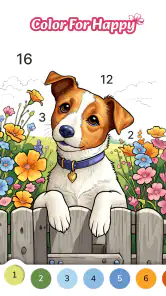
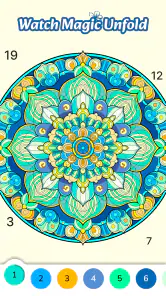
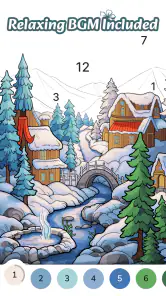
I found Color Flow most appealing when I wanted a quiet activity rather than a competitive board game. It turns numbered coloring into a simple, low-pressure routine: choose an image, match each number with its color, and gradually watch the picture come together. The idea is familiar, but the experience depends heavily on how easy it is to see small areas, follow the palette, and keep control of the screen without feeling rushed.
That makes this a particularly interesting choice for people who enjoy relaxing visual tasks, including users who may find fast games tiring or distracting. I would not describe it as universally effortless, though. Its usefulness depends on eyesight, touch accuracy, patience with detailed pictures, and comfort with the way the game presents its coloring workflow. After spending time with it, I see a pleasant free board game from Coloring Game Studio@RabiGame, but also one that works best when treated as a focused coloring break rather than a complete creative tool.
How the coloring experience handles readability and navigation
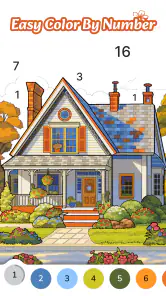
The central interaction is easy to understand. A picture contains numbered sections, and the player fills those sections by selecting the matching color. There is no complicated rule set to memorize, which is a genuine advantage for someone opening the game for the first time or sharing it with a child. The basic loop also means I can return after a few days without having to relearn anything.
In practice, readability matters more than the simplicity of the rules. A numbered coloring game asks me to distinguish between tiny spaces, read their labels, and identify the active color. When the artwork contains broad areas, the process feels smooth and forgiving. More intricate images demand slower checking, especially when several neighboring sections use similar-looking shades. I recommend beginning with simpler pictures if you are testing whether the interface suits your eyes or your preferred pace.
Navigation benefits from the narrow purpose of the game. I am not moving through a large story world, managing a complicated collection, or learning a series of menus. The experience is built around choosing artwork and filling it. That straightforward structure can be helpful for younger players and for anyone who prefers predictable screens over dense dashboards.
One useful habit is to treat each image as a short visual project instead of trying to finish it in one sitting. I work through the most obvious larger areas first, then return to the smaller numbered pieces. This reduces the feeling of hunting around the picture and makes progress easier to notice. It also gives the session a natural stopping point when my attention starts to fade.
The game’s store summary presents it as a way to experience mental flow and relax, and I think that description makes sense when the image is readable and the pace remains comfortable. The calming effect does not come from deep strategy. It comes from repetition, visible progress, and having one small task in front of me. Anyone expecting a traditional board game with tactical decisions, opponents, or meaningful branching choices should adjust expectations before installing it.
More From Our News Desk

Weather by Xiaomi Review: Clear at a Glance, Less Clear Up Close

X Under Pressure: Can It Recover When Posting Goes Wrong?

Clash of Clans Is Won Between the Battles

Android Auto Makes the Case for Quieter Car Software

MobiOffice: Transforming Mobile Productivity with Seamless Integration

EA SPORTS FC™ Mobile Soccer: Redefining Mobile Sports Gaming
Color Flow is free to install, which makes trying the basic experience relatively easy. It is rated for Everyone, and that broad age label fits the accessible concept, although a child’s comfort will still depend on the size of the details and how confidently they use a touchscreen. I would sit with a younger player at first, not because the rules are difficult, but because matching small numbered regions can be more demanding than the simple description suggests.
What makes the interface approachable
The strongest design choice is the direct relationship between number and color. Instead of asking me to invent a palette or understand artistic theory, the game gives me a clear assignment. That removes a common barrier for people who like the look of coloring but feel unsure about choosing colors themselves.
It also supports a useful “completion by attention” rhythm. I can scan for the current number, fill a few areas, and pause without losing the overall idea. This is different from many puzzle games that punish interruption or require remembering a board state. For a short break at home, that low memory demand is a real strength.
Still, the same simplicity can feel repetitive. Players who want to make independent artistic decisions may find the numbered format restrictive. The finished image is guided from the beginning, so the satisfaction comes from completing the design rather than expressing a personal style. For creative freedom, a blank-canvas coloring app or a more traditional drawing tool would be a better match.
Motor, sensory, and situational considerations
Touch precision is the most important practical issue. Numbered coloring often places several small targets close together, so a person with limited fine-motor control may need more time or repeated taps. I found that using a deliberate fingertip movement is more reliable than tapping quickly. A stylus, if comfortable with the device, may also help some players, but I would regard that as a personal workaround rather than a guaranteed solution.
The game can be gentler than action titles because there is no need to react to moving enemies, coordinate rapid gestures, or maintain a high score under pressure. That makes it potentially suitable for relaxed play during a quiet period. Someone who experiences stress from timers, competition, or sudden visual changes may appreciate the slower coloring task.
On the other hand, the visual focus is unavoidable. The player needs to read numbers and distinguish colored feedback on a screen. People with low vision, color-vision differences, visual fatigue, or sensitivity to busy artwork should test a few images carefully. A palette-based activity can be less comfortable when adjacent shades are hard to separate, even if the number system provides some assistance.
My practical suggestion is to change the physical setup before deciding that the game is unsuitable. I use a brighter, stable environment, hold the phone at a comfortable distance, and take short breaks instead of leaning closer for long periods. I also avoid playing when I am already tired, because tiny sections become much more frustrating when my eyes are struggling.
For users with reduced dexterity, a slower workflow is more useful than trying to chase speed. I select one color, search methodically from one side of the image to the other, and accept that some areas may require several attempts. This turns the task into a scanning exercise rather than a test of quick tapping. It is not a replacement for dedicated accessibility controls, but it can make the ordinary interaction less demanding.
Audio is not central to the reason I would choose this game. The meaningful information is visual: the numbered spaces, the selected color, and the changing picture. That can be positive for someone who wants a quiet screen activity, but it also means the game’s core value is tied to seeing the artwork clearly. If your ideal relaxing game is driven by spoken guidance or strong nonvisual feedback, this is probably not the right category.
Where it fits into an ordinary day
A realistic use case is a ten-minute pause after work. I can open a picture, fill a few obvious sections while sitting with a drink, and stop before the activity becomes another obligation. The lack of a demanding narrative makes it easy to use when my concentration is limited but I still want something more engaging than passively scrolling.
It can also work during a waiting period, provided the surrounding situation allows focused screen use. I would not recommend relying on it while walking, crossing a road, or doing anything that requires attention elsewhere. The detailed coloring task is visually absorbing, and that is precisely why it can be calming in a safe setting but inappropriate in a moving or shared environment.
For families, I see a simple shared activity rather than a deep educational game. An adult can help a child identify numbers, discuss color names, and decide which parts to complete first. The child gets immediate visual feedback, while the adult can control the pace. However, children who become bored by repetition or want to draw their own pictures may lose interest quickly.
It may also suit someone recovering from a mentally busy day who wants a structured task with a clear endpoint. The important distinction is that the relaxation comes from concentration, not from doing nothing. If you are looking for complete rest, even this gentle interaction may feel like work. If you need a small, predictable activity to settle your attention, it has a better chance of helping.
Remaining barriers and trade-offs
The biggest limitation is that “easy to understand” does not always mean “easy to operate.” The rules are simple, but detailed artwork can create a precision burden. That matters for users with shaky hands, joint pain, slower touch response, or visual processing difficulties. I would judge the game by how comfortable the smallest sections feel, not by how quickly the first image can be completed.
The free model also deserves attention. The game is free, while in-app purchases range from $4.99 to $99.99 per item. That does not tell me how every player will experience the purchase prompts, but it does mean families should be aware of the available spending range before handing the device to a child. I would review purchase settings on the phone and make expectations clear, especially in a shared household.
Another trade-off is the difference between guided coloring and genuine creation. The numbered system removes uncertainty, which is excellent for relaxation and beginners. It also limits ownership of the final image. I cannot use the same process to experiment freely with unusual combinations or build a picture from scratch. Players who want artistic control should compare this with a drawing or open coloring application instead of assuming all coloring games offer the same kind of freedom.
Compared with competitive board games, this is much less social and much less strategic. There is no reason to choose it when you want bluffing, planning, rivalry, or a shared match. Compared with puzzle games, it offers less problem-solving and more repetition. Compared with ordinary digital coloring books, its numbered structure may feel more organized, but it can also feel more constrained. Its place is between a visual puzzle and a guided coloring exercise.
Device compatibility is reasonably broad for an older Android phone because the minimum operating system is Android 6.0. That helps people who are not using a recent handset, although the comfort of the experience will still depend on screen size and touch responsiveness. A compact display may make detailed sections harder to select, while a larger screen can make scanning less tiring. I would consider the physical device part of the accessibility decision, not just the software version.
The current version is 1.9.54, and the game has passed the early-install stage rather than being an obscure experiment. It has more than 500 thousand installs, an average rating of 4.6 from about 4.6 thousand ratings, and 794 written reviews. Those figures suggest that many users find the basic idea appealing, but they do not remove the need to test the visual and motor demands for yourself. Popularity can confirm interest; it cannot guarantee personal comfort.
Some people should skip it altogether. I would not choose it for a player who needs audio-led interaction, wants substantial strategic depth, dislikes repetitive tapping, or expects a blank canvas. I would also be cautious if small on-screen targets regularly cause hand pain or eye strain. In those cases, a larger-format creative activity, an accessible puzzle with stronger nonvisual cues, or a physical coloring book may be more suitable.
My inclusive verdict
After considering different abilities and settings, I see Color Flow as a welcoming concept with uneven practical accessibility. Its clear number-to-color relationship lowers the learning barrier, and its calm pace avoids many pressures found in action games. The ability to work in short sessions is especially useful for people whose energy or attention changes throughout the day.
Its limits are equally clear. The experience remains dependent on visual reading and accurate touch, and detailed images can turn relaxation into effort. I would not describe it as a specialized accessibility solution. I would describe it as a simple game that may fit a wide range of players when the artwork, screen, and physical setup are comfortable.
My advice is to start with a short session, choose an uncomplicated picture, and notice three things: whether the numbers are easy to distinguish, whether selecting small regions feels comfortable, and whether the repetition actually settles your mind. Those answers matter more than the broad Everyone rating or the high store score. If the first few minutes feel peaceful, the game can become a useful little routine.
For me, the best reason to recommend it is its low-pressure structure. I can open it without preparing, make visible progress without learning a complicated system, and stop without feeling that I abandoned a challenge. The weakest part is the gap between the relaxing promise and the precision required by some artwork. That gap will be minor for confident touchscreen users and significant for others.
Overall, I would recommend this free board game to beginners, families who want a quiet shared activity, and adults looking for a guided visual break. I would steer competitive players and independent artists elsewhere. If your priority is a calm, organized coloring task and your device makes small touch targets manageable, Color Flow is worth trying. Its most inclusive quality is not that it removes every barrier, but that its simple rhythm gives many people a comfortable starting point.
Color Flow - Color by Number Frequently Asked Questions
What devices can run Color Flow - Color by Number?
Color Flow - Color by Number is available for Android devices running Android 6.0 or later. Before downloading, check your device’s operating system version to make sure it meets that requirement. The game is listed as a free download, so you can try its numbered coloring activity without paying upfront, while keeping in mind that optional in-app purchases are available.
What is Color Flow - Color by Number?
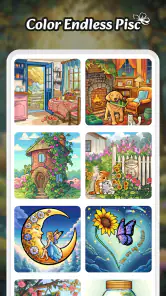
Color Flow - Color by Number is a relaxing coloring app built around numbered artwork. You select a picture, zoom in on the canvas, and fill each section by matching it with the correct color. The app is designed for casual play, stress relief, and creative entertainment rather than advanced drawing. Its simple controls make it accessible to beginners, while the growing collection of illustrations gives users plenty of images to complete.
How does the coloring system work in Color Flow - Color by Number?
After choosing an illustration, each part of the image contains a number that corresponds to a specific color in the palette. Tapping the correct color and then selecting matching sections gradually completes the picture. The zoom feature is useful for small or detailed areas, and the interface generally keeps the process straightforward. If you have trouble locating a remaining section, available hints or assistance features may help, depending on the version installed.
Can Color Flow - Color by Number be played offline?
Many of the coloring activities can usually be enjoyed without a continuous internet connection once the necessary content has loaded, which makes the app convenient for travel or short breaks. However, internet access may still be required for downloading new artwork, receiving updates, displaying advertisements, synchronizing progress, or using online features. Offline availability can vary by device and app version, so it is worth testing the specific images you want before relying on it without internet.
Is Color Flow - Color by Number free to download and use?
Color Flow - Color by Number is generally available as a free download, allowing users to start coloring without an upfront purchase. Like many free creative apps, it may include advertising, optional purchases, premium content, or features that are limited unless unlocked. Optional in-app purchases range from $4.99 to $99.99 per item. Parents should also check purchase settings if children will use the app, since accidental in-app transactions can occur.
Pros
- Simple color-by-number gameplay suitable for quick
- relaxing sessions.
- Large variety of pictures across animals
- nature
- patterns
- and more.
- Helpful hints make small or difficult color areas easier to complete.
- Completed artwork can be saved and shared with friends or family.
- Smooth tap controls make coloring comfortable on phones and tablets.
Cons
- Some images and features may require watching ads or making purchases.
- Frequent advertisements can interrupt the coloring experience.
- Tiny sections may be difficult to select accurately on smaller screens.
- The app may become repetitive for players seeking more creative freedom.
- An internet connection may be needed for certain content or features.
- Category
- Board
- Version
- 1.9.54













