Chess Clash: Online & Offline
- 1.07K
- 4.5
- Installs
- 10.00M
- Price
- Free

Screenshots

Analysis by Reviewed
When I want a chess game that can fill a short break without making me commit to a study session, Chess Clash: Online & Offline is an appealing option. It puts familiar board play alongside online competition and solo practice, so I can choose between a relaxed game and the sharper pressure of facing another person. That flexibility is its main draw, though it also means the experience is aimed more at accessible play than at replacing a dedicated chess tutor.
Small goals make it easier to begin
For me, the useful question at the start of a session is not “How do I become a better chess player today?” but “What is one thing I can practise?” The game’s challenges give me a focused task to begin with, which can be less intimidating than launching straight into a match when I have not played for a while. I can use one as a warm-up, then carry the same idea into a game and see whether I notice a similar opportunity.
That approach works best when I keep expectations realistic. A puzzle gives me a narrow problem to solve; a complete game asks me to keep track of threats and plans across many decisions. I would not treat a successful challenge as proof that I am ready for a tougher opponent. Instead, I use it to get my attention onto the board before choosing whether I have time and focus for a full match.
Choosing a session that fits the moment
On a quiet evening, I might start with solo play because I can focus on the position without the social pressure of an online opponent. If I have a bit more time and want an unpredictable test, I can switch to a human match. The distinction is useful in everyday life: a short pause between errands suits practice better, while a live game makes more sense when I can stay with it rather than repeatedly putting the phone away.
That choice also helps answer a practical question: is it mainly for solo play or for competition? I see it as a flexible mix rather than a game that requires one style. Offline play gives me a lower-pressure place to try ideas; online play brings the uncertainty that an AI opponent cannot fully reproduce. Moving between them is more useful than expecting either option to meet every need.
Getting Started with Chess Clash
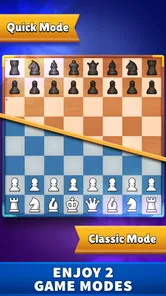
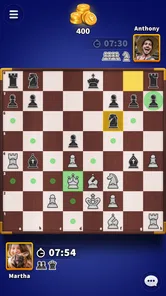
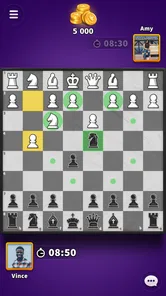
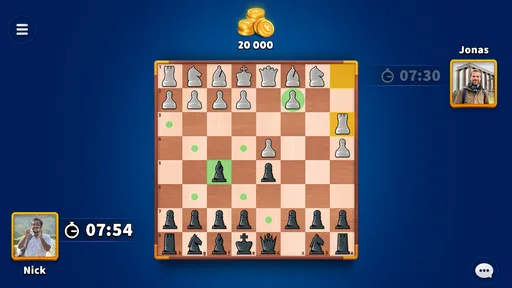
First off, let's talk about the interface. The moment you open Chess Clash: Online & Offline, you’re greeted with a sleek and intuitive design. It’s got that classic chess board look that we all know and love, but with a modern twist. Navigating through the menus is a breeze, even if you’re all thumbs like me.
Game Modes Galore
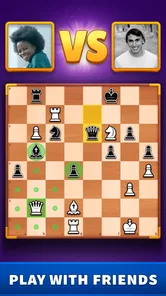
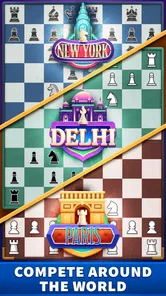
The app offers a variety of game modes to keep things interesting. You can dive into an online match, pitting your skills against players from around the world. The matchmaking is quick, and I rarely found myself waiting long for a game. If you’re not feeling the competitive vibe, there’s also an offline mode where you can practice against AI opponents of varying difficulty levels. I found this particularly useful for honing my strategies before taking on real opponents.
More From Our News Desk

 Gmail
GmailGmail in a Busy Inbox: Who Benefits Most?
From first account to crowded workday, Gmail earns its place through dependable search and flexible sorting—but its best fit depends on how much inbox maintenance you can tolerate.

 Prime Video
Switching to Prime Video: What Changes in Your Viewing Routine
Prime Video can make a compelling second home for streaming, but switching means learning a different catalog, rental layer, and route from browsing to playback.

 Universal TV Remote Control
Universal TV Remote Control Works Best as a Reliable Backup
A phone remote earns its place through quick setup and reliable habits. Here is how to get more from Universal TV Remote Control—and where its limits show.

 Weather - By Xiaomi
Weather by Xiaomi Review: Clear at a Glance, Less Clear Up Close
Xiaomi’s weather app makes everyday forecasts quick to scan, but its calm surface can leave useful details and recovery paths harder to find than they should be.

 X
XX Under Pressure: Can It Recover When Posting Goes Wrong?
A resilience-focused review of X, examining setup, mistaken posts, interruptions, weak connections, and the gaps that matter when recovery needs to be dependable.

 Clash of Clans
Clash of Clans Is Won Between the Battles
Its raids are quick; its community is a long-term project of coordination, teaching, rivalry, and shared responsibility—with all the friction that entails.
Latest News



For those who love a bit of a storyline, Chess Clash has you covered too. The game features engaging challenges that test your skills in unique scenarios. It’s like solving a chess puzzle, and who doesn’t love a good puzzle?
Visuals and Sound
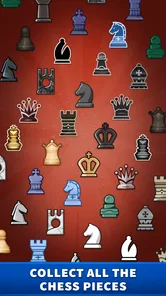
Now, let’s chat about the visuals and sound. The graphics are crisp and clean, making it easy to see every piece on the board. Plus, there are different themes you can choose from, so if you’re feeling a bit fancy, go ahead and switch things up. The sound effects are subtle yet satisfying, adding an extra layer of immersion to each move you make.
The presentation stays readable, which matters more in chess than decorative effects. I like being able to distinguish pieces quickly without the board itself competing for attention. Themes are a nice personal touch, but I would pick one for clarity and stick with it during a serious game; changing the look repeatedly can make a familiar position feel less immediate. The sounds add feedback, though I would keep the phone’s audio low in a shared space.
Community and Social Features
One of the standout features of Chess Clash is its community aspect. You can add friends, chat with opponents, and even join clubs. It’s like being part of a global chess club, and I’ve met some pretty cool people along the way. The social features really enhance the overall experience, making each game feel more personal and engaging.
I also appreciate the leaderboard system, which adds a competitive edge. Climbing the ranks gives you a sense of accomplishment and keeps you coming back for more.
For someone deciding whether to use those social options, I would separate “playing online” from “being social.” A person can enjoy the challenge of another human without making chat or clubs the point of the experience. If community is what you want, those features can make repeated visits feel less anonymous; if you prefer a quiet board, solo play remains a sensible alternative. I would also use a friend match when the goal is a relaxed game with someone I know, rather than assuming every online match will have the same pace or atmosphere.
Goals That Give a New Player Direction
When I’m returning to chess after a break, a blank board can feel like homework: I know the rules, but I’m not sure what to focus on. The short challenges give me a concrete task, so I can practise spotting a tactic instead of playing aimlessly. I’d use them as warm-ups before a match, not as a substitute for learning openings or reviewing a full game. That distinction matters: a puzzle can sharpen one decision, while a real game asks me to manage a position over many moves.
A practical routine is to play one challenge, then start an offline game and deliberately look for the same kind of opportunity. If I miss it, I can treat that as a cue to slow down on the next move. This turns a quick session into focused practice without requiring a long study block. For a casual player, that is a more approachable entry point than opening a dedicated chess-training tool and being faced with lessons before getting to play.
There is a useful trade-off here for newer players: challenges can make practice feel purposeful, but they do not automatically explain every decision in a full position. I would pause after solving one and say aloud why the move works, then look for the opponent’s best reply. That extra step turns a quick win into a habit of checking consequences. It is a small self-directed technique, not a claim that the game supplies a complete course.
Progress, Pace, and the Cost of Competition
Leaderboards give competitive players a visible reason to return, but I wouldn’t make rank the only measure of improvement. A result can depend on the particular opponent and the decisions made in one game; noticing a recurring mistake is more useful than chasing a position on a board of names. I’d set a small personal goal, such as avoiding an unsupported piece or checking the opponent’s threats before moving. That keeps progress meaningful even on a day when a match goes badly.
The online side suits someone who wants a human opponent and a little pressure, while offline play is the calmer choice when I want to experiment without turning every result into a contest. A realistic use is a few minutes on a commute: I can choose a short session, play when I have attention to spare, and leave the deeper analysis for home. If interruptions are likely, offline practice is the safer fit; a live match is better when I can stay focused through the game.
There is a trade-off between quick access and competitive friction. Playing strangers can make each game feel fresh, but it also means I cannot choose the exact playing style or level of every opponent. The AI option is more predictable for practice, yet it cannot reproduce the surprises of a person. I’d switch between them rather than expecting either route to cover every need. Players who want detailed coaching, opening databases, or careful post-game analysis may be happier with a specialist chess study app alongside this one.
For pacing, I would avoid starting a live match just because I have a spare minute: chess asks for attention even when the interface makes it easy to get into a game. A better habit is to decide first whether I can stay focused, then choose online play or a solo session accordingly. That simple check prevents a quick break from becoming a frustrating half-game interrupted by something else. When I only have a moment, a challenge is the more manageable target.
Who Will Enjoy It—and Who May Want Something Else
I’d recommend this board game to someone who already knows the basic moves and wants an easy way to alternate between solo practice and social competition. It can also work for a beginner who prefers learning by playing, provided they are comfortable figuring out lessons through challenges and experience. The visual themes offer a bit of personal choice, while the familiar board keeps the central task clear rather than burying it under elaborate presentation.
On the other hand, anyone who dislikes competitive rankings or chatting with opponents can simply focus on solo play, but may find a dedicated puzzle app more efficient for targeted training. And if a player wants a completely controlled match against a friend, they should check how the available friend and club options fit their intended setup before relying on them. The best reason to choose this game is its mix of accessible chess and online community, not a promise that it replaces every kind of chess tool.
Compared with a traditional, study-first chess app, this one leans toward getting me onto a board and into a match rather than making analysis the centre of the experience. Compared with a physical set, it is easier to carry and offers opponents when nobody nearby is ready to play, but it cannot recreate the calm of sitting across a table. I would choose it for convenient variety, and choose a dedicated training resource or a real board when that is the experience I actually want.
It is also a better fit for players who enjoy a visible sense of competition than for those who want every session to feel private and unhurried. The leaderboard can provide a reason to return, but it can also make a casual game feel like a test if I let rank dominate. I get more lasting value by treating wins and losses as individual games, then choosing a modest skill to work on next time. That keeps the competitive layer motivating instead of turning it into pressure.
What to Know Before Downloading
Miniclip.com made this free-to-download board game for Android, where it is rated for Everyone; the game also offers in-app purchases ranging from $0.99 to $99.99 per item. I’d treat those purchases as optional extras rather than a reason to spend: the core appeal is making moves, practising, and finding opponents. If you prefer a no-purchase experience, check the purchase prompts carefully and make sure your device’s purchase settings suit you before handing the phone to a child.
It has a 4.5 average from around 92,000 ratings and more than 10 million installs, which suggests a sizeable audience for this particular blend of chess and social play. The current version is 8.7.0, and it needs Android 7.0 or later. If you’re choosing between this and a traditional chess app, the deciding question is whether you value its community and quick access to opponents more than a quieter, study-first experience.
The age rating makes it broadly suitable for a general audience, but I would still consider whether online interaction is appropriate for the person using it. For a younger player, checking purchase controls and deciding in advance whether chat is welcome are practical steps. For an adult who wants chess without social elements, the option to practise alone is important; the game does not need to become a community app just because those features are available.
Where its progression works best
For me, the strongest progression loop is modest: a challenge gives me a specific target, practice lets me test an idea, and a human match supplies an unpredictable check on whether I can use it under pressure. None of those steps guarantees rapid improvement, and I would not expect a leaderboard position to explain what I should study next. But together they can make returning to chess easier than opening a blank board with no plan.
That is why I would recommend it as a convenient companion rather than a complete chess education. It suits someone who wants to play regularly, vary the level of pressure, and enjoy a social layer when it appeals. If the main goal is systematic instruction, deep analysis, or a fully controlled training plan, a specialist tool is the better choice. The clearest reason to try it is that it makes several kinds of chess session accessible from one place, while leaving the player to decide how seriously to pursue progress.
In conclusion, Chess Clash: Online & Offline is more than just a chess game; it’s a community, a challenge, and a handy way to practise your skills, whether you’re a seasoned player or just starting out. So, if you’re looking for a chess app that offers versatility and a bit of style, give Chess Clash: Online & Offline a try. You might just find yourself drawn back by the game’s charm and strategic depth.
Chess Clash: Online & Offline Frequently Asked Questions
Can I play Chess Clash: Online & Offline on a tablet as well as a phone?
Yes. Chess Clash: Online & Offline is a mobile game that can be played on a compatible phone or tablet. The board-game format suits a larger screen if you prefer more room to view the pieces, while a phone makes it convenient to play on the go. Check that your device meets the platform requirements before downloading.
Does Chess Clash: Online & Offline support both two-player and multiplayer games?
Yes. Chess Clash: Online & Offline is described as a chess game for two-player and multiplayer puzzle-board play. That makes it suitable whether you want a straightforward match or prefer playing with more people through its multiplayer options. The game also offers online and offline modes, so you can choose an experience that fits your situation.
Who is Chess Clash: Online & Offline intended for?
Chess Clash: Online & Offline is a board game for people who enjoy chess, from casual players to those who play regularly. Its Everyone content rating makes it appropriate for a broad audience, and the mobile format lets you play on a compatible device. If you are new to chess, the game’s beginner guidance can help you get started.
Is Chess Clash: Online & Offline free to download, and are there optional purchases?
Chess Clash: Online & Offline is free to download, so you can try its chess modes without paying upfront. It also offers optional in-app purchases, with items ranging from $0.99 to $99.99. Consider reviewing purchase settings before playing, particularly if the device is shared or used by a younger player. The game is rated Everyone.
What kind of game is Chess Clash: Online & Offline?
Chess Clash: Online & Offline is a board game built around chess, with options for two-player and multiplayer puzzle-board play. It is intended for people who enjoy traditional chess and want to play on a mobile device. Its online and offline modes make it possible to choose between competing with other players and playing without an internet connection.
Pros
- Engaging multiplayer mode
- Intuitive user interface
- Offline play available
- Wide variety of chess boards
- Regular updates
Cons
- Occasional connectivity issues
- Limited free features
- Ads in free version
- In-app purchases required
- Lacks advanced tutorials