Checkers
- 394.00
- 4.7
- Installs
- 10.00M
- Price
- Free
Screenshots
Analysis by Reviewed
I often reach for checkers when I want a small, thoughtful break rather than a game that demands a long setup or a steep learning curve. Gamma Play’s free board game is an easy way to play on a phone, whether I have a few minutes alone or someone nearby wants a quick match. Its 4.7 average from around 29,000 ratings and more than 10 million installs suggest it has found a broad audience, but what matters most to me is how comfortably its familiar rules fit into everyday play.
First Impressions: A Game That Gets to the Board
For a mobile game, the first practical question is whether I can begin playing without wading through a complicated setup. Here the familiar checkers format does much of the work. I can understand the board at a glance, and a new player can usually follow the basic objective after a brief explanation. That makes it a handy choice when I want to use a short break rather than spend it learning menus or systems.
I also like that it can serve two different moods. When I have a few minutes to myself, a match against the AI gives me a small tactical problem to focus on. When another person is close by, pass-and-play turns the same phone into a shared board. Those are distinct use cases, not just different labels: one is a quiet solo pastime, the other is a quick way to settle into a friendly face-to-face game.
A Familiar Board, Ready for a Quick Match
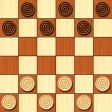
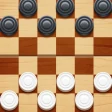
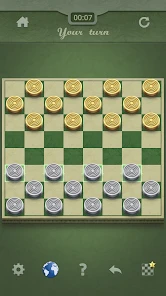
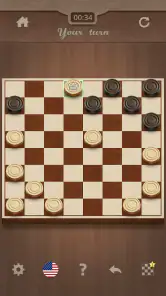
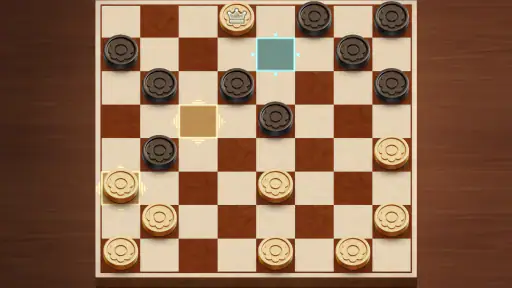
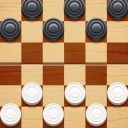
When I first opened the Checkers app, I was instantly hit with a wave of nostalgia. The app’s design stays true to the traditional board game, complete with a simple yet elegant interface that mimics the feel of a real checkers board. The developers have done a fantastic job of maintaining the authenticity of the game, while also adding a touch of modern flair.
The visual restraint suits checkers: the board and pieces need to be easy to read, because the challenge is deciding what to move, not deciphering the screen. I like that the familiar layout makes it approachable for someone who already knows the game, while the basic turn-by-turn structure is also easy to explain to a first-time player. It is a focused digital board rather than a larger game world, so I would not choose it for elaborate animation or a story-led setting.
World Language: Making the Board Feel Familiar
Checkers has no fictional setting to explore, so the board itself is the whole visual world. That simplicity is a strength when I am playing on a phone: the important information stays in front of me, and I do not need to learn a visual language before making a move. It also means the game depends on clear contrast. If a board or piece style is harder to distinguish on a small screen, a decorative choice can become a practical nuisance rather than a welcome change.
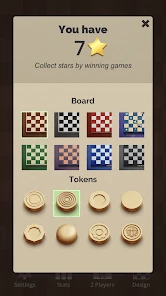
When I choose a look, I would start with legibility and only then consider personal taste. A high-contrast combination is especially useful if I am playing outside or holding the phone at an awkward angle. This is a small choice, but it can reduce the effort of tracking pieces as the board becomes crowded. The customization is therefore most valuable when it helps me read the position comfortably, not simply when it makes the screen look different.
More From Our News Desk

Clash of Clans Is Won Between the Battles

Android Auto Makes the Case for Quieter Car Software

MobiOffice: Transforming Mobile Productivity with Seamless Integration

EA SPORTS FC™ Mobile Soccer: Redefining Mobile Sports Gaming

How Microsoft OneDrive Became a Mobile Productivity Giant

How Google Translate Breaks Language Barriers Effortlessly
Choosing the Right Kind of Match
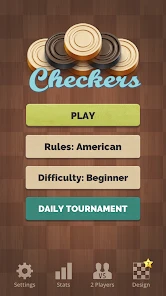
One of the standout features of this app is the variety of game modes available. Whether you're a solo player looking to challenge your strategic skills or someone who enjoys a good match with friends, this app has got you covered. You can play against the AI, which offers various difficulty levels, or opt for a multiplayer mode to play against other online users. There’s even a pass-and-play option if you want to challenge someone sitting right next to you!
That range makes it useful in different situations: I can play alone while waiting for an appointment, or hand the phone to a friend during a quiet evening at home. For a face-to-face match, pass-and-play has a different feel from playing on a physical board: both players share one screen, so it is convenient, though less spacious than a tabletop. If you mainly want a private game with someone beside you, that is a practical trade-off; if you want a social experience built around a full table, a physical set may suit you better.
Small, Real-World Ways to Use It
A realistic moment for this game is a delayed appointment: I can start a solo match, think through a few moves, and put the phone away when my turn to leave arrives. Checkers is naturally suited to that stop-and-start pattern because the position remains easy to understand when I return. I would still avoid beginning a match if I know I have only a few seconds; the best use is a pause long enough to consider a move, not a frantic glance between other tasks.
It can also make a low-key family activity when people want something more interactive than watching a screen together. Pass-and-play gives each person a turn without requiring a separate device, and the rules are familiar enough to explain as the game unfolds. For young or completely new players, I would keep the first match relaxed and treat mistakes as part of learning. The Everyone rating supports its broad audience, but an age label does not make every player equally comfortable with strategy; patience and a willing opponent matter more.
The trade-off is that one shared phone is less comfortable than a physical board for a long match. Players have to pass the device back and forth, and the screen is a smaller space for both people to inspect. If I were planning a long game night, I would choose a tabletop set for its room to spread out and its natural shared presence. If I simply want a quick rematch while waiting for food, the phone version is much easier to carry and set up.
Sound and Rhythm: Quiet Tension, Not Spectacle
Now, let’s talk about the gameplay itself. It’s smooth as butter! I didn’t experience any lags or glitches during my time with the app, which is always a win in my book. The intuitive controls make it easy for anyone to pick up and play, even if they’re new to the game. Plus, the app provides helpful hints and tips, so you can improve your skills as you play.
Checkers is quiet by nature: the tension comes from weighing a capture against the position it leaves behind, not from a rush of action. I find that the app’s straightforward presentation lets me keep that rhythm. A useful habit is to pause before taking an obvious jump and scan the opponent’s next reply; a capture can open a route for a counter-capture. Hints can help a newcomer understand a position, but relying on them too often may make it harder to build the habit of planning several moves ahead.
The pacing makes this a good match for someone who enjoys thinking at their own speed. It does not ask me to react quickly, so a move can be considered rather than guessed in a rush. That same measured rhythm will not suit everyone. If what I want is a loud, fast game with constant visual changes, checkers will feel deliberately restrained. Its atmosphere comes from the possibility that one apparently simple move can change the board’s balance.
Using Hints Without Losing the Challenge
Hints are most useful to me as a teaching aid, especially when I am returning to the game after a long break or introducing it to a new player. I would use one to examine a position I cannot read, then try to explain why the suggested move might work before making it. That turns guidance into a prompt for learning rather than an automatic answer. In a close match, I would leave hints alone unless I genuinely want assistance; otherwise, they can take away the satisfaction of finding a plan myself.
Another practical habit is to ask what a move gives up as well as what it gains. A capture can look immediately rewarding, but the piece may be exposed afterward. I find it helpful to scan the opponent’s likely response before moving, then check whether my remaining pieces still protect useful squares. The app’s basic interface keeps attention on that decision, while the player supplies the deeper analysis. That balance is appealing for practice, though it will not replace a dedicated study tool for someone who wants structured lessons or detailed analysis.
How It Sits Beside Other Board Games
For people comparing it with other board games on a phone, the appeal here is the low learning barrier and short path from opening the app to making a move. A deeper strategy game may offer more rules to master, while an online-only option may better fit someone seeking a dedicated competitive community. This is a better fit when you want recognizable checkers and a choice between solo and shared play, without turning a spare moment into a commitment.
Compared with a physical checkers set, the mobile version wins on portability and the ability to play alone against the AI. A physical board wins when people want to gather around a larger surface and handle pieces together. Compared with more elaborate mobile board games, this one asks less of a newcomer but also has less variety in its underlying play. The right choice depends on what I want from the session: accessible checkers, not a collection of unrelated game systems.
Online play may appeal to someone who specifically wants opponents beyond the people nearby, but it is not the only reason to use this game. Solo play and pass-and-play make it useful even when I am not looking for a broader social environment. If my main goal is a sustained competitive ladder, advanced statistics, or a strong sense of progression, I would choose a game built around those priorities. Here, the attraction is the board and the match itself.
A Board That Can Feel More Personal
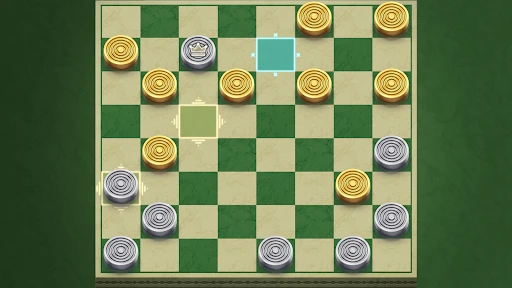
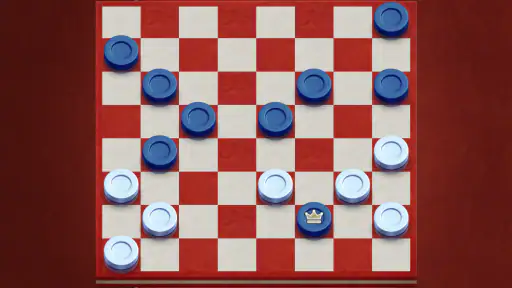
Another cool aspect of the Checkers app is its customizable features. You can choose from different board designs and pieces, giving you the freedom to personalize your gaming experience. Whether you’re in the mood for a classic wooden board or something more modern, the app has plenty of options to suit your style.
Changing the look is more than decoration if you play often: a board style with clear contrast can make pieces easier to track, especially on a small phone screen or in bright surroundings. I would pick readability over novelty when I expect to play a longer match. The game is free, with optional in-app purchases listed from $0.99 to $2.99 per item, so the core appeal is easy to try before deciding whether any extras matter to you.
The optional purchases are worth approaching as extras rather than a reason to download. I would first see whether the basic board, play options, and visual choices are enough for my routine. Someone who only plays now and then may have no reason to spend anything; a regular player who cares about personalizing the board may value the choice differently. Since the game is free, trying its ordinary play before deciding about an item is a sensible way to judge what matters to you.
Who Will Enjoy It—and Who May Not
I would recommend it to casual players, people revisiting the game after years away, and families who want a familiar activity that does not need much explaining. It can also suit a beginner who wants to learn through short games rather than study a rulebook first. The Everyone content rating makes it suitable for a broad audience, and the game is listed for Android devices running version 6.0 or later.
It is less compelling if you need a rich soundscape, dramatic visual effects, or a long-term competitive structure to keep you engaged. Checkers itself has a compact set of rules, and repeated play can feel predictable if you are not interested in improving your tactics or changing opponents. Gamma Play’s current version is 1.92; the game was released on June 23, 2019, and its familiar format remains its main strength rather than a promise of constant novelty.
I would also steer away from it if you are looking for a game that teaches a full strategy curriculum. Helpful hints can support a move-by-move learning process, but they are not the same as lessons that explain openings, long plans, or recurring patterns in depth. It is more satisfying for someone willing to learn by playing and reviewing their own decisions. A player who wants structured instruction should look for a dedicated learning option alongside, or instead of, a casual board game.
For a beginner, a comfortable way to start is to choose a relaxed AI challenge and focus on keeping pieces protected rather than trying to force captures. For an experienced player, switching opponents or raising the difficulty can make familiar rules feel less routine. Neither approach changes the game’s essential character: it remains a compact contest of positioning. The benefit is that the same board can welcome a new player and still offer tactical choices to someone who already knows the basics.
Atmosphere Verdict: A Calm Place to Think
In conclusion, the Checkers app is a delightful blend of classic gameplay and modern convenience. It’s perfect for anyone who loves a good strategy game or simply wants to take a trip down memory lane. With its user-friendly interface, variety of game modes, and customizable options, it’s no wonder this app ranks high among board game lovers. So, go ahead, download it, and let the games begin!
My own recommendation is simple: keep it in mind for a short solo puzzle-like session or an easy match with someone sitting beside you, and use the hints as occasional guidance rather than a substitute for thinking through the board. If the charm of checkers is enough to hold your attention, this is a convenient way to enjoy it. If you want a more elaborate game world or a highly structured competitive challenge, I would look elsewhere.
Checkers Frequently Asked Questions
Is Checkers a good choice for a quick game between other activities?
Checkers is built around familiar turn-based board-game play, so a match can be picked up whenever you have time to think through a few moves. Its simple premise—jump, capture, and crown—makes it approachable without requiring players to learn a complicated setup. Whether a session feels brief or becomes a longer strategy game depends on the pace of play.
Do I need to know the rules before downloading Checkers?
You do not need much preparation to get started if you already know the basic idea of checkers: move diagonally, capture opposing pieces, and try to reach the far side of the board. The rules are straightforward enough for new players to learn as they play, while planning captures and protecting pieces gives experienced players room to think strategically.
Does Checkers need much storage or a newer phone to run?
Checkers is a board game from Gamma Play, and it supports devices running Android 6.0 or later. It is a straightforward option for players who want a familiar strategy game on a compatible phone or tablet. Before downloading, check that your device meets the minimum operating-system requirement so you can install and play it smoothly.
What is Checkers and how is it played?
Checkers is a classic board game played on an 8x8 grid, where two players compete to capture all of the opponent's pieces or block them so they cannot make a move. Each player starts with 12 pieces placed on the dark squares of the three rows closest to them. The game involves strategic moves where pieces can only move diagonally on the dark squares. When a piece reaches the opponent's back row, it becomes a 'king' and gains the ability to move both forward and backward.
Is the Checkers app free to download and play?
The Checkers app is free to download, and its basic game is available without an upfront purchase. Optional in-app purchases are available, with items priced from $0.99 to $2.99. Players who prefer not to make purchases can enjoy the core checkers experience, while those considering extras can review the purchase choices shown in the app before buying.
Pros
- Simple and intuitive interface
- Supports offline and online modes
- Customizable difficulty levels
- Cross-platform multiplayer
- Low battery consumption
Cons
- Limited board themes
- Occasional online lag
- Ads in the free version
- No advanced analytics
- Requires frequent updates
- Category
- Board
- Version
- 1.92