Word Crush - Fun Puzzle Game
- 41.29K
- 4.7
- Installs
- 10.00M
- Price
- Free
Screenshots


Analysis by Reviewed
At our place, a word game tends to come out in the gaps between other plans: someone is waiting for the kettle, another person has a few minutes before heading out, and nobody wants to start something that needs a long commitment. Word Crush - Fun Puzzle Game fits that kind of shared pause because its basic action is easy to understand: find a word among the letters and swipe across it. I like that a second person can join in simply by looking at the same screen and offering a suggestion, rather than needing a separate explanation or a formal team setup.
A game that works in short household turns
That simple format makes it natural to pass the device around, but I’d set expectations before doing so. A practical routine is to let one person finish a board, then hand over the phone or tablet. It avoids someone else making a move in the middle of a puzzle and makes the turn feel complete without keeping score. If a player wants to solve quietly, that should be fine too; the game is easy to enjoy as a shared activity or as a few minutes alone.
One everyday situation where I’d use it is while waiting for dinner to finish. A person can take a turn, while anyone nearby scans the letters and calls out a possible word. That can be a pleasant bit of teamwork, but I wouldn’t mistake it for a dedicated multiplayer experience with coordinated turns or a shared campaign. If your household wants those things, a game built explicitly around group play will serve you better.
Keep device and account boundaries simple
Before sharing a device, I’d agree on what counts as a turn: one completed puzzle or a short stretch of play. That small decision helps avoid the “one more” loop when other people are waiting. It also makes sense to avoid passing a phone around if the device is signed into an account whose activity or settings you want to keep private. I wouldn’t assume the game has separate household profiles, so use device and account arrangements that already make sense for your family.
If different players care about separate progress, the safest approach is to check the available device and account options rather than assume that a single installation will keep everyone’s play distinct. This is especially worth thinking through on a shared tablet, where one person may be comfortable with a casual turn but not with someone else changing settings or continuing their session. Word puzzles are low-stakes, but clear handoff habits still make shared use smoother.
Getting Started with the Game
Installing Word Crush - Fun Puzzle Game is a breeze. Whether you're on Android or iOS, a quick trip to the app store and you’re all set to dive into the world of letters and words. The game kicks off with a super simple tutorial, easing you into the mechanics without any fuss. Honestly, it's like the game just knows how to make you feel at home.
Gameplay and Features
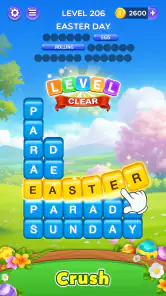
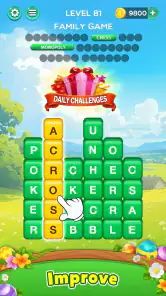
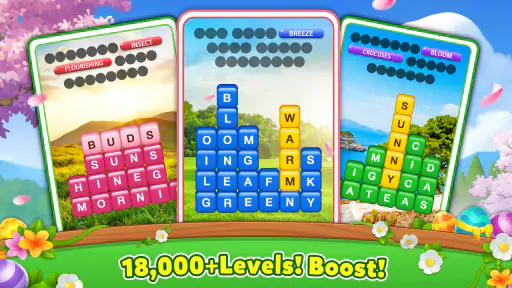
Once you dive in, you’ll find that the gameplay is incredibly engaging. The primary objective? Swipe through the letter blocks to form words and clear the board. It sounds simple, but as you progress, the levels get more challenging, keeping you on your toes. And let me tell you, it's the kind of challenge that keeps you coming back for more.
More From Our News Desk

Weather by Xiaomi Review: Clear at a Glance, Less Clear Up Close

X Under Pressure: Can It Recover When Posting Goes Wrong?

Clash of Clans Is Won Between the Battles

Android Auto Makes the Case for Quieter Car Software

MobiOffice: Transforming Mobile Productivity with Seamless Integration

EA SPORTS FC™ Mobile Soccer: Redefining Mobile Sports Gaming
One of my favorite features is the daily challenges. These are not only a great way to earn extra coins but also a fantastic way to keep your brain sharp. Plus, there's a satisfying sense of accomplishment when you complete them.
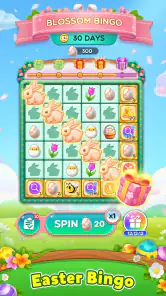
Another thing I absolutely love is the vibrant and colorful design. It’s like eye candy that makes the whole experience even more enjoyable. The developers have done a fantastic job in making sure that every aspect of the game is visually appealing.
Make the most of a short session
I find this kind of letter-search game easiest to enjoy when I treat it as a small break rather than a task to finish as quickly as possible. If I have only a moment, I focus on one board and stop at a natural break instead of trying to squeeze in more play while doing something else. That keeps the game relaxing and makes it easier to hand the device to someone else without losing track of whose turn it is.
When a board feels stubborn, I don’t immediately swipe at every plausible combination. I scan for familiar letter patterns, check the edges and corners, then look again at what remains after spotting an obvious word. This is a useful habit for a search-based puzzle because it gives the eyes a second pass and reduces random guessing. It also turns a shared session into a conversation: one person can describe what they see without taking over the screen.
Making room for different players
On a shared device, I’d agree on a simple boundary before handing it over: let each player finish their current puzzle, then pass the phone along. That keeps one person from accidentally taking over another’s play, especially if the device is signed into an account used for other purposes. I wouldn’t assume the game provides separate household profiles or parental controls; if distinct progress matters, it’s safer to use separate devices or check the available account and device settings first.
That small bit of coordination also helps with the game’s casual rhythm. A short turn is easy to fit between chores or while waiting for someone, but a player who is deeply focused may not want to stop mid-puzzle. Agreeing whether a turn means one puzzle or simply a few minutes avoids the familiar “just one more” problem without turning a relaxed game into a competition.
Why You Should Play
Word Crush - Fun Puzzle Game isn't just about swiping letters; it's about building your vocabulary and sharpening your mind. It’s perfect for those moments when you just want to relax but still keep your brain active. Whether you’re waiting for your coffee to brew or winding down at the end of the day, this game is your perfect companion.
And let's not forget the social aspect. You can connect with friends and challenge them to see who’s the word master. It adds a lovely competitive edge without being too overwhelming.
How it compares with other word puzzles
The swipe-to-find approach sits in a different lane from crosswords and clue-led word games. A crossword asks you to interpret hints and fit answers into a grid; this game puts the letters in front of you and asks you to notice words within them. That makes it a quicker entry point when you want an immediate puzzle, but it won’t scratch the same itch if you enjoy decoding clues, writing answers, or working through a connected theme.
It also differs from turn-based word games where players build words strategically against an opponent. Here, the most satisfying part is visual searching and spotting combinations, rather than planning a move that affects another player. I’d choose it for a relaxed solo break or for calling out finds with someone beside me. For a serious head-to-head match or a stronger language-learning routine, I’d pick a game designed around those goals instead.
Who will enjoy it—and who may not
I’d recommend it to people who like spotting words, want a light activity between other tasks, or enjoy sharing a puzzle aloud with someone nearby. Compared with a crossword, the swipe-and-find format asks less of you in terms of written clues and lets you get straight to searching. Compared with a word game built around spelling definitions or strategic turns, it is more immediate, but may offer less depth for players who want to study language or plan several moves ahead.
A useful way to keep a puzzle from becoming a guessing contest is to scan the board in more than one direction before swiping: look for familiar beginnings and endings, then check whether the remaining letters suggest a longer word. If you get stuck, pausing for a moment can be better than tapping at random; a fresh look often reveals a combination you overlooked. The trade-off is that the same quick loop may feel repetitive if you prefer a story, varied puzzle formats, or a strong sense of progression beyond completing boards.
Age, trust, and practical expectations
The game is rated for Everyone, which makes its word-puzzle premise broadly suitable across ages, though I’d still choose play time based on the person and the household’s routines. It comes from FUNJOY and is free to install, with optional in-app purchases listed from $0.99 to $99.99 per item. I’d keep purchases in mind if a child uses a shared device: checking the device’s purchase settings and agreeing that payment needs an adult’s permission is a sensible boundary for any free game with paid items.
For context, Word Crush is a word game with a 4.7 average from around 238,000 ratings, and it has passed 10 million installs. It first arrived on January 23, 2019; version 3.7.7 is the current release, and it requires Android 7.0 or later. Those details make it easy to judge whether it fits a device, while the day-to-day question is simpler: does the player enjoy searching letters and swiping words, or would they rather have clues, a paper puzzle, or a more deliberate vocabulary challenge?
Questions worth considering before installing
If you’re wondering whether it suits a quick break, I’d say yes: its basic search-and-swipe loop is easy to pick up, and a single puzzle gives you a clear stopping point. If you’re wondering whether it works well for several people sharing one device, it can, as long as you agree on turns and don’t expect separate profiles or a structured team mode. The best shared use is informal, with people taking turns or suggesting words together.
If a child will use it, the Everyone rating is reassuring as a broad age classification, but it doesn’t replace household rules. I’d pay particular attention to the optional paid items and set expectations around purchases before handing over a device. If the main goal is to keep separate progress, check the device and account setup first. And if you want a deep vocabulary course, a storyline, or competitive word strategy, this is probably not the one I’d choose as the household’s only word game.
In conclusion, if you’re looking for a game that’s both fun and educational, Word Crush - Fun Puzzle Game is definitely worth a download. It’s one of those apps that makes you feel like you’re not just wasting time, but actually doing something beneficial. So, go ahead, give it a try and let the word fun begin!
A household verdict
My verdict is that this is an easy game to share casually, provided everyone understands that passing around one device is different from having separate progress or private play spaces. Its quick word-search routine is a good match for small gaps in the day and for people who enjoy solving aloud together. I’d skip it for a household looking for robust family coordination, a deep solo word curriculum, or guaranteed separation between players. For everyone else, the free starting point makes it a low-commitment way to see whether this particular swipe-and-find style clicks.
Word Crush - Fun Puzzle Game Frequently Asked Questions
What kind of puzzles does Word Crush - Fun Puzzle Game offer?
Word Crush - Fun Puzzle Game centers on finding words in letter grids, making it a straightforward choice if you enjoy spotting patterns and solving word challenges. Its short description invites players to search and swipe to solve puzzles. The basic idea is easy to grasp, while each puzzle gives you a reason to look carefully at the available letters before making a move.
Is Word Crush - Fun Puzzle Game suitable for casual play?
Yes. Its word-focused format is approachable, so you can pick it up for a quick puzzle session without needing to learn complicated controls or systems first. Searching for words and swiping through letter grids gives play a simple rhythm, while the puzzles still offer a challenge when you want to concentrate. It can suit players who enjoy fitting a small brain teaser into spare moments.
What devices and operating systems can run Word Crush - Fun Puzzle Game?
Word Crush - Fun Puzzle Game is a word game for Android and iOS. On Android, it requires version 7.0 or later, so checking your device’s software version before downloading can help avoid compatibility surprises. The game is free to download, and its current version is 3.7.7. Make sure you have enough room on your device for the installation and any updates.
What is Word Crush - Fun Puzzle Game?
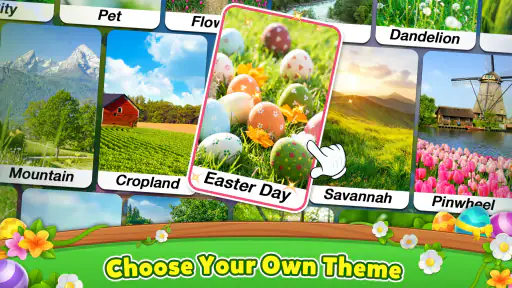
Word Crush - Fun Puzzle Game is an engaging word puzzle game available for both Android and iOS devices. The game challenges players to find hidden words in a grid of letters, providing an entertaining way to enhance vocabulary and spelling skills. With various levels and themes, it offers hours of educational fun for players of all ages. It is developed by FUNJOY and has a 4.7 average rating.
Is Word Crush - Fun Puzzle Game free to play?
Yes, Word Crush - Fun Puzzle Game is free to download and play. However, it contains in-app purchases ranging from $0.99 to $99.99 per item, which may add convenience or other options during play. The core game is available without paying, so you can try its word puzzles before deciding whether to make a purchase.
Pros
- Engaging and addictive gameplay
- Variety of challenging levels
- User-friendly interface
- Regular updates with new content
- Suitable for all ages
Cons
- Contains in-app purchases
- Advertisements can be intrusive
- Requires internet connection
- Limited free hints available
- Can consume battery quickly
- Category
- Word
- Version
- 3.7.7











