Tower Craft:Skyscraper Builder
- 5.12K
- 4.5
- Installs
- 50.00M
- Price
- Free

Screenshots




Analysis by Reviewed
When I want a strategy game that asks for attention without demanding a long session, a tower builder is an appealing choice. Tower Craft: Skyscraper Builder makes the height of the structure the immediate goal, but the more interesting question is how carefully I want to make each decision along the way. It suits quick visits as well as longer stretches of play, though its simple premise won’t satisfy everyone looking for a deep city-management challenge.
Choosing how to build upward
The useful decision space here is focused: I’m trying to make progress toward a taller skyscraper while weighing the resources and upgrades available to me. That gives each choice a practical purpose rather than turning the game into a broad simulation. I find it best to pause briefly before spending resources, especially when an upgrade could help the next stretch of construction instead of giving only a short-term boost.
That small planning habit is a good fit for a spare moment during a commute break or while waiting for dinner. I can return to the tower, make a considered choice, and stop without needing to keep a complicated plan in my head. If you prefer strategy games built around several competing systems, opponents, or long campaigns, this narrower focus may feel thin; a larger management game will give you more to juggle.
Where the risk meets the reward
Stacking efficiently matters more than tapping through decisions without thought. A tempting upgrade can feel worthwhile, but I try to consider whether it supports steady construction or simply looks attractive in the moment. This is a modest kind of risk-and-reward judgment, not the pressure of a competitive match, and that lower-stakes feel is part of the appeal.
One practical tip is to treat each return to the game as a chance to check the tower’s current needs before committing resources. That helps me avoid making choices on autopilot and gives a short session a clear purpose. The trade-off is that anyone seeking precise, demanding tactics may want more control and consequence than this style of building offers.
How the game fits a routine
Building games have always held a special place in my heart. There's something incredibly satisfying about watching a structure rise from the ground up, piece by piece. Enter Tower Craft: Skyscraper Builder, a game that brings that very satisfaction right to your fingertips. Let me take you through my experience with this app, and why it might just be your next gaming obsession.
First Impressions
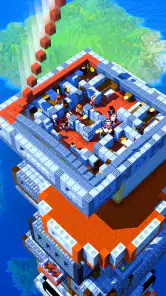
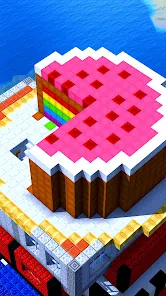
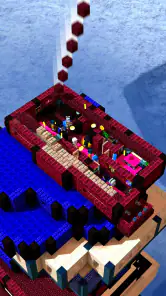
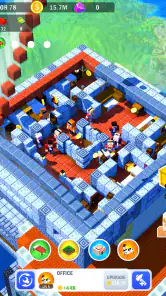
From the get-go, Tower Craft: Skyscraper Builder offers a visually appealing interface that’s both intuitive and engaging. The graphics are vibrant, and the animations are smooth, making the game a joy to play. I was pleasantly surprised by how easy it was to navigate the menus and understand the game mechanics, even as a newbie.
You May Like

Clash of Clans Is Won Between the Battles

Android Auto Makes the Case for Quieter Car Software

MobiOffice: Transforming Mobile Productivity with Seamless Integration

EA SPORTS FC™ Mobile Soccer: Redefining Mobile Sports Gaming

How Microsoft OneDrive Became a Mobile Productivity Giant

How Google Translate Breaks Language Barriers Effortlessly
Gameplay Mechanics
The core of the game revolves around building the tallest skyscraper you can, using various blocks and resources. The more efficiently you stack these blocks, the higher your tower grows. What I love about this game is the strategic element it introduces. You can’t just stack blocks willy-nilly; you need to plan and manage your resources wisely. Each block comes with its own set of benefits and costs, adding an exciting layer of strategy to the mix.
As you progress, you unlock new building materials and upgrades that allow you to enhance your skyscraper. The sense of progression is rewarding, and I found myself eagerly anticipating each new unlock. There’s also a delightful element of surprise with the introduction of challenges and mini-games that keep the gameplay fresh and exciting.
Adjusting expectations as you progress
The rhythm changes as new materials and upgrades become available: early decisions teach you the basic loop, while later choices invite you to think about what will help your construction continue. I wouldn’t treat every unlock as an automatic improvement. It’s more satisfying to notice how a new option changes your approach and then decide whether it suits the way you like to play.
That makes the game a better match for players who enjoy gradual progression than for anyone who needs a different objective every few minutes. The challenges and mini-games add variety, but the central pleasure remains building upward. If you’re deciding whether to install it for a child or to play together, the Everyone age rating makes it broadly accessible, while the simple premise is easy to explain; the strategy still comes from managing the building choices rather than mastering a complex control scheme.
How it compares with other strategy games
Compared with the usual strategy alternatives, this is a much more contained experience than a base builder or a sprawling city simulator. Those games often ask me to balance several areas at once; here, the visible tower keeps the goal immediate and easy to understand. That focus is a strength when I want a low-pressure break, but it also means it may not be the right pick for players who want elaborate planning, direct competition, or a story-led campaign.
The game is free to start, with in-app purchases priced from $0.99 to $49.99 per item, so I’d keep that spending range in mind if a younger player will use the device. It has an average rating of 4.5 from around 246,000 ratings and over 50 million installs, a sign that the straightforward building loop has broad appeal. CASUAL AZUR GAMES released it on July 6, 2020; version 1.10.20 supports Android 5.1 and later. Those details make it easy to judge basic compatibility, while the actual appeal depends on whether you enjoy this focused kind of progression.
Making short sessions count
A useful way to fit the game into a busy day is to give each visit one small purpose rather than trying to make every session a major push. I might check what my current resources can support, choose an upgrade, and then spend the remaining time building. That order makes the session feel deliberate: I’m not just collecting taps, and I have a simple point at which to stop.
This routine also helps answer a common question about whether the game works in brief bursts. For me, its focused goal makes it easy to pick up when I have a few spare minutes, though the satisfaction comes from gradual progress rather than a guaranteed dramatic change every time. If I’m waiting somewhere with distractions, I can make a small decision and leave; if I have a longer quiet stretch, I can stay with the construction and explore the choices available.
Why It Stands Out
One of the standout features of Tower Craft: Skyscraper Builder is its balance between challenge and relaxation. It's not often you find a game that strikes this balance so well. Whether you’re looking to unwind after a long day or seeking a bit of a challenge, this game caters to both. Plus, the game's charming graphics and soothing background music create a calming atmosphere that enhances the overall experience.
Another aspect worth mentioning is the app's performance. I played it on both my Android and iOS devices and didn’t encounter any lags or crashes. The developers have done a commendable job optimizing it for a smooth and seamless experience across platforms.
Spending and expectations
Because this is a free game with optional purchases, I’d decide in advance whether I’m comfortable spending anything before handing a device to a younger player. The listed purchase range runs from $0.99 to $49.99 per item, which is broad enough that I would not treat every purchase prompt as a minor add-on. I’d first see whether the regular building loop holds my interest without paying; the basic appeal is clear even before considering optional spending.
I also wouldn’t expect paying to turn the game into a different genre. The main attraction remains incremental tower construction, not a sprawling strategy campaign. If a player’s frustration comes from wanting more tactical depth, a purchase is unlikely to solve that mismatch. I’d choose a more complex builder instead, where managing multiple systems is part of the central experience.
Who I’d recommend it to
I’d point casual players toward it if they like seeing a clear, growing result from a few small choices, and I’d suggest it to anyone who wants a gentle alternative to more demanding strategy games. It can also work as a short shared activity: one person can suggest which resource or upgrade to prioritize, then see how that decision affects the next building stretch. I’d skip it if I wanted a deep tactical contest or a large world to manage, because its pleasures come from a tighter loop.
For a practical routine, I’d play in short sessions rather than expecting every visit to reveal a major change. Before closing the game, I’d decide what I want to focus on next time—an upgrade, a new material, or simply continuing construction. That small bit of intention keeps the progression satisfying without turning a relaxing game into homework.
When another kind of builder is better
The best alternative depends on what I want from a strategy game. If I’m in the mood to plan a whole settlement, balance production chains, or react to rivals, a city builder or competitive strategy game is a better fit. Tower Craft keeps attention on one rising structure, so I don’t get the same breadth of decisions or social pressure. That narrower scope is precisely why I’d choose it for a calm break, but also why I wouldn’t recommend it as a substitute for a deep management game.
It is also a better choice for someone who enjoys visible progress than for someone who needs a strong story or a sequence of sharply different missions. The tower gives the experience a simple direction, and the materials, upgrades, challenges, and mini-games add changes around that central activity. I find that enough for casual play, provided I’m comfortable with repetition as part of the appeal.
Final Thoughts
In a world full of complex, high-stakes mobile games, Tower Craft: Skyscraper Builder is a refreshing change of pace. It’s addictive yet relaxing, challenging yet rewarding. If you’re a fan of building games, or even if you’re just looking for something new to try, I wholeheartedly recommend giving it a go. Happy building!
Tower Craft:Skyscraper Builder Frequently Asked Questions
Is Tower Craft: Skyscraper Builder free to download?
Yes. Tower Craft: Skyscraper Builder is free to download, so you can try its block-stacking skyscraper-building gameplay without an upfront purchase. The game also offers optional in-app purchases, which are separate from downloading it. If you prefer to avoid accidental spending, review your device’s purchase controls before handing the game to a child or another player.
What kind of gameplay can I expect from Tower Craft: Skyscraper Builder?
The central idea is to stack blocks and build a skyscraper upward from a tiny tower, aiming to create the highest tower in the world. It is a strategy game with a simple premise that is easy to understand at a glance. Players who enjoy focused building challenges may find the straightforward goal appealing, while the tower’s height gives each session a clear target.
Does Tower Craft: Skyscraper Builder have a suitable age rating?
Tower Craft: Skyscraper Builder has an Everyone content rating, making it suitable for a broad range of players, including children. Its building-focused premise is easy to grasp, and the game’s stated goal is to stack blocks into a tall skyscraper. Parents should still keep in mind that optional in-app purchases are available and can use device-level purchase controls if they want to manage spending.
Can I play Tower Craft: Skyscraper Builder offline?
Tower Craft: Skyscraper Builder is a mobile game built around stacking blocks to grow a skyscraper from a tiny tower. If you prefer games that can be played without a constant connection, check the app’s current store details and your device settings before downloading, since connectivity requirements can change. The core idea is straightforward: build upward and aim for the tallest tower.
Can my device run Tower Craft: Skyscraper Builder?
The game supports Android devices running Android 5.1 or later, so checking your phone or tablet’s operating-system version is a useful first step. It is also available on iOS. As with any mobile game, available storage and device performance can affect how smoothly it runs, so make sure your device has room for the download and is up to date before installing.
Pros
- Engaging gameplay with endless building possibilities.
- Simple controls make it easy to play for all ages.
- Vibrant graphics enhance the building experience.
- Regular updates keep the game fresh and exciting.
- Offline mode available for play without internet.
Cons
- In-app purchases can become necessary for progress.
- Limited variety in building materials.
- Ads can be intrusive and interrupt gameplay.
- Some levels feel repetitive after a while.
- Occasional bugs that affect game performance.

- Category
- Strategy
- Version
- 1.10.20