The Jackbox Party Pack 3
- 7.00
- 3.6
- Installs
- 10.00K
- Price
- $24.99

Screenshots



Analysis by Reviewed
I’d consider The Jackbox Party Pack 3 when the plan is to get a group talking, teasing and laughing rather than settle in for a serious gaming session. It’s a trivia-focused party game collection from Jackbox Games, Inc., built around short social rounds and phone-based input. The pack’s appeal is easy to understand: one person runs the game on a larger screen, while everyone else joins in with a phone or tablet. That lowers the barrier for guests who don’t own a console or usually play games, though it still works best when people are comfortable being a little silly in front of one another.
How the collection plays in a real room
The moment you fire up The Jackbox Party Pack 3, you're greeted with a quintet of uniquely hilarious games. Each one offers a different flavor of fun, ensuring that there's something for everyone in your crew. Whether you're a trivia buff, a fan of drawing games, or you simply enjoy making others laugh with witty quips, this pack has got you covered.
Games Galore
First up, there's Quiplash 2. This is the game where your creativity and humor take center stage. You and your friends answer quirky prompts with the funniest responses you can muster up. The best part? Everyone gets to vote on their favorite answers, leading to uproarious results!
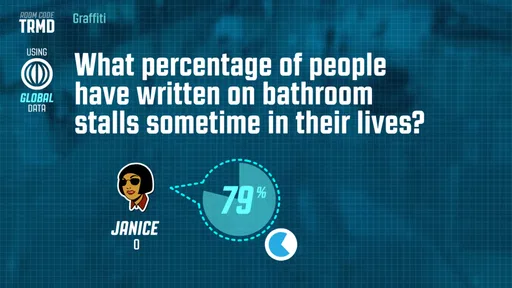
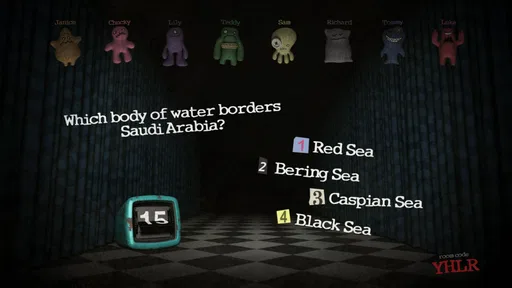
Then there's Trivia Murder Party, a game that blends trivia with a spooky theme. It's all about answering questions correctly to stay alive, but beware—wrong answers could lead to some unexpected outcomes. It's both thrilling and entertaining, keeping everyone on their toes.
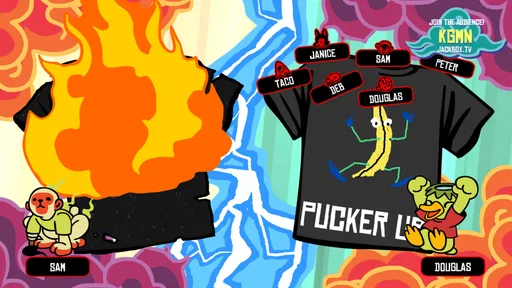
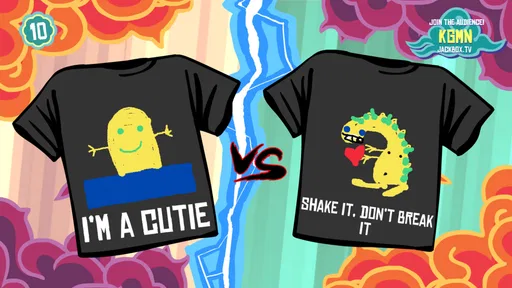
If you fancy yourself an artist (or even if you don't), Tee K.O. lets you flex those creative muscles. Design your own wacky t-shirts and compete to see which design reigns supreme. This one is a personal favorite because, let's face it, who doesn't love a custom tee?
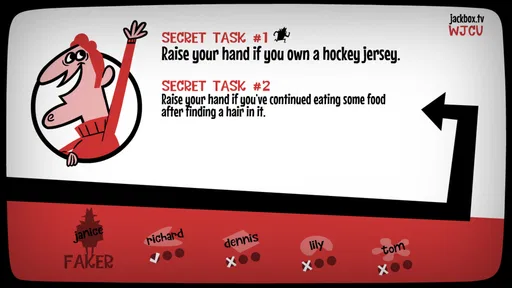
For those who enjoy social deception, Fakin’ It is your go-to. Here, one player is the faker, trying to blend in while the others figure out who it is. It's a test of observation and bluffing skills, and it never fails to deliver laughs and surprises!
Easy Setup, With a Few Practical Caveats
One of the best things about these games is how easy they are to set up. No need for multiple controllers or complex installations. Just a single device and your trusty smartphones, and you're ready to dive into the fun. The seamless integration with smartphones makes it accessible for everyone, even those who aren't usually into gaming.
More From Our News Desk

 Gmail
GmailGmail in a Busy Inbox: Who Benefits Most?
From first account to crowded workday, Gmail earns its place through dependable search and flexible sorting—but its best fit depends on how much inbox maintenance you can tolerate.

 Prime Video
Switching to Prime Video: What Changes in Your Viewing Routine
Prime Video can make a compelling second home for streaming, but switching means learning a different catalog, rental layer, and route from browsing to playback.

 Universal TV Remote Control
Universal TV Remote Control Works Best as a Reliable Backup
A phone remote earns its place through quick setup and reliable habits. Here is how to get more from Universal TV Remote Control—and where its limits show.

 Weather - By Xiaomi
Weather by Xiaomi Review: Clear at a Glance, Less Clear Up Close
Xiaomi’s weather app makes everyday forecasts quick to scan, but its calm surface can leave useful details and recovery paths harder to find than they should be.

 X
XX Under Pressure: Can It Recover When Posting Goes Wrong?
A resilience-focused review of X, examining setup, mistaken posts, interruptions, weak connections, and the gaps that matter when recovery needs to be dependable.

 Clash of Clans
Clash of Clans Is Won Between the Battles
Its raids are quick; its community is a long-term project of coordination, teaching, rivalry, and shared responsibility—with all the friction that entails.
Latest News



In practice, the host should get the game displayed before guests arrive and make sure everyone can see the screen. Players use their own phones or tablets as controllers, which means the group doesn’t need a pile of gamepads, but it also means each person needs a charged device and a way to join the session. If someone’s phone battery is low, sharing a device can be a useful workaround, though it can make private answers or decisions less convenient. A quick explanation of the room code and where to enter answers saves the host from having to pause the first round to troubleshoot.
The games also suit different social moods, but not every group will click with every mode. Quiplash 2 rewards people who enjoy inventing punchlines; a quiet guest may prefer watching a round before jumping in. Trivia Murder Party gives trivia a more theatrical edge, while Fakin’ It depends on noticing how other people behave and being comfortable with bluffing. Tee K.O. is a good change of pace when the group wants to make things rather than rely on general knowledge. I’d rotate modes based on the room instead of assuming everyone will love the same one.
Choosing the Right Group and Setting
For a mixed group, I’d start with the activity that asks the least of newcomers, then move toward the more performative games once people have warmed up. That small bit of hosting matters: putting a shy guest straight into a bluffing round can make the game feel like an audition, while letting them watch first gives them time to catch the rhythm. The pack is at its best when participation feels like an invitation, not a test of who is funniest or quickest.
A realistic use for the pack is a casual Friday gathering where friends have finished dinner but aren’t ready to call it a night. The host can put the game on the television, let people join on their phones, and use a short round to bring newcomers into the conversation. It can also work for a remote hangout if the host shares the game screen and participants can see it clearly; people joining from different places should expect a little more coordination than a living-room group, especially when timing and conversation overlap. Streaming can help include absent friends, but it doesn’t remove the need for a clear shared view and a group willing to speak up.
For remote play, I’d treat the shared screen and the voice conversation as two separate jobs: one person should make sure the game stays visible, while everyone keeps the call easy to hear. If players are watching a stream with a delay, jokes and reactions may arrive a beat late, so a host who pauses between rounds to check that everyone is ready can keep the evening from feeling disjointed. In person, by contrast, people can glance between the screen and the room naturally, which is a real advantage for the social deduction and voting moments.
How It Compares with Other Party Games
Compared with familiar trivia apps, this collection is less about one person chasing a score and more about the group reacting to each other’s answers, drawings and guesses. Compared with a conventional console party game, the phone-controller approach is more welcoming to casual guests, while the reliance on written responses and social performance can feel awkward for people who prefer direct competition or dislike being put on the spot. I’d choose a straightforward quiz game for a group that mainly wants factual questions, and a quieter cooperative game for guests who don’t enjoy improvising jokes or bluffing.
That distinction also helps answer whether this is a good choice for a family gathering or a work get-together: it depends less on everyone being a gamer than on the group’s comfort with playful public answers. I would use it with friends who already enjoy trading jokes, but I’d be more cautious with colleagues who barely know one another or guests who might feel exposed by the humor. A standard trivia game is the safer pick when the main goal is testing knowledge; this pack is the better fit when the reactions and conversation are the point.
It is also worth thinking about how often the group changes. With familiar friends, recurring players can develop running jokes and learn which games suit the room, making the collection easier to bring out again. With a one-off group, the host may spend more time explaining the format and easing people in. If you’re deciding between this and another party collection, compare the specific activities your friends enjoy rather than choosing by genre label alone; a collection with games built around a different kind of humor may suit them better.
Current State and Buying Considerations
The game was released on Oct 20, 2016, and its current version is 1.1.3, so this is an established collection rather than a new release whose appeal depends on fresh launch features. The listed minimum operating system is 4.0, and it carries a Teen age rating. Its average rating is 3.6 from 23 ratings, with 7 written reviews and over 10K installs; those figures offer a modest snapshot, not a guarantee that your particular group will enjoy its humor. At $24.99, I’d think of it as a purchase for repeated gatherings, not an impulse download for a single evening. The game is strongest when you can bring together enough willing participants and reuse it with different people, since a familiar group can quickly settle into its own jokes and rivalries.
For existing players, version 1.1.3 identifies the current release, but that fact alone doesn’t tell me what changed from earlier versions. I wouldn’t buy it expecting a particular new feature or major overhaul; I’d judge it by the five-game mix and whether that suits my group. If you already own other Jackbox packs, compare the kinds of activities you actually use before paying for another collection. If you’re new to the format, the phone-based setup is approachable, but remember that the host still needs a screen and a group that can gather around it or follow a shared stream.
The age rating is another useful filter for planning a mixed-age night. I’d check that the Teen rating fits the people invited and the tone you want in the room, rather than assuming a party-game format automatically makes it suitable for everyone. The same goes for humor: answers are created by players, so the group’s own boundaries shape the evening. A host who sets a light, friendly tone before starting can help keep the jokes enjoyable without turning the game into a contest to shock one another.
Before buying, I’d also decide whether the person who owns the game will regularly be the host. The phone-controller setup makes it easy for guests to take part, but the host still has to run the game and provide the shared view. That makes the pack a more sensible purchase for someone who often gathers friends than for a guest who expects to play independently on a phone. If you mainly want a solo trivia app, this is the wrong format even though trivia is part of its appeal.
Where It Can Fall Short
The same social focus that makes the pack lively can limit it. The humor depends on the people playing, so a group that is shy, unfamiliar with one another, or uncomfortable making jokes may find the first round slow. Trivia can also be frustrating if a player doesn’t know an answer, and drawing or bluffing games won’t be equally appealing to everyone. I’d avoid choosing it as the main activity for guests who want a predictable, low-pressure game or for a group without reliable access to individual phones or tablets. It is also not a substitute for a deep single-player game: its value comes from the company in the room, not a long solo progression.
There is a practical trade-off in using personal phones as controllers, too. It saves the host from supplying several gamepads, but it makes the group dependent on devices being available and usable throughout the session. A guest may have notifications competing for attention, a dim screen, or little battery left after a day out. I’d ask people to charge their phones beforehand and keep the main display easy to see; those simple preparations matter more here than fine-tuning a complicated setup.
Another limitation is that the collection asks the host to read the room. Rotating games can help, but it will not solve every mismatch: a guest who dislikes writing jokes may still feel left out of a prompt-based round, and someone who hates bluffing may not enjoy being questioned in Fakin’ It. I’d keep an alternative activity ready rather than insisting that every person play every mode. That flexibility is especially useful at a gathering where some people want to join in while others would rather watch and chat.
The game’s age rating and player-generated humor also make it a poor choice when the host needs tightly controlled content. If the group includes younger guests or people who don’t know one another well, I’d be clear about the intended tone and choose a different activity if that feels uncomfortable. The pack’s appeal comes from spontaneous responses; that same openness means the experience depends on the players, not just the game’s prompts.
Who I’d Recommend It To
I’d recommend it to someone who hosts regularly, has access to a screen, and likes bringing different kinds of people into a shared activity without asking them to learn traditional controls. It can be a lively centerpiece for a relaxed evening, but it also works as a flexible option to bring out when conversation is fading. The strongest fit is a group happy to make things up, laugh at unexpected answers, and accept that some rounds will land better than others.
I’d skip it if you mostly play alone, need a reliable factual quiz, or want a game where skill and progress matter more than the people around you. I’d also choose something less performative for a group that is reserved or meeting for the first time. Those aren’t flaws that an update can necessarily fix; they come from the collection’s social design. Knowing that before spending money is more useful than expecting every party game to suit every party.
All in all, The Jackbox Party Pack 3 is a must-have for anyone who loves to entertain. It's the kind of game that turns ordinary gatherings into unforgettable nights filled with laughter and camaraderie. Whether you're hosting a family night, a get-together with friends, or even a virtual party, this pack is your ticket to a good time. So go ahead, give it a spin, and let the good times roll!
The Jackbox Party Pack 3 Frequently Asked Questions
How many games are included in The Jackbox Party Pack 3?
The Jackbox Party Pack 3 includes five party games, so there are different styles of group play to choose from rather than one activity repeated throughout. The collection is presented as a trivia game, but its appeal is also in having friends participate together using phones or tablets as controllers. It suits gatherings where people want a shared, lighthearted game experience.
What is The Jackbox Party Pack 3?
The Jackbox Party Pack 3 is a collection of party games that you can play with friends and family. It includes five different games: Quiplash 2, Trivia Murder Party, Guesspionage, Fakin' It, and Tee K.O. Each game supports multiple players and is designed to be engaging and fun for social gatherings, whether in person or online.
How can I play The Jackbox Party Pack 3 with friends remotely?
The Jackbox Party Pack 3 can be played remotely by using screen sharing platforms like Zoom, Google Meet, or Discord. One player can host the game on their device and share their screen with others. Players can join the game through their own devices by entering the game room code provided by the host. It's an excellent way to stay connected and have fun with friends and family from afar.
What devices support The Jackbox Party Pack 3?
The Jackbox Party Pack 3 is available on various platforms, including PlayStation, Xbox, Nintendo Switch, PC, and Mac. Additionally, it can be played on mobile devices using a web browser to join the games. This flexibility ensures that players can enjoy the game on their preferred devices, making it accessible to a wider audience.
Do I need controllers to play The Jackbox Party Pack 3?
No, The Jackbox Party Pack 3 does not require traditional gaming controllers. Instead, players use their smartphones, tablets, or computers as controllers to join and interact with the game. This unique feature allows for a seamless gaming experience and makes it easy for anyone to participate without needing additional hardware.
Pros
- Engaging multiplayer experience
- Variety of mini-games
- Humorous content
- Great for parties
- Easy to set up
Cons
- Requires multiple devices
- Internet needed
- Some games are repetitive
- Limited single-player options
- Not suitable for all ages