Tanks a Lot - 3v3 Battle Arena
- 7.27K
- 4.3
- Installs
- 10.00M
- Price
- Free

Screenshots
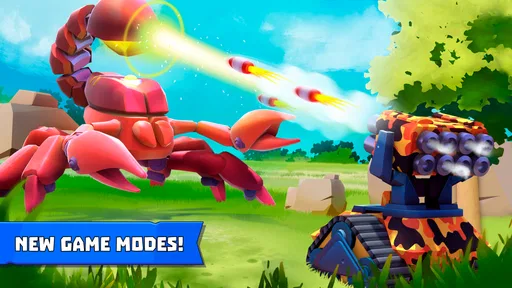
Analysis by Reviewed
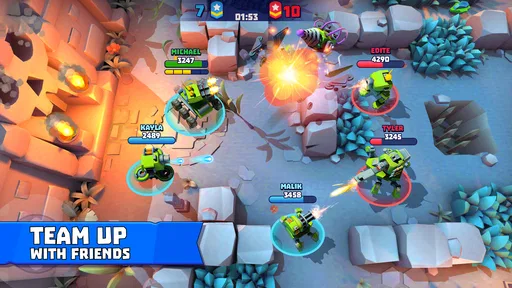
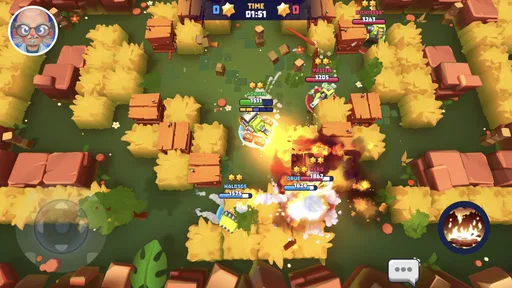
I spent time with Tanks a Lot - 3v3 Battle Arena as a quick-play action game, and my first impression was that it understands the appeal of short online tank battles. You choose a machine, enter a compact fight, and have to make useful decisions almost immediately. It is easy to grasp, but it is not automatically easy to play well. The gap between moving and actually helping your team becomes clear after only a few matches.
That makes it a good fit for someone who wants a mobile multiplayer tank game rather than a slow, highly technical simulator. I enjoyed it most when I treated each match as a focused burst of action instead of expecting a long campaign or a deeply realistic battlefield. The game is free to start, carries an Everyone 10+ rating, and comes from Highcore Labs LLC. Its strong audience response—an average of 4.3 from around 334 thousand ratings—also matches my sense that the basic idea is immediately accessible.
Getting into a match without unnecessary frustration
The first place players can get stuck is before the battle even feels like it has begun. Online action games depend on more than tapping the install button: the device has to run the game comfortably, the connection has to remain stable, and the player has to understand what the opening screens are asking them to do. This title supports Android 7.0 and later, so compatibility is broad, but compatibility alone does not guarantee a smooth session on every phone.
I recommend opening it on a reliable connection and giving the initial screens time to finish before repeatedly tapping buttons. When a game is waiting on an online service, impatiently reopening it can make the experience feel more broken than it is. A simple first check is to confirm that other online apps are working, then launch the game once and wait through the complete loading process. If the phone is already busy with downloads or several demanding apps, closing those first is a sensible way to remove avoidable pressure.
The controls are easier to understand if you spend the first battle learning movement rather than chasing every target. My practical advice is to keep the tank moving in short, deliberate changes of direction. Wide, panicked swipes often leave you exposed, while small adjustments make it easier to stay near cover or keep an opponent in view. This matters especially in a 3v3 setting, where an individual mistake can affect the whole group quickly.
Another common sticking point is expecting the game to behave like a traditional single-player action title. The store summary presents it as online multiplayer warfare, and that description is important: your experience depends on the pace and behavior of the people sharing the match. If teammates scatter or opponents play aggressively, a battle can feel chaotic even when the controls are responding correctly. I found it more enjoyable once I stopped trying to control the entire arena and focused on one useful job at a time.
Small setup habits that make the first sessions better
Before judging the game, I would check three practical things. First, make sure the device has enough free space for installation and routine system activity. Second, use a connection that does not switch unpredictably between networks while you are playing. Third, begin with a short session rather than launching into a long run of matches when the phone is warm or low on battery. These are ordinary checks, but they remove many false impressions about performance.
More From Our News Desk

 Gmail
GmailGmail in a Busy Inbox: Who Benefits Most?
From first account to crowded workday, Gmail earns its place through dependable search and flexible sorting—but its best fit depends on how much inbox maintenance you can tolerate.

 Prime Video
Switching to Prime Video: What Changes in Your Viewing Routine
Prime Video can make a compelling second home for streaming, but switching means learning a different catalog, rental layer, and route from browsing to playback.

 Universal TV Remote Control
Universal TV Remote Control Works Best as a Reliable Backup
A phone remote earns its place through quick setup and reliable habits. Here is how to get more from Universal TV Remote Control—and where its limits show.

 Weather - By Xiaomi
Weather by Xiaomi Review: Clear at a Glance, Less Clear Up Close
Xiaomi’s weather app makes everyday forecasts quick to scan, but its calm surface can leave useful details and recovery paths harder to find than they should be.

 X
XX Under Pressure: Can It Recover When Posting Goes Wrong?
A resilience-focused review of X, examining setup, mistaken posts, interruptions, weak connections, and the gaps that matter when recovery needs to be dependable.

 Clash of Clans
Clash of Clans Is Won Between the Battles
Its raids are quick; its community is a long-term project of coordination, teaching, rivalry, and shared responsibility—with all the friction that entails.
Latest News



I also suggest lowering your expectations for the first few rounds. Early matches are useful for learning how quickly your tank turns, how much room you need to retreat, and how exposed you become when you chase a damaged enemy too far. The most valuable discovery is often not a hidden button but a sense of timing: when to press forward, when to break contact, and when to let a teammate take the lead.
The current version is 9.700, and keeping the app updated is a sensible troubleshooting step if the store offers an update for your device. An outdated installation can create avoidable compatibility problems after the operating system or online service environment changes. I would not jump straight to reinstalling, though. Restarting the device and trying one clean launch is less disruptive and should come first.
Recovering when a session goes wrong
When a match fails to load, freezes, or returns you to an earlier screen, I use a simple recovery order. I close the game completely, reopen it once, and test the connection with another online service. If everything else is working, I try the game again without repeatedly switching between apps. If the issue continues, restarting the phone is the next reasonable step. This approach is less dramatic than immediately deleting the installation and gives you a better idea of whether the problem is temporary.
Reinstalling can be useful as a last resort for damaged local files, but I would treat it carefully in any online game. Before doing so, make sure you understand how your progress is connected to the game and whether you can return to the same account or profile. I would not assume that deleting an app is harmless simply because the game itself is free. The safest recovery habit is to use the game’s own account or profile options when they are available, rather than experimenting with removal first.
There is also a difference between a genuine crash and a match that is simply struggling with a poor connection. A crash closes the app or makes the interface unusable. Connection trouble may look like delayed movement, opponents jumping between positions, or actions registering late. In the second case, restarting the game may not solve anything until the network becomes stable. If you are playing on mobile data, moving to a place with a stronger signal can be more useful than changing in-game settings.
For everyday use, I would build a small routine around this. If I had ten minutes before commuting, I would start one match only after checking that the connection was steady. If the first round showed obvious delay, I would stop rather than spend the whole break blaming my controls. That choice saves frustration and avoids confusing network lag with poor aim or slow reactions.
How to play more effectively in short battles
The strongest practical lesson I took from the game is that survival and positioning are often more valuable than constant aggression. A player who charges toward every visible enemy may deal some damage but can also remove their own tank from the fight early. I had better results when I used the edges of an engagement, moved after firing, and watched for moments when an opponent was already occupied.
In a 3v3 battle, think in terms of pressure rather than individual victories. If two enemies are focused on one teammate, approaching from another angle can create an opening. If your side is separated, rushing alone usually makes the separation worse. Staying close enough to support a teammate, without stacking directly on top of them, gives the group more options and makes the arena feel less random.
A useful habit is to decide your retreat route before you commit. This sounds obvious, but mobile controls encourage forward movement because attacking feels more productive than repositioning. I found that knowing where I would go next made me less likely to remain in a bad exchange. It also helped me distinguish a deliberate withdrawal from a panicked escape.
Players who prefer a calm, methodical pace should know that this is not the game’s main strength. The action comes quickly, and online opponents do not wait while you plan. Compared with a slower strategy game, this title asks for faster visual reading and more tolerance for imperfect situations. Compared with a realistic tank simulator, it is much more approachable but offers less of that heavy, deliberate battlefield feeling.
What to expect from progression and spending
The game is free, which makes it easy to try without committing money at the start. It includes optional in-app purchases ranging from $0.99 to $99.99 per item, so I would recommend deciding on a personal spending limit before browsing any purchase screens. The low entry cost is a genuine advantage, but the wide purchase range means that “free to download” should not be confused with “every possible advantage or convenience is free.”
My advice is to play enough matches to decide whether the core loop is enjoyable before spending anything. If you do not like steering, aiming, and reacting under online pressure, a purchase will not fix that. If you do enjoy the battles, wait until you understand what you are buying and whether it improves a real weakness in your play rather than simply responding to impatience.
This is also where the game may not suit every player. Someone looking for a fully offline experience, a story-led campaign, or a carefully balanced simulation should choose a different kind of action game. Someone who dislikes competitive matchmaking may find the uncertainty of teammates and opponents tiring. On the other hand, a player who wants short sessions, recognizable controls, and immediate multiplayer conflict will find a clear reason to keep returning.
When the game is not the actual problem
It is tempting to blame the app whenever a battle feels unfair or unresponsive, but online play has several moving parts. A weak signal, background downloads, an overloaded phone, or heat-related performance changes can all make controls feel worse. Before concluding that the game is malfunctioning, I would test one short session after closing other apps and moving to a more reliable connection.
It is equally important to separate design friction from technical failure. A teammate who ignores the group is not a crash. Losing a close fight after taking a risky route is not necessarily lag. The game’s compact battles leave little room to recover from mistakes, so some disappointing rounds are simply the result of aggressive decisions or uneven coordination.
If the app repeatedly fails while other online games and services work normally, then it makes sense to try the standard steps: restart, update, and reinstall only after considering account recovery. If the problem appears only at a particular time or on one network, I would investigate that environment first. This mindset is useful because it prevents unnecessary changes to the phone and helps identify whether the issue follows the game, the connection, or the device.
Parents should also remember the Everyone 10+ rating when deciding whether the game is appropriate for a younger player. The rating gives a useful age guideline, while the online nature of the experience means adults may still want to understand how the child uses multiplayer features and any purchase screens. On a shared device, setting purchase safeguards is a practical step even when the game itself costs nothing to download.
Who will get the most from it
I would recommend this game to someone who enjoys competitive action in compact sessions and does not need every match to follow a predictable script. It works particularly well for a player who can accept a few rough rounds while learning movement and positioning. The tank theme gives the action a clear identity, while the 3v3 format keeps the focus on quick decisions rather than a long match commitment.
It is less suitable for someone who wants complete control over the pace. If you need a game that remains satisfying without a connection, this is the wrong direction. If your favorite tank games are built around detailed customization, slow aiming, and realistic systems, this arena format may feel too brisk. I would also skip it if competitive losses quickly spoil your mood, because the online team structure means that not every result will reflect your own performance.
For a casual player, the best use case is a short break where you want active involvement rather than passive entertainment. For a more dedicated player, the appeal comes from refining decisions: taking safer angles, supporting the right teammate, and learning when not to chase. Those lessons give the simple premise more depth than the short description suggests.
My practical verdict after playing
Highcore Labs LLC has made a free action game that is easy to enter but rewards more restraint than a first glance might suggest. I liked the directness of the battles and the way a small arena can turn one positioning error into an immediate problem. The main friction comes from the online format: connection quality, teammate behavior, and device condition can all shape a session before your own skill gets a fair test.
With over ten million installs, it is clearly a well-established choice for mobile players, and its 4.3 average shows broad approval. I would still treat popularity as a starting point, not a guarantee that it matches your taste. Try it when you want fast tank combat, keep your first sessions short, and judge it after learning the movement rather than after one chaotic defeat.
My bottom line is simple: this is a worthwhile pick for quick online tank battles, provided you are comfortable with team uncertainty and occasional technical friction. Keep the app updated, use a stable connection, avoid spending until the core play feels right, and focus on positioning before chasing damage. If that style sounds appealing, the free download makes experimenting easy; if you want offline depth or a slower simulation, another action game will serve you better.
Tanks a Lot - 3v3 Battle Arena Frequently Asked Questions
What kind of gameplay should I expect from Tanks a Lot?
Tanks a Lot is an action game built around online multiplayer battles, with a focus on fast-paced PvP combat. Its store summary invites players to fight and become heroes in online multiplayer wars. If you enjoy aiming, moving around an arena, and competing against other players, its central style should feel familiar; the team-based battles and tank-building choices add tactical variety.
Does Tanks a Lot offer different ways to build a tank for battle?
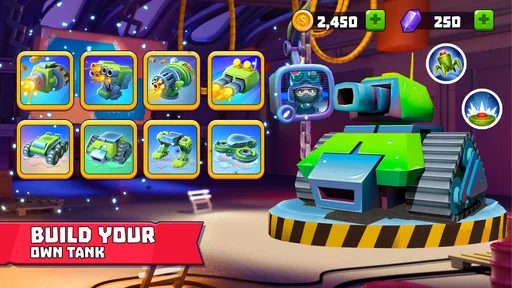
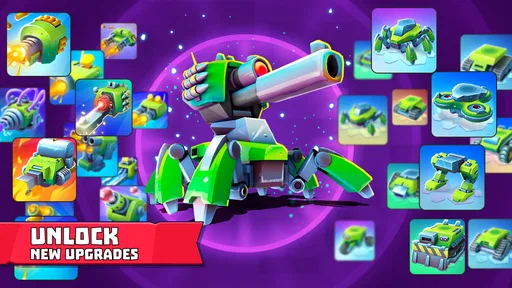
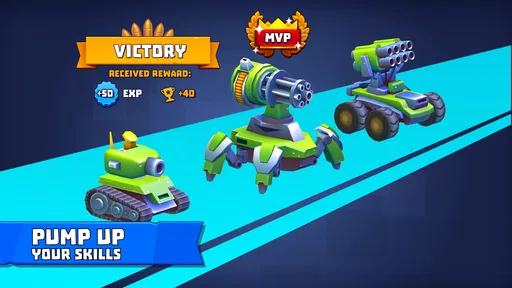
Yes. Tank customization is one of the main parts of Tanks a Lot. You can combine different components, weapons, and abilities to create a vehicle suited to your preferred play style, whether you enjoy close-range attacks, long-distance damage, defense, or support. Upgrading your equipment improves performance, but selecting a balanced build and adapting it to the game mode is often just as important as having powerful parts.
How much storage space should I have available before installing Tanks a Lot?
It is sensible to leave some free space on your device before downloading Tanks a Lot and installing its game files. The amount needed can vary by device and may change as the game is updated. If you are short on storage, clearing unused apps or files first can help avoid installation problems and leave room for future updates.
Can I play Tanks a Lot on my Android or iOS device?
Tanks a Lot is available for Android and iOS devices, so players can look for it in the store that matches their platform. On Android, the stated minimum operating system is 7.0. Before downloading, check that your device meets the platform requirements and has enough available storage for the installation and later updates.
What is Tanks a Lot – 3v3 Battle Arena?
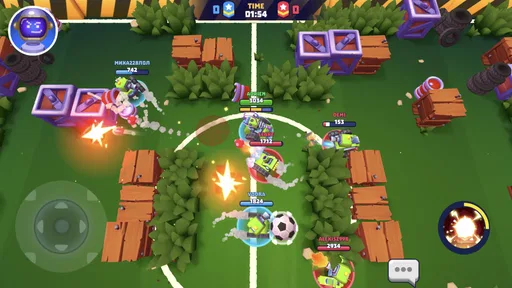
Tanks a Lot is a fast-paced multiplayer tank game for Android and iOS. Matches are played in real time, usually in teams of three, with players controlling customizable tanks in compact arenas. The game focuses on short battles, aiming, movement, teamwork, and choosing the right tank setup for each situation. It is designed for quick sessions but includes progression and equipment upgrades for longer-term play.
Pros
- Fast-paced 3v3 matches are easy to start and finish.
- Multiple tanks and weapons support varied playstyles.
- Simple controls make aiming and movement accessible.
- Team coordination can turn matches around quickly.
- Regular events add variety beyond standard battles.
Cons
- Progression can feel slow without frequent play.
- Upgrades may create uneven matchups between players.
- Random teammates often make coordinated play difficult.
- Matches can become repetitive after extended sessions.
- Online connection is required for the main gameplay.