RFS - Real Flight Simulator
- 5.37K
- 4.3
- Installs
- 5.00M
- Price
- $0.99

Screenshots


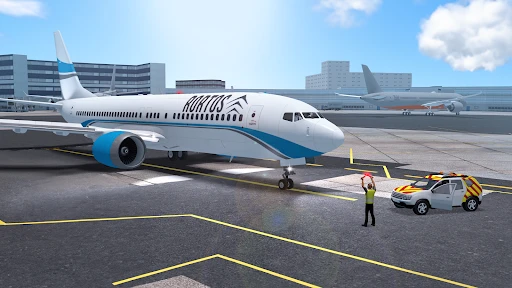





Analysis by Reviewed
Have you ever dreamed of being a pilot, soaring through the skies at the helm of a majestic aircraft? Well, with RFS - Real Flight Simulator, that dream is just a tap away. As an app enthusiast and a wannabe aviator, I decided to take this app for a spin, and let me tell you, it's quite the ride.
First Impressions: A World of Aviation at Your Fingertips
The moment I launched RFS - Real Flight Simulator, I was greeted with a sleek, user-friendly interface that made navigation a breeze. The app boasts an impressive array of aircraft to choose from, each meticulously detailed to give that authentic feel. Whether you're a fan of commercial jets or prefer the agility of smaller planes, there's something here to sate your aviation appetite.
Graphics and Realism: Flying High
One of the standout features of this simulator is its stunning graphics. The developers have really outdone themselves in crafting a visually immersive experience. From the glint of sunlight on the aircraft wings to the detailed cityscapes below, it feels like you're actually up there. The realism doesn't stop at visuals; the flight dynamics are spot on. I found myself adjusting to wind conditions and navigating through turbulent weather, just like a real pilot would.
Features That Soar
The app is packed with features that cater to both novice and seasoned pilots. There's a comprehensive tutorial for beginners, ensuring that even those new to flight simulators can learn the ropes with ease. The real-time flights and multiplayer options add an exciting social element, allowing you to share the skies with fellow aviation enthusiasts from around the globe.
One feature that particularly caught my attention was the customizable flight plans. It allowed me to chart my own course, experimenting with different routes and weather conditions. It's this level of detail and control that sets RFS apart from other flight simulators.
Room for Improvement?
While RFS - Real Flight Simulator is an impressive app, there's always room for improvement. My main gripe is with the in-app purchases. While the base app provides plenty of content, accessing certain aircraft and features requires additional payment. It’s a bit of a bummer when you’re all set to try out a new plane only to find it locked behind a paywall.
Also, while the graphics are generally excellent, there are occasional glitches, especially in high-density areas. It's nothing that ruins the experience, but it's noticeable enough to mention.
Final Approach: Is it Worth the Download?
All things considered, RFS - Real Flight Simulator is a stellar app for anyone interested in aviation. It combines stunning graphics, realistic flight dynamics, and a plethora of features to keep you engaged. Whether you’re a casual flyer or an aspiring pilot, this simulator offers a rich, immersive experience that’s hard to beat.
So, if you're ready to take to the skies and experience the thrill of flying, I’d say give RFS a try. Just be prepared for the occasional in-app purchase and a few minor glitches. Happy flying!
Pros
- Realistic flight simulation experience.
- Wide range of aircraft options.
- Detailed airports and navigation aids.
- Multiplayer mode available.
- Regular updates and improvements.
Cons
- In-app purchases for additional features.
- Requires Internet for multiplayer.
- High battery consumption.
- Complex controls for beginners.
- Occasional performance issues.

- Category
- Simulation
- Version
- 2.5.7