Questbound
- 673.00
- 4.3
- Installs
- 100.00K
- Price
- Free

Screenshots





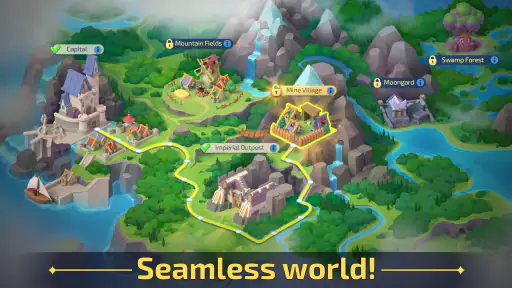
Analysis by Reviewed
I spent time with Questbound as a mobile adventure game from Playrix, and my first impression was that it is easiest to appreciate when you treat it as a relaxed exploration experience rather than a demanding action title. Its central appeal is the combination of discovering places, dealing with threats, and gradually building up what you need for the next part of the journey. That mix gives each short session a sense of purpose, even when I only have a few minutes.
The game is free to download and aimed at players aged Everyone 10+, with optional purchases ranging from $0.99 to $149.99 per item. That combination is familiar for mobile games, but it matters here because the pace can tempt you to spend when you want to move forward faster. I found the best experience came from deciding in advance that purchases were optional, then treating progress as a longer-term process instead of a race.
Questbound has attracted a 4.3 average from around 4.4 thousand ratings, alongside over 100 thousand installs. Those figures suggest a healthy level of interest without making the game feel like an anonymous download. Playrix released it on October 30, 2023, and the current version is 13.4.0. It runs on Android 7.0 or later, which makes it available to many older devices, although the experience can still depend on the phone’s screen, performance, and battery condition.
How clearly the adventure communicates what to do
Readable goals without turning the screen into a checklist
What worked for me was the way the game presents exploration as a sequence of understandable intentions. I usually knew whether I was supposed to investigate an area, deal with an obstacle, or prepare for the next step. That clarity is valuable for players who find sprawling adventure games tiring, especially when too many icons and unexplained systems compete for attention.
The interface is built around touch interaction, so the important question is not only whether the text can be read, but whether the next action is obvious. In my sessions, the broad structure was easier to follow than games that bury objectives inside several layers of menus. I could return after a break and generally recover my place without having to remember a complicated control scheme.
That does not mean every moment is equally effortless. Adventure games often ask the player to notice environmental cues, understand why a particular action is available, and connect a reward with a later task. If you prefer explicit instructions at all times, you may occasionally feel that Questbound expects a little observation rather than spelling out every answer.
A good fit for players who need flexible attention
I think the game is particularly approachable for someone who enjoys a story-like journey but does not want to commit to a long uninterrupted session. A quick visit can be useful for checking progress or preparing the next activity, while a longer session gives more room to explore. That flexibility helps people whose attention is divided by work, study, family responsibilities, or fluctuating energy.
One practical routine worked well for me: I opened the game during a short waiting period, reviewed the current objective first, and only then began interacting with the world. That small habit reduced the feeling of being dropped into a busy screen. It also helped me avoid tapping randomly, which is useful for anyone who finds rapid visual scanning or trial-and-error interaction frustrating.
The game’s store summary, “Explore, fight, and build!”, describes the broad loop accurately, but it does not explain how those activities feel together. I found the building side useful because it gives exploration a visible consequence. Discoveries are not only about seeing something new; they contribute to a sense that the surrounding world is becoming more manageable and familiar.
Navigation is approachable, but not completely frictionless
Questbound is easier to navigate than a game that expects you to memorize a large map immediately. Still, players with reading difficulties, limited concentration, or visual fatigue may want to pause between actions and avoid playing with a cluttered screen around them. The game is more comfortable when I gave myself time to distinguish the active element from decorative scenery.
I also recommend keeping the device at a stable angle instead of holding it while walking or moving between tasks. That sounds obvious, but touch adventure games depend on accurate visual attention. A player with hand tremors or reduced precision may find that an ordinary one-handed grip creates unnecessary mistakes, especially when the screen is small.
Where the usual alternatives may be better
Compared with a purely casual puzzle game, Questbound asks for more continuity. You are not simply solving one isolated challenge and leaving; the journey, exploration, and building elements make more sense when you remember what you were working toward. In exchange, it offers more context and a stronger feeling of progression.
Compared with a traditional console-style adventure, it is better suited to touchscreens and shorter visits, but it does not offer the same kind of precise physical control that a controller provides. Players who want fast reactions, complex movement, or a cinematic experience may prefer a dedicated action adventure elsewhere. Questbound makes more sense for someone who values a gentler, mobile-first rhythm.
Playing with different abilities and in different situations
Motor demands: manageable for some, tiring for others
The main physical demand is repeated touch interaction. That makes the game approachable for people who do not want to learn a large button layout, but it can create a different set of challenges. Repeated tapping, holding a phone steady, and selecting small areas may be uncomfortable for players with limited dexterity, joint pain, tremors, or one-handed use.
I would not describe the touch controls as a universal solution for motor accessibility. A larger phone or tablet can make targets easier to see and select, while a firm surface can reduce the effort of holding the device. If you play with one hand, placing the device so your thumb does not have to stretch across the entire screen is a simple improvement.
For someone with variable energy, the game’s short-session structure is helpful because it does not require every play period to become a major commitment. I could stop after a small piece of progress and return later. That is a meaningful strength for players managing fatigue, although the desire to complete “just one more” task can still make a session last longer than planned.
Visual and sensory comfort
Questbound relies on a visual presentation to communicate places, activities, and changes in the environment. Players who enjoy colorful worlds will likely find that inviting, but visual richness can also become tiring. I had a better experience when I reduced surrounding glare, increased the distance between my eyes and the screen, and played in a quiet setting rather than trying to follow the game beside a bright television.
People sensitive to motion, flashes, dense animation, or frequent visual changes should approach carefully and stop if the presentation becomes uncomfortable. I do not want to claim that the game provides specialized sensory controls when that is not something I can establish. The practical advice is simply to test a short session in a controlled environment and judge your own response.
Audio is not the only way to understand the game, which is useful when I play without sound in public. That said, a silent session can change the atmosphere and may make some moments feel less clear or less engaging. Playing with sound muted is convenient, but it is worth checking the screen carefully rather than assuming every cue will be reinforced in another way.
Context matters more than the “free” label suggests
Because the game is free to start, it is easy to imagine it as something to open anywhere. In practice, I would avoid playing while walking, crossing a street, or handling other tasks. Exploration and touch decisions need attention, and the game is not a good companion for situations where your eyes or hands must remain available.
It works better during a commute when you are seated, during a quiet break, or at home with the phone supported. A parent or caregiver may also appreciate that the age guidance is Everyone 10+, but that label should not replace personal judgment. The combination of adventure, fighting, and optional purchases is worth considering for younger players, particularly when a device is shared.
For players with limited data access or an unreliable connection, I would plan ahead rather than assume every part of the experience will be equally convenient offline. I am not treating this as a confirmed limitation of the game; it is simply a sensible consideration for any mobile title that you expect to use away from home. Test it in the places where you actually intend to play before relying on it during travel.
Useful habits that make the game more inclusive
My first recommendation is to separate progress planning from active play. Before starting an objective, I looked at what I already had and what the next action seemed to require. This reduced hurried taps and helped me make better use of a short session. It is especially useful for players who process information more comfortably when the task is broken into small stages.
My second recommendation is to use a larger display when possible, not because the game requires it, but because extra screen space can make visual selection less demanding. A tablet or a phone with a comfortable grip may suit players with reduced precision better than a compact device. The trade-off is portability: the larger screen is easier to inspect, but less convenient to carry.
My third recommendation is to treat purchases as a pacing decision, not an accessibility shortcut. Spending may reduce waiting or provide resources more quickly, but it does not automatically solve visual, motor, or concentration barriers. If the basic interaction is uncomfortable, paying more is unlikely to make the game the right choice. This is one reason I prefer to test the free experience first.
Remaining barriers I would want players to consider
The biggest barrier is that touch-first design can be both welcoming and demanding. It removes the need to learn controller buttons, yet it places more responsibility on the screen and the player’s hands. Someone with precise touch control may find this simple; someone with tremors, pain, or difficulty targeting small areas may need a different device or may decide that another genre is more comfortable.
Another barrier is cognitive continuity. Questbound is not difficult because it presents a complicated control manual, but it still asks you to remember the relationship between exploration, conflict, and construction. Players who prefer completely self-contained rounds may find the ongoing structure less relaxing than a match-based game or a simple puzzle app.
The purchase model can also affect comfort. The broad price range of optional items means that families should use the device’s purchase protections and agree on expectations before handing the game to a child. Even adults can benefit from a personal rule, such as playing without spending until they know whether the regular rhythm feels satisfying.
Finally, the game may not suit anyone looking for a completely quiet or low-stimulation experience. The adventure framing and visual activity are part of its identity. If you need a minimal interface, large static text, or highly configurable accessibility controls, a specialized app may be a better choice than trying to adapt this one.
Who I would recommend it to
I would recommend Questbound to players who want a mobile adventure with a clear sense of movement and development, but who do not need every session to be long. It is a good candidate for someone who enjoys exploring, handling occasional fights, and seeing a world become more developed over time. It also suits players who prefer touch controls to a traditional controller.
I would be more cautious for people who need extensive control customization, have difficulty with repeated tapping, or are highly sensitive to visual activity. I would also steer away from it for players who want a purely skill-based action game. Its appeal is the blend of activities and the gradual journey, not uncompromising reflex challenge.
My inclusive verdict
After playing it with accessibility and real-life context in mind, I see Questbound as a reasonably approachable adventure for many mobile players, especially those who value flexible sessions and a straightforward touch interface. Its strongest inclusive quality is not a specialized feature I can point to, but the way its exploration and building loop can be taken in small pieces.
That strength has limits. Screen-based navigation, repeated touch input, visual attention, and the pressure created by optional purchases can all affect whether the experience feels comfortable. I would start with a short, free trial on the device you actually plan to use, ideally in a calm setting, and pay attention to hand comfort, reading effort, and how easy it is to resume after a break.
For me, the game works best as a patient, portable adventure rather than a constantly urgent one. Playrix has made something that can fit naturally into spare moments, and the current version gives interested players a mature starting point on compatible devices. If that rhythm matches your needs, Questbound is worth trying; if you need highly configurable accessibility or controller-level precision, another adventure game may serve you better.
Pros
- Clear quest objectives make it easy to know what to do next.
- Exploration rewards curious players with optional discoveries.
- Progression feels satisfying as new abilities and areas become available.
- The game offers a relaxed pace suited to short or longer sessions.
- Distinct locations give the adventure a pleasant sense of variety.
Cons
- Some quests may feel repetitive after extended play sessions.
- Certain objectives can be unclear without carefully checking the map.
- Loading times may become noticeable on older mobile devices.
- The interface can feel crowded on smaller phone screens.
- Limited replay value once most secrets and quests are completed.

- Category
- Adventure
- Version
- 13.4.0