Poly Bridge 2
- 920.00
- 4.7
- Installs
- 500.00K
- Price
- $1.99

Screenshots

Analysis by Reviewed
When I have a few minutes to spare, Poly Bridge 2 gives me a satisfying reason to think before I tap: I have to plan a crossing, watch it face a moving load, then decide whether to repair the weak point or rethink the whole design. That loop suits a simulation game better than a quick reflex challenge, and it is the main reason I keep coming back to it.
Why the First Build Is Only a Starting Point
The useful question when a level opens is not simply “Where should I put the bridge?” but “What does this crossing need to let through, and what is likely to bear the load?” I start with the simplest structure that seems plausible, because an uncomplicated first attempt makes the result easier to read. If I begin with a tangled design, a failure tells me less about which decision went wrong.
This is also what makes the game approachable without making it effortless. I do not need engineering experience to begin; I can make a reasonable guess and learn from what happens. But the game does ask me to pay attention. A design that looks convincing while idle still has to survive the moving vehicles, and that difference between appearance and performance is where the puzzle begins.
For a younger player who likes construction puzzles, the Everyone content rating makes it an easy candidate to consider. I would still expect them to enjoy it most if they are comfortable trying again after a bridge fails. The appeal is less about getting every answer right immediately and more about figuring out what the structure is telling you.
The Puzzle Game That Engineers Dreams
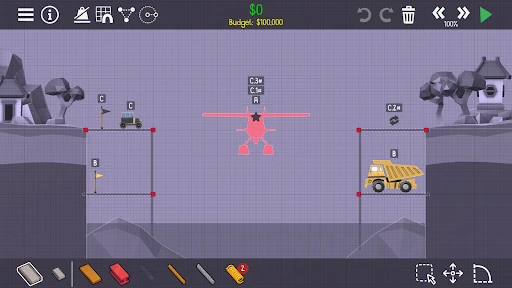
Poly Bridge 2 is like an engineering playground. From the moment you start, it immerses you into a world where your problem-solving skills are put to the test. The game provides a simple yet intriguing concept: build bridges to get vehicles from point A to point B. Sounds easy, right? Think again.
The first useful habit is to treat a failed crossing as a test result, not a command to rebuild everything. I look for the joint or span that bends first, then change one part and run the crossing again. That makes each attempt informative: a dramatic collapse can be funny, but spotting why it happened is what turns the next build into a better one.
Gameplay Mechanics That Keep You Hooked
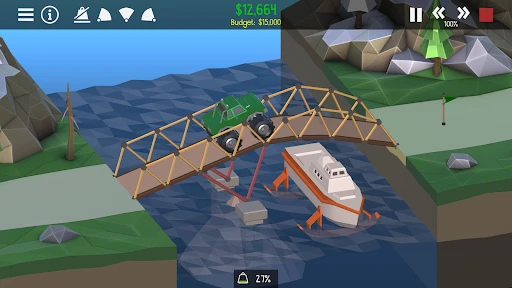
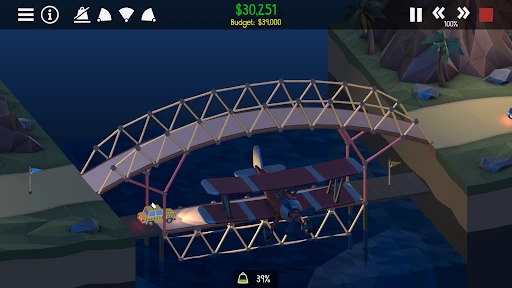
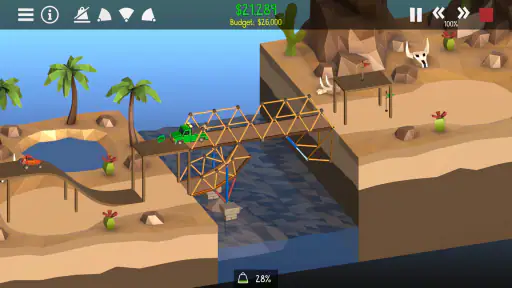
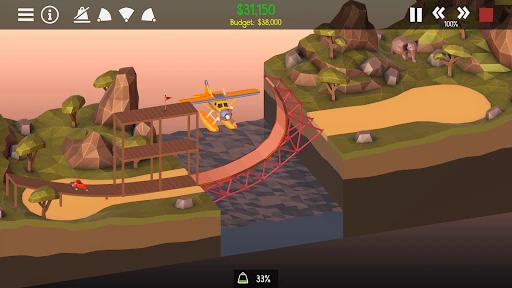
What makes this game so addictive is its physics engine. Every beam, every suspension, and every arch you place affects how your bridge will perform. Watching your creation either withstand the weight of a truck or crumble into pieces is all part of the charm. The satisfaction when a bridge stands strong is unparalleled.
More From Our News Desk

Weather by Xiaomi Review: Clear at a Glance, Less Clear Up Close

X Under Pressure: Can It Recover When Posting Goes Wrong?

Clash of Clans Is Won Between the Battles

Android Auto Makes the Case for Quieter Car Software

MobiOffice: Transforming Mobile Productivity with Seamless Integration

EA SPORTS FC™ Mobile Soccer: Redefining Mobile Sports Gaming
Adding to the challenge are the various materials you have at your disposal - wood, steel, ropes, and hydraulics. Each material has its strengths and weaknesses, and learning how to use them effectively is key to progressing through the levels. It's like a puzzle within a puzzle, and that's what makes it so intriguing.
A practical way to learn those differences is to avoid changing several materials at once. If a span fails under a vehicle, reinforce the part that visibly gives way before redesigning the whole crossing. When a simple arrangement works, it can be more useful to understand why than to add extra supports everywhere. That restraint helps keep a design readable and gives you a clearer idea of what each adjustment actually fixed.
Reading the Feedback Before You Rebuild
The test run is more than a pass-or-fail screen: I use it to watch the sequence of events. Does the bridge sag as the vehicle reaches the middle, or does a connection give way earlier? Does the structure hold until the load moves to another section? Even without turning every attempt into a technical investigation, noticing the order of failure helps me choose a more targeted change.
One small but useful discipline is to pause before editing and name the problem in plain language: “the middle bends,” “the approach shifts,” or “the supports are doing too much.” That keeps me from making a random pile of upgrades. It also makes a failed attempt feel like progress, because I have a clearer next experiment instead of merely hoping the next version looks stronger.
There is a trade-off here. Replaying a test is satisfying when I am curious about the result, but less so when I just want a guaranteed answer and quick forward motion. A player who likes watching cause and effect will probably enjoy the feedback rhythm; someone who sees retries as delays may find the same mechanic tiring.
Creative Freedom at Its Best
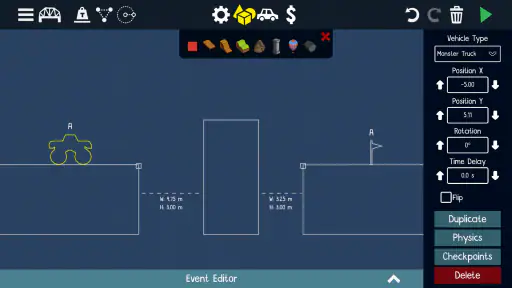
Unlike many games that restrict you to a linear path, Poly Bridge 2 encourages creativity. There’s no one-size-fits-all solution here. You can build a sturdy, conventional bridge or go crazy with an intricate, artistic design. The sandbox mode is where your imagination can truly run wild, offering an endless opportunity to experiment without the constraints of budgets or materials.
That makes the game a good fit for someone who enjoys sketching out a solution, testing it, and refining it rather than simply following a fixed recipe. Sandbox experimentation is especially useful when I want to explore an unusual shape without the pressure of solving a particular crossing. The trade-off is that open-ended building can feel aimless if you prefer clear goals and steady progress; in that mood, a structured puzzle is likely the better choice.
Sandbox play also gives me a different way to approach a tricky idea: I can try a rough version of a shape first, then carry the lesson back to a focused challenge. I would not use it as a substitute for every level, since the freedom is precisely what removes the pressure that makes a specific crossing engaging. It works best when I have a particular design question in mind, such as whether a simpler support arrangement can do the job.
In a normal day, I might open it while waiting for a meal or taking a short break, work on one crossing, and stop after a test reveals a new problem to solve. It can be hard to put down once a design is nearly working, though. If you want a game that provides immediate action with little planning, this is not the best match; its pleasure comes from thinking through a build and accepting a few imperfect attempts.
Who Will Enjoy This Kind of Session?
I would recommend it to people who like compact problems with visible consequences: puzzle fans, patient builders, and anyone who enjoys tinkering with a design until it behaves. It is also a nice fit when I want a game that can occupy a short break without requiring me to manage a long-running world. One crossing can give me a clear task, while the possibility of another attempt makes it easy to continue if I have time.
It is a less natural choice for someone who wants a story to follow, a broad simulation to manage, or a stream of rapid action. The game’s focus stays on bridge construction and testing, so there is less variety in the basic activity than in a management sim that asks you to balance many systems. That focus keeps each puzzle legible, but it also means your enjoyment depends heavily on whether the build-test-adjust cycle itself appeals to you.
If I am stuck, I try to separate “I do not understand the failure” from “I understand it but have not found the fix.” In the first case, I watch the test again and look for the first part that moves or gives way. In the second, I make one deliberate change. That distinction saves time and helps keep experimentation from becoming a frustrating sequence of unrelated edits.
Community and Challenges
Another fantastic aspect of this game is its community. Players can share their bridge designs and solutions, which adds a social element to the game. You can also take on daily challenges and compete on leaderboards, pushing you to improve your skills and try out new strategies.
Those shared designs are most valuable as inspiration rather than instructions to copy blindly. A solution can show a clever arrangement, but trying to understand why it works is more rewarding than treating it as a shortcut. Compared with many simulation games that focus on managing a whole town, factory, or vehicle, this one keeps its attention on a single engineering problem at a time. That narrow focus is a strength when you want a compact puzzle, but it will not satisfy someone looking for a broad management game or a story-led adventure.
When I look at another player’s design, I try to identify the idea that makes it work rather than memorize its exact shape. Maybe the useful lesson is how the load is supported, or how a gap is handled; carrying that principle into my own attempt keeps the challenge alive. Copying a solution may get a crossing done, but it gives me less practice making decisions on the next one.
The daily challenges and leaderboards offer a reason to return when I have already spent time on the main puzzle flow. They suit players who enjoy comparing approaches or giving themselves a fresh constraint. If competition does not motivate you, they are not essential to the central appeal: the strongest reason to keep playing is still the satisfaction of making a design work.
For those who love a good challenge, the game offers plenty of scenarios that will have you scratching your head and maybe even pulling out a strand or two of hair. But fear not, each failure is a step closer to success. Plus, the sense of accomplishment when you finally see those vehicles safely cross your bridge is worth every trial and error.
What You Are Paying For
For a paid mobile game, the key question is whether you enjoy experimenting enough to return after a failed run. The price is $1.99, and the game is rated Everyone, so it is an easy option to consider for a younger player who likes puzzles, as well as adults who enjoy building and testing ideas. Dry Cactus Limited is the developer; the game was released on Oct 1, 2020, and its current version is 1.71, with Android 6.0 as the minimum OS requirement. It has a 4.7 average from around 12K ratings and over 500K installs. Those figures suggest a well-liked game, but the more important fit is personal: patience and curiosity matter more here than engineering knowledge.
The price is easiest to judge against the kind of play you want. If you expect to return to a puzzle, test a different construction, and enjoy the process of narrowing down a solution, the focused design makes sense. If you are mainly looking for a disposable distraction between messages, paying for a game whose main pleasure depends on thought and retries may not suit you as well. I would decide based on whether the idea of examining a failed bridge sounds interesting rather than annoying.
For Android players, the minimum operating system requirement is worth checking before buying, especially on an older device. Beyond that practical point, the decision is less about whether the game is technically “for” beginners or experienced players and more about whether you are willing to learn through observation. I find that a curious first-timer can get more out of it than a seasoned player who dislikes trial and error.
When the Loop Clicks—and When It Does Not
The reward is not only the successful crossing. There is a smaller payoff in finding the weak point, then seeing a single adjustment change the outcome. That makes a run feel worthwhile even when the bridge does not hold, provided I can tell what happened. It is a thoughtful kind of progress: the game gives me a result, and I decide what to do with it.
My best sessions are the ones where I stop after a useful test instead of forcing a solution while tired. If I have only a minute, I can still inspect a design or try one change, but I should not expect every puzzle to resolve neatly in that window. When I have more time, I can follow an idea through several tests. This flexibility makes it convenient for short play, though the urge to finish a nearly solved crossing can stretch a break longer than planned.
Compared with a typical building or management simulation, this is much narrower and more hands-on: I am not balancing a town or maintaining a sprawling system; I am making one structure answer one problem. Compared with a quick casual puzzle, it asks for more patience and gives more room to revise a solution. That middle ground is appealing if I want something more involved than a simple tap challenge but do not want a large simulation to keep track of.
Conclusion: A Must-Play for Puzzle Enthusiasts
In conclusion, Poly Bridge 2 is more than just a game; it's a delightful experience that combines creativity, physics, and a bit of humor. Whether you're a budding engineer or just someone who loves a good puzzle, this game has something to offer. So, grab your hard hat and get ready to build the bridge of your dreams!
And remember, in the world of Poly Bridge 2, every failure is just a stepping stone to mastering the art of bridge building.
My verdict is that the repeat loop is the real reward: act by placing a structure, get immediate feedback when traffic tests it, improve the weak link, then reset for another attempt. I recommend it to players who enjoy learning through trial and error and like seeing a clear result from each design choice. If repeated testing feels like busywork, or you would rather have a fast, low-effort mobile distraction, the same reset-and-rebuild rhythm may become frustrating instead of compelling.
Poly Bridge 2 Frequently Asked Questions
Is Poly Bridge 2 suitable for beginners, or is it mainly for engineering fans?
Poly Bridge 2 is approachable for casual players as well as people who enjoy engineering-style challenges. Its central idea is easy to grasp: design a bridge that lets vehicles cross, then see how the structure handles the load. The puzzles call for experimentation and problem-solving, so you do not need specialist knowledge to enjoy the game, though an interest in building can make its challenges especially appealing.
What is Poly Bridge 2?
Poly Bridge 2 is a bridge-building simulation game that challenges players to construct bridges using various materials and designs to get vehicles across. It features realistic physics, multiple levels, and creativity-driven gameplay. Players can enjoy solving puzzles in different environments, making it a unique and engaging experience for both casual gamers and engineering enthusiasts. Developed by Dry Cactus Limited, it is the acclaimed bridge-building indie hit returning with more bridge-design puzzles.
How do the physics in Poly Bridge 2 work?
The physics engine in Poly Bridge 2 is designed to mimic real-world behavior, providing a realistic simulation of materials under stress. Players must consider weight distribution, tension, and compression when building bridges. This immersion into realistic physics challenges players to apply problem-solving skills to create structures that can withstand the test of vehicles crossing them. A design that looks convincing on screen still needs to hold up during a crossing, making each test a practical part of the puzzle.
Can I share my bridge designs in Poly Bridge 2?
Yes, Poly Bridge 2 allows players to share their custom bridge designs through the game's community features. You can upload your creations and download others' designs, fostering a collaborative environment. This feature enhances the replayability of the game as players are inspired by community creations and can challenge themselves with new puzzles.
Is there a multiplayer mode in Poly Bridge 2?
Poly Bridge 2 primarily focuses on single-player campaigns where players tackle increasingly complex puzzles. However, the game fosters a community-driven experience through shared designs and leaderboards. While it doesn't offer a traditional multiplayer mode, the collaborative aspect of sharing and competing with others adds a social element to the gameplay.
Pros
- Challenging puzzles keep players engaged.
- Realistic physics for a lifelike experience.
- Multiple levels with increasing difficulty.
- User-friendly interface and controls.
- Supports custom bridge designs and sharing.
Cons
- Can become repetitive over time.
- Some levels require in-app purchases.
- Occasional glitches in complex levels.
- High battery consumption on older devices.
- Limited device compatibility for optimal play.
- Category
- Simulation
- Version
- 1.71