

FarmVille 2: Tropic Escape
- 31.58K
- 4.0
- Installs
- 10.00M
- Price
- Free

Screenshots


Analysis by Reviewed
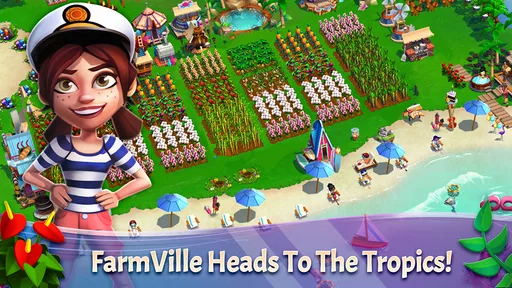
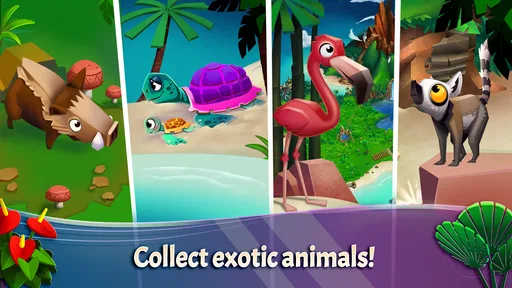
FarmVille 2: Tropic Escape is the kind of simulation game I open when I want a gentle, colorful break rather than a demanding challenge. I build a farm on a tropical island, work through its story, and spend time with unusual animals while gradually making the place feel more complete. Developed by Zynga, it is free to start and rated for Everyone, so it is easy to approach as a casual game for short sessions.
What makes this version different from a standard countryside farm is its island setting. The scenery gives the familiar planting, collecting, crafting, and expanding loop a holiday-like mood. I found that relaxing at first, although the game becomes more structured as the island fills with tasks and progress goals. It is best understood as a long-term management game with a tropical theme, not as a fast action title or a completely open-ended sandbox.
How comfortable is the island to use?
I find the island easiest to enjoy when I treat each visit as a small planning session, not a race to clear every prompt. That lets me focus on what I can comfortably see and tap, while keeping the screen’s busy details from taking over. It also raises a useful next question: how well does the game’s layout hold up as the island and its activities grow?
Readability and navigation during everyday play
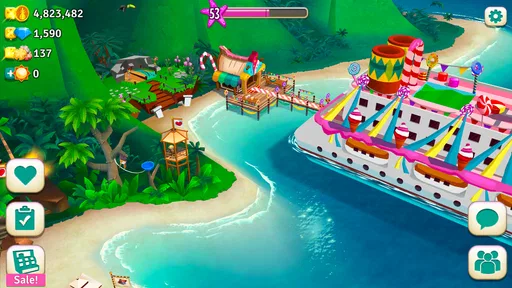
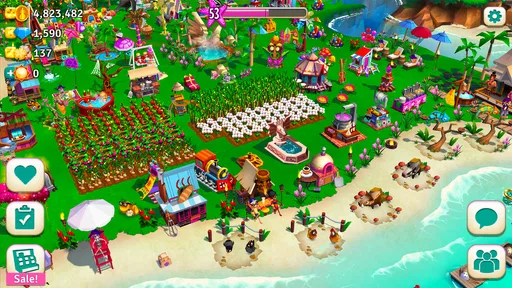
The visual presentation is bright and busy, but the main idea is usually easy to understand: tap an object, see what it needs, wait for a process to finish, and collect the result. This makes the opening experience approachable even if you have not played a FarmVille game before. The island setting also helps separate areas visually, so I can generally tell whether I am looking at a production spot, a crop, an animal, or a story-related activity.
That clarity matters because simulation games can become confusing once several resources and objectives appear at once. Here, the game gradually introduces its island routine instead of dropping every possible activity on me immediately. I appreciate that pacing when playing on a smaller phone, where a crowded interface can make every tap feel less precise.
Still, the screen can become visually dense. Decorations, characters, animals, harvestable items, and task prompts compete for attention, particularly after the island has developed. I sometimes need to pause and look carefully before choosing the object I actually want. Someone with reduced vision may find the cheerful art less comfortable than a simpler, higher-contrast interface, especially during longer sessions.
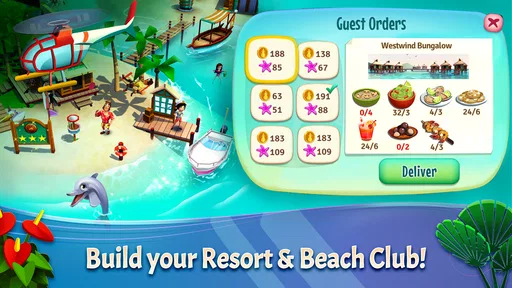
I also recommend treating the task list as a planning tool rather than blindly completing the first request that appears. When several orders or story objectives are available, I get better results by checking which one fits the resources already in storage. That small habit reduces unnecessary back-and-forth and makes the island feel less frantic.
More From Our News Desk

 Gmail
GmailGmail in a Busy Inbox: Who Benefits Most?
From first account to crowded workday, Gmail earns its place through dependable search and flexible sorting—but its best fit depends on how much inbox maintenance you can tolerate.

 Prime Video
Switching to Prime Video: What Changes in Your Viewing Routine
Prime Video can make a compelling second home for streaming, but switching means learning a different catalog, rental layer, and route from browsing to playback.

 Universal TV Remote Control
Universal TV Remote Control Works Best as a Reliable Backup
A phone remote earns its place through quick setup and reliable habits. Here is how to get more from Universal TV Remote Control—and where its limits show.

 Weather - By Xiaomi
Weather by Xiaomi Review: Clear at a Glance, Less Clear Up Close
Xiaomi’s weather app makes everyday forecasts quick to scan, but its calm surface can leave useful details and recovery paths harder to find than they should be.

 X
XX Under Pressure: Can It Recover When Posting Goes Wrong?
A resilience-focused review of X, examining setup, mistaken posts, interruptions, weak connections, and the gaps that matter when recovery needs to be dependable.

 Clash of Clans
Clash of Clans Is Won Between the Battles
Its raids are quick; its community is a long-term project of coordination, teaching, rivalry, and shared responsibility—with all the friction that entails.
Latest News



Touch control, timing, and sensory load
The controls are built around tapping and scrolling, so there is no complicated virtual joystick or rapid combination system to master. For me, that makes the game suitable for relaxed play with one hand, provided the phone is large enough for the interface. The basic actions are forgiving in spirit: I am managing a queue of activities rather than trying to hit moving targets at high speed.
That does not mean every player will find the controls effortless. Repeated tapping, dragging across the island, and selecting small objects can become tiring for people with limited dexterity or hand tremors. The game also asks me to move between locations and menus often enough that a longer session may feel physically repetitive. A stylus or a larger screen could make precise selection easier, but that is a personal workaround rather than a special feature of the game.
The colorful animation and island atmosphere are pleasant, yet they may be intense for players who are sensitive to motion, bright visual effects, or frequent on-screen activity. I would begin with short sessions and lower the device brightness if the presentation feels tiring. Playing with sound reduced or muted can also make the experience calmer, especially in public places or for anyone who prefers a quieter sensory environment.
One useful approach is to separate “active” play from “maintenance” play. When I have more energy, I move around the island and organize several objectives. When I am tired, I simply collect finished items, start one or two straightforward tasks, and leave. The game supports that flexible rhythm because progress is based on managing activities over time rather than constant reflexes.
Playing in different everyday situations
This is a practical game for waiting rooms, commutes, breaks, and quiet evenings. A short visit can be enough to collect completed goods and begin another production cycle. I do not need to remember a complicated control scheme after putting it down for a day, which is useful when I want something familiar but not mentally demanding.
For example, I might open it during a lunch break, check which island activities have finished, use available materials on the most useful request, and close the game before returning to work. Later, I can come back and continue from that point. That routine makes it more flexible than a game that expects a long uninterrupted session.
At the same time, the free-to-play structure can make “just one quick check” turn into a series of extra decisions. Waiting, collecting, comparing requests, and considering whether to speed something up all compete for attention. If you are trying to limit screen time, setting a personal stopping point is sensible. I find it easier to decide in advance that I will complete one planning cycle rather than opening the game without a clear boundary.
The game is also more comfortable when the phone is held steadily. On a crowded bus or while walking, small targets and scrolling are less convenient. It is not a good choice when you need to keep your attention on your surroundings. For a player who relies on a stable surface, a tablet may be more comfortable than a phone, although the experience remains fundamentally touch-based.
What the progression feels like
The central appeal is gradual improvement. I begin with a modest tropical farm and slowly turn it into a busier island operation. Each new improvement gives the landscape more character, and the story provides a reason to keep checking what comes next. The exotic animals are not just decoration from my point of view; they help the island feel more distinct from a typical rural farming game.
The trade-off is patience. This is not the right game if you want to unlock everything quickly or make large changes in a single sitting. Progress is designed around repeated visits and managing what is available. I enjoy that when I want a low-pressure routine, but I can see it frustrating players who prefer direct control and immediate rewards.
I get more enjoyment by choosing a small priority for each visit. One session might focus on preparing materials, while another concentrates on a story objective or tidying the farm layout. Trying to improve every part of the island at once creates more clutter and makes the resource loop feel slower. This is one of the less obvious lessons of the game: organization is more valuable than simply tapping every available prompt.
Another helpful habit is to avoid spending scarce resources just because an item is available. I prefer to look at the next few requests and keep a reserve for tasks that are harder to replace. That approach reduces the temptation to rush and makes the free experience more manageable. Players who enjoy planning will probably get more from the game than those who treat every request as an emergency.
Free access and purchase pressure
The game can be downloaded and played for free, which lowers the risk of trying it. Its in-app purchases range from $0.99 to $199.99 per item, so the possible spending range is substantial. I would treat purchases as optional convenience spending, not as part of the basic cost of entry, and I would use device purchase controls if children may access the game.
The important question is not simply whether the game is free, but whether its waiting and resource decisions fit your preferences. I am comfortable with a slower pace when I want a relaxing island routine. If you dislike timers, repeated collection, or any suggestion that progress can be made quicker through spending, this structure may become irritating even though the initial download costs nothing.
For families, the Everyone rating makes the tone broadly approachable, but an age rating does not remove the need for supervision around purchases or screen time. I would explain that the game is designed to encourage return visits and that buying something is not necessary to enjoy the basic loop. That conversation is more useful than presenting the game as entirely free in every sense.
How it compares with other farming simulations
Compared with a traditional countryside farming game, this one stands out through its tropical island atmosphere, story framing, and exotic animals. If you want a familiar rural setting, a more focused gardening experience, or a game centered on direct character control, another simulation may suit you better. FarmVille 2: Tropic Escape is strongest when the setting itself is part of the reason you are playing.
It also differs from a pure building game because the island is not only about placing structures. Production, collection, and requests shape the order in which I develop the farm. That creates more routine and planning, but less freedom than a decoration-first game. I would choose it over a simpler idle title when I want decisions to make, but I would not recommend it to someone seeking a completely hands-off experience.
Its audience is likely to include casual players who enjoy familiar tasks, visible progress, and a friendly setting. It is less suitable for people who need strong action, competitive pressure, or a clearly finished endpoint. The island is meant to be revisited, so the pleasure comes from the rhythm of improvement rather than reaching a final conclusion quickly.
Device support, longevity, and practical expectations
The current version is 1.225.148, and the game supports devices running Android 7.0 or later. That makes checking your operating system worthwhile before installing, particularly if you use an older phone. On compatible hardware, I would still leave room for the game to display its detailed island scenes comfortably; a cramped screen can make selection and navigation more tiring.
Its scale is easy to see from the community around it: the game has passed ten million installs, with an average rating of 4.0 from around 409 thousand ratings and about 32 thousand written reviews. Those figures suggest a well-established casual title, but they do not guarantee that its waiting-based progression will suit everyone. I would read the overall reception as evidence of broad appeal rather than proof that the design is universally comfortable.
Longevity depends heavily on your tolerance for repetition. I can return for weeks if I enjoy checking production, fulfilling requests, and watching the island expand. If I need constant novelty, the same cycle may eventually feel predictable. The story and changing goals help give direction, but they do not transform the game into a fast-moving adventure.
Who should try it, and who should skip it?
I would recommend it to someone who wants a colorful simulation for short, repeatable sessions and likes the idea of a tropical setting more than a realistic farm. It is especially appealing if you enjoy making small plans, saving materials, and seeing a location become busier over time. The simple tap-based interaction also makes it approachable for players who do not want complex controls.
I would suggest skipping it if you want a one-time purchase with no optional spending prompts, instant progress, or a completely quiet interface. Players who find bright animation distracting, who have difficulty with repeated touch gestures, or who need very large and highly adjustable text may also want to test it cautiously rather than assuming the Everyone rating means every interaction will be accessible.
My most practical recommendation is to play it in a controlled way: use a stable surface, keep sessions short at first, mute or reduce brightness if the sensory presentation becomes tiring, and decide your spending limit before opening the shop. Those steps do not change the game, but they make it easier to judge whether its rhythm works for you instead of being pulled along by every available task.
After spending time with it, I see the main strength as a welcoming combination of island atmosphere and manageable planning. The main weakness is that the same long-term loop, purchase range, and busy presentation can create friction for players who want simplicity in a different sense. FarmVille 2: Tropic Escape works best when you want a gentle routine you can adapt to your day, not when you need fast action or complete control over the pace.
For me, that makes it a worthwhile free simulation to try, with realistic expectations. I would recommend it to a friend who enjoys returning to a growing virtual place and does not mind waiting between decisions. I would be more cautious with anyone who needs highly customizable accessibility options or who prefers games that respect a strict, interruption-free session. Its inclusive potential comes from its approachable theme and straightforward taps, but its visual density, repetitive gestures, and monetized pacing still deserve attention before settling in for the long term.
FarmVille 2: Tropic Escape Frequently Asked Questions
How much space should I have available before installing FarmVille 2: Tropic Escape?
It is sensible to leave free storage for the initial download as well as later game updates. FarmVille 2: Tropic Escape is an ongoing island-building game, so keeping some room available can help avoid installation or update problems. Check the space shown by your device before downloading, and consider removing unused files or apps if storage is tight.
Does FarmVille 2: Tropic Escape save my progress if I change devices?
The game uses an internet connection to synchronize progress, so staying connected while you play is important. If you are planning to move to another device, make sure your game is connected to the relevant account or service and that your progress has had a chance to sync before switching. This helps you continue your island rather than starting over.
Is FarmVille 2: Tropic Escape easy to learn for new players?
The game introduces a familiar farming-and-management loop: grow crops, collect resources, care for animals, make goods, and use them to develop your island. Its casual style makes it approachable if you are new to simulation games, while exploration, resort upgrades, characters, and events add more to work toward over time. Progress is gradual, so it suits players who enjoy returning to ongoing tasks.
What devices and operating systems can run FarmVille 2: Tropic Escape?
FarmVille 2: Tropic Escape is available for Android devices that meet its minimum operating-system requirement of Android 7.0. Before downloading, check your device’s software version and make sure you have enough free storage for the game and its updates. The game is also available on iOS, so check its compatibility with your particular Apple device in the relevant app store.
Who developed FarmVille 2: Tropic Escape, and what kind of game is it?
FarmVille 2: Tropic Escape is a simulation game developed by Zynga. Its tropical setting and island resort theme give the familiar farming-and-management format a distinct feel, with crops, animals, crafting, and exploration all contributing to your progress. If you enjoy casual games that let you build gradually and return to ongoing activities, its mix of farming and island development may suit you.
Pros
- Relaxing tropical setting with colorful graphics and cheerful animations.
- Many crops
- recipes
- and island activities keep the gameplay varied.
- Easy-to-learn controls make it accessible for casual players.
- Regular events and quests provide fresh short-term goals.
- You can expand and customize different areas of the island.
Cons
- Energy limits can interrupt longer play sessions.
- Progress may feel slow without spending premium currency.
- Frequent tasks can become repetitive over time.
- Some upgrades require considerable storage and resource management.
- An internet connection is generally needed to play.











