

Eye Color Mix
- 2.26K
- 4.5
- Installs
- 10.00M
- Price
- Free
Screenshots

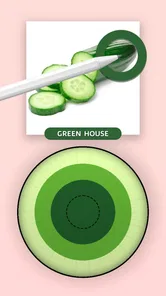
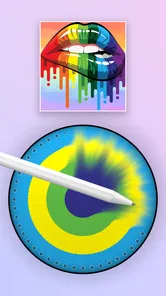
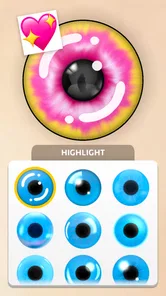


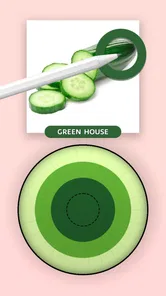
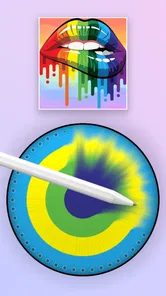
Analysis by Reviewed
I like games that let me test a small idea without asking for a big time commitment, and Eye Color Mix fits that mood. Its focus is simple: change the look of eyes in a portrait, compare shades, and see how far a little color adjustment can take an image. I find that narrow focus refreshing when I want a quick creative distraction rather than a full editing project.
A useful first experiment starts with one good photo
For a first session, I’d choose a clear, well-lit portrait where both eyes are visible, then make one natural-looking edit before trying anything bold. This gives you a useful baseline: if the original photo is blurry, heavily shadowed, or taken at an unusual angle, it can be harder to judge whether the color is working. Starting with a straightforward image makes the result easier to assess and helps keep the first few minutes enjoyable rather than turning into a hunt for a better source photo.
I also wouldn’t treat the first result as a final verdict on how a shade would look in real life. A portrait is a fixed image, and the mood, lighting, and expression all affect how a color reads. For a playful what-if, that’s part of the fun; for a serious appearance decision, I’d use the result as inspiration rather than a reliable prediction.
Choosing a goal keeps the session focused
The easiest way to avoid aimless tapping is to decide what you want to learn from a session. Maybe you’re comparing two subtle shades, checking whether a brighter color suits a particular selfie, or making an intentionally fanciful image to share with a friend. Those are different goals, and each benefits from a different approach: subtle comparisons call for restraint, while a joke portrait can be more expressive.
A small, practical workflow is to keep the same photo and change only one thing at a time. Try a shade first, then adjust its intensity, and only afterward consider an extra effect. That order makes it easier to identify which change improved the image and which one pushed it away from the look you wanted. It’s a more satisfying use of the game’s simple loop than changing several elements at once and losing track of what you were testing.
Where it fits among photo and simulation apps
As a simulation game, this is much closer to a focused portrait toy than to a broad makeover or photo-editing suite. A general editor is the better choice if you want to crop, retouch, adjust a whole image, or work with many kinds of edits in one place. A makeover game may be a better fit if you’re looking for a larger set of appearance-related activities. Here, the appeal is narrower: the eye-color experiment is the activity, not one small tool inside a bigger creative workspace.
That narrowness is a real trade-off, not necessarily a flaw. It helps the game feel approachable when all you want is to see a face with a different eye shade, but it also means it may not hold your attention if you quickly run out of combinations you care to try. I’d pick it for a brief visual experiment, not as my main photo app or as a substitute for a simulation with layered goals and long-term progression.
More From Our News Desk

 Gmail
GmailGmail in a Busy Inbox: Who Benefits Most?
From first account to crowded workday, Gmail earns its place through dependable search and flexible sorting—but its best fit depends on how much inbox maintenance you can tolerate.

 Prime Video
Switching to Prime Video: What Changes in Your Viewing Routine
Prime Video can make a compelling second home for streaming, but switching means learning a different catalog, rental layer, and route from browsing to playback.

 Universal TV Remote Control
Universal TV Remote Control Works Best as a Reliable Backup
A phone remote earns its place through quick setup and reliable habits. Here is how to get more from Universal TV Remote Control—and where its limits show.

 Weather - By Xiaomi
Weather by Xiaomi Review: Clear at a Glance, Less Clear Up Close
Xiaomi’s weather app makes everyday forecasts quick to scan, but its calm surface can leave useful details and recovery paths harder to find than they should be.

 X
XX Under Pressure: Can It Recover When Posting Goes Wrong?
A resilience-focused review of X, examining setup, mistaken posts, interruptions, weak connections, and the gaps that matter when recovery needs to be dependable.

 Clash of Clans
Clash of Clans Is Won Between the Battles
Its raids are quick; its community is a long-term project of coordination, teaching, rivalry, and shared responsibility—with all the friction that entails.
Latest News



Good moments to play, and reasons to pass
I can picture opening it during a quiet wait—on a bus, between errands, or while a friend is choosing a photo—and making a few versions to compare. It doesn’t need to become a polished project. A couple of quick edits can be enough to answer a small curiosity, and the same-photo comparison can turn into an easy conversation about which shade feels most natural or which one is funniest.
It will probably suit people who enjoy visual tinkering, casual selfie edits, and low-pressure creative play. I’d be less likely to recommend it to someone who wants a demanding game, a deep character creator, or a professional-looking retouching workflow. It also may not be a good match if you dislike editing portraits or would rather spend your short breaks on games with clear stages and measurable challenges.
Hey there! Have you ever wondered what you’d look like with different eye colors? Well, wonder no more because Eye Color Mix is here to satisfy your curiosity. This app is all about giving you a fresh perspective on your eye color, and trust me, it's pretty fun to play around with!
Small goals make the first session easy to approach
Once you download Eye Color Mix, the first thing you’ll notice is its user-friendly interface. It's super straightforward, so even if you’re not tech-savvy, you’ll have no trouble navigating through it. To get started, just upload a photo of yourself or snap a new one directly from the app. Then, let the magic unfold!
That simple starting point suits a quick, low-pressure session: I’d begin with one clear portrait, try a natural-looking shade, then make a more unusual version just to compare. The small goal is not to build a complicated project, but to see how a color choice changes the same face. If you have only a few minutes while waiting for a friend or taking a break, that makes the game easy to pick up without needing a long block of time.
How the color play and progression feel
I find the appeal of Eye Color Mix is less about chasing a finish line and more about having a small visual question to answer: how does this portrait change when I shift the eye color? That makes each session easy to shape around my mood, from a believable comparison to a deliberately playful edit. With that low-pressure starting point in mind, the next thing to consider is how the color choices themselves give experimentation direction.
Mixing shades gives experimentation a purpose
The app offers a variety of eye colors to choose from. Whether you want to see yourself with baby blues, enchanting greens, or even something more exotic like violet, it's all there. One of the coolest features is the ability to blend colors for a truly personalized look. You can mix and match to create a color that’s uniquely you.
That mixing is the most useful reason to spend longer than a minute with it. Instead of choosing a shade and stopping, I’d treat the starting colors as reference points and compare a few blended variations against the same photo. A practical tip is to keep the lighting and expression consistent between comparisons; otherwise, the image itself can distract from the difference you are trying to judge. This makes the result more helpful if you are simply curious about a look, and more playful if you are aiming for an imaginative portrait.
Visual feedback matters more than a complex challenge
What’s more, the app doesn’t just slap a color over your eyes. It uses advanced technology to ensure the color change looks natural. I was genuinely impressed by how realistic the results were. You can adjust the intensity and even add effects like enlarging your eyes for that doe-eyed look or adding a sparkle for an extra touch of glamour.
The clearest progress signal is the image changing as you experiment: a subtle adjustment can feel believable, while stronger intensity or added effects push the portrait toward a deliberately stylized result. I’d make one change at a time, especially when testing intensity and sparkle, so it’s easier to tell what you actually like. The trade-off is that dramatic effects can quickly become less convincing than a simple color change. If your goal is a realistic preview, restraint is more useful than piling on every effect.
A creative break, not a deep simulation
Beyond just changing your eye color, Eye Color Mix encourages creativity. It’s a fun tool not just for trying out new looks but also for creating unique and artistic photos. Whether you’re looking to enhance your selfies or just want to have some fun with your friends, this app is a great choice.
In the wider simulation-game space, this is a light, image-focused activity rather than a game built around long-term planning or a demanding challenge. That makes it a better fit for casual experimentation than for players who want levels, a sustained difficulty curve, or a detailed character-building system. A realistic everyday use would be trying a few versions of a selfie during a quiet moment, then showing a friend the natural and playful edits side by side. If you mainly want a broad photo editor with many unrelated tools, a general editing app may suit you better; this one keeps its appeal centered on eye-color play.
It’s also worth mentioning that sharing your new look is a breeze. With integrated social media sharing options, you can easily post your photos on platforms like Instagram or Facebook and get feedback from your friends.
Sharing can give a finished edit a purpose, but I’d still decide what I want from the image before posting it: a believable preview, a joke among friends, or a more theatrical effect. That choice helps avoid spending time polishing a look that does not match the audience or mood. For a private experiment, simply comparing versions on your own is just as valid; the fun does not depend on getting reactions online.
Who will enjoy the pace, and who may not
CrazyLabs LTD publishes this free simulation game, which is rated for Everyone and has a 4.6 average from around 51,000 ratings, with over 5 million installs. It arrived on September 23, 2023, and version 1.2.6.0 supports Android 6.0 and later. Those figures suggest it has found a broad audience, but the more important question is whether its narrow creative loop matches what you want to do.
I’d recommend it to someone who enjoys quick visual experiments, wants to compare possible eye colors, or likes making playful portraits without learning a complicated editing workflow. I’d skip it if you expect a deep simulation with unlocks, strategic goals, or a steadily rising challenge: the appeal here is trying combinations and seeing the result, not mastering a long progression system. The pacing stays casual, so your interest will depend on whether experimenting with faces is fun for you in the first place.
Final Thoughts
In conclusion, if you're curious about experimenting with your eye color or simply want to have some creative fun, Eye Color Mix is definitely worth a try. The app’s ease of use, combined with its realistic effects, makes it a standout choice for anyone looking to play around with their appearance. So go ahead, give it a whirl, and let your eyes do the talking!
My verdict is that it works best as a focused, low-commitment creative toy. Start with a well-lit portrait, test a restrained shade before adding effects, and compare a few blends rather than changing everything at once. That workflow gives you a clearer sense of what the color itself contributes. If that kind of quick visual trial sounds enjoyable, it is an easy game to try; if you need a substantial challenge or a full-featured photo-editing toolkit, I’d choose something built for those needs instead.
Eye Color Mix Frequently Asked Questions
Is Eye Color Mix suitable for children?
Eye Color Mix is rated Everyone, making it suitable for a broad audience, including children. Its focus is a creative coloring activity: painting, matching paint, and combining colors. Parents may still want to check the game themselves and consider their child’s preferences before downloading, as the age rating does not describe every detail of the play experience.
How much storage space does Eye Color Mix need?
The space required can vary depending on the device and the version being installed. Before downloading, check the app’s download page and your device’s available storage so the installation has room to complete. Keeping some free space on your phone can also help avoid installation interruptions and leave room for other apps and updates.
Who makes Eye Color Mix, and is it a game or a photo-editing app?
Eye Color Mix is a simulation game made by CrazyLabs LTD, centered on a coloring activity rather than editing eye colors in photographs. The game’s described focus is painting, matching paint, merging colors, and getting creative. If you are looking for a photo editor that changes the appearance of eyes in an uploaded picture, this is not the experience described by the game.
What is Eye Color Mix and what can I do in the game?
Eye Color Mix is a free simulation game from CrazyLabs LTD built around painting, matching paint, merging colors, and getting creative in a coloring game. It is a good fit if you want a simple, hands-on creative activity rather than a complex strategy game. The game is rated for Everyone, so it is presented for a broad audience.
What is Eye Color Mix and how does it work?
Eye Color Mix is a mobile application designed to let users experiment with different eye colors on their photos. It uses advanced image processing algorithms to detect the eyes in an image and allows users to overlay and blend various color effects. Simply upload a photo, select a color, and adjust the intensity to see how you would look with different eye shades.
Pros
- Easy to use interface for beginners.
- Wide variety of color options.
- Realistic eye color change effect.
- Fast processing and preview.
- No need for internet connection.
Cons
- Limited free features in the free version.
- Occasional ads in the free version.
- Some colors may not look natural.
- May not work well on older devices.
- In-app purchases for full features.











