DOOM
- 1.04K
- 4.3
- Installs
- 100.00K
- Price
- $4.99

Screenshots
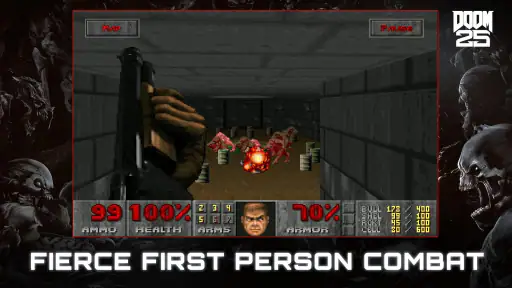
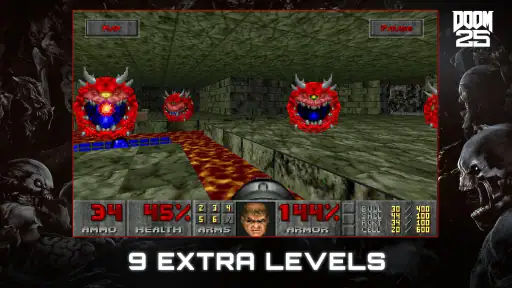
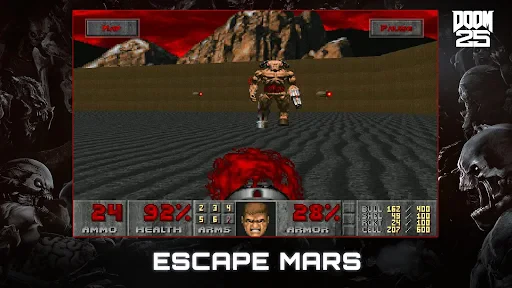
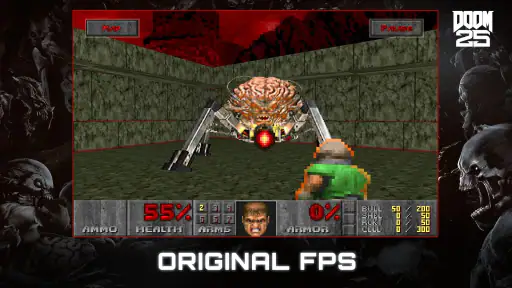
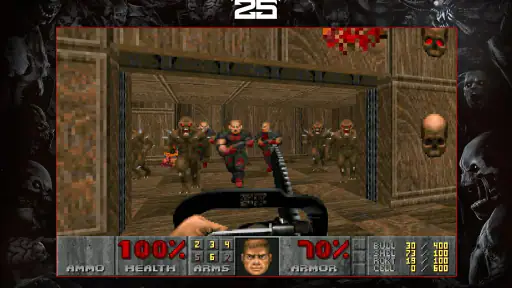
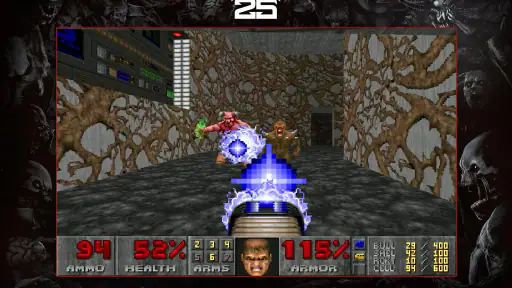
Analysis by Reviewed
If you want a mobile shooter that rewards quick decisions more than careful, slow aiming, DOOM is an easy one to consider. I like it most when I have a short stretch of time and want to jump straight into movement and combat, rather than spend it managing a complicated setup. It is a paid action game from Bethesda Softworks LLC, released for mobile on Jul 26, 2019; the current version is 1.0.11, and it requires Android 8.0 or later. The Mature 17+ rating is worth taking seriously: this is a violent demon-shooting game, not a gentle action adventure.
The Thrill of the Hunt
From the moment you start playing DOOM, you're thrown into a fast-paced, demon-blasting frenzy. The gameplay is smooth and intuitive, making it easy to dive right into the action. Whether you're a seasoned gamer or a newcomer to the first-person shooter genre, you'll find the controls responsive and engaging. My practical advice is to give yourself a few minutes to settle into the touch layout before judging it: hectic fights ask for movement, aiming, and firing at once, and comfort with the controls matters more than it does in a slower shooter.
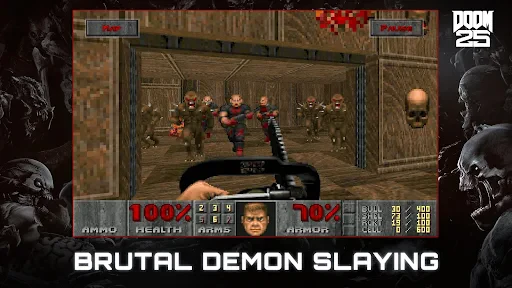
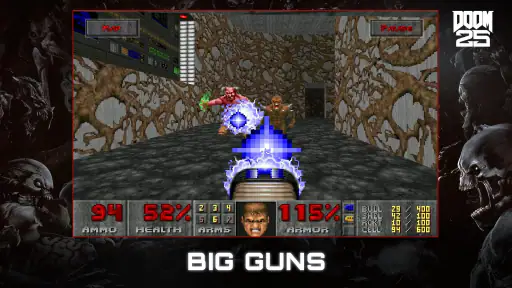
One of the standout features of this game is its vast array of weapons. From the iconic shotgun to the powerful BFG, each weapon feels unique and satisfying to use. As you progress through the game, you'll find yourself constantly switching up your arsenal to take down increasingly challenging foes. And trust me, nothing feels as gratifying as obliterating a horde of demons with a single well-placed shot. A useful habit is to switch weapons according to the space and threat in front of you instead of treating one favourite as the answer to every encounter. That keeps fights lively and makes the arsenal feel like part of the decision-making, not just a collection screen.
A Hellish Playground
The level design in DOOM is nothing short of brilliant. Each stage is meticulously crafted to provide a perfect balance of exploration and combat. You'll find yourself navigating through dark, eerie corridors, open arenas, and labyrinthine environments that keep you on your toes. The game encourages you to explore every nook and cranny, rewarding you with hidden secrets, power-ups, and additional challenges. I recommend checking side passages when the action gives you breathing room; pushing forward at full speed can mean missing useful discoveries. On a first visit, exploration is part of the pleasure, while a replay can be a good chance to move more confidently through areas you already understand.
Visually, the game is a treat. The graphics are impressive for a mobile platform, capturing the gritty, hellish atmosphere that DOOM is renowned for. The eerie sound design and intense soundtrack further immerse you into the game, making every encounter feel like a fight for survival. Playing with sound on makes enemy encounters easier to read emotionally and gives the atmosphere more weight, though the soundtrack can make a quick session feel more intense than a casual mobile game. If you prefer a quieter setting, the visuals still carry the action, but you lose some of the force of the presentation.
Adaptation to Mobile
Transitioning a classic PC game to a mobile platform is no easy feat, but DOOM does it with finesse. The developers have optimized the game to run smoothly on most devices, ensuring that you get the full DOOM experience without sacrificing performance. The touch controls are customizable, allowing you to tailor your gaming experience to your preferences. I would check that layout early and make small adjustments between sessions rather than trying to redesign everything at once. A repeatable setup makes it easier to build muscle memory, especially when a fight gets crowded and there is no time to hunt for a control.
However, if you're someone who misses the tactile feedback of a physical controller, the game also supports external gamepads. This option is perfect for those longer gaming sessions where precision is key. A controller is also worth considering if touch aiming feels tiring or imprecise on your device; on the other hand, the touchscreen makes the game easier to pick up for a few minutes without carrying extra gear. That is the main mobile trade-off: convenience is excellent, but your preferred input can make a noticeable difference to comfort.
More From Our News Desk

Weather by Xiaomi Review: Clear at a Glance, Less Clear Up Close

X Under Pressure: Can It Recover When Posting Goes Wrong?

Clash of Clans Is Won Between the Battles

Android Auto Makes the Case for Quieter Car Software

MobiOffice: Transforming Mobile Productivity with Seamless Integration

EA SPORTS FC™ Mobile Soccer: Redefining Mobile Sports Gaming
Building a Better Run
For an everyday routine, I would treat each session as a focused run: find a comfortable position, confirm your control layout still feels natural, and then concentrate on movement and weapon choice rather than constantly pausing to rethink the setup. If you are interrupted, the game is better suited to a deliberate play session than to a few distracted taps while doing something else. The combat moves quickly, and splitting attention can turn an enjoyable challenge into needless frustration.
A practical example is an evening break when you have enough time to settle in but not enough to commit to a long, distracted stretch. I would pick a level, keep the phone steady, and play with sound at a setting that suits the room. If I had only a moment between other tasks, I would leave the run for later rather than begin a demanding encounter and expect to respond to interruptions gracefully. The action asks for continuous attention, so the best short session is one that is brief by choice, not constantly broken up.
There is also a useful distinction between learning and replaying. When a stage is unfamiliar, I slow down at safe moments to check corners and understand the arena before charging toward the next fight. Once I know the route, I can keep a more purposeful pace and spend less attention wondering where to go. This approach makes exploration feel rewarding without turning every later run into a search. It also gives weapon switching a clearer purpose: I can react to the room in front of me rather than trying to use the same tactic everywhere.
The game also rewards a different pace from many mobile action titles. Where a typical mobile shooter may lean on short rounds or repeated progression loops, this one is built around its first-person action, its environments, and the satisfaction of learning how to handle each encounter. I would choose it when I want a concentrated single-player shooter feel, not when I am looking for a social routine or a relaxed game to play one-handed. Its 4.3 average from around 5,200 ratings and more than 100,000 installs suggest a substantial audience, but the right fit still depends on whether fast, close-quarters action is what you enjoy.
Settings That Make a Difference
I would start with the control layout, because that is the setting most likely to affect whether the game feels manageable. Move controls only as much as needed to make movement and aiming comfortable together, then play a few encounters before making another change. If you alter several things at once, it becomes difficult to tell which adjustment helped. This small, repeatable test is more useful than endlessly tweaking the layout in the abstract.
Consider your screen size and how you hold the device, too. A layout that seems sensible while looking at the menus may feel awkward once both thumbs are active in a fight. I would test it in a lower-pressure stretch and check whether I can move while aiming without shifting my grip. If your hands cover part of the action, a controller may be the better answer than trying to force a touchscreen arrangement that never feels natural. The game supports external gamepads, which offers a straightforward alternative for players who value physical controls.
Sound is another choice worth making deliberately. The soundtrack helps build tension, but it may not suit a quick session in a shared room or a noisy commute. When I can listen, I leave the audio on because it adds character to the arenas; when I cannot, I accept that some of the atmosphere is lost and focus on the visual action. This is less about finding one perfect setting than matching the experience to where and how you are playing.
Faster Patterns Without Rushing
Experienced play here is not simply moving as fast as possible. I get better results by building a few habits: keep moving when a fight becomes busy, look for a safe moment to check the surrounding space, and switch weapons based on the enemies and room rather than on habit alone. Those decisions reduce hesitation without making every encounter feel like a sprint. If a tactic is not working, changing the weapon or angle is more useful than repeating the same attack with more urgency.
It helps to separate navigation from combat in your attention. When enemies are not pressing you, scan for side routes and useful discoveries. Once a fight starts, focus on movement and immediate threats instead of trying to search every corner at once. That simple rhythm gives exploration its own place and stops it from becoming a distraction in the middle of a difficult exchange. On a return visit, familiar routes can help you move with more confidence, but I still pause when an area presents a new threat or an opportunity to recover.
I also recommend choosing a control setup and keeping it for several sessions before deciding it has failed. Familiarity matters in a shooter where movement, aiming, and firing overlap, and constant layout changes make that coordination harder to build. If the touchscreen remains uncomfortable after a fair trial, do not treat that as a personal failure: use a compatible gamepad if available, or choose another shooter better suited to your preferred input. Comfort is part of performance, not a bonus to worry about only after mastering the game.
Where the Mobile Version Has Limits
Touch controls make this version convenient, but they cannot give the same physical feedback as buttons and sticks. Players who already know they dislike aiming on a phone should think carefully before buying, especially if they do not have a gamepad to use. Customization helps, but it cannot change the basic fact that a touchscreen is a flat surface beneath your fingers. For me, the trade-off is acceptable when I want to play without extra equipment, but it is not automatically the best way to play for everyone.
The other limitation is the intensity itself. This is not an ideal pick for a quiet, low-effort game while watching something else, nor for someone who wants tactical pauses and careful long-range engagements. It asks you to stay involved, adapt quickly, and accept graphic combat. If you want a shooter built around slower planning, a competitive social loop, or a casual one-handed routine, another option in the genre will fit better. The Mature 17+ rating is a meaningful guide to the tone, not a detail to overlook.
It is a paid game at $4.99, so I would decide based on the kind of experience I want rather than expecting a free sampler or a bundle of unrelated activities. The purchase makes the most sense for someone seeking an action-focused first-person shooter with exploration and weapon variety. If you are unsure about the pace, subject matter, or touch aiming, those are the questions to settle before paying. Its 1,000 reviews show that players have plenty to say about it, but no rating can tell you whether this particular style is right for your hands and habits.
Who Should Pick It Up
I would recommend it to players who like classic-feeling shooters, switching weapons under pressure, and exploring levels rather than simply following a sequence of quick mobile rounds. It is also a strong choice for someone curious about the genre who is comfortable learning touch controls or has a compatible gamepad. The $4.99 price makes it a purchase rather than a free trial-style download, so I would go in expecting a focused action game and not a collection of unrelated modes. The 1,000 reviews and Mature 17+ content rating are further reminders that this is aimed at people who actively want intense, graphic combat.
It is less suitable if you dislike violence, want a slow tactical shooter, or rely on casual play that can be interrupted every few seconds. Likewise, players who find touchscreen aiming uncomfortable should try a controller if they have one; if they do not, the adjustable controls are worth experimenting with, but they may not remove that basic preference. Those distinctions matter more than whether someone is new to shooters: the action is approachable, but its pace and subject matter are specific.
Overall, DOOM for mobile is a fantastic adaptation that retains all the elements that made the original game a classic. With its engaging gameplay, stunning visuals, and intense action, it's a game that every fan of the genre should have in their collection. So grab your weapons, gear up, and get ready to dive into the depths of hell. Happy demon hunting! I would add one qualification: it is best for players who want a direct, demanding shooter and are happy to tune their controls to suit their hands. Bethesda Softworks LLC’s mobile release has a clear identity, and if that identity matches what you want from an action game, it is an enjoyable way to spend a focused session.
DOOM Frequently Asked Questions
What kind of game is DOOM, and what is its central appeal?
DOOM is an action game built around fast-paced first-person shooting. Its appeal lies in direct, intense combat and the classic shooter style that made the series memorable. The game’s concise store description calls it “the fast-paced FPS that changed gaming forever,” which gives a clear sense of its focus: quick movement, constant action, and an experience centered on taking on enemies rather than slower, more deliberate play.
Who developed DOOM, and what is its current version?
DOOM is developed by Bethesda Softworks LLC. The mobile release is listed as version 1.0.11, and it was released on July 26, 2019. These details can help you identify the game before installing it, particularly if you are comparing it with other DOOM titles. It is a paid mobile game, so check that you are selecting the intended DOOM release for your device.
What devices support DOOM, and is it available on both Android and iOS platforms?
DOOM is a classic first-person shooter game available on both Android and iOS platforms. It supports devices running Android 4.1 and above, as well as iOS 9.0 or later. This ensures a broad range of compatibility, allowing both Android and iOS users to enjoy the iconic gameplay experience of DOOM on their smartphones or tablets.
Does DOOM require an internet connection to play?
No, DOOM does not require an internet connection to play. It is designed as an offline game, allowing players to enjoy the full experience without needing to be connected to Wi-Fi or mobile data. This makes it perfect for gaming on the go, especially in areas with limited or no internet access.
Are there any in-app purchases or ads in DOOM?
DOOM is a premium game, which means it does not contain any in-app purchases or ads. Once you purchase and download the game, you gain access to all of its features and levels without additional charges. This provides a seamless gaming experience, free from interruptions and extra costs.
Pros
- Intense action gameplay
- Engaging storyline
- High-quality graphics
- Wide variety of weapons
- Smooth controls
Cons
- Repetitive level design
- Limited multiplayer features
- High battery consumption
- Large app size
- Expensive in-app purchases
- Category
- Action
- Version
- 1.0.11