Carve Quest
- 1.11K
- 3.6
- Installs
- 1.00M
- Price
- Free

Screenshots
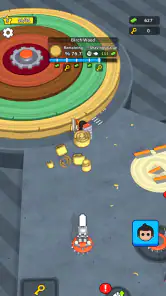
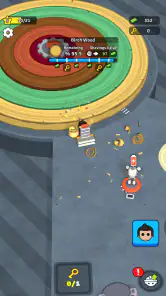


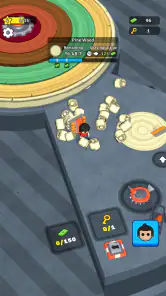
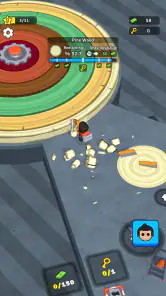
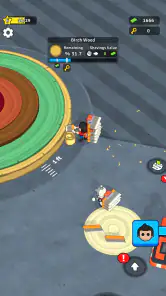
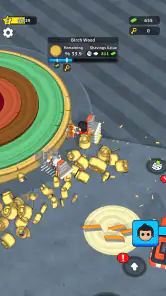
Analysis by Reviewed
I approach mobile adventure games with one practical question: do they feel pleasant to pick up when I have a few spare minutes, or do they demand more attention than the moment allows? Carve Quest is presented as a relaxed, rewarding adventure, and that framing makes it appealing for short breaks. My main advice is to treat it as a casual game to sample at your own pace, rather than expect a deep, fast-moving adventure with lots of explanation or a guaranteed smooth run on every device.
A useful way to test the rhythm
If I were deciding whether to keep playing, I’d try a few visits at different times rather than make up my mind after one distracted minute. A quiet break shows whether the activity itself is engaging; a second visit helps reveal whether I’m interested in returning once the novelty has softened. That small distinction matters with a game whose appeal depends more on its central activity than on a promise of a sprawling campaign.
For someone who wants an easy game to share a device with a child, the Everyone rating is a helpful starting point, but I would still check the purchase settings before handing over the phone. The free entry point makes trying it straightforward, while the in-app purchase range means it is worth setting a clear household rule before play. I’d treat “free to start” and “no spending concerns” as two different things.
How the pace feels in everyday play
The appeal here is the promise of a calmer kind of progress. That can suit a commute, a quiet moment after work, or a short pause while waiting for something else. I would choose a game with this kind of low-pressure pitch when I want a simple diversion, not when I’m looking for a story-heavy campaign or a demanding test of reflexes.
There is an important distinction between a game being described as relaxing and every session actually feeling relaxing. A repeated task can be satisfying when I can make progress without concentrating intensely; it can also become monotonous if I want new challenges at a brisk pace. I’d start with a brief session and see whether the carving-focused premise holds my interest before making it part of a daily routine.
For speed expectations, I’d avoid assuming that “rewarding” means rapid advancement. The short description gives a broad sense of the game, but not enough to promise a particular progression speed or session length. In practical terms, this is better approached as a casual experience whose rhythm you can judge while playing, rather than a game to install expecting a specific pace or a long list of modes.
Where it fits—and where it doesn’t
Rollic Games is the developer, and the game sits in the adventure category. Its relaxed positioning sets it apart from action-led mobile adventures that put constant pressure on quick reactions. If you usually reach for a puzzle game to unwind, this may offer a more hands-on-feeling alternative; if you want complex exploration, tactical choices, or a strong narrative, a more substantial adventure is likely a better match.
More From Our News Desk

Weather by Xiaomi Review: Clear at a Glance, Less Clear Up Close

X Under Pressure: Can It Recover When Posting Goes Wrong?

Clash of Clans Is Won Between the Battles

Android Auto Makes the Case for Quieter Car Software

MobiOffice: Transforming Mobile Productivity with Seamless Integration

EA SPORTS FC™ Mobile Soccer: Redefining Mobile Sports Gaming
A realistic use case is opening it during a short break when you have enough time to focus on one small stretch of play, but not enough to settle into a long game. I would keep expectations modest at first: try it when you are not rushing, notice whether the controls and pace feel comfortable, and decide from that experience whether it suits quick repeat visits. That is more useful than judging it by its broad promise alone.
Choosing it over another kind of mobile game
Compared with a conventional puzzle game, this is a better fit if you want an activity that feels tied to carving rather than solving a board of logic problems. Compared with a story-led adventure, it asks less of your memory and commitment, but that lighter approach also means it may not offer the narrative pull or sense of discovery you want. I’d choose based on what I’m in the mood to do, not just the broad adventure label.
It can also sit between idle games and more demanding action titles in a player’s rotation: a possible middle ground for someone who wants to interact, but not compete or react under pressure. That is a preference test, not a claim about specific modes. If you need a game that reliably fills a long evening, I’d look for a title with clearly varied activities or a stronger campaign structure instead.
What to watch during longer sessions
Casual games can feel very different in a quick tryout versus a longer stretch. Repeating a relaxed activity may be soothing for a while, then expose a lack of variety or make progress feel less compelling. I’d pay attention to whether I still want to continue after the initial novelty wears off. If I find myself playing only because I’m chasing the next reward, rather than enjoying the activity, that is a sign to take a break or choose something with more varied challenges.
Longer use also makes interruptions more noticeable. Before starting a session when you might need to stop suddenly, it is sensible to check how the game handles leaving and returning. I can’t promise a particular save or recovery behavior, so I would not begin a lengthy stretch on the assumption that progress will always resume exactly where I left off. For short, low-stakes play, that uncertainty matters less; for a focused session, it matters more.
Another useful trade-off is attention. A calm game may be a good companion when you want a little engagement without the intensity of competitive play, but it still deserves your focus. I wouldn’t play while walking, crossing streets, or handling something that needs both hands. A low-pressure mood is not the same as being safe to ignore your surroundings.
Stability, interruptions, and recovery
I would assess reliability through ordinary use rather than infer it from the game’s category or its popularity. Try opening it, playing for a few minutes, and returning after switching away briefly. If it behaves consistently on your phone, that is a more relevant sign for your own setup than broad expectations about mobile games. If it closes or feels sluggish, restart it and check whether the issue repeats before deciding whether it is a persistent problem.
That small test also answers a practical question: is it comfortable to play in fragments? Some people prefer a game that works as a quick check-in, while others want a stable experience for longer sessions. Because recovery after an interruption can depend on the device and the way the game is running, I would avoid relying on it for a session where losing continuity would be especially frustrating.
The game has passed one million installs and holds an average rating of 3.6 from around eleven thousand ratings. Those figures suggest it has attracted a substantial audience, while the mixed average is a reminder that it will not suit everyone equally. I’d use them as context, not as proof that performance or enjoyment will be identical on your device.
Device fit and spending considerations
The game is listed for devices running Android 7.0 or later, which gives many Android users a clear compatibility starting point. Meeting that minimum does not guarantee the same responsiveness on every phone, especially if a device is older or busy with other apps. If the game feels slow, close other demanding apps and try again; that simple check can help distinguish a crowded device from a problem you encounter repeatedly in the game itself.
For a fair first impression, make sure your device has some free space, avoid testing while several heavy apps are running, and try both a short session and a return after briefly switching away. These are practical checks, not promises that they will fix every issue. If your phone struggles with other recent games, I would be cautious about expecting especially smooth performance here just because the game aims for a relaxed feel.
Carve Quest is free to download, with in-app purchases ranging from $1.99 to $99.99 per item. That range makes it worth paying attention to purchase prompts and setting device-level spending controls if children may use the phone. The content rating is Everyone, but an age rating does not tell you whether the game’s purchase options fit your household’s rules. I’d try the free experience first and avoid spending until you know you genuinely enjoy returning to it.
Who should give it a try
I’d recommend giving it a chance if you like casual adventures, prefer a gentler pace to constant action, and are happy to decide whether a game works for you by sampling it. The game is free, and its Everyone rating makes it broadly approachable, though parents should still consider the available purchases. It is also a reasonable option for someone who wants a small mobile diversion rather than a major commitment.
I would skip it if your priority is a rich storyline, elaborate exploration, guaranteed long-term variety, or precision performance for extended play. Players who dislike repetition should be especially cautious: a relaxed central activity can be enjoyable without being endlessly engaging. If you want a more varied challenge, a puzzle adventure or a story-focused mobile game may serve you better.
The game launched on March 19, 2025, and its current version is 2.55.3. When considering it now, I would check that my device meets the Android requirement, try the game without rushing, and keep an eye on spending prompts. Those steps matter more than expecting the version number or release timing alone to predict how it will run for you.
My performance verdict
My overall view is that Carve Quest sounds best suited to low-pressure, short visits, with its appeal depending on whether its central activity stays satisfying for you. I would not choose it as my first pick for a demanding adventure or assume it will feel equally responsive on every device. Start with a brief session, test how it handles an interruption, and judge the pace before investing time or money.
That is the fairest way to approach a casual game with a broad audience and a mixed average rating: let your own phone and your own tolerance for repetition decide. If the calm rhythm works for you, it could become a pleasant break-time option. If you quickly want more variety, deeper progression, or a stronger story, moving on is a sensible choice rather than a missed opportunity.
A practical first-session plan
For a low-friction trial, I’d open it when I have a few unhurried minutes, keep the phone comfortably charged, and avoid beginning while multitasking. I’d notice whether the game responds consistently, whether the activity feels satisfying without a long warm-up, and whether I’m curious to return later. That gives a more useful answer than trying to judge it by a single moment when I’m distracted or in a hurry.
If the first session goes well, I’d still wait before making purchases. A return visit is a better test of lasting interest than the initial appeal, especially for a casual game that may rely on repeating its main activity. If I find the pace too slow, or the same actions stop feeling enjoyable, I’d move on rather than spend to force a better fit.
What makes it a personal fit
For me, the key decision is not whether a relaxed adventure is objectively better than a puzzle or a narrative game; it is whether I want a gentle, focused distraction at that particular time. Someone who likes to pick up a phone, engage with one simple premise, and put it down again may find this a comfortable match. Someone who needs frequent surprises or a clear story payoff may feel under-served even if the game runs adequately.
My final recommendation is cautious but positive for the right player: try it free, check how it behaves on your own device, and judge the carving-centered activity over more than one visit. The audience size shows that many people have tried it, but the rating also leaves room for mixed reactions. If you value a calm mobile break, it is worth sampling; if you are shopping for depth, variety, or dependable long-session continuity, another adventure is likely the wiser choice.
Carve Quest Frequently Asked Questions
What is Carve Quest, and what do you do in the game?
Carve Quest is a casual mobile game built around carving and shaping objects as you work through a series of challenges. Its appeal comes from the hands-on carving activity and the sense of progress as each task is completed. The exact objectives, tools, and available modes can depend on the version you install, so check the store listing and screenshots to confirm what is included.
Is Carve Quest free to download, and does it include in-app purchases?
Carve Quest may be available to download for free, but a free download does not necessarily mean every feature is free. Some versions of mobile games offer optional purchases, advertisements, or paid content. Before installing, review the current Google Play or App Store listing for pricing details, in-app purchase information, and any notes about ads. These details can vary by platform, region, and app update.
Can I play Carve Quest offline?
Whether Carve Quest works without an internet connection can depend on how its current version handles loading, advertising, saved progress, and other online features. Some parts of a game may remain playable offline even if an internet connection is needed for initial setup or certain functions. If offline play matters to you, check the store description and test the game in airplane mode after installation rather than assuming every feature will work.
Is Carve Quest suitable for children?
Carve Quest may be approachable for players who enjoy simple, creative gameplay, but suitability depends on the content, controls, and advertising in the version available in your region. Parents should check the age rating, content descriptors, privacy information, and in-app purchase settings on the relevant app store. If a child will play, consider enabling purchase restrictions and reviewing the game together before allowing access.
Which devices support Carve Quest, and how can I download it safely?
Carve Quest availability and compatibility can differ between Android and iOS devices, as well as by country and operating-system version. Check the official Google Play Store or Apple App Store page for supported devices, storage requirements, and the latest update information. Downloading from an official store helps you avoid unofficial files, but you should still review the developer details and requested permissions before installing.
Pros
- Straightforward controls make it easy to start carving.
- Short levels suit quick play sessions.
- Carving gives each level a satisfying sense of progress.
- The gameplay offers a relaxing alternative to fast-paced action games.
- Simple objectives make the game accessible to casual players.
Cons
- The core carving mechanic may feel repetitive over time.
- Players looking for a deep story may find little narrative.
- Level challenges may offer limited variety.
- The game may not appeal to players who prefer competitive play.
- Progress can feel slow if later stages require repeated attempts.
- Category
- Adventure
- Version
- 2.55.3