Bowling 3D Pro
- 2.95K
- 4.6
- Installs
- 1.00M
- Price
- Free

Screenshots
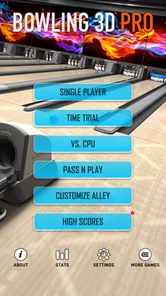
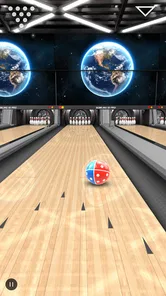
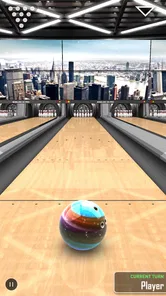
Analysis by Reviewed
I approached Bowling 3D Pro as a quick sports game rather than a full bowling simulator, and that distinction matters. It is free to start, easy to understand, and built around the simple pleasure of lining up a shot, choosing your release, and watching the pins react in a three-dimensional lane. After spending time with it, I found the strongest part of the experience is how quickly it gets from opening the game to taking a turn. There is very little learning overhead for someone who simply wants a bowling break on a phone.
The game comes from EivaaGames and sits in the sports category. Its presentation aims for realistic-looking 3D bowling instead of a flat arcade board, but it remains approachable enough for casual play. That balance makes it suitable for short sessions, family use, and anyone who enjoys bowling without wanting a complicated career system or a large collection of rules to study first.
How Bowling 3D Pro feels in everyday play
The first thing I noticed was the pace. A bowling game can become frustrating when every turn is buried under menus, loading screens, or complicated setup. Here, the basic loop is immediately recognizable: prepare a shot, send the ball down the lane, and react to the result. That makes it a good choice when I have only a few minutes, such as waiting for an appointment or taking a short break between tasks.
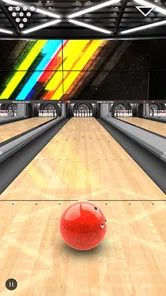
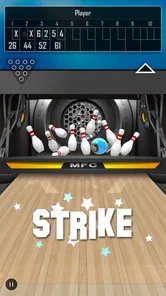
The realistic 3D presentation helps the game feel more like a digital bowling lane than a simple score counter. The lane, ball, and pins give the action enough visual weight to make each throw satisfying, especially when a well-aimed shot clears most of the deck. At the same time, I would not mistake the graphics for a console-level simulation. The appeal is clarity and immediacy, not a huge visual world filled with detailed environments.
Controls are the part that determines whether the game remains enjoyable. Bowling depends on small adjustments, and a touch interface can make those adjustments feel either natural or slightly imprecise depending on the device and the way I hold it. I found that deliberate movements work better than hurried swipes. Taking an extra moment to line up the ball is usually more useful than trying to play at maximum speed.
That leads to one of my practical tips: I treat each throw as a short setup routine rather than a reflex action. I first look at the starting line, decide whether I want a direct shot or a slight angle, and then make one controlled movement. This reduces accidental releases and makes the game feel more consistent. It is a small habit, but it matters more here than simply tapping quickly through turns.
Speed is a real strength, with a small trade-off
For casual sessions, the game feels quick because the central action is always close at hand. I do not need to learn a long control scheme before playing, and the bowling format naturally breaks into manageable turns. That makes it easy to stop after a few shots without feeling that I have abandoned a complicated mission halfway through.
More From Our News Desk

 Gmail
GmailGmail in a Busy Inbox: Who Benefits Most?
From first account to crowded workday, Gmail earns its place through dependable search and flexible sorting—but its best fit depends on how much inbox maintenance you can tolerate.

 Prime Video
Switching to Prime Video: What Changes in Your Viewing Routine
Prime Video can make a compelling second home for streaming, but switching means learning a different catalog, rental layer, and route from browsing to playback.

 Universal TV Remote Control
Universal TV Remote Control Works Best as a Reliable Backup
A phone remote earns its place through quick setup and reliable habits. Here is how to get more from Universal TV Remote Control—and where its limits show.

 Weather - By Xiaomi
Weather by Xiaomi Review: Clear at a Glance, Less Clear Up Close
Xiaomi’s weather app makes everyday forecasts quick to scan, but its calm surface can leave useful details and recovery paths harder to find than they should be.

 X
XX Under Pressure: Can It Recover When Posting Goes Wrong?
A resilience-focused review of X, examining setup, mistaken posts, interruptions, weak connections, and the gaps that matter when recovery needs to be dependable.

 Clash of Clans
Clash of Clans Is Won Between the Battles
Its raids are quick; its community is a long-term project of coordination, teaching, rivalry, and shared responsibility—with all the friction that entails.
Latest News



The trade-off is that players looking for a deep sports package may find the experience narrower than expected. Bowling itself has plenty of strategy, but a compact mobile game cannot provide the same sense of physical presence as a real alley. If I want the sound, social atmosphere, and tactile feedback of actual bowling, this cannot replace it. It works better as a convenient digital version of the activity.
I also think the pace depends on expectations. Someone searching for a fast arcade game may prefer more exaggerated action, while someone seeking a thoughtful bowling practice session may appreciate the slower concentration before a release. The game sits between those two styles. It is not purely frantic, and it is not trying to be a detailed coaching tool either.
What happens during longer or heavier sessions
Short play is where the design makes the most sense. During a longer session, the repeated lane-and-pins structure becomes more noticeable. That is not necessarily a flaw; bowling naturally repeats its basic action. Still, players who need constant novelty may eventually feel that the core loop does not change enough to hold their attention indefinitely.
In my view, the best way to use it heavily is in focused bursts. I might play several turns while trying to improve my aim, then put it aside rather than forcing a marathon session. This approach also makes each mistake easier to assess. If I keep throwing without thinking, a poor result becomes just another tap. If I pause between attempts, I can decide whether the problem was alignment, timing, or simply an overly ambitious angle.
A useful everyday scenario is a friendly pass-and-play moment. Two people can take turns trying to beat a score without needing to understand a complicated sports interface. The game’s straightforward premise makes it accessible to younger players and casual users, which fits its Everyone content rating. I would still keep expectations realistic: it is better for informal competition than for recreating the full social experience of a bowling center.
Another practical use is short concentration practice. I would not call it a training system, but the repeated need to line up a shot encourages patience. Players can use a few turns to develop a consistent routine: choose a target, make a controlled release, and review the result. That is more rewarding than randomly swiping and hoping for a strike.
Stability and recovery in normal use
The game has been available since December 1, 2015, and its current version is 2.12. That history gives it the feel of an established mobile title rather than a brand-new experiment. It has also reached over a million installs, with an average rating of 4.6 from around eighteen thousand ratings and roughly three thousand written reviews. Those figures suggest that many players find the basic experience dependable enough to keep using, although popularity alone cannot guarantee identical behavior on every phone.
From a user perspective, reliability is less about dramatic features and more about whether I can return to a quick game without unnecessary friction. Bowling is a self-contained activity, so there are fewer moving parts to understand than in a large sports management title. That simplicity is helpful when recovering from an interrupted session: I can usually remember what I was doing immediately because the game’s purpose is so clear.
There is an important limitation to that observation. A bowling game can be simple to resume without offering sophisticated recovery tools. If I am expecting deep progress tracking, elaborate backups, or a broad account-based ecosystem, I should look elsewhere or check the current store experience before committing to it. The title’s strength is the throw itself, not a large surrounding platform.
I also recommend closing other demanding apps before a long session on an older phone. That is not a claim that this game is unusually heavy; it is simply sensible practice for any 3D game. Keeping the device free of unnecessary background activity can make touch response feel more predictable and reduce the chance that an interruption becomes annoying.
Device limits and what the graphics imply
The minimum operating-system requirement is Android 5.1, which makes the game accessible to a broad range of Android devices. That does not mean every compatible phone will deliver exactly the same experience. Screen size, touch sensitivity, available memory, and the age of the device can all affect how comfortable it feels to aim and release a ball.
On a smaller screen, the main challenge is not reading text but making precise gestures without covering too much of the lane with a finger. I prefer holding the phone steadily and using a controlled movement from a comfortable position. On a larger screen, the lane is easier to read, but the device may be less convenient for one-handed play. This is one of the rare cases where a smaller phone can feel more portable while a larger one can feel easier to control.
The 3D presentation also means the game is not as visually minimal as a basic two-dimensional score game. Players with older hardware should expect the experience to depend more on the phone’s general condition than on the operating-system requirement alone. I would not choose it specifically for a very low-end device without trying it first, especially if that device already struggles with other 3D applications.
Battery expectations should be practical rather than extreme. A short bowling session is a modest use case, but repeated play with a bright screen can still contribute to normal battery drain. If I am traveling and trying to conserve power, I would play briefly, lower the screen brightness when comfortable, and avoid treating the game as an all-day activity. These are ordinary mobile trade-offs, but they matter more when the game is being used as a regular time filler.
Free access, optional spending, and value
The game is free, which is a major reason it is easy to recommend for a trial. I can see whether the controls and visual style suit me without paying before I understand the basic loop. In-app purchases are listed at $2.99 per item, so anyone who prefers to keep spending at zero can approach it as a free casual game, while others should remember that optional purchases are part of the overall experience.
My advice is to play enough to decide whether the core throwing mechanic is enjoyable before considering any purchase. A paid item cannot fix a control style that feels wrong in my hand, and it cannot turn a compact bowling game into a full simulation. The sensible value question is whether the simple lane-and-pins loop already gives me enough entertainment. If it does, the free entry point is attractive; if it does not, spending more is unlikely to change the fundamental fit.
Compared with bowling games that focus heavily on cartoon characters, exaggerated power-ups, or constant unlocks, this one is more appealing to players who want the sport itself to remain recognizable. Compared with a detailed console or PC bowling simulator, it is more convenient but less immersive. Compared with real bowling, it is cheaper and available anywhere, but it cannot reproduce the physical release, lane conditions, or shared atmosphere of an alley.
Who should play it, and who should skip it
I would recommend it to someone who wants a straightforward sports game for short sessions, especially if realistic-looking 3D lanes are more appealing than a highly stylized arcade presentation. It also suits families and casual groups because the basic idea is understandable without a long tutorial. The Everyone rating supports that broad accessibility, although individual comfort with touch controls will still vary.
I would be more cautious about recommending it to a player who needs deep progression, a large competitive community, or a detailed simulation of bowling technique. It is also not the right choice for someone who dislikes repeated turn-based sports actions. Even a polished bowling game still asks the player to perform variations of the same basic task, and no visual upgrade can completely remove that repetition.
Players who mainly want a social night out should choose a real bowling venue instead. Players who want a richer sports-management experience should choose a game built around teams, seasons, or strategy. This title makes more sense for the gap between those options: a quick, private bowling session when I have a phone but no lane nearby.
My performance verdict after using it
My overall impression is that Bowling 3D Pro succeeds because it keeps the important part visible: line up a shot and see what happens. Its perceived speed is good for short play, its 3D design gives the simple action some presence, and its long availability plus broad install base make it feel like a familiar, established option. The minimum Android 5.1 requirement also keeps the door open to older compatible devices, though actual comfort will depend on hardware and touch response.
The limitations are equally clear. Longer sessions can expose repetition, precise throws may require patience rather than frantic gestures, and the game does not replace the atmosphere or physical feedback of real bowling. Optional purchases at $2.99 per item also mean I would judge the free core experience first instead of assuming extra spending is necessary.
My recommendation is to try it when you want a compact bowling break, not when you want a complete bowling lifestyle in your pocket. EivaaGames has focused the experience on accessible 3D play, and that focus is its greatest advantage. If I were handing my phone to a friend for a quick sports game, I would feel comfortable suggesting it, especially to someone who values immediate play and simple controls over elaborate systems. For a deeper simulation or richer long-term variety, I would point that friend toward a different kind of bowling game.
Bowling 3D Pro Frequently Asked Questions
What age rating does Bowling 3D Pro have, and is it suitable for family play?
Bowling 3D Pro is rated Everyone, so its content is intended to be suitable for a broad audience, including children. The bowling-focused gameplay makes it an approachable option for family play. As with any game that offers optional purchases, parents may want to supervise payment settings on a shared device so younger players do not make unintended transactions.
How much storage does Bowling 3D Pro need, and what devices can run it?
Bowling 3D Pro runs on Android devices using version 5.1 or later. Before installing, it is sensible to check that your device has enough available storage and that its operating system is compatible. The game is designed for mobile play, and performance can vary between phones and tablets depending on their hardware and screen responsiveness.
Can I play Bowling 3D Pro against friends or other players?
Bowling 3D Pro centers on mobile bowling, with the main appeal being the chance to aim and control your throws in a three-dimensional setting. If you are downloading it specifically to compete with friends or join online matches, check the current app listing for the available play modes before installing. The core bowling experience can still suit casual solo sessions.
Is Bowling 3D Pro free to download, and are there optional purchases?
Bowling 3D Pro is free to download, so you can try its bowling gameplay without paying upfront. The game also offers in-app purchases, priced at $2.99 per item. Check the purchase options before confirming any transaction, particularly if children use your device. The free download and optional purchases make it worth reviewing the payment settings on your Android or iOS device before you start playing.
Who developed Bowling 3D Pro, and what kind of game is it?
Bowling 3D Pro is a sports game from EivaaGames, built around playing bowling in realistic three-dimensional graphics. It is designed for players who want a straightforward bowling experience on a mobile device, whether they are familiar with the sport or simply looking for a casual game. Its focus is on aiming and controlling throws rather than offering a broad collection of different sports.
Pros
- Realistic 3D lanes and physics make each throw feel satisfying.
- Multiple bowling environments add visual variety between games.
- Simple controls are easy for beginners to understand quickly.
- Works well for short
- casual matches when you have limited time.
- Offline play lets you enjoy bowling without a constant internet connection.
Cons
- Limited modes may feel repetitive after extended play sessions.
- Some advanced features may require in-app purchases or extra unlocks.
- Touch controls can occasionally make precise shots difficult.
- Visual quality may vary depending on your device’s performance.
- Ads can interrupt the experience in the free version.