Viral Streamer: Idle Clicker
- 36.00
- 4.7
- Installs
- 100.00K
- Price
- Free

Screenshots

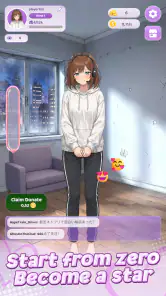





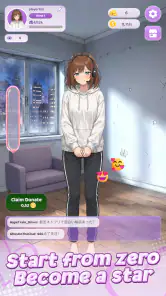
Analysis by Reviewed
I approached Viral Streamer: Idle Clicker as a small, low-pressure simulation game rather than a serious streaming simulator. Its central idea is easy to grasp: tap to build momentum, collect donations, and use progress to develop an anime streamer’s career. That makes it approachable at a glance, though the experience is also shaped by the familiar limits of idle and clicker games: repetition, gradual progression, and the temptation to pay to move faster.
What stood out to me most is how much the concept depends on a simple loop. You do not need streaming knowledge or a complicated strategy guide to understand the premise. Instead, the appeal is in watching a character’s career take shape through small actions and unlocks. If you enjoy casual simulations with a playful anime theme, it is an easy game to sample. If you want deep management decisions or a hands-on creative tool for making streams, this is not that kind of experience.
Getting oriented in a streamer-themed simulation
A clear premise, with a deliberately narrow focus
The game is published by CSCMobi Studios and sits in the simulation category, but its streaming theme is more of a setting for incremental progress than a realistic recreation of broadcasting. The focus is on tapping, earning donations, and advancing an anime streamer’s career. That focused premise helps newcomers understand what they are working toward without first learning a large set of systems.
I see that simplicity as a genuine advantage for short sessions. You can open the game, make progress, and leave without having to remember a complicated plan. The trade-off is that players looking for detailed choices about stream schedules, audience management, equipment, or content creation may find the concept lighter than the theme suggests. I would treat it as a character-progression clicker with a streamer backdrop, not as a full creator-management game.
The available audience response suggests that the idea has found an interested player base: it has a 4.7 average from around 4,900 ratings, and it has passed 100,000 installs. Those figures are useful context, but they do not tell me whether its particular rhythm will suit you. Clicker games can be enjoyable to one person and monotonous to another, even when both understand the same goal.
Reading the game without rushing
Because the core action is so direct, the game is easier to approach than a simulation built around many menus and interlocking resources. I would still recommend taking a moment to inspect the screen before tapping repeatedly. In games of this type, acting quickly can make it harder to notice which progress cues matter, what an unlock changes, or whether a purchase prompt is separate from ordinary advancement.
A useful habit is to pause whenever a new outfit or career milestone appears and check what has actually changed. That turns the stream of small rewards into something more legible: rather than tapping on autopilot, you can connect an action with its outcome. It is also a simple way to decide whether a cosmetic reward is meaningful to you or whether you would rather save your attention for the next progression step.
I would not assume that a straightforward concept automatically means every screen will feel equally clear to every player. Readability depends on the device, display settings, eyesight, and how comfortably someone can distinguish the game’s visual elements. If text or icons are hard to make out on your phone, the practical test is whether you can still identify the main action and the next useful choice without strain. If not, the repeated nature of a clicker can make that friction more noticeable over time.
Input demands, comfort, and sensory pace
Tapping is the defining interaction, so motor comfort deserves attention before settling into a long session. A player who finds repeated touch input tiring may prefer brief visits rather than trying to push through an extended run. I would also avoid treating rapid tapping as a requirement unless the game itself makes that clear; a calmer pace is a sensible starting point while you learn how progress works.
One practical approach is to use the game in small windows: check in, make a few deliberate taps, review any new unlock, and stop when the interaction begins to feel repetitive or uncomfortable. This does not depend on a special feature. It is simply a way to keep a tap-focused game manageable for someone with limited hand stamina, temporary discomfort, or a preference for less repetitive input.
The anime presentation and reward cycle may also be a matter of sensory preference. Some players enjoy frequent visual changes and a steady sense of activity; others prefer quieter screens and fewer prompts competing for attention. If you are sensitive to busy interfaces or animated feedback, try a short first session in a comfortable setting and see whether the game’s pace feels pleasant rather than distracting. I would not choose it expecting a subdued, text-led simulation.
Where it fits into an ordinary day
This is the sort of game I would keep for a spare moment between tasks, not for a session that needs sustained concentration. For example, if I had a few minutes while waiting for a ride, I could open it, make progress toward an outfit or career step, and close it again. That use case suits the simple loop better than trying to turn each visit into a lengthy optimization session.
That same flexibility can help when attention is limited: the basic premise is easy to return to, and you are not being asked to learn a complex story before doing anything useful. On the other hand, it may be a poor fit in situations where tapping is awkward, such as while walking, holding something, or using a phone one-handed in a crowded place. A game can be simple and still need a comfortable, stable moment for touch input.
It is free to download, with in-app purchases ranging from $0.99 to $49.99 per item. That makes it worth deciding in advance whether you want to play without spending. My advice is to treat purchases as optional and first see how satisfying the ordinary pace feels. A large price range can make an impulse purchase easy to regret, especially in an idle game where the main appeal is gradual progress.
Progression choices and the cost of convenience
Unlockable outfits give the streamer’s growth a visible, personal element, which is more engaging than watching a number rise with no change in presentation. A useful way to enjoy that aspect is to set your own small target, such as reaching the next outfit you genuinely like, then reassessing whether you still want to continue. That keeps the loop anchored to a reward you care about rather than to tapping simply because the game invites it.
The key trade-off in an idle clicker is usually between patience and convenience. Here, donations and career growth provide the theme for that trade-off, while optional purchases create a route for spending. I would not buy anything just to test whether the game becomes more fun; first establish whether you enjoy the basic actions. If the repeated loop already feels dull, accelerating it is unlikely to fix the underlying mismatch.
Compared with management simulations that emphasize planning, this game appears better suited to players who want an uncomplicated, incremental routine. Compared with other clickers, its anime streamer identity and outfit progression give it a more specific flavor, but they do not remove the genre’s repetition. Choose it for the character theme and easy-to-understand advancement; choose a deeper management game if you want consequential decisions, or a creative streaming app if your goal is to produce actual broadcasts.
Who may find it difficult to stick with
The biggest limitation is not a complicated rule set; it is the possibility that the central action will wear thin. If you quickly tire of repeating taps or prefer games where each decision changes the outcome in a substantial way, the simplicity that helps newcomers may also make the experience feel shallow. I would be cautious about recommending it to someone who expects a detailed simulation merely because the subject is streaming.
There is also a difference between a game being easy to start and being comfortable for everyone to use. The tap-centered loop may not suit players who need reduced repetitive input, while small screen elements can be challenging depending on the phone and the player. A sensible trial is to play briefly, check whether the controls feel comfortable, and stop if the repeated motion or visual pace becomes tiring. The Everyone age rating makes it broadly suitable by age, but it does not guarantee that its interaction style will suit every person.
Viral Streamer is currently at version 1.1.7 and runs on Android 7.0 or later. That helps readers with older Android devices judge basic compatibility, though the experience still depends on whether the game feels usable on a particular screen and setup. It is free to start, but the optional purchases are worth keeping in mind before handing the phone to a younger player or anyone likely to make purchases impulsively.
A balanced recommendation for inclusive play
My recommendation is to try it when you want a light, anime-themed progress loop that can fit around a busy day. The clearest strengths are its understandable premise, small-session appeal, and the personal touch of unlocking outfits as the streamer advances. Its limits are equally important: tapping is central, repetition is part of the deal, and purchases offer paid convenience rather than transforming the game into a deeper simulation.
It is best for someone who enjoys seeing modest progress accumulate and likes the streamer character enough to make those milestones feel rewarding. It is less suitable for players who want minimal touch input, a slower sensory presentation, or strategic management with substantial choices. I would start with a short, no-spend session, notice whether the interface is comfortable to read and use, and decide from there. That gives you a fair sense of the game without assuming that a popular clicker will automatically be the right fit for your hands, attention, or taste.
With its Everyone rating, free entry, and a small but established audience reflected in 36 written reviews, it is an approachable option for curious players, but not one I would recommend blindly to every simulation fan. If you enjoy the routine, the anime career theme can make brief check-ins pleasant. If you find yourself tapping without caring about the next unlock, that is a good sign to move on to a game with more varied interaction.
Viral Streamer: Idle ClickerViral Streamer: Idle Clicker Frequently Asked Questions
What is Viral Streamer: Idle Clicker?
Viral Streamer: Idle Clicker is a casual management game built around the fantasy of growing an online streaming channel. Players typically tap to earn progress, improve their setup, and unlock upgrades intended to increase their audience and income. Its idle-style systems are designed to keep progress moving between sessions, though the pace and available features can vary by version. Check the store listing for the latest description and screenshots before downloading.
How do you play Viral Streamer: Idle Clicker?
The main loop is generally based on tapping to build momentum and spending earned resources on upgrades that help the streamer attract viewers and generate more rewards. As the channel develops, new improvements or milestones may become available, giving you reasons to return and reinvest. The controls are intended to be straightforward for short sessions, but progression can become more gradual, so choosing upgrades thoughtfully may help you advance more efficiently.
Can you make progress while the game is closed?
As an idle clicker, Viral Streamer: Idle Clicker may offer rewards or progress that accumulate while you are away, allowing you to return and collect what your channel has earned. The exact amount, time limit, and availability of offline earnings depend on the current game version and its settings. Review the in-game instructions, and note that some bonuses or faster progression may require watching ads or making optional purchases.
Does Viral Streamer: Idle Clicker require an internet connection, and does it contain ads?
Connection requirements and advertising can differ between releases, devices, and regions. Some parts of an idle game may work offline, while rewarded bonuses, advertisements, cloud features, or store services generally need internet access. The game may also present ads or optional purchases as ways to gain extra rewards or speed up progress. Check the app-store page and the game’s privacy and purchase information before installing, especially if you prefer an ad-free experience.
Is Viral Streamer: Idle Clicker free, and what should I check before downloading?
The game may be free to download while offering optional in-app purchases, advertisements, or paid items; confirm the current pricing details on the Google Play or Apple App Store listing. Before installing, check that your device meets the listed requirements, read recent user reviews, and verify the developer and requested permissions. Availability, features, and compatibility can change with updates, so rely on the store page for the most current information.
Pros
- Simple tap-to-grow gameplay is easy to pick up.
- Idle earnings provide progress even when you’re away.
- Short sessions suit quick breaks throughout the day.
- Upgrades give you clear goals as your channel grows.
- Streamer theme adds a playful twist to idle clicking.
Cons
- Progress can slow down without frequent upgrades.
- Repeated tapping may feel monotonous over time.
- Ads or optional purchases may affect the experience.
- Idle rewards may require returning regularly to claim them.
- Gameplay offers limited depth compared with strategy games.

- Category
- Simulation
- Version
- 1.1.7