

Village City Life Building
- 289.00
- 3.7
- Installs
- 50.00M
- Price
- Free

Screenshots

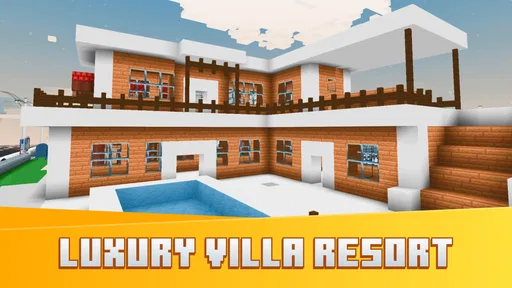

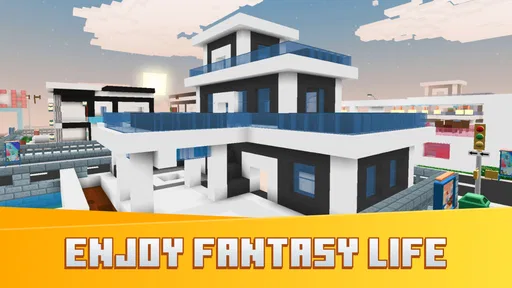
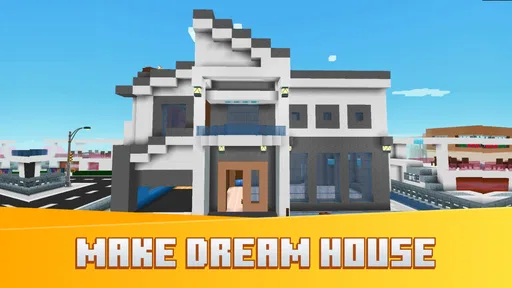

Analysis by Reviewed
I judge a city-building game less by how large its map can become and more by whether the small choices feel satisfying along the way. Village City Life Building is a simulation game from RabbitStudio that invites you to shape a settlement and watch it develop. I’d approach it as a relaxed creative pastime rather than a detailed planning tool: the appeal is the idea of making a place your own, while the usual city-builder questions—how much control you want, how quickly you like to progress, and whether you enjoy repeating small tasks—still matter.
What the cost does—and doesn’t—tell you
The game is free to download, so you can try its basic appeal without paying upfront. It also offers optional in-app purchases, with listed items ranging from $0.99 to $99.99. That is a broad range, not a promise that spending is necessary or that any one purchase is good value. I’d start without buying anything, learn what the ordinary play loop feels like, and only consider a purchase if a specific item solves a frustration you have actually encountered. For a younger player, I’d also make sure purchases are understood and supervised.
Where the value comes from
The value here is primarily the time spent arranging and developing a virtual village, not a guaranteed amount of content for a fixed payment. If I have a few spare minutes, I can think about what I want the town to look like and make a small change; if I’m in the mood for a longer session, I can focus on how the layout is coming together. That flexibility suits players who enjoy visual progress and creative tinkering. It is less compelling if you want a tightly authored campaign, a clear finish line, or a simulation that exposes lots of detailed planning controls.
One useful way to test whether it fits is to play with a personal design goal rather than trying to expand as quickly as possible. I might keep a simple theme in mind—such as a compact, orderly village—and see whether the building choices let me express it. That makes the early sessions more purposeful and gives me a reason to return beyond simply collecting more space or structures. If the pleasure comes from shaping a scene, that can be enough; if you need every decision to unlock a substantial new mechanic, the experience may feel light.
How the building experience holds up
First things first, downloading Village City Life Building is a breeze. Available on both Android and iOS, it’s pretty much a tap away. Once you’ve got it installed, you’re met with a friendly tutorial that walks you through the basics. Trust me, even if you’re not a seasoned gamer, you’ll be laying down roads and zoning residential areas in no time.
The Gameplay Experience
The game kicks off with a small plot of land. Your mission, should you choose to accept it, is to transform this humble beginning into a thriving urban landscape. The interface is intuitive, with a drag-and-drop feature that makes placing buildings a cinch. And the graphics? Simply stunning. The vibrant colors and detailed animations make your city feel alive, bustling with activity day and night.
As your city grows, so do the challenges. You’ll have to balance the needs of your citizens, ensure there’s enough housing, manage resources, and keep the economy thriving. It’s a delicate dance, but that’s what makes it so engaging. Plus, who doesn’t love a bit of city drama now and then?
More From Our News Desk

 Gmail
GmailGmail in a Busy Inbox: Who Benefits Most?
From first account to crowded workday, Gmail earns its place through dependable search and flexible sorting—but its best fit depends on how much inbox maintenance you can tolerate.

 Prime Video
Switching to Prime Video: What Changes in Your Viewing Routine
Prime Video can make a compelling second home for streaming, but switching means learning a different catalog, rental layer, and route from browsing to playback.

 Universal TV Remote Control
Universal TV Remote Control Works Best as a Reliable Backup
A phone remote earns its place through quick setup and reliable habits. Here is how to get more from Universal TV Remote Control—and where its limits show.

 Weather - By Xiaomi
Weather by Xiaomi Review: Clear at a Glance, Less Clear Up Close
Xiaomi’s weather app makes everyday forecasts quick to scan, but its calm surface can leave useful details and recovery paths harder to find than they should be.

 X
XX Under Pressure: Can It Recover When Posting Goes Wrong?
A resilience-focused review of X, examining setup, mistaken posts, interruptions, weak connections, and the gaps that matter when recovery needs to be dependable.

 Clash of Clans
Clash of Clans Is Won Between the Battles
Its raids are quick; its community is a long-term project of coordination, teaching, rivalry, and shared responsibility—with all the friction that entails.
Latest News



Why You’ll Love It
One of the standout features that I absolutely adore is the customization options. You can design your city to reflect your personality. Want a beach paradise? Go for it. Prefer a high-tech metropolis? The choice is yours. The freedom to create is what keeps me coming back for more.
Moreover, the game incorporates a social aspect. You can visit friends’ cities and even collaborate on projects. It adds a layer of interaction that I find refreshing, especially when you see the different creative directions other players take.
Challenges and Rewards
Like any great game, Village City Life Building has its share of challenges. As you progress, managing your city becomes increasingly complex. But here’s the kicker: overcoming these challenges is immensely rewarding. Watching your city flourish thanks to your strategic decisions is a feeling like no other.
And let’s not forget the rewards. From unlocking new buildings to special events that offer exclusive content, there’s always something new to strive for. It keeps the gameplay fresh and exciting, ensuring you’re never stuck in a rut.
Everyday play and practical trade-offs
A realistic way to fit this game into a day is to open it during a short break, make one deliberate layout adjustment, and leave the larger redesign for a time when you can pay attention. That approach helps keep city planning enjoyable instead of turning every session into an attempt to optimize everything. I’d also take a moment before placing something to consider how it relates to nearby roads and buildings; even without treating the town like a spreadsheet, a little forethought can make the overall design feel more intentional.
Compared with many simulation games, the city-building premise puts visual authorship at the center: you are shaping a place, not simply completing a sequence of isolated rounds. That can be more relaxing than a competitive game, but it may be less satisfying than a deeper management simulator if you want transparent systems and fine-grained control. The practical trade-off is clear: choose this when you want a personal-looking village and approachable building, and choose a more complex city sim when detailed economic planning is the main attraction.
Who is likely to enjoy it
I’d recommend giving it a try if you like arranging buildings, watching a small settlement take shape, and returning to a project in short sessions. It may also suit someone who enjoys comparing creative ideas with friends, since visiting other cities gives the building side a social angle. The game is rated Everyone 10+, and its broad, accessible premise makes it easier to approach than a simulation built around specialist knowledge. It is not my pick for someone who dislikes gradual development, expects a fast competitive loop, or wants every action to produce an immediate, substantial reward.
It has attracted over 50 million installs and has an average rating of 3.7 from around 46,000 ratings, alongside 289 written reviews. I take that rating as a reminder to keep expectations measured rather than as a verdict on whether I’ll personally enjoy it: the appeal depends heavily on liking this particular kind of creative simulation. The game was released on April 1, 2023, and version 1.2.7 is the current version. It requires Android 7.1 or later, while iOS players can also find it on their platform.
Making the village feel like yours
I find the best way to get more out of a small-building session is to decide what I want the next change to accomplish before I start tapping around. A new road can be a visual divider, a route that connects two parts of town, or the start of a future cluster. Treating each placement as one piece of a larger composition prevents the settlement from becoming a scatter of unrelated structures. It is a simple habit, but it makes the creative side more rewarding even when I only have time for a brief visit.
There is also a useful distinction between making a town look attractive and trying to make every part of it efficient. Those goals can overlap, but they do not always lead to the same layout. I’d take a screenshot or pause to look at the whole settlement before making a major rearrangement, rather than judging each building in isolation. That helps me notice whether the village has a coherent shape and whether a new idea improves the overall view. Players who enjoy visual organization will likely appreciate this kind of self-directed challenge; players who want the game to clearly score every design decision may find it less satisfying.
How it fits into an ordinary day
Picture opening the game after school or during a quiet moment at home, with enough time to make one small improvement but not enough for a long session. I’d pick a single goal—tidy one corner, extend a road, or decide where a new cluster should sit—then stop once that change is in place. This keeps the game from turning into an open-ended chore and gives each visit a clear purpose. When I return, I can assess the result with fresh eyes instead of making several rushed changes I may want to undo.
That rhythm also makes it easier to judge whether the free experience is enough for you. If I’m already enjoying the ordinary act of arranging the village, I don’t need to spend just to prove the game has value. If I find myself repeatedly blocked or impatient, I’d first ask whether I still like the core building activity; paying for something cannot make a mismatched style of game suddenly feel right. The important question is not how much can be bought, but whether the time I’m choosing to spend in the town is enjoyable on its own.
What to expect from the social side
Visiting friends’ cities and collaborating can add a welcome point of comparison, but I would treat that as a bonus rather than the sole reason to download. The creative payoff is seeing how another player has interpreted the same broad idea of building a village, then returning to your own layout with a fresh perspective. If nobody you know is playing, the personal design challenge still gives you a reason to build; if social interaction is essential to your enjoyment, check that this part of the experience suits the way you want to play before making it your main game.
For families, the Everyone 10+ rating is a helpful starting point, not a substitute for deciding whether the game is right for a particular child. I’d also talk through the optional purchases in advance and keep spending settings in mind, especially because the available items span a wide price range. That way, a child can enjoy experimenting with a village without assuming that every appealing addition needs to be bought. The game’s approachable premise can make it easy to share, while the purchase choices are worth handling deliberately.
Choosing between a casual builder and a deeper sim
Against a more demanding city-management simulator, this game’s draw is the approachable, personal act of shaping a settlement. I would choose a deeper alternative if I wanted to study interconnected economic systems, plan around detailed constraints, or make every placement part of a larger optimization puzzle. I’d choose this one when I want a more relaxed creative outlet and am happy to set my own design goals. That difference matters: a game can be enjoyable without being the most mechanically complex option in its category.
It is also a different sort of break from a quick competitive or puzzle game. Those alternatives often give each session a clear round or challenge; a village-building project is more open-ended, so the payoff comes from noticing how the place changes over time. That can suit a player who likes returning to an evolving scene, but it may frustrate someone who wants a clean stopping point and an immediate win. I’d pick it for slow, visual progress, not as a replacement for a game built around short, defined matches.
Questions worth settling before you start
Can I try it without paying? Yes: the download is free, and I’d begin by learning whether the building loop is enjoyable before considering any optional purchase. Is there a way to play on iOS as well as Android? Yes, it is available on both platforms, and Android devices need version 7.1 or later. Is it suitable for a younger player? Its content rating is Everyone 10+, and I’d still discuss purchases with the child and supervise them as appropriate.
Will it suit someone who wants a detailed strategy game? Probably not as well as a specialist management sim; the stronger fit is a player who values customization, gradual development, and the pleasure of shaping a town. Do I need friends to enjoy it? I wouldn’t make that a requirement: visiting and collaborating add a social dimension, but the core appeal of arranging your own settlement can stand on its own. Those are the questions I’d answer before deciding whether to make room for it on my phone.
My buy-or-skip verdict
So, if you’re in the market for a game that offers both creativity and strategy, Village City Life Building is worth checking out. Whether you’re a casual player looking to kill some time or a die-hard fan of city builders, this game has something for everyone. Happy building!
My more specific advice is to try the free download first and decide based on the feel of building, not on the promise of future rewards. The optional purchases make it possible to spend, but the listed price range alone cannot tell you whether any item is worthwhile for your play style. If you enjoy customizing a village and can accept that a casual simulation may not offer the depth of a dedicated management game, it is an easy one to sample. If you are only interested in intricate systems or a clearly bounded story, I’d skip it and look for a city builder designed around those priorities.
Village City Life Building Frequently Asked Questions
Is Village City Life Building suitable for someone new to city-building games?
Yes. Village City Life Building is a simulation game built around creating and managing a city, so it offers a familiar starting point for players who enjoy shaping a town and developing it over time. You can begin with basic building and resource decisions, then expand as you become more comfortable with the different parts of your city.
What kind of game is Village City Life Building?
Village City Life Building is a simulation game with a building focus. Its store summary describes the experience as simulating and building a world with a variety of cubes, while the short description calls it Village City Life. If you enjoy arranging buildings and developing a place of your own, its central premise may appeal to you.
How much storage space should I set aside before downloading?
Before installing Village City Life Building, it is sensible to check the available storage on your device and leave enough room for the game and any updates. The installation size can vary by device and may change over time. If space is limited, removing unused files or apps first can help avoid interruptions during download or installation.
Can I play Village City Life Building in short sessions?
The game’s city-building format can suit players who like to make progress in manageable steps, such as placing buildings, reviewing resources, or working through tasks. You can decide how long to spend on each session based on your own routine. As with any simulation game, returning regularly can help you keep track of how your city is developing.
What age group is Village City Life Building suitable for?
Village City Life Building is rated Everyone 10+, so it may be a suitable choice for players aged 10 and older. It is a simulation game centered on building and managing a city, with activities such as creating different areas and balancing residents’ needs. Parents can review the game on their preferred app store before deciding whether it fits their family.
Pros
- Engaging city-building gameplay
- Wide variety of buildings to construct
- Colorful and vibrant graphics
- Offline play supported
- Suitable for all age groups
Cons
- In-app purchases can be costly
- Progression can be slow at times
- Requires frequent updates
- Advertisements can be intrusive
- Limited social interaction features











