Try to Fly
- 2.20K
- 4.1
- Installs
- 5.00M
- Price
- Free

Screenshots





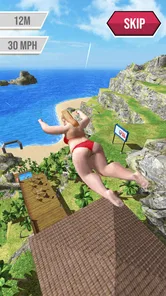
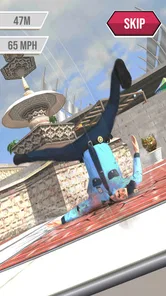

Analysis by Reviewed
Hey there! So, I recently got my hands on the game Try to Fly, and let me tell you, it’s quite the ride. If you’re someone who’s into quirky, casual games that test your reflexes and timing, then this might just be your next favorite obsession. Let’s dive into what makes this game tick and why it could be worth your while.
A Good Fit for the Right Kind of Break
I’d recommend this to someone who likes a small, clear challenge more than a busy screen full of objectives. The basic appeal is easy to explain to a friend: make a launch, watch how it goes, then decide what to adjust. It gives a short session a natural endpoint, which is handy when I want a quick diversion rather than a game that asks me to remember a long quest or keep track of several systems.
That focus also makes the game less suitable for certain moods. If I want to compete directly against another player, build a team, or follow a detailed sports season, I’d choose a different kind of sports game. If I’m looking for a puzzle that rewards careful planning over reflexes, a puzzle game would be a better match. Here, the satisfaction comes from the immediate link between timing a launch and seeing the flight play out.
For a first-time player, I’d set expectations around experimentation rather than instant mastery. A promising attempt can still go wrong, and that uncertainty is part of the charm, but it can also make progress feel uneven. I find the game more enjoyable when I’m curious about what the next adjustment will do, not when I’m treating every run as a test I must pass.
First Impressions: A Quirky Concept
From the get-go, Try to Fly throws you into a world that’s both whimsical and challenging. The premise is simple: you’re a character who dreams of flying, and your job is to launch yourself off a variety of platforms and see just how far you can go. It’s all about timing, angles, and a bit of luck. The graphics are colorful and cartoonish, perfectly suited for a light-hearted game like this. I was immediately drawn in by the vibrant design and the promise of some good old fun.
What to Expect From a Quick Flight
This is a sports game from BoomBit Games, but its appeal is closer to a playful physics challenge than a realistic sports simulation. I wouldn’t approach it expecting teams, match tactics, or a long career mode. The pleasure is in setting up a launch, watching the result, and deciding whether the next attempt can go a little better. That makes it easy to understand at a glance, though the repeated attempts may feel less rewarding if you prefer a story or a large set of distinct activities.
It’s free to start, and the Teen content rating gives a parent a useful first clue when deciding whether it suits a younger player. The game has a 4.1 average from around 22,000 ratings, with over 5 million installs, so it has clearly found an audience. Those numbers don’t tell me whether you’ll enjoy its particular rhythm, but they do suggest this is an established casual game rather than an obscure experiment.
More From Our News Desk

 Instagram
’s Power Comes From Its Place in Your Phone
A close look at how Instagram turns Meta’s reach, recommendation systems and everyday camera habits into durable platform power—and what that costs users.

 Gmail
Gmail in a Busy Inbox: Who Benefits Most?
From first account to crowded workday, Gmail earns its place through dependable search and flexible sorting—but its best fit depends on how much inbox maintenance you can tolerate.

 Prime Video
Switching to Prime Video: What Changes in Your Viewing Routine
Prime Video can make a compelling second home for streaming, but switching means learning a different catalog, rental layer, and route from browsing to playback.

 Universal TV Remote Control
 Works Best as a Reliable Backup
A phone remote earns its place through quick setup and reliable habits. Here is how to get more from Universal TV Remote Control—and where its limits show.

 Weather - By Xiaomi
Weather by Xiaomi Review: Clear at a Glance, Less Clear Up Close
Xiaomi’s weather app makes everyday forecasts quick to scan, but its calm surface can leave useful details and recovery paths harder to find than they should be.

 X
X Under Pressure: Can It Recover When Posting Goes Wrong?
A resilience-focused review of X, examining setup, mistaken posts, interruptions, weak connections, and the gaps that matter when recovery needs to be dependable.
Latest News



Getting Started Without Overthinking It
For a first session, I’d keep the goal modest: learn the launch rhythm before worrying about perfect distance or trying to make every attempt count. The key decision is when to release, so pay attention to how a small timing change affects the flight. If a run falls short, treat it as useful feedback rather than a reason to restart your whole approach. That simple habit makes the opening much less frustrating and gives you a clear way to improve without needing a guide.
The controls are approachable, but an easy first tap doesn’t mean every launch will feel predictable. Try to change one thing at a time—your timing, rather than several choices at once—so you can tell what helped. This is a practical tip for games built around repeated attempts: chasing a lucky result can be fun, but noticing a repeatable improvement is more satisfying. I’d play in short bursts at first, especially if you’re only looking for a quick break.
Gameplay Mechanics: Easy to Learn, Hard to Master
The controls in Try to Fly are straightforward, which is one of the things I love about it. You tap to build momentum and release at the right moment to launch yourself. Sounds easy, right? Well, that’s just the beginning. As you progress, you’ll encounter obstacles, wind currents, and even some power-ups that add layers of complexity to each launch. It’s a game that’s easy to pick up but takes time to truly master, which keeps me coming back for more.
How to Turn a First Win Into a Better Run
My advice after a successful launch is not to assume the same timing will work in every situation. Obstacles and changing conditions can make a familiar approach less effective, so use each attempt to read what the course is asking of you. When something goes wrong, identify the moment the flight began to lose its promise; that observation is more useful than simply tapping faster next time. The game works best when I treat each run as a small experiment.
Power-ups can make a run feel more forgiving or give it a different outcome, but I wouldn’t let them replace learning the basic release timing. A strong launch gives you a better sense of what the added help is doing. That distinction matters if you’re trying to improve rather than just see a surprising flight. It also helps keep the game’s luck factor in perspective: a good result can be exciting, while consistent control is what makes repeated play feel earned.
Challenges and Levels: Keeping It Fresh
One of the standout features of Try to Fly is the variety of levels and challenges it offers. Each level introduces new elements that keep the gameplay fresh and exciting. Whether it’s navigating tricky wind patterns or avoiding pesky birds, there’s always something new to keep you on your toes. Plus, the game does a great job of gradually increasing difficulty, so you’re constantly being challenged but never overwhelmed.
Making Progress Without Turning It Into a Grind
When I’m stuck, I find it useful to separate a bad run from a bad approach. A single disappointing flight doesn’t prove that I need to change everything; it may simply mean that I released too early or too late for that attempt. I’d give a level a few focused tries, watching for one clue each time, then take a break if I’m repeating the same mistake without learning anything. That pause can be more useful than continuing out of frustration.
This is also why I wouldn’t judge the game by a single lucky success. A run that works once is encouraging, but a repeatable result is a better sign that I’m understanding the timing. If I’m playing alongside someone else, I’d make the fun about comparing what we noticed rather than turning every attempt into a contest. The game’s small feedback loop is the interesting part: make a choice, see its effect, and adjust.
Where It Fits in a Busy Day
I can see this working well during a short wait—say, when I have a few minutes before an appointment and want something more active than scrolling. A single launch has a clear objective, so I don’t need to settle in for a long session to understand what I’m doing. On the other hand, if I’m commuting or playing in a place where I can’t focus on timing, I’d choose something more passive. The appeal here depends on paying attention to the moment of release, not just leaving the game running in the background.
Compared with sports games built around matches, rosters, or realistic competition, this is a much lighter, more individual experience. Compared with other casual games, its hook is the launch-and-flight challenge rather than solving a puzzle or managing a collection. That’s a useful distinction when choosing: pick it if you enjoy experimenting with timing and watching a run unfold; skip it if you want deep sports strategy, direct competition, or substantial narrative progression.
What a First Session Might Look Like
In a realistic everyday session, I might open it while waiting for a takeaway order, make a few launches, and use the first couple to get a feel for the release. If I notice that a slightly different timing changes the result, I can spend the remaining minutes testing that idea. Then I can close the game without needing to remember a complicated plan for later. That’s a better use of it than opening it while distracted and tapping through attempts without watching what happens.
Before installing, I’d also think about the setting where I usually play. This is a reflex-led game, so a quiet moment with a little attention is more rewarding than a situation where I’m frequently interrupted. It can suit a brief pause at home or a wait with nothing else demanding focus. If your usual gaming time is mostly hands-free or you prefer to play while listening to something else, the timing element may make this a less comfortable choice.
Visuals and Sound: A Feast for the Senses
The developers have done a fantastic job with the visual and audio aspects of the game. The graphics are not only vibrant but also smooth, making every flight visually satisfying. The sound effects and background music complement the gameplay perfectly, adding an extra layer of enjoyment to each session. It’s the kind of game you can easily lose yourself in for hours without even realizing it.
Spending, Compatibility, and Expectations
The game is free, with optional in-app purchases ranging from $2.99 to $29.99 per item. I’d start by playing without buying anything and decide later whether an optional purchase would genuinely improve your enjoyment. The temptation in a retry-focused game is to spend in pursuit of a better result; I’d first check whether the fun is coming from learning the launch or simply wanting to move past a difficult section. That’s a sensible way to keep a casual game casual.
The current version is 0.6.0 and it requires Android 7.0 or later, so it’s worth checking compatibility before you plan a session on an older device. The game is also available on iOS. Its low-commitment premise makes it approachable for a first-time player, but it may not suit someone who dislikes retries or wants every action to produce a predictable outcome. If you enjoy short, timing-led challenges, the learning curve is part of the appeal; if repeated trial and error wears you down, a more structured sports game is likely a better fit.
Choosing It Over Another Casual Game
The choice I’d make comes down to what I want from the next few minutes. If I want a quick test of timing with an amusing flight as the payoff, this has a clearer fit than a game built around slow collecting or a puzzle that needs careful thought before every move. If I want a longer arc, more deliberate strategy, or an activity that feels different from one session to the next, I’d look elsewhere. Its focused loop is a strength when I’m in the right mood and a limitation when I’m not.
One practical way to decide is to ask whether small improvements are satisfying to you. If adjusting a release and seeing a better result feels rewarding, the repeated attempts can give you a reason to return. If you need frequent new mechanics or a strong narrative to hold your attention, the central launch idea may feel narrow. I’d treat it as a compact side game rather than a replacement for a deeper sports title.
Final Thoughts: Is It Worth Your Time?
In my opinion, Try to Fly is a delightful addition to the casual gaming genre. It’s perfect for those moments when you want to escape reality and just have a bit of fun. The combination of simple mechanics, engaging challenges, and charming visuals makes it a game that’s hard to put down. So, if you’re looking for something light-hearted yet challenging, give Try to Fly a shot. You might just find yourself hooked, just like I did.
My practical recommendation is to give it a brief, no-pressure first session and judge it by whether you enjoy learning from a launch, not by whether you immediately get an impressive result. I’d leave purchases alone until I knew the retry loop suited me, and I’d stop when attempts stopped teaching me anything. For a first-time player who likes quick, slightly unpredictable challenges, that’s a reassuring way to find out whether this particular flight is worth keeping on the phone.
Try to Fly Frequently Asked Questions
What age group is Try to Fly intended for?
Try to Fly has a Teen content rating, so it is generally intended for teenagers and older players. Parents may want to consider that rating when deciding whether it is suitable for a younger child. The game focuses on stunt-oriented action, and its free download includes optional in-app purchases, so it can also be helpful to review purchase settings before handing over a device.
How much storage space does Try to Fly need, and is it a large download?
Before downloading Try to Fly, it is sensible to check that your device has enough free storage for the game and any later updates. The game is available on mobile devices and features stunts across multiple locations, so keeping some space available can help avoid download or update interruptions. You can check the download size shown for your device in its app store before installing.
Does Try to Fly receive updates, and should I install them?
Try to Fly has a current version available, and installing updates when offered is generally a good way to use the latest release of the game. Updates may affect compatibility or gameplay, so check your device’s available storage and operating-system requirements before proceeding. If you already play, keeping the app updated can help ensure you are using the version currently offered.
Can I play Try to Fly with friends or compete against other players?
Try to Fly is built around picking up your character and performing stunts across multiple locations, making its central appeal the individual challenge of pulling off airborne moves. Whether you prefer solo play or competing with others, consider that core premise before downloading. The game’s store summary emphasizes stunts and locations, rather than describing it as a team-based sports experience.
Is Try to Fly suitable for short play sessions?
Try to Fly’s stunt-focused premise makes it an option to consider if you want a mobile game you can pick up for a quick attempt at an airborne move. You can experiment with your character and try to perform stunts across different locations. How long a session lasts depends on your own pace and interest in replaying challenges, so it may suit players who enjoy practicing.
Pros
- Engaging gameplay mechanics.
- Stunning graphics and visuals.
- User-friendly interface.
- Wide variety of levels.
- Great sound design.
Cons
- In-app purchases can be pricey.
- Occasional app crashes.
- Requires stable internet.
- High battery consumption.
- Limited offline play.