Touchgrind Skate 2
- 14.18K
- 3.8
- Installs
- 50.00M
- Price
- Free

Screenshots
Analysis by Reviewed
When it comes to skateboarding games on mobile, Touchgrind Skate 2 truly stands out as a must-have for any skateboarding enthusiast. This app, available on both Android and iOS, takes the skateboarding experience to a whole new level with its innovative touch controls and immersive gameplay. If you're looking for a game that combines skill, creativity, and a bit of adrenaline, then you're in for a treat.
I’d describe it as a game for short sessions that can become surprisingly absorbing: a few minutes spent trying to land a clean trick can easily turn into a longer attempt to improve a run. The two-finger control style asks for attention rather than quick button presses, so it suits players who enjoy learning a physical-feeling input through practice. If you mainly want an effortless game to play one-handed while distracted, this is less likely to click.
Getting the Hang of the Controls
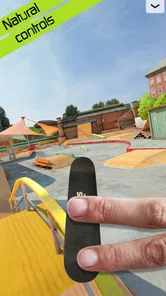
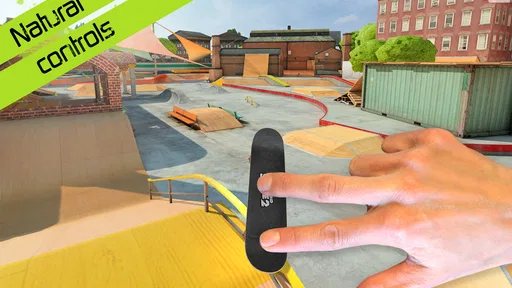
One of the first things you'll notice about Touchgrind Skate 2 is its unique control system. Instead of traditional buttons, the game uses a two-finger touch control that mimics actual skateboarding movements. It might take a little while to get used to, but once you get the hang of it, executing tricks becomes incredibly satisfying. Whether you're performing an ollie, kickflip, or grinding on rails, the controls are designed to feel intuitive and responsive.
My practical advice is to give yourself a few quiet minutes to learn how your fingers need to move, instead of judging the game by the first failed attempts. When a trick doesn’t come off, changing one part of the motion at a time makes it easier to see what went wrong than repeatedly swiping faster. This makes practice useful even when a session isn’t producing a high score: you can focus on control, then bring that movement into a more demanding run. The trade-off is real, though. Players who find touch gestures fiddly, or who prefer a conventional virtual joystick and buttons, may find the learning curve more frustrating than rewarding.
Making Practice Count
A useful way to approach the controls is to treat each attempt as a small experiment. Keep the movement you already understand steady, then adjust one detail—such as the timing or direction of a finger motion—rather than changing everything at once. That makes it easier to notice which part of a trick is causing trouble. It’s a simple habit, but it can stop practice from turning into a blur of random swipes.
I’d also avoid trying to learn a complicated sequence and a new route at the same time. First get comfortable with the individual movement in a low-pressure setting, then try to place it into a run. This separation is especially helpful on a phone, where small changes in finger placement can affect accuracy. If your hands are tired or the screen feels crowded, taking a break is more useful than forcing another attempt.
Touch controls are the game’s defining strength, but they are also the main reason it won’t suit everyone. They make a successful trick feel earned because your fingers are doing more than selecting a command. The same directness can make a miss feel personal, particularly if you expect the game to interpret broad gestures generously. I’d give the controls a fair trial, but I wouldn’t assume that more play will automatically make them enjoyable if tactile precision simply isn’t your thing.
More From Our News Desk

 Gmail
Gmail in a Busy Inbox: Who Benefits Most?
From first account to crowded workday, Gmail earns its place through dependable search and flexible sorting—but its best fit depends on how much inbox maintenance you can tolerate.

 Prime Video
Switching to Prime Video: What Changes in Your Viewing Routine
Prime Video can make a compelling second home for streaming, but switching means learning a different catalog, rental layer, and route from browsing to playback.

 Universal TV Remote Control
 Works Best as a Reliable Backup
A phone remote earns its place through quick setup and reliable habits. Here is how to get more from Universal TV Remote Control—and where its limits show.

 Weather - By Xiaomi
Weather by Xiaomi Review: Clear at a Glance, Less Clear Up Close
Xiaomi’s weather app makes everyday forecasts quick to scan, but its calm surface can leave useful details and recovery paths harder to find than they should be.

 X
X Under Pressure: Can It Recover When Posting Goes Wrong?
A resilience-focused review of X, examining setup, mistaken posts, interruptions, weak connections, and the gaps that matter when recovery needs to be dependable.

 Clash of Clans
 Is Won Between the Battles
Its raids are quick; its community is a long-term project of coordination, teaching, rivalry, and shared responsibility—with all the friction that entails.
Latest News



Exploring the Game Modes
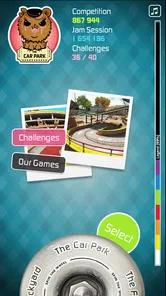
The game offers several modes to keep you entertained. "Jam Session" lets you practice your moves in a more relaxed setting, while "Competition" mode ramps up the challenge as you compete against others to score the highest points. There's also a "Training" mode for those who want to perfect their skills. Each mode is designed to offer something different, ensuring that you never get bored. The variety is a strong point, making it accessible for both newcomers and seasoned players alike.
These modes also give me a useful way to choose how much pressure I want in a session. If I’m still working on a particular move, a practice-focused option makes more sense than treating every run as a performance. When I’m ready to test consistency, competition provides a clearer target. That distinction matters for beginners: there’s no need to treat an early score as a verdict on whether you’re good at the game. Learning the controls first can make later challenges feel fairer and more satisfying.
For a newcomer, I’d start with the mode that lets you experiment without worrying about a result, then switch when you can repeat a few movements with some confidence. This gives you a natural progression without turning the game into a checklist. Competition is more useful once you have a reliable base: otherwise, a disappointing run may reflect unfamiliar controls rather than a lack of creativity.
The different modes answer a practical question: can I play without committing to a long session? Yes, the game’s practice-oriented feel works well for short visits, especially if you decide in advance what you want to work on. But it may not be the best choice when you want a quick, clearly bounded match with an immediate winner. The appeal is more about refining and experimenting than finishing a round and moving on.
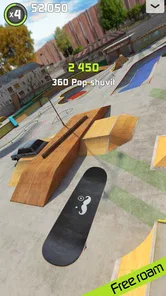
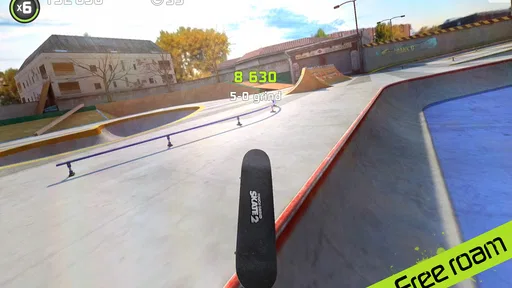
What I find particularly engaging is the freedom to explore the skate park and experiment with different tricks. The game encourages creativity, allowing you to string together combos and discover new ways to navigate the courses. It's a playground for your fingers, offering endless possibilities for trick combinations.
A good everyday use is a short break when you want something more involved than a passive time-killer but don’t have time for a long play session. I’d pick one small goal—landing a trick consistently, or finding a cleaner route through a section—rather than trying to master everything at once. That approach makes the game’s open-ended experimentation feel manageable, and it gives each return to the park a purpose. It also highlights a limitation: players who need a clear story, a guided campaign, or constant new objectives may prefer a different kind of sports game.
Finding Your Own Lines
Once basic movements feel familiar, the park becomes more interesting as a space to make choices rather than just a backdrop. I like setting a route goal and seeing whether I can connect a few actions cleanly, instead of trying to force the flashiest trick into every run. A simpler line that you can repeat is often a better starting point for building consistency than a complicated attempt that falls apart halfway through.
This is also where the game’s open-ended quality can be a strength or a weakness. If you enjoy inventing your own small challenges, you can make a session feel purposeful without needing a scripted objective every time. If you rely on the game to tell you exactly what to do next, that freedom may feel less like variety and more like a lack of direction. I’d choose it for self-guided practice, not for a structured sports career.
Graphics and Soundtrack
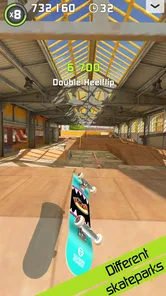
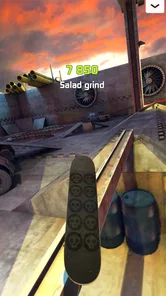
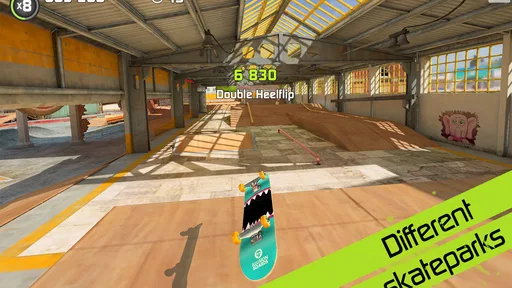
The visuals in Touchgrind Skate 2 are top-notch, with detailed environments and smooth animations that make the gameplay experience even more immersive. The skate parks are beautifully designed, capturing the essence of real-world locations. The attention to detail is impressive, making you feel like you're really skating through these venues.
Accompanying the stunning graphics is a vibrant soundtrack that keeps you pumped as you skate. The music is upbeat and complements the fast-paced nature of the game perfectly. Whether you're landing a difficult trick or just cruising around, the soundtrack adds an extra layer of excitement to the experience.
The presentation helps the parks feel inviting, but I see it as support for the hands-on play rather than the main reason to stay. If you are choosing a skateboarding game primarily for a story, a large roster of characters, or a realistic sports-management layer, the visual polish here may not compensate for those missing priorities. I’d judge it by whether the board control and space to experiment hold your attention.
Compared with many sports games built around timed matches, teams, or straightforward button combinations, this one puts the satisfaction in controlling the board directly with your fingertips. That makes it a more personal, practice-driven alternative, but not necessarily the better choice for everyone: someone who wants quick match results or familiar controller-style inputs may be happier elsewhere. I’d also keep the phone comfortably supported and give the screen enough space for two fingers; cramped handling can make precise movements feel harder than they need to be.
That comparison is useful when deciding what to install. A conventional sports title is usually a better fit if you want to understand the controls immediately and get into a match with little practice. A skateboarding game built around direct board handling is a better match if you enjoy repeating a motion until you can make it dependable. The difference isn’t simply difficulty: it’s whether you want the game to simplify the physical action or make that action the core of play.
For an everyday scenario, I’d reach for this after a class or during a quiet break when I have a few minutes and can hold the phone steadily. I might spend that time trying one trick, then stop once I’ve made a little progress. On a crowded commute, while walking, or when I need to keep one hand free, I’d choose something less demanding; two-finger precision and divided attention are a poor combination.
Cost, Value, and Final Thoughts
Overall, Touchgrind Skate 2 is a fantastic skateboarding game that offers a realistic and enjoyable skateboarding experience on your mobile device. Its innovative controls, diverse game modes, and stunning graphics make it a standout in the genre. It's not just a game; it's a digital skate park where you can unleash your creativity and skate to your heart's content.
Touchgrind Skate 2 is a free sports game from Illusion Labs, with in-app purchases priced from $2.49 to $8.99 per item. That means you can try the core experience without paying upfront, while purchases are an optional extra to weigh against how much you’re enjoying it. I wouldn’t spend simply because a difficult trick is taking time to learn; first see whether the control style and practice loop keep you coming back. Its 3.8 average from around 304,000 ratings, alongside over 10 million installs, suggests a sizeable audience but also a mixed reception. The game is rated for Everyone, and version 1.7.0 requires Android 6.0 or later.
The clearest value question is whether you enjoy the free experience enough to return to it. Since the game can be tried without an upfront payment, I’d use that opportunity to check two things before considering an in-app purchase: whether the gesture controls feel satisfying after practice, and whether creating your own goals keeps you engaged. The listed purchase range gives a sense of the possible item prices, but it doesn’t by itself tell you which item is worthwhile for your play style. I’d decide only after playing long enough to know what you want from the game.
For someone who already enjoys mobile skateboarding games, that low-commitment start is a sensible way to test a more hands-on control approach. For someone who is unsure about gesture-heavy play, the free entry also makes it easier to walk away if the basic feel does not click. I wouldn’t treat spending as a shortcut to enjoyment: the main question is whether the learning and experimentation are rewarding on their own.
The game’s rating is another reason I’d set expectations carefully rather than assume universal appeal. A 3.8 average from a large pool of ratings points to a well-used title with a divided response, which fits my view that its distinctive controls are both its biggest draw and its sharpest barrier. A player who enjoys mastering inputs may find that trade worthwhile; someone who wants instant, forgiving play could arrive at a very different conclusion.
Whether you're a seasoned skater or someone just looking for a fun game to pass the time, Touchgrind Skate 2 is definitely worth checking out. So grab your virtual skateboard, hit the park, and start shredding. You'll find yourself hooked in no time!
I’d recommend it most to people who enjoy deliberate, skill-based play and don’t mind repeating a movement until it feels right. If you want a casual skateboarding theme with minimal precision, or dislike learning gestures on a touchscreen, I’d skip it and choose a game with simpler controls. For me, the free entry makes it reasonable to test that fit; the best value comes from enjoying the process of improving, not from expecting every session to deliver an instant win.
My verdict is a qualified recommendation: try it if the idea of controlling a tiny board with deliberate finger movements sounds appealing, and give yourself time to learn before deciding. Choose another sports game if you want quick rounds, a guided progression, or controls that feel familiar from the first tap. The purchase options may add value for a committed player, but they are not the reason I’d suggest installing it; the real test is whether the free play makes you want to return and make your next run a little cleaner.
Touchgrind Skate 2 Frequently Asked Questions
Does Touchgrind Skate 2 require a lot of space on my device?
Before installing Touchgrind Skate 2, make sure your device has enough free storage for the game. Available space can also matter when downloading updates or adding optional content. If storage is tight, you may want to clear room first so the installation can complete smoothly. The game is designed for mobile play, but it still needs room on your device to install.
Can I use a controller or do I need to play with the touchscreen?
Touchgrind Skate 2 is built around touch gestures, with players using their fingers to guide the board and perform tricks. That hands-on approach is central to how the game plays, rather than a conventional button-based control scheme. If you prefer physical controls, keep in mind that the distinctive touchscreen style is what the game emphasizes, and learning it is part of the experience.
Is Touchgrind Skate 2 a good choice for beginners who have never played a skateboarding game?
You do not need experience with skateboarding games to try Touchgrind Skate 2, but its gesture-based controls can take time to learn. The game rewards practice and precise inputs, so beginners should expect some trial and error while getting comfortable with steering and tricks. If you enjoy gradually improving at a skill-based game, the learning curve may be part of its appeal.
Does Touchgrind Skate 2 have different skate parks and challenges?
Touchgrind Skate 2 centers on performing tricks, taking on challenges, and progressing through different skate parks. This gives players goals beyond simply riding around, with high scores and trick mastery helping shape the experience. If you like games that give you objectives to work toward, the challenge-focused structure can offer a reason to keep practicing and refining your runs.
Can I customize my skateboard in Touchgrind Skate 2?
Touchgrind Skate 2 offers optional ways to personalize the skateboarding experience, including additional skateboards and customization options available through in-app purchases. These extras are not necessary to try the core gameplay, which focuses on controlling the board and landing tricks. Players who enjoy tailoring their setup may appreciate the added variety, while others can simply focus on skating.
Pros
- Realistic physics for an immersive experience.
- Variety of skateboards and customization options.
- Challenging levels keep players engaged.
- High-quality graphics enhance visual appeal.
- Intuitive controls for easy learning.
Cons
- Requires internet for some features.
- In-app purchases can be expensive.
- Limited free content available.
- Ads can be intrusive at times.
- Battery drains quickly during gameplay.