Touchgrind BMX 2
- 5.06K
- 4.7
- Installs
- 50.00M
- Price
- Free
Screenshots
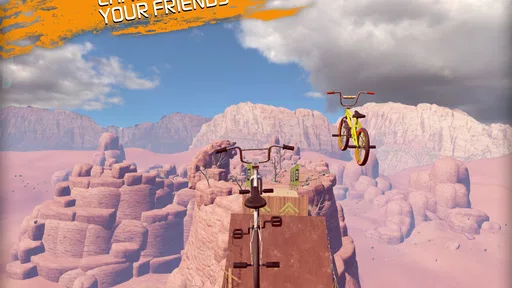
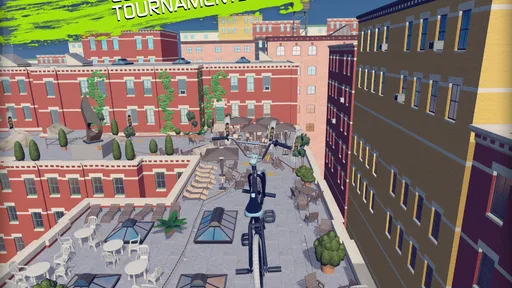
Analysis by Reviewed
I like BMX games most when they give me room to experiment rather than turning every run into a race against a clock. That is the appeal of Touchgrind BMX 2: it makes the bike itself feel like the puzzle, and every jump gives me another chance to find a cleaner line or land a trick with more control. It is a free sports game from Illusion Labs, rated for Everyone, and its strong following—an average 4.5 from around 312,000 ratings, with over 50 million installs—suggests its tactile approach has found a broad audience.
A good fit for short, focused sessions
I find the game easiest to enjoy when I can give it a few minutes of undivided attention. A realistic use case is a quiet break between errands: I can choose a section, concentrate on one obstacle, and stop after a handful of attempts without needing to commit to a full match or long career mode. That makes it convenient, but not truly mindless. If I am walking, multitasking, or trying to play with one hand, the precision that makes a clean run satisfying can also make the session frustrating.
It suits players who like learning through repetition and want their own hands to make the difference. Someone who prefers a straightforward racer, where steering and acceleration are handled with familiar buttons, may find this approach unnecessarily demanding. Likewise, players looking for team tactics, a season structure, or a management layer should look elsewhere. This is a focused BMX stunt game, not a broad sports simulation, and its appeal depends on enjoying that narrower goal.
Small adjustments that make practice more useful
One practical habit is to change only one thing between attempts. If a landing goes wrong, I try not to alter my approach, rotation, and timing all at once; otherwise I cannot tell which adjustment helped. Repeating the same line with one deliberate change turns trial and error into something closer to practice. It also makes failure less irritating because I can take away a specific lesson instead of treating the whole run as wasted.
I also recommend separating a personal best from a satisfying session. A leaderboard can provide a target, but trying to beat someone else every time may make a game built around experimentation feel like a chore. I get more from choosing a small objective—clean up a landing, make a tricky section more consistent, or try a different trick—then using rankings only when I want an extra challenge. That balance keeps competition available without letting it dictate how I play.
How the riding feels in practice
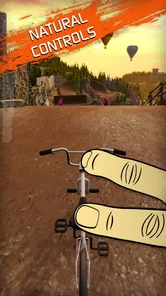
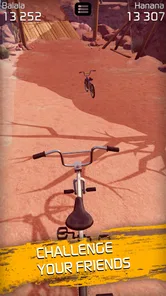
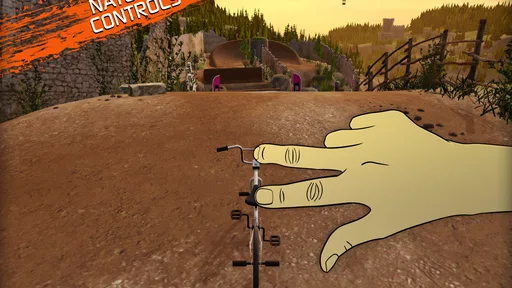
When I first opened Touchgrind BMX 2, I was immediately drawn in by the vibrant graphics and smooth animations. You're not just flicking your screen; you're controlling a BMX bike with precision and style. The app gives you the freedom to choose your track and bike, each with its own set of challenges and rewards. What I love most is the dual-control system, which makes me feel like I'm really steering and balancing the bike as I attempt those daring tricks.
Learning the controls without rushing
The dual-control idea is a real adjustment if you normally play sports games with virtual buttons. My practical advice is to treat the first few runs as practice, not as attempts to rack up a perfect score. Small, deliberate movements help me understand how the bike responds; frantic swipes make it harder to tell whether a missed landing came from timing, rotation, or balance. Once that connection clicks, repeating a section becomes more satisfying because I can change one input and see what it does.
More From Our News Desk

 Gmail
Gmail in a Busy Inbox: Who Benefits Most?
From first account to crowded workday, Gmail earns its place through dependable search and flexible sorting—but its best fit depends on how much inbox maintenance you can tolerate.

 Prime Video
Switching to Prime Video: What Changes in Your Viewing Routine
Prime Video can make a compelling second home for streaming, but switching means learning a different catalog, rental layer, and route from browsing to playback.

 Universal TV Remote Control
 Works Best as a Reliable Backup
A phone remote earns its place through quick setup and reliable habits. Here is how to get more from Universal TV Remote Control—and where its limits show.

 Weather - By Xiaomi
Weather by Xiaomi Review: Clear at a Glance, Less Clear Up Close
Xiaomi’s weather app makes everyday forecasts quick to scan, but its calm surface can leave useful details and recovery paths harder to find than they should be.

 X
X Under Pressure: Can It Recover When Posting Goes Wrong?
A resilience-focused review of X, examining setup, mistaken posts, interruptions, weak connections, and the gaps that matter when recovery needs to be dependable.

 Clash of Clans
 Is Won Between the Battles
Its raids are quick; its community is a long-term project of coordination, teaching, rivalry, and shared responsibility—with all the friction that entails.
Latest News



That hands-on style is also the main trade-off. It offers more direct control than a typical one-thumb arcade racer, but it asks for patience and a reasonably comfortable grip. If you want a game that plays itself through simple taps, or you are using a small screen where your fingers crowd the action, this may feel fiddly. I would choose it for focused sessions rather than expecting it to be effortless from the first minute.
Customization to Suit Your Style
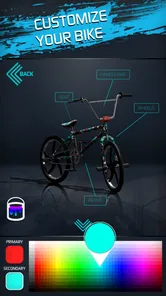
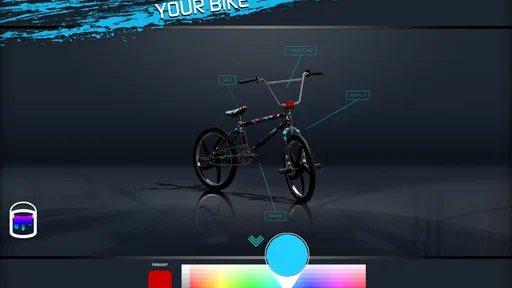
One thing that stands out in this app is the level of customization available. From painting your bike to tweaking its components, the app lets you personalize your ride to match your personality. And let's not forget about the customization of your BMX rider! It's like giving your avatar a makeover before heading into the action-packed tracks. I spent hours just playing around with different combinations.
Another cool feature is the ability to unlock new bikes and gear as you progress, which keeps the game exciting and gives you something to strive for. It's like being in a candy store, but for BMX enthusiasts!
There is a useful distinction between customizing for looks and improving your play routine: changing a bike's appearance is a low-pressure way to make a session feel fresh, while chasing unlocks gives a clear reason to return. I would avoid treating every locked item as a requirement, though. If your enjoyment comes from learning a course, focus on that first; progression is more motivating when it supports your own goals instead of becoming a checklist.
Challenging Tracks and Stunts
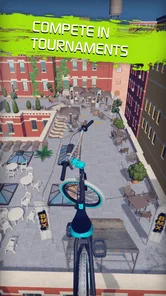
Let's talk about the tracks. They're not just circuits; they're masterpieces of design where you can test your skills. Each track offers unique obstacles and opportunities to perform tricks. Whether it's a backflip over a canyon or a tailwhip on a rooftop, the game challenges your creativity and reflexes. The more you practice, the better you get, and trust me, landing that perfect trick is immensely satisfying.
A handy way to get more out of a difficult section is to separate the problem into pieces: first concentrate on approaching the obstacle cleanly, then work on the trick, and only after that try to link both into one run. That keeps a failed landing from feeling like a mystery. I also find this makes short sessions worthwhile: a few deliberate attempts at one tricky moment can feel more rewarding than repeatedly restarting without a plan.
What keeps me coming back is the leaderboard feature. Competing against friends and players worldwide adds a layer of competitiveness that’s really addictive. It's not just about beating the track; it's about outdoing everyone else!
Competition, spending, and choosing the right fit
Leaderboards make the game more appealing once I have a favorite route, but they also change the mood: a relaxed stunt session can turn into a hunt for a better result. I like having that option, though I would not recommend chasing rankings if comparison makes a game feel like work. For a casual player, the strongest reason to stay is the tactile riding and the personal satisfaction of improving a trick, not the pressure to place above someone else.
The game is free to start, with optional in-app purchases priced from $0.99 to $24.99 per item. I would approach those as optional extras rather than an entry fee: try the riding and progression first, then decide whether any purchase genuinely improves your enjoyment. If you prefer a sports game built around full matches, teams, or realistic career management, a conventional cycling or team-sports title will probably suit you better. This one is about controlling a single BMX ride and making stunts work.
What its current version means
The game was released on December 13, 2018, and its current version is 2.2.3. Those details place it as an established title rather than a brand-new experiment, but they do not tell me what changed between releases, so I would not infer a particular feature history from them. Existing players can judge the current build on the riding and progression they find today; anyone coming back after time away should simply check how it feels on their device and whether the current challenges still match what they want from a BMX game.
For everyday use, I can see it fitting a short break when I have enough attention to focus on a run but not enough time to settle into a long sports match. It is less suited to one-handed play while distracted: the controls reward deliberate input, so a quiet moment and a stable grip make a real difference. The minimum operating system is 7.0, and the game has 4.9 thousand written reviews, giving newcomers plenty of player feedback to consider alongside its broad rating history.
Smooth Controls and Realistic Physics
Now, let’s get into the nitty-gritty of controls. The touch controls are super intuitive. I found myself pulling off complex tricks without a hitch. The realism in the physics is commendable, making every stunt feel authentic. It's not just a game; it’s an experience that mimics real-life BMX action.
Touchgrind BMX 2 also does a fantastic job of ensuring that the gameplay remains smooth even on older devices. So, no worries if you're not rocking the latest phone model!
Who I would recommend it to
I would recommend this to someone who enjoys mastering a physical-feeling control scheme, likes replaying a course to improve, or wants a sports game that can be played in compact sessions. It is also a good fit for players who enjoy customizing a rider and bike as a personal touch rather than needing a deep simulation. If you mainly want simple pick-up-and-play controls, a conventional arcade racer is the safer choice; if you want the strategy of a full BMX management game, this is not trying to provide that either.
My overall impression is positive, with one clear caveat: the game’s strongest quality is also its biggest hurdle. The direct stunt control makes successful runs feel earned, but it takes practice and can frustrate anyone expecting instant mastery. I would give it a try if that learning curve sounds appealing, keep purchases optional, and pay attention to whether the touch handling feels comfortable on your phone. When it clicks, a small improvement in a run can be enough to make me want one more attempt.
Looking ahead as a player
What I would watch for over time is whether the current mix of courses, unlocks, and competition continues to give me a reason to return. The version number alone is not a promise of upcoming changes, so I would judge future interest by what is actually playable rather than by assumptions about a roadmap. For now, the clearest value is already in the core loop: practice a section, make a better attempt, and enjoy the moment a tricky landing finally feels controlled.
Who may want a different kind of BMX game
The closest alternative depends on what I want from a sports game that day. If I want quick movement with little attention to finger placement, a button-led arcade racer is easier to pick up. If I want the decisions and longer-term structure of managing a rider or team, a simulation-oriented title is a better match. This game sits between those expectations only in the broad sense that it is about BMX: its distinctive draw is shaping a ride through direct touch, not simply reaching the finish or planning a season.
That difference matters when deciding whether to keep playing after the novelty wears off. I would give the controls a fair practice period, but I would not force myself through them just because the game is popular. If I still cannot enjoy the act of setting up a trick and correcting a landing, the leaderboard and unlocks are unlikely to fix that mismatch. Conversely, a player who likes fine control may find that repeating a familiar course stays interesting even without treating every session as a competition.
Making progression feel personal
When I return after a break, I would start with a course and bike combination I already recognize rather than immediately chasing a difficult new goal. That gives me a baseline for how the controls feel and makes it easier to notice whether I am rusty or simply approaching a section differently. Once the familiar run feels comfortable, I can decide whether I want to work toward an unlock, explore another track, or test myself against a ranking. It is a simple way to keep progression from turning into aimless menu browsing.
For a younger player or anyone sharing a device, the Everyone age rating makes the game broadly approachable, while the optional purchases are still worth keeping in mind. I would set expectations before handing over a phone: the game is free to begin, but extras can be bought, and the most useful first step is to see whether the core riding is enjoyable without spending. That is also my answer to whether paying is necessary: I would start with the free experience and only consider an item if I can name the specific reason I want it.
What I would judge on returning
For someone reinstalling after a long gap, I would not assume that a version number means the game has been rebuilt or that a particular new feature is waiting. I would check the present feel on my own device, try the controls again, and see whether the tracks and progression still give me a reason to practice. The listed minimum operating system is 7.0, but a supported baseline does not guarantee the same comfort on every screen or device, so grip, display size, and responsiveness remain practical parts of the decision.
My recommendation is therefore specific: try it if the pleasure of a BMX game, for you, comes from controlling the trick rather than merely watching a rider perform it. Give the dual controls a few patient attempts, keep purchases secondary, and use leaderboards only if they add fun rather than pressure. If that hands-on loop feels rewarding, the game can turn a short spare moment into a focused little challenge; if it feels like wrestling with the screen, a simpler racer is a better use of your time.
Touchgrind BMX 2 Frequently Asked Questions
Is Touchgrind BMX 2 suitable for someone new to BMX games?
Yes, you can start without experience in BMX games, but the controls take practice. Touchgrind BMX 2 focuses on performing tricks with touchscreen gestures, so it may feel unfamiliar at first. Give yourself time to learn how the controls respond and try easier challenges before aiming for more demanding runs. It is a better fit if you enjoy building skill through repetition.
What kind of game is Touchgrind BMX 2?
Touchgrind BMX 2 is a sports game centered on BMX riding and tricks. Its store summary describes it as “Extreme BMX action,” which gives a good sense of its energetic focus. Rather than simply steering through a course, you use touchscreen controls to perform moves and tackle challenges. It should appeal most to players who enjoy action games that reward timing and practice.
Does Touchgrind BMX 2 need a powerful phone or tablet?
Touchgrind BMX 2 is a sports game by Illusion Labs, and it is available for Android and iOS. The Android version requires Android 7.0 or later. If you are unsure whether your device can run it, check its operating system version in your device settings before downloading. The game is free to download, so you can try it without paying upfront.
Can I play Touchgrind BMX 2 offline?
Touchgrind BMX 2 is built around BMX riding, tricks, and challenges, so it can be an appealing choice when you want a quick action game on a touchscreen. Some features, such as competing with other players, involve online play. If you mainly want to play without an internet connection, check how the game behaves on your device before relying on offline access.
What devices are compatible with Touchgrind BMX 2?
Touchgrind BMX 2 is compatible with both Android and iOS devices. However, to ensure optimal performance and experience, it's recommended to have a device with updated operating system versions and at least 2GB of RAM. This will provide smoother graphics and gameplay. Always check the app store for specific device compatibility before downloading.
Pros
- Stunning graphics and realistic physics.
- Challenging courses with varied obstacles.
- Intuitive touch controls enhance gameplay.
- Frequent updates with new content.
- Supports offline play for convenience.
Cons
- Limited bike customization options.
- In-app purchases can be expensive.
- Some levels are very difficult.
- Ads may disrupt gameplay experience.
- Requires significant storage space.