

Tamadog - Puppy Pet Dog Games
- 869.00
- 4.4
- Installs
- 10.00M
- Price
- Free

Screenshots


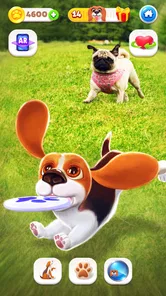



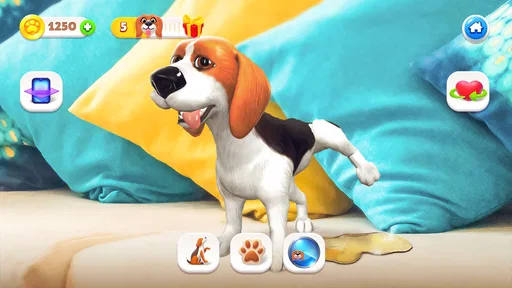
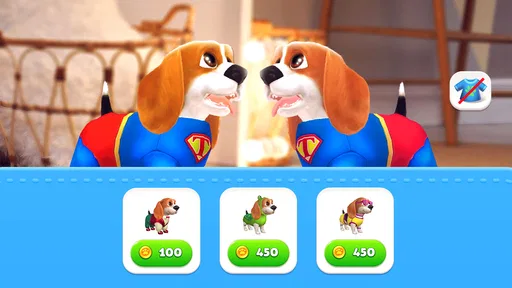
Analysis by Reviewed
Some mobile games ask for a few minutes of attention, while others are designed to become a small daily ritual. Tamadog - Puppy Pet Dog Games belongs to the second group. I approached it as a light pet simulation game, expecting something easy to open, understand, and enjoy in short sessions. That is still the best way to view it: a friendly virtual-dog experience rather than a deep strategy game or a demanding action title.
The basic appeal is immediate. You spend time with a cute digital puppy, take care of it, and return when you want a gentle distraction. The game is free to download, suitable for Everyone, and made by Appsyoulove. Its 4.4 average from around 27 thousand ratings suggests that the central idea works for a broad audience, while more than 10 million installs show that it has reached well beyond a small niche.
I also found that the most useful question is not simply whether the puppy is charming. It is whether the game fits the way you like to play on a phone. If you want a calm, approachable companion that can fill a short break, it has a clear purpose. If you want complex progression, competitive play, or a large world to explore, you may quickly feel that it is too simple.
What using the virtual puppy feels like
The first impression is deliberately soft and accessible. Tamadog does not present itself as a difficult game that expects you to learn a large collection of rules. Instead, the experience is built around the familiar idea of looking after a dog. That makes it comfortable for younger players and for adults who want something relaxing rather than mentally exhausting.
In everyday use, I would treat it like a small check-in game. You might open it while waiting for a bus, during a short lunch break, or before putting your phone down for the night. The important part is not spending a long uninterrupted session. The appeal comes from returning to the puppy and giving yourself a simple, pleasant activity.
That simplicity is both the main strength and the main limitation. A virtual pet can be satisfying when you want a predictable routine. It can also become repetitive if you need constant novelty. I would not install it expecting the variety of a full life simulator. Its charm depends on whether caring for a digital dog sounds enjoyable in itself.
The store summary describes cute puppy games and raising a charming dog, and that captures the tone without telling the whole story of the experience. The game is best understood as a low-pressure simulation with playful pet-care framing. It is not trying to replace a more elaborate console-style simulation, and comparing it directly with one would create the wrong expectations.
More From Our News Desk

 Gmail
GmailGmail in a Busy Inbox: Who Benefits Most?
From first account to crowded workday, Gmail earns its place through dependable search and flexible sorting—but its best fit depends on how much inbox maintenance you can tolerate.

 Prime Video
Switching to Prime Video: What Changes in Your Viewing Routine
Prime Video can make a compelling second home for streaming, but switching means learning a different catalog, rental layer, and route from browsing to playback.

 Universal TV Remote Control
Universal TV Remote Control Works Best as a Reliable Backup
A phone remote earns its place through quick setup and reliable habits. Here is how to get more from Universal TV Remote Control—and where its limits show.

 Weather - By Xiaomi
Weather by Xiaomi Review: Clear at a Glance, Less Clear Up Close
Xiaomi’s weather app makes everyday forecasts quick to scan, but its calm surface can leave useful details and recovery paths harder to find than they should be.

 X
XX Under Pressure: Can It Recover When Posting Goes Wrong?
A resilience-focused review of X, examining setup, mistaken posts, interruptions, weak connections, and the gaps that matter when recovery needs to be dependable.

 Clash of Clans
Clash of Clans Is Won Between the Battles
Its raids are quick; its community is a long-term project of coordination, teaching, rivalry, and shared responsibility—with all the friction that entails.
Latest News



Where players may get stuck first
The first point of friction is usually expectation. Someone may see “games” in the description and anticipate a collection of substantial mini-games with a lot of independent depth. My experience of the concept suggests a better approach: think of those activities as part of the puppy-care loop. They support the relationship with the pet rather than turning the app into an arcade package.
A second issue is patience. A virtual pet game can feel slow if you open it expecting an immediate reward every time. The more comfortable rhythm is to do what is available, enjoy the interaction, and leave. Trying to force a long session can make the same gentle design feel thin.
There is also the question of purchases. The game is free, but optional in-app items range from $0.99 to $99.99 per item. That range is important for families and for anyone handing a device to a child. I recommend deciding in advance whether purchases will be allowed, and checking the device’s purchase controls before playing. The safest habit is to treat the free download as the starting point, not as a promise that every possible item will be free.
For a child, the Everyone age rating makes the concept approachable, but age suitability is not the same as purchase readiness. I would still explain that digital items can cost real money. For an adult, this is less about concern over the game’s tone and more about avoiding an accidental tap during a casual session.
Setup checks that prevent avoidable frustration
The current version is 4.5.0.0, and the minimum operating system is Android 7.0. Before installing, I would check the phone’s Android version and available storage rather than assuming that every older device will behave identically. Meeting the minimum requirement allows installation, but it does not guarantee the same smoothness on every handset.
If the game does not install, the most useful first checks are ordinary ones: confirm that the device is running a compatible Android release, make sure there is enough free space, and use a stable connection while downloading. Restarting the device can also clear a temporary installation problem. These steps sound basic, but they solve more issues than repeatedly tapping the install button.
If the app opens and then behaves strangely, I would avoid immediately deleting it. First close other demanding apps, restart the phone, and try again. On an older device, background activity can make a small game feel less responsive even when the app itself is functioning normally. Keeping the operating system and the app store components reasonably current is also sensible.
Families should complete the initial setup themselves before giving the phone to a child. That makes it easier to review purchase settings and understand the game’s basic rhythm. It also prevents a child from interpreting every visible option as something they are expected to buy.
One practical tip is to test the game on the connection you normally use. If you plan to play during commutes or away from home, do not assume that the first successful launch tells you everything about later sessions. A stable home connection is useful for the initial download, while ordinary mobile use may depend on the device and network conditions around you.
Recovering the routine when something goes wrong
When a session fails to load properly, I prefer a gradual recovery process. Close the game completely, reopen it, and give the phone a moment before launching it again. If that does not help, restart the device. This is less disruptive than immediately clearing data or reinstalling, especially in any game where you care about keeping local progress.
I would be cautious with storage-clearing tools. Clearing only temporary cache data is generally a gentler troubleshooting step than removing the app’s stored information, but the exact menus vary by Android phone. I would not erase app data unless I understood what might be lost and had already considered whether the game offers a way to restore progress.
Reinstallation should be the later step, not the first one. It can help when an installation has become damaged, but it can also create unnecessary uncertainty about saved progress. Before using it, note the account or device situation involved and make sure you are comfortable starting again if the game does not restore everything automatically.
If a purchase does not appear immediately, I would not buy the same item again in frustration. Close and reopen the game, check the connection, and allow a little time for the transaction to update. Keep any receipt or transaction record. That is a more sensible recovery path than repeating a purchase and then trying to untangle duplicate charges.
Another useful habit is to separate a gameplay problem from a device problem. If the whole phone is slow, hot, or struggling with several apps, the puppy game may simply be the app you notice first. Restarting the phone and testing another lightweight app can help reveal whether the issue is isolated.
When the game may not be the cause
Not every interruption points to a fault in Tamadog. A weak network, an Android update waiting to finish, aggressive battery-saving settings, or very limited free storage can all affect how an app opens and responds. If the game works normally after a restart but becomes unreliable later, I would inspect the phone’s general condition before blaming the game.
Older hardware deserves realistic expectations. The minimum Android version tells you whether the software can be installed, not how much spare performance the phone has. A newer device with plenty of free space will usually be a more comfortable home for a pet game than an older phone already struggling with everyday tasks.
Notification behavior can also be confusing. If you expect reminders and do not see them, check the phone’s notification settings and battery restrictions before assuming the game is broken. Android manufacturers sometimes limit background activity differently, so the same app can behave differently from one device to another.
Connection problems can be misleading as well. If other apps are failing at the same time, switch between Wi-Fi and mobile data when appropriate, or wait until the network is stable. Avoid repeatedly reinstalling a game when the real problem is a temporary connection outage.
Finally, remember that a free game with optional purchases may feel different depending on how you play. If you are comfortable with a slower, casual routine, the free starting point may be enough. If you dislike any experience that presents paid items, even when they are optional, this may not be the right fit. That is a preference issue rather than a technical defect, but it matters just as much when choosing an app.
How it compares with other pet and simulation games
Compared with a traditional digital-pet app, Tamadog places more emphasis on playful puppy activities instead of presenting only a narrow care checklist. That makes it a better choice for someone who wants the pet theme to feel like a game. On the other hand, players searching for detailed breeding, decorating, resource management, or a large social world should look toward a deeper simulation instead.
Compared with an action game, it is far less demanding. There is no reason to choose it for reflex challenges or competition. Its value is in the mood change: opening the app gives you a small, friendly task instead of another intense match. I found that distinction useful when deciding whether it belonged on my phone.
It also differs from a real dog-care planning app. The virtual puppy is entertainment, not a guide to feeding, training, veterinary care, or responsible ownership. A child may enjoy the idea of caring for the digital pet, but the game should not be presented as a substitute for learning what a real animal needs.
The best comparison is therefore not “better than every alternative.” It is a question of fit. Choose this game if you want a cute, low-pressure pet routine with game elements. Choose a more advanced simulation if you need long-term systems and strategic choices. Choose an action title if you want constant challenge. Choose a practical pet-care resource if your goal is real-world knowledge.
Small habits that make the experience work better
I would set a short personal limit for each visit. That prevents the simple loop from becoming tiring and makes returning later feel more natural. A few minutes during a break is a better match than expecting the game to occupy an entire evening.
For children, playing together occasionally is more useful than leaving the game to explain itself. You can show the difference between an activity and a purchase, discuss why the puppy is virtual, and decide when it is time to stop. That turns the app into a shared, supervised pastime rather than an unexamined source of screen time.
For adults, the game works nicely as a low-stakes reset between more demanding tasks. I would not use it when I need deep concentration immediately afterward if I know that pet games tend to pull me into “just one more” interaction. The strongest use case is a deliberate short break, not an accidental time sink.
Another trade-off is notification control. Reminders can make the pet feel more present, but too many alerts can make a relaxing game feel demanding. If the phone becomes noisy, reduce or disable notifications through the device settings. The game should fit your routine, not dictate it.
Because the app is free to start, I would try it without committing to purchases. Spend enough time deciding whether the basic puppy-care loop is enjoyable on its own. If it is not, paid items will not solve that fundamental mismatch. This is one of the clearest ways to avoid spending money on a game whose central style does not suit you.
My practical verdict after living with the puppy
Tamadog - Puppy Pet Dog Games is an approachable simulation for people who want a cheerful virtual dog and short, uncomplicated play sessions. Appsyoulove keeps the premise easy to understand, and the Everyone rating makes it accessible to a wide audience. With a 4.4 average and more than 10 million installs, it is clearly not an obscure experiment; many players have found the pet concept appealing.
I would recommend it to a child with sensible purchase supervision, an adult who enjoys digital pets, or anyone looking for a gentle phone game between daily tasks. The strongest realistic scenario is a five-minute break: open the puppy, complete a small activity, enjoy the interaction, and close the app before the routine becomes repetitive.
I would skip it if you need a deep simulation, a competitive challenge, or a game that constantly introduces complex new systems. I would also avoid it if optional purchases make you uncomfortable, since the available items can cost from $0.99 up to $99.99 each. The free entry is attractive, but it is worth setting boundaries before someone else uses the device.
My final advice is to install it with practical expectations. Check Android compatibility, keep enough storage available, supervise purchases, and troubleshoot gradually instead of deleting data at the first problem. If the phone itself is struggling, fix that wider issue first. With those points handled, the game is at its best as a small, friendly companion rather than a major long-term hobby.
In that role, I think it succeeds. It does not need to be the most sophisticated simulation to be worthwhile. It only needs to make a short visit with a virtual puppy feel pleasant, clear, and easy to return to—and for the right player, that is exactly what it offers.
Tamadog - Puppy Pet Dog Games Frequently Asked Questions
How large is Tamadog, and should I check my device storage before downloading?
As with any mobile game, it is sensible to check that your phone or tablet has enough free storage before installing Tamadog. The game is available on Android and iOS, and keeping some space available can also help your device handle updates smoothly. If storage is tight, reviewing unused apps or files first may make installation and later updates easier.
Is Tamadog a good choice for someone who has never played a virtual pet game?
Tamadog is built around straightforward puppy-care activities, so newcomers do not need experience with simulation games to understand its appeal. Feeding, bathing, and playing with a digital dog are familiar ideas, and the focus is on relaxed interaction rather than mastering complicated systems. It may be a comfortable starting point for someone curious about virtual pets.
What devices can run Tamadog - Puppy Pet Dog Games?
Tamadog is available for Android and iOS, so you can play on a compatible phone or tablet. On Android, the listed minimum requirement is version 7.0, which helps you check compatibility before downloading. If you are choosing between devices, consider the screen size and who will be using it: the puppy-care activities are designed for casual play and simple interactions.
Who developed Tamadog, and what kind of game is it?
Tamadog is a simulation game developed by Appsyoulove. Its focus is raising a charming virtual puppy, with familiar pet-care activities rather than action-heavy or competitive play. It may suit players looking for a relaxed game they can dip into for short sessions. The game is free to download, with optional in-app purchases available.
What is Tamadog - Puppy Pet Dog Games?
Tamadog - Puppy Pet Dog Games is a virtual pet simulator in which you adopt and care for a playful digital puppy. You can feed, wash, entertain, and interact with your dog while watching it grow and develop its personality. The game is designed for casual play, with simple activities that make it suitable for children, families, and anyone who enjoys virtual pet games.
Pros
- Cute puppy animations make the virtual pet feel lively and engaging.
- Simple controls are suitable for children and casual players.
- Short activities are convenient for quick play sessions.
- Pet customization adds a personal touch to the puppy experience.
- Offline play may make it useful when an internet connection is unavailable.
Cons
- Frequent reminders to return can feel repetitive over time.
- Some content may be locked behind in-app purchases.
- Gameplay depth is limited once the main activities become familiar.
- Ads may interrupt play
- especially in the free version.
- Young children may need supervision around purchases and advertisements.











