Spot It - Find Hidden Objects
- 26.00
- 4.2
- Installs
- 10.00K
- Price
- Free

Screenshots

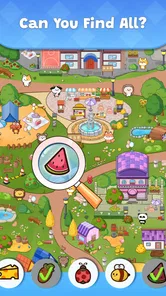
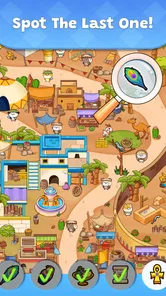

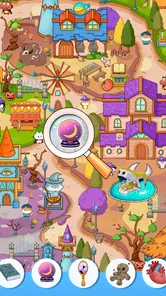


Analysis by Reviewed
I like hidden-object games best when they give me a clear, small task: scan a picture, find what does not belong, and enjoy the moment when the scene finally makes sense. Spot It - Find Hidden Objects is built around that simple appeal. It is a free trivia game from Teras Global JSC, rated for Everyone, and a good fit when I want a visual puzzle rather than a story-heavy adventure or a fast reaction test.
Why this kind of search works in short sessions
The basic appeal is easy to understand, but the way I approach a scene makes a real difference. I try to divide the image into a few mental zones and finish one before moving to the next. That reduces the chance of repeatedly checking the same obvious areas while overlooking a small object near an edge. It is a useful habit for this particular format because the challenge comes from visual attention, not from memorizing facts or learning a complicated control scheme.
I also treat each target as a shape and color rather than relying only on what I think the object should look like. A target partly blended into a scene may be easier to recognize by its outline or contrast than by its everyday meaning. If I have already scanned the whole picture once, I slow down and compare small clusters of details instead of tapping every vaguely similar item. That keeps the search deliberate and makes a correct find feel earned.
A quick game for small breaks
This is the kind of game I would open while waiting for an appointment or taking a quiet break at home. A useful way to approach each scene is to scan it in sections instead of jumping between likely hiding places: check the edges, then the center, and zoom in only when an object is genuinely hard to distinguish. That method keeps the hunt focused and can make a busy image feel less frustrating.
It also helps to pause before tapping. In a hidden-object puzzle, a tiny decoration can resemble the target at first glance, and a hurried guess may interrupt the satisfying search rhythm. I would recommend it to players who enjoy careful looking and short, self-paced challenges. If you prefer competitive matches, word trivia, or puzzles that rely on logic rather than visual detail, another kind of trivia game will probably suit you better.
How it fits among hidden-object games
Compared with quiz apps that test facts against a timer, the appeal here is visual attention: the scene itself is the puzzle. That makes it easier to dip into casually, but it may feel repetitive to someone who wants changing mechanics or a deep progression system. I would treat it as a light search game, not as a broad trivia collection.
That difference matters when choosing what to install. A general-knowledge quiz is a better pick if I want to learn or recall facts, while a word puzzle gives me clues and language patterns to work through. A narrative adventure is better when I want characters and a reason to move from one scene to another. This game’s more specific pleasure is spotting visual details, so it works best when I want a compact activity without having to follow a plot or prepare for a match.
More From Our News Desk

 Gmail
Gmail in a Busy Inbox: Who Benefits Most?
From first account to crowded workday, Gmail earns its place through dependable search and flexible sorting—but its best fit depends on how much inbox maintenance you can tolerate.

 Prime Video
Switching to Prime Video: What Changes in Your Viewing Routine
Prime Video can make a compelling second home for streaming, but switching means learning a different catalog, rental layer, and route from browsing to playback.

 Universal TV Remote Control
 Works Best as a Reliable Backup
A phone remote earns its place through quick setup and reliable habits. Here is how to get more from Universal TV Remote Control—and where its limits show.

 Weather - By Xiaomi
Weather by Xiaomi Review: Clear at a Glance, Less Clear Up Close
Xiaomi’s weather app makes everyday forecasts quick to scan, but its calm surface can leave useful details and recovery paths harder to find than they should be.

 X
X Under Pressure: Can It Recover When Posting Goes Wrong?
A resilience-focused review of X, examining setup, mistaken posts, interruptions, weak connections, and the gaps that matter when recovery needs to be dependable.

 Clash of Clans
 Is Won Between the Battles
Its raids are quick; its community is a long-term project of coordination, teaching, rivalry, and shared responsibility—with all the friction that entails.
Latest News



The game has an average rating of 4.2 from 169 ratings and has reached over 10,000 installs. Those figures suggest that it has found an audience, but they cannot tell me whether every scene or session will suit a particular player. It was released on July 30, 2024, and version 1.3.4 is listed for devices running Android 5.1 or later.
The Hunt Begins
Once you open Spot It - Find Hidden Objects, you're greeted with a vibrant and colorful interface that immediately draws you in. The game sets you up in different scenarios where your mission is to find hidden items cleverly camouflaged within the scene. From bustling cityscapes to serene gardens, each level is a visual treat and a test of your observational skills.
Gameplay Experience
What I love about this app is how it seamlessly combines relaxation with a bit of a mental workout. As you progress through the levels, the difficulty ramps up subtly, ensuring you’re always engaged without feeling overwhelmed. The objects you need to find are ingeniously hidden, often requiring a keen eye and a little bit of patience.
For an everyday example, I would use it during a short wait when I have enough attention to look closely but do not want to start something that needs a long uninterrupted session. I would finish only the search I am working on, put the phone away, and return later if I felt like another round. That is a better fit for this visual format than opening it while walking, commuting through a crowded space, or trying to divide attention between the screen and another task. The pictures reward looking carefully, so a calm moment is more useful than a rushed one.
The touch controls are intuitive, allowing you to zoom in for a closer look or pan around the scene with ease. There’s a satisfying feeling when you finally spot that elusive object, and the game rewards you with a little sparkle and a sound effect, which never fails to make me smile.
Making a search less frustrating
When a scene starts to feel cluttered, I would resist the urge to sweep the screen randomly. I find it more productive to scan in a consistent direction, then change the scale of the search: first look at the overall composition, then inspect the areas where the target’s outline could plausibly fit. This is a small workflow, but it prevents the common hidden-object habit of fixating on one suspicious corner while ignoring the rest of the image.
Zooming is most helpful when I already have a reason to inspect a particular area. Enlarging the whole picture too early can make the search feel slower because I lose the wider layout that helps me orient myself. I would use the wider view to eliminate obvious sections, then zoom in for ambiguous details. If I still cannot see the object, a short pause can be more helpful than repeated tapping: returning with fresh eyes often makes a shape stand out.
Features Galore
One of the standout features of Spot It - Find Hidden Objects is its variety. With numerous levels to explore and a diverse range of scenes, you’ll never get bored. The app also introduces new themes and challenges regularly, keeping the content fresh and exciting. Whether you’re a casual player or a hidden object aficionado, there’s something here for everyone.
For me, the most practical way to judge that variety is not to assume that every scene will land equally well. Some pictures may invite a quick sweep, while others can demand more patience because objects blend into their surroundings. That variation is part of the appeal for someone who likes close observation, but it is also a trade-off: if I am tired or looking at a small screen, a denser image can turn a relaxing break into a strain. I would match the session to my attention level rather than push through simply to clear a scene.
If you ever find yourself stuck, the game offers hints to nudge you in the right direction. But use them sparingly! There’s a certain pride in finding all the objects without any assistance.
Who will enjoy it, and who may not
I think it is especially suited to players who like visual puzzles but do not want a long tutorial, a complicated story, or a score to defend against other people. It can also work for someone looking for a quiet activity to share: one person can hold the phone while another suggests where to look, turning a solo search into a low-pressure back-and-forth. The Everyone age rating makes the game broadly approachable, although whether a particular scene is comfortable for a player still depends on their patience and eyesight.
I would skip it if I were looking for a strong sense of competition, a collection of different trivia formats, or a game where every session teaches me new facts. It is also not my first choice when I want fast feedback or a clear strategic system to master. Its central activity stays focused on looking, and that focus is either the reason to try it or the reason it will not hold someone’s interest.
Spending and fairness
The game is free to download, with in-app purchases ranging from $0.99 to $94.99 per item. That broad range is worth noticing before spending: I would check the item and its final price carefully rather than assume every purchase is small or necessary. A free download does not by itself tell me whether purchases affect progress, and I would not treat spending as a shortcut unless the game clearly explains what an item does.
For a fair personal test, I would first play without buying anything and see whether the scenes remain enjoyable at my own pace. If hints become tempting, pause and try scanning the image systematically before deciding whether help is worth it. The game’s appeal is the search itself, so paying to reduce that challenge may not improve the experience for everyone.
That is also the fairest way to think about spending: the listed purchase range confirms that optional paid items exist, but it does not tell me what each item changes or whether a purchase provides an advantage. I would inspect the in-game explanation and the final checkout amount before deciding. If I am playing alongside someone else, I would keep any purchase decision separate from the fun of solving the scene; a hint should be a considered convenience, not an assumed requirement.
What to expect before playing
A practical question is whether this suits a short session or demands a long stretch of attention. Its scene-based format makes it easy to approach one search at a time, though a player who dislikes visually busy pictures may find careful scanning tiring rather than relaxing. I would also choose another option if I wanted a trivia game built around general knowledge, head-to-head competition, or a wider mix of puzzle types.
Another consideration is the difference between what a game feels like and what its store figures can prove. It has 26 reviews, but that number is not a substitute for trying a few scenes yourself; individual preferences for image clarity and search difficulty matter more. The safest expectation is a focused hidden-object activity, not a promise of a particular amount of content or a specific pace of updates.
Questions worth settling as you play
Does it work without spending? The download is free, and I would start by playing without purchases, then decide whether any paid option is useful based on what it actually offers. I would not assume hints or other items are necessary just because they are available. The right test is whether I can enjoy the search at my own pace before paying to change it.
Is it suitable for a quick break? Yes, if I have a moment when I can give the image my attention. The scene format lends itself to a short attempt, but I would not treat it as a good companion for situations where I need to watch my surroundings or keep switching tasks. And if I want fresh questions, opponents, or a story, I should choose another type of game rather than expect this one to become something it is not.
Will every scene feel relaxing? Not necessarily. A player who enjoys visual scanning may find the focused search calming, while someone who tires quickly from dense pictures may find it demanding. I would try a few searches and pay attention to whether I am enjoying the process, not just whether I am clearing targets. That is a more useful personal measure than assuming the same difficulty will suit everyone.
Trust and the final call
Spot It - Find Hidden Objects is more than just a game; it's an adventure waiting to unfold. Whether you’re looking to kill time on a commute or unwind after a long day, this app offers a perfect blend of challenge and relaxation. The stunning visuals and immersive gameplay are bound to keep you coming back for more. So, why not give it a try? You might just find that you have a knack for spotting the hidden gems in life.
My overall recommendation is measured: try it if visual searches sound satisfying, keep purchases deliberate, and give yourself permission to stop when a scene starts feeling like work. The strongest reason to play is the simple pleasure of noticing details; if that is what you want from a mobile break, this is an easy premise to test for yourself.
In trust terms, I am comfortable recommending it as a modest, clearly scoped pastime, not as a game whose every cost or long-term progression should be taken for granted. Its developer is Teras Global JSC, and the age rating is Everyone, while the free entry point gives curious players a way to see whether the search suits them. I would still read each purchase prompt carefully and base my decision on the specific item shown, rather than on the general promise of faster progress.
A sensible way to decide
If you are unsure, use your first few sessions to answer a simple question: do you enjoy examining the scene even when the next object takes time to find? If yes, the game’s narrow focus may be a strength, and you can keep it as an occasional visual break. If you mainly want variety, social competition, or a sense of discovery driven by a story, a different puzzle or trivia game will likely be a better use of your time.
I would also decide in advance what would make me stop: repeated frustration with image detail, a feeling that I am tapping without really searching, or pressure to spend for reasons I cannot clearly explain. Those are useful personal boundaries for any free-to-start game, especially one where the core pleasure is the effort of finding things. With that approach, it is easier to enjoy what the game does offer without expecting it to provide a broader experience.
Spot It - Find Hidden Objects Frequently Asked Questions
Does Spot It - Find Hidden Objects have a relaxed pace, or is it timed?
The central task is to look carefully through a scene and find its hidden objects, so the appeal is in observation rather than quick reflexes. You can take time to inspect the picture and zoom in when needed. That makes the game a comfortable choice for short breaks or a more leisurely puzzle session.
What is Spot It - Find Hidden Objects?
Spot It - Find Hidden Objects is an engaging puzzle game available on Android and iOS platforms. The game challenges players to find hidden objects within beautifully illustrated scenes. Perfect for players of all ages, it enhances your observation skills while providing a fun and relaxing experience. It's free to play with optional in-app purchases.
How do you play Spot It - Find Hidden Objects?
To play Spot It - Find Hidden Objects, you need to carefully examine each scene to find a list of hidden objects. You can zoom in for a closer look and use hints if you get stuck. The game offers various levels with increasing difficulty. Completing levels earns you stars and rewards, which can unlock more content.
Is Spot It - Find Hidden Objects free to download and play?
Yes, Spot It - Find Hidden Objects is free to download and play on both Android and iOS devices. While the game is free, it does offer in-app purchases for additional hints, levels, or to remove ads. These purchases are optional and are not required to enjoy the full game experience.
Can Spot It - Find Hidden Objects be played offline?
Yes, Spot It - Find Hidden Objects can be played offline. Once downloaded, you can enjoy the game without an internet connection, making it a great option for playing during travel or in areas with limited connectivity. However, some features, like in-app purchases, require an internet connection.
Pros
- Visually appealing graphics
- Engaging and challenging levels
- Regular updates with new content
- User-friendly interface
- Offline mode available
Cons
- Ads can be intrusive
- Some levels too challenging
- Occasional bugs and glitches
- In-app purchases necessary for progression
- Limited hints without purchase