Spider Solitaire
- 1.38K
- 4.8
- Installs
- 5.00M
- Price
- Free

Screenshots


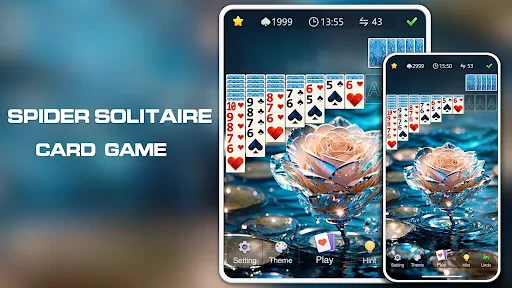

Analysis by Reviewed
I often reach for Spider Solitaire when I want a quiet game that asks for a little thought without demanding a long setup. This is a familiar style of board game: arrange cards into descending sequences, uncover what is hidden, and work toward clearing the layout. Its appeal is less about surprises than about weighing each move. That makes it an easy fit for a short pause, though the same measured pace may feel too slow if you want action or a steady stream of new challenges.
What a typical session feels like
The basic rhythm is simple to pick up, but a promising move can have consequences several turns later. I find it useful to pause before moving a card just because it is available. Opening a concealed card or keeping a useful empty column can matter more than making an immediately tidy sequence. That small habit turns a casual round into a more satisfying puzzle, and it helps explain why the game suits players who enjoy planning without complicated rules.
For example, it works well during a coffee break when I have enough time to think through a few moves but do not want to start a story-driven game. A round can also be a calming way to wind down: there is no need to coordinate with other players or keep up with a fast timer. The trade-off is that a difficult layout can take longer than expected, so it is not always ideal when I need to stop instantly or give my attention to something else.
The Addictive Gameplay
First off, let's talk about the gameplay. If you've never played Spider Solitaire before, let me give you a quick rundown. The goal is to move all the cards to the foundation in as few moves as possible. Sounds simple, right? Well, not quite. You've got to be strategic about it, which is what makes this game so addictive. It's like a puzzle that you can't put down. You can choose from different difficulty levels, so whether you're a newbie or a card shark, there's a challenge waiting for you.
Choosing a challenge and learning the rhythm
The choice of difficulty is useful because it lets a newcomer learn the flow before taking on tougher decisions. I would start at a comfortable level, then raise the challenge once the rules feel natural; jumping straight into a demanding game can make early mistakes feel arbitrary. A practical tip is to use a hint as a learning aid rather than an automatic next move: first look for a way to reveal a hidden card or preserve a clear column, then compare that plan with the suggestion.
Undo is similarly helpful when used thoughtfully. It can let you test a move and retreat if the result closes off a better option, but leaning on it after every decision can turn the game into trial and error instead of planning. The recorded stats offer another way to keep a personal sense of progress. I would treat them as a reason to notice whether my decisions are improving, not as pressure to chase a perfect run every time.
Visuals and User Interface
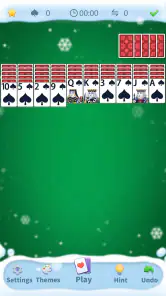
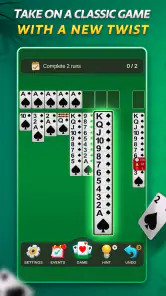
Now, let’s chat about the visuals and user interface. The graphics are clean and straightforward, which is perfect for a card game. You don't want anything too flashy distracting you from your master plan. The cards are easy to read, and the touch controls are spot on. You can drag and drop cards with ease, making the gameplay smooth as butter. Plus, the app's layout is intuitive, so you'll have no trouble navigating through the menus.
More From Our News Desk

Weather by Xiaomi Review: Clear at a Glance, Less Clear Up Close

X Under Pressure: Can It Recover When Posting Goes Wrong?

Clash of Clans Is Won Between the Battles

Android Auto Makes the Case for Quieter Car Software

MobiOffice: Transforming Mobile Productivity with Seamless Integration

EA SPORTS FC™ Mobile Soccer: Redefining Mobile Sports Gaming
Oh, and did I mention the customizability? You can change the card backs and backgrounds to suit your mood. Feeling a bit retro? Go for a classic green felt background. Want something more modern? There are sleek designs for that too. It's the little things that make a difference, you know?
Performance during longer play
Spider Solitaire is a turn-based card game, so I would not expect the sense of speed that comes from an action game. The important performance question is whether tapping, dragging, and following a sequence feels comfortable enough to keep the puzzle flowing. A long session puts more emphasis on readable cards and reliable touch input than on visual effects. If a move does not go as intended, undo gives you a way back; that is a useful recovery option, though it does not replace taking care before moving a stack.
For everyday use, the offline play makes it convenient when a connection is unavailable, such as during travel or in a waiting room. It also means the game can serve as a low-commitment alternative to online multiplayer card games, where a session depends on other people and a network. Players looking for competition, social interaction, or a changing set of objectives may prefer those alternatives instead. This one is best when the pleasure comes from working through the layout at your own pace.
Features That Keep You Hooked
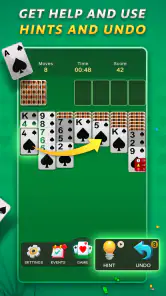
What sets this app apart are the nifty features it offers. You can undo moves if you make a mistake, which is a lifesaver for those "oops" moments. There's also a hint button, just in case you get stuck. Trust me, it happens to the best of us. And for those of you who like to keep track of your progress, the app records your stats so you can see how you improve over time.
Another feature worth mentioning is the ability to play offline. Yup, you read that right. No Wi-Fi? No problem. You can still enjoy your favorite card game wherever you are, whether it's on a plane or in a remote cabin in the woods.
Making the game fit into real life
The best way I have found to use a solo card game like this is to match the session to the moment, rather than assume every round will be brief. If I have only a few minutes, I can make a couple of deliberate moves and leave the rest for later only if I am comfortable pausing the game; I would not start a new layout when I know I must respond immediately to something else. While waiting for an appointment, it is a nice alternative to scrolling because the cards give my attention one clear task without requiring sound or another person.
For a more focused session, I would pick a difficulty and stick with it for a while instead of switching whenever a layout becomes awkward. That makes the stats more meaningful as a personal record, since I am comparing similar kinds of play rather than unrelated challenges. It also helps me identify whether I am getting better at uncovering cards or simply using undo more often. This is a small but useful distinction: a high sense of progress can come from learning to plan, not just from finishing a round.
There is a practical stopping point, too. A move that opens a hidden card can make a layout feel promising, but it does not guarantee that the rest will fall into place. If I am playing near bedtime, I try not to treat a nearly cleared board as a reason to keep going indefinitely. The puzzle is at its most relaxing when I can enjoy the decisions without turning completion into an obligation.
Who is likely to enjoy it
Classic Puzzle Games Maker is the developer behind this free board game, which is rated for Everyone. Its average rating is 4.8 from around 15,000 ratings, and it has been installed over 5 million times. Those figures suggest it has found a broad audience, but the better reason to try it is straightforward: you already like card puzzles, want a solo game, and value being able to play without relying on Wi-Fi.
The game was released on May 28, 2023, and its current version is 1.7.7. It requires Android 6.0 or later. That minimum makes it a possible option for some older Android devices, but the version requirement alone cannot tell me how smoothly it will run on every handset. If your phone struggles with games generally, I would keep expectations modest and try a short session before settling into a longer one. On a device with a screen that makes the cards comfortable to read, the simple presentation is a practical advantage rather than a technical burden.
If you are deciding between this and another solitaire app, think about the kind of play you want. A standard solitaire variation may offer a quicker, more familiar sequence of decisions; Spider asks you to manage longer runs and think about how one move affects what you can uncover next. A multiplayer board game is a better fit for shared play, while a sprawling puzzle game is better for variety and progression. This app occupies the quieter middle ground: a repeatable solo challenge that is easy to return to, but not a substitute for a game built around novelty.
Device comfort and reliability expectations
For this kind of game, I judge performance less by flashy effects and more by whether the cards remain easy to follow and a drag lands where I intend. Spider Solitaire’s straightforward board gives the phone little spectacle to manage, so it is a sensible choice when I want a low-key game rather than a visually demanding one. Still, an older device or a small screen can change the experience: overlapping cards may take more attention to read, and precise dragging can feel less comfortable. I would try a short session on the actual phone before deciding it is a good fit for long play.
Because the game is turn-based, a brief interruption is less disruptive than it would be in a timed action game. I can take a moment to look away and return to the same decision without having to catch up with a moving scene. Undo also offers a simple way to recover from a mistaken move. I would not treat that as a guarantee against every interruption, though; it is a gameplay tool, not a promise about saving or restoring a session. The dependable habit is to avoid beginning a demanding layout when I know I may need to put the phone away immediately.
Its offline option is especially useful on commutes or in places with patchy reception, and it removes the need to wait for another player before starting. That convenience has a clear boundary: a solitary offline puzzle cannot provide the conversation or shared stakes of a multiplayer match. If connection-free solo play is the priority, that is a strength; if I want a social game to play with someone beside me, I would choose something designed for that instead.
Final Thoughts
All in all, Spider Solitaire is a must-have app for anyone who loves card games. It's a fun, challenging, and rewarding experience that will keep you entertained for hours. The app's simplicity combined with its strategic depth makes it perfect for both short breaks and extended play sessions. So go ahead, download it, and see if you have what it takes to become a Spider Solitaire master. Happy playing!
My recommendation comes with one qualification: choose it for calm, deliberate card play, not for constant novelty or social competition. I would skip it if I usually abandon games that require patience, or if I want a quick burst of action with a clear endpoint. For everyone else, the mix of difficulty choices, hints, undo, stats, and offline play gives a beginner room to learn and a regular player reasons to return. It is a familiar formula, but one that suits the small, unhurried moments when a thoughtful game is exactly enough.
Spider Solitaire Frequently Asked Questions
Is Spider Solitaire available for iOS as well as Android?
Spider Solitaire is a familiar card-game choice for mobile players, but platform availability can vary by edition. The version described here is for Android devices, with Android 6.0 or later required. If you are using an iPhone or iPad, check the relevant app store for an edition that supports your device before downloading.
Who developed Spider Solitaire, and is it a well-established game?
Spider Solitaire is developed by Classic Puzzle Games Maker. The game has attracted a substantial player community, with more than five million installs, around 15,000 ratings, and roughly 1,400 written reviews. Those figures suggest that it has reached many players, although they cannot guarantee that every player will enjoy its style or find every session equally engaging.
Is Spider Solitaire suitable for a quick game or a longer session?
Spider Solitaire can suit either kind of play, depending on how much time you have and how carefully you want to plan your moves. You can focus on making progress one move at a time, or take a longer session to work through a more involved layout. Its relaxed card-game format makes it easy to pick up whenever you feel like playing.
What kind of game is Spider Solitaire, and who is it suitable for?
Spider Solitaire is a board-style card game for players who enjoy arranging cards and thinking ahead. It is rated Everyone, so it is suitable for a broad audience. The game’s familiar solitaire format is approachable, while planning sequences and managing columns can provide a thoughtful challenge for both casual players and people who already enjoy card games.
What is Spider Solitaire and how does it differ from classic Solitaire?
Spider Solitaire is a popular card game that involves two decks of cards arranged in ten columns. Unlike classic Solitaire, which typically uses a single deck and focuses on building card sequences in alternating colors, Spider Solitaire requires players to build sequences of the same suit from King to Ace. The game's complexity increases with more suits, offering a challenging and engaging experience for players seeking a strategic card game.
Pros
- Addictive gameplay with daily challenges.
- Supports offline play
- no internet needed.
- Various difficulty levels to suit all players.
- Intuitive interface for easy navigation.
- Minimal ads for uninterrupted play.
Cons
- Limited customization for card designs.
- Occasional in-app purchase prompts.
- No multiplayer or leaderboard features.
- Battery draining on extended play.
- Ads may sometimes disrupt gameplay.
- Category
- Board
- Version
- 1.7.7











