

Pop Us!
- 1.38K
- 4.3
- Installs
- 50.00M
- Price
- Free

Screenshots
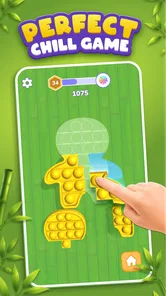
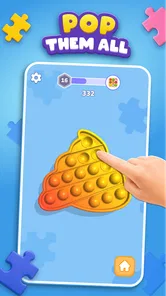
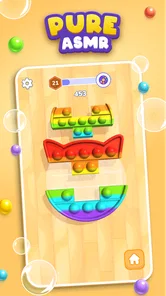
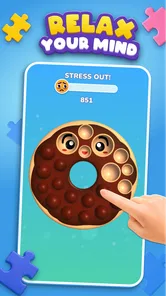
Analysis by Reviewed
I went into Pop Us! expecting a very simple time-killer, and that is exactly where it makes the best impression. This is a free simulation game from SayGames Ltd built around popping colorful shapes with quick taps. It does not ask me to learn a complicated system before I can enjoy it, so I can open it during a short break, play for a few minutes, and put it down without feeling that I have abandoned a long campaign.
That simplicity is both its strongest quality and its main limitation. The game is easy to understand, visually cheerful, and suitable for Everyone, but players looking for deep strategy, a story, or a demanding challenge may find the experience too light. I would describe it as a small relaxation tool with game-like goals rather than a traditional simulation with layers of management.
Where the first few minutes can feel less obvious
The basic interaction is clear almost immediately: I tap the pieces that appear and watch them pop away. The satisfying part comes from keeping my attention on the board and responding to what is in front of me. There is no need to study a tutorial for long, which makes the game approachable for younger players and for anyone who prefers games that explain themselves through touch.
However, “simple” does not always mean “frictionless.” A player may initially wonder whether every object should be tapped in the same order, whether speed matters more than accuracy, or whether a particular arrangement is meant to be solved carefully. My practical advice is to spend the first few rounds observing the board instead of tapping randomly. The game feels better when I treat each screen as a small visual task rather than as a button-mashing exercise.
That change in attitude is one of the first useful discoveries. Fast tapping can be relaxing, but deliberate tapping gives the activity a cleaner rhythm. I often use one short session to settle into the pattern, then continue only if the game still feels pleasant. This prevents a casual anti-stress game from turning into another source of irritation.
Another point worth understanding is the audience. The Everyone rating makes it a reasonable choice for a family device, but that does not mean every player will enjoy it equally. Children may like the colors and immediate response, while adults may appreciate it as a brief distraction. Players who want competition, character development, or a strong sense of progression should set their expectations lower before installing it.
The game has attracted a broad audience, with over 50 million installs and an average rating of 4.3 from around 46 thousand ratings. Those figures suggest that its accessible concept works for many people, but they should not be read as a promise that it will remain engaging for everyone over a long period. A short, tactile game has a naturally narrower purpose than a large adventure or strategy title.
More From Our News Desk

 Gmail
GmailGmail in a Busy Inbox: Who Benefits Most?
From first account to crowded workday, Gmail earns its place through dependable search and flexible sorting—but its best fit depends on how much inbox maintenance you can tolerate.

 Prime Video
Switching to Prime Video: What Changes in Your Viewing Routine
Prime Video can make a compelling second home for streaming, but switching means learning a different catalog, rental layer, and route from browsing to playback.

 Universal TV Remote Control
Universal TV Remote Control Works Best as a Reliable Backup
A phone remote earns its place through quick setup and reliable habits. Here is how to get more from Universal TV Remote Control—and where its limits show.

 Weather - By Xiaomi
Weather by Xiaomi Review: Clear at a Glance, Less Clear Up Close
Xiaomi’s weather app makes everyday forecasts quick to scan, but its calm surface can leave useful details and recovery paths harder to find than they should be.

 X
XX Under Pressure: Can It Recover When Posting Goes Wrong?
A resilience-focused review of X, examining setup, mistaken posts, interruptions, weak connections, and the gaps that matter when recovery needs to be dependable.

 Clash of Clans
Clash of Clans Is Won Between the Battles
Its raids are quick; its community is a long-term project of coordination, teaching, rivalry, and shared responsibility—with all the friction that entails.
Latest News



What I check before blaming the game
If the game does not feel responsive, I first check the obvious physical causes. A dirty screen, a thick screen protector, damp fingers, or a case pressing near the display can make tapping feel inconsistent. Because the whole experience depends on direct touch, a small problem with the screen can look like a problem inside the game.
I also close other demanding apps before deciding that Pop Us! is running poorly. This is especially sensible on an older phone or a device with little free storage. The game is lightweight in concept, but the phone still has to handle the operating system, background activity, and the game at the same time. Restarting the device is a basic step, yet it can clear temporary touch or performance oddities without changing anything in the game itself.
Compatibility is another early check. The current version is 1.1.60 and requires Android 8.0 or later. On Android, I would confirm the operating system before spending time troubleshooting installation. If the phone is below that requirement, changing settings inside the game will not solve the underlying compatibility issue.
For a new installation, I prefer a stable connection while the app is being obtained and opened for the first time. If an installation pauses, I check available storage, the device’s connection, and whether the app store is waiting for another update. These are ordinary setup checks, but they matter because a failed download can easily be mistaken for a fault in the game.
The free price makes trying it low-risk, although free-to-play design still deserves attention. In-app purchases are listed at $1.99 per item. I would avoid tapping purchase prompts automatically, especially when handing the phone to a child. The best way to evaluate the core experience is to play normally first and decide whether the free version already provides enough relaxation.
A calmer setup for family and short-break play
For family use, I would set expectations before passing the phone over: this is a tapping game, not an open-ended toy or a long-form adventure. That simple explanation prevents disappointment. It also makes it easier for a child to understand that the game is designed for short rounds and visual interaction rather than a large world to explore.
For my own use, I keep the first session short. I play while waiting for an appointment, during a quiet pause between tasks, or when I want something more active than scrolling but less demanding than a strategy game. The useful boundary is that I decide in advance whether I want one quick session or several. Without that boundary, the repetition can become noticeable.
Sound and visual comfort are personal matters, so I adjust the phone rather than assuming the game is at fault. Lowering brightness, taking regular breaks, and avoiding play when my eyes are already tired make a bigger difference than searching for a hidden setting. Since the appeal is visual and tactile, comfort directly affects whether the game feels relaxing.
I also recommend checking the purchase controls on the device used by a child. The game is rated Everyone, but the presence of optional purchases means the surrounding device settings still matter. This is not a criticism of the popping mechanic; it is simply sensible preparation for any free game that offers paid items.
Recovering a session when the flow breaks
When a round stops responding, I do not immediately reinstall. First, I leave the current screen and reopen the game. If that does not help, I close it fully and launch it again. This basic sequence separates a temporary session problem from a repeatable issue. It also avoids taking more drastic steps before I know whether they are necessary.
If the game opens but taps still seem unreliable, I test another part of the screen outside the game. If touches fail there too, the phone or screen is the more likely cause. If other apps respond normally, I try a device restart and then check whether the game and operating system are up to date. Keeping both current is a sensible general troubleshooting step, particularly when an app has received a newer version.
I am cautious about clearing app data or uninstalling. Those actions can remove local progress or settings, depending on how a particular game stores them. Before using them, I would make sure I am comfortable starting over. For a small casual game, reinstalling may be acceptable, but it should be a last resort rather than the first response to one frozen round.
A useful recovery habit is to notice exactly when the problem occurs. Does it happen on launch, after many taps, when an interruption appears, or only on one area of the screen? Writing down that pattern gives a much clearer picture than saying that the app is “broken.” It also helps identify whether the issue is tied to the game, the device, or a particular interaction.
If the problem appears repeatedly after ordinary checks, I would use the official support route connected with the app store or developer rather than relying on random fixes. I would include the phone model, Android version, current game version, and a short description of the failed step. That information is more useful than a vague complaint and does not require changing risky device settings.
When the game is not the cause
Some frustrations come from the environment around the game. A phone in battery-saving mode may behave differently from one running normally. A nearly full storage drive can interfere with updates. A weak connection can affect installation or other connected parts of the experience. None of these possibilities proves a fault in Pop Us!, but checking them prevents wasted time.
Touchscreen calibration is another overlooked factor. If taps consistently register beside the intended target across several apps, I would investigate the screen rather than the game. Removing a poorly fitted protector for a quick test can reveal whether the accessory is interfering. I would not press harder or tap aggressively; that only makes the interaction less comfortable and will not repair inaccurate touch input.
Notifications and incoming calls can also interrupt a short session. If the game seems to restart after an interruption, I first consider whether the phone closed it in the background. The practical response is to reduce unnecessary background activity and reopen the game, not to assume that the popping mechanic has lost progress permanently.
There is also a difference between technical failure and design fatigue. If the game works correctly but the repeated popping no longer feels satisfying, troubleshooting will not fix that. I take a break, return later, or choose a different kind of game. Recognizing that distinction is important: a casual title can be functioning perfectly while still no longer matching my mood.
How it compares with other relaxing games
Compared with puzzle games that require planning several moves ahead, Pop Us! is much easier to enter. I do not need to remember a complex rule set or prepare for a difficult level. That makes it a better choice when I want immediate tactile feedback and a low mental load.
Compared with idle games, it asks me to participate rather than simply wait for resources to accumulate. The trade-off is that its relaxation comes from active tapping, not from watching progress build in the background. Someone who likes upgrading systems and checking long-term numbers may prefer an idle title instead.
It is also different from match-three games. Those usually encourage pattern recognition, combinations, and strategic planning. Pop Us! feels more direct: the pleasure is in clearing colorful objects with touch. If I want a puzzle that tests foresight, I choose the match-three alternative. If I want a quick sensory reset, this game is more suitable.
Players who enjoy simulation games with detailed construction, realistic management, or storytelling should look elsewhere. The simulation label here should be understood in a light, casual sense. The game simulates the satisfying act of popping objects, but it does not offer the depth associated with city builders, farming games, or management sandboxes.
Small techniques that make the experience better
My first tip is to slow down whenever the board looks crowded. A quick scan helps me identify the easiest targets and reduces accidental taps. This is especially useful when I am playing one-handed or while distracted. The game becomes more controlled, and the visual feedback feels less chaotic.
My second tip is to use it as a transition activity rather than a background habit. A few rounds before studying, commuting, or returning to work can provide a clear pause. I avoid playing while doing something that already requires concentration, because the game’s value is lost if it becomes another divided-attention task.
My third tip is to evaluate purchases by asking whether they change my enjoyment or merely extend a session I am already tired of. Since items cost $1.99 each, I would not buy anything simply because a prompt appears. I would first use the free experience long enough to know whether the game’s basic loop genuinely suits me.
A fourth practical insight is to treat repetition as a feature with a limit. The same uncomplicated action that settles my mind during a short break can feel monotonous after extended play. I get more from the game when I stop while it is still pleasant. That approach is more useful than expecting a small relaxation title to provide endless novelty.
Who should install it, and who should skip it
I would recommend it to someone who wants a colorful, uncomplicated game for brief sessions, especially if direct tapping feels more appealing than reading instructions or managing a complicated interface. It is also a reasonable option for a family device because of its Everyone content rating, provided an adult handles purchase controls and explains the game’s limited scope.
I would skip it if my priority were a substantial simulation, a competitive leaderboard, a story campaign, or a strong sense of character progression. I would also hesitate if I know that repetitive tapping quickly loses its appeal. In that situation, a logic puzzle, creative sandbox, or deeper management game would probably offer better long-term value.
The developer, SayGames Ltd, has positioned this as an accessible mobile game rather than a demanding specialist experience, and that is how I judge it. Its popularity is understandable because the first interaction is immediate. Still, popularity cannot replace personal fit. The important question is whether a short sequence of colorful taps is the kind of break I actually want.
My practical verdict
Pop Us! succeeds when I use it for what it is: a free, approachable simulation game that turns simple tapping into a brief colorful distraction. The current version, 1.1.60, supports Android 8.0 and later, and the low entry cost makes it easy to test on a compatible phone. I like that I can understand the basic activity without committing to a long tutorial or a complicated progression system.
Its limitations are equally clear. The loop can become repetitive, the experience is not designed for deep strategy, and optional purchases mean I would pay attention when using it on a shared or child-accessible device. Technical problems should be checked against the phone, screen, storage, connection, and background activity before blaming the game itself.
My recommendation is straightforward: try it when you want a few quiet minutes of tactile play, not when you are searching for a full simulation adventure. The best way to enjoy Pop Us! is to keep the sessions short, tap deliberately, and let its simplicity remain a benefit instead of demanding depth it was never meant to provide.
Pop Us! Frequently Asked Questions
Is Pop Us! a good choice for a quick, relaxing break?
Pop Us! is built around colorful, satisfying bubble-popping play, making it a natural fit for short sessions when you want something light rather than demanding. Its simple tapping and sliding controls keep the focus on the tactile activity, and the game’s stated aim is to offer enjoyable anti-stress entertainment. Players looking for a complex challenge or a detailed story may prefer a different kind of game.
How much storage space should I have available before installing Pop Us!?
It is sensible to leave some free space on your phone or tablet before installing Pop Us!, as you would with any game. The installation itself and later updates need room on the device, and keeping a little extra space available can help avoid download or update interruptions. Check your device’s available storage before starting, especially if you regularly install games or save lots of photos and videos.
What devices and operating systems can run Pop Us!?
Pop Us! is available for Android and iOS, so it can suit players who want a casual game on a phone or tablet. On Android, the minimum operating system requirement is version 8.0. Check that your device meets the relevant platform requirements before downloading, and make sure you have enough free storage for the installation and any updates.
What is Pop Us! and how does the game work?
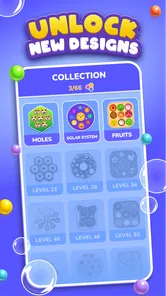
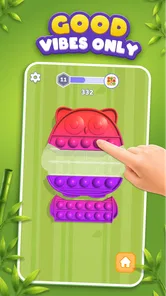
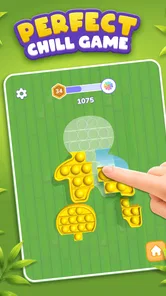
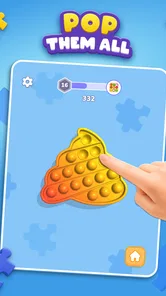
Pop Us! is a casual puzzle game based on the relaxing activity of popping virtual bubbles. After choosing a board, you tap or slide across the bubbles to clear them and complete the available patterns or challenges. The controls are simple enough for quick sessions, while the different shapes, layouts, and visual effects provide variety. It is designed primarily for stress relief and light entertainment rather than complex strategy.
Is Pop Us! free to download and play?
Pop Us! is free to download, making it easy to try on a compatible Android or iOS device. However, optional in-app purchases are available at $1.99 per item, and the free version may also include advertising or additional content that requires payment. Before downloading, it is worth checking the store listing for the current pricing model and available purchases, and considering device-level payment controls if children will play.
Pros
- Simple mechanics make it easy to start playing immediately.
- Short levels are convenient for quick breaks or casual sessions.
- Bright visuals give the game a cheerful
- relaxing atmosphere.
- Gradual challenges provide a gentle sense of progression.
- Works well for players who enjoy quiet
- low-pressure puzzles.
Cons
- Some puzzles may feel repetitive after extended play.
- The relaxed pace may not satisfy players seeking intense action.
- Later levels can become more trial-and-error than strategic.
- Ads may interrupt the experience
- depending on the version.
- Limited variety can reduce long-term replay value for some users.











