Phone Case DIY: ASMR Mobile
- 6.00
- 3.2
- Installs
- 1.00M
- Price
- Free

Screenshots
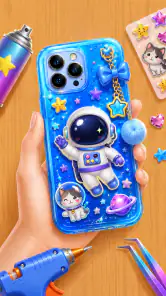
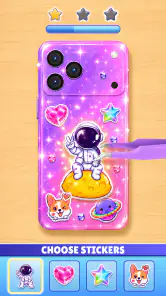
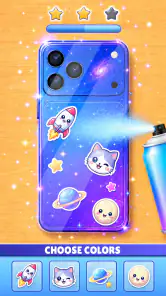
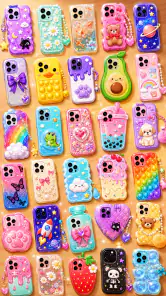


Analysis by Reviewed
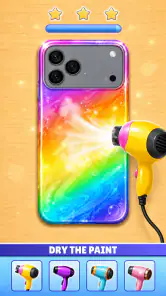
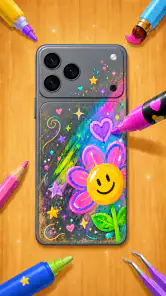
I’m drawn to small creative games when I have a few minutes to spare, and Phone Case DIY: ASMR Mobile is built around that kind of low-pressure activity. It is a simulation game from smartsolution where the central idea is to decorate phone cases with color and stickers. That gives it an easy-to-understand appeal: you can focus on making something cute without needing to learn a complicated game world first.
My overall impression is that this is best approached as a casual design pastime, not as a deep creative studio or a demanding simulation. The simple premise makes it approachable, while the modest average rating of 3.2 from around 510 ratings suggests players’ experiences are mixed. I’d try it if playful decoration sounds relaxing, but I wouldn’t expect extensive design tools or a long-term progression challenge.
Creative play at an easy pace
What the decorating loop is good for
The appeal here is the small scale of the task. Rather than designing a whole room or managing a business, you work on a single familiar object: a phone case. That gives each session a clear visual goal and makes the game easy to pick up when you want a brief break. Its focus on coloring and sticker decoration is also a natural fit for players who enjoy arranging shapes and choosing a look more than solving puzzles or competing.
I can imagine opening it while waiting for a friend or taking a quiet pause between other tasks. A case is a compact canvas, so the creative decision is less intimidating than starting with a blank page in a drawing app. The trade-off is that players who want to sketch freely, build elaborate scenes, or make designs for actual printing may find this format too constrained. It is a playful game activity, rather than a replacement for a full art tool.
The “ASMR” part of the title may lead some people to expect a particular sound-focused experience. I would treat that label as part of the game’s presentation, not as a guarantee that it will suit everyone seeking dedicated relaxation audio. If sound is important to you, it’s sensible to check how it feels on your own device and in your preferred play setting rather than assuming the title alone tells the whole story.
A practical way to approach each design
For a more satisfying result, I’d decide on a simple theme before starting: for instance, a favorite color paired with a small set of matching stickers. That helps a design feel intentional instead of crowded. A useful second pass is to leave a little empty space around the main decoration; on a small case-shaped canvas, filling every area can make the finished look feel busy. These are simple choices, but they give a casual decorating session a bit more purpose.
I’d also treat each attempt as a quick experiment rather than trying to create a perfect design on the first go. If a combination feels off, changing one element at a time makes it easier to see what improves the look. That approach is particularly helpful in a game centered on visual choices, where small adjustments can matter more than having a large canvas or advanced tools.
You May Like

Clash of Clans Is Won Between the Battles

Android Auto Makes the Case for Quieter Car Software

MobiOffice: Transforming Mobile Productivity with Seamless Integration

EA SPORTS FC™ Mobile Soccer: Redefining Mobile Sports Gaming

How Microsoft OneDrive Became a Mobile Productivity Giant

How Google Translate Breaks Language Barriers Effortlessly
One trade-off with sticker-based creativity is that the result depends on the range of choices available in the game. Players who enjoy working within a playful selection may find that limitation freeing: it gives them a starting point and keeps the activity light. People who want complete control over shape, line, and color may prefer a drawing app instead, where the creative boundaries are wider.
How quickly it fits into a spare moment
Phone Case DIY: ASMR Mobile has a premise that should be easy to understand without a long explanation, which is a real advantage for short sessions. I’d expect the main appeal to be getting into the decorating activity quickly, rather than spending a lot of time learning layered systems. Still, I can’t promise a particular loading speed or smoothness across devices: those depend on the phone, its available resources, and how the game behaves in practice.
If you’re deciding whether it belongs in a short-break routine, the best test is whether the first few minutes feel comfortable on your handset. Notice whether the interface responds promptly to taps and whether the visual activity stays smooth while you decorate. That hands-on check matters more than assuming that a small, casual concept will automatically perform well on every device.
A practical tip is to close or pause other demanding apps before playing if your phone is already struggling. That is general device housekeeping rather than a special requirement for this game, but it can help distinguish a game-specific issue from a phone that is low on available resources. If performance improves, you have a clearer idea of what was causing the friction.
When a longer session may feel different
A quick design session and a longer stretch of play are not always the same experience. In a longer session, repeated choices can make a simple creative loop feel less fresh, especially if you came in hoping for a substantial progression system. I’d use the game in short bursts and see whether the decorating itself stays enjoyable, rather than judging it by how long it can hold attention in one sitting.
Heavy use can also expose ordinary device limits: an older phone, little free storage, or many apps running in the background can affect responsiveness in mobile games generally. I wouldn’t assume this title is especially demanding, but neither would I treat its casual style as proof that it uses negligible resources. If the phone heats up or begins to lag, take a break and check whether other apps are contributing before deciding the game is the sole cause.
For a smoother creative workflow, I’d avoid switching rapidly between the game and several other apps while in the middle of a design. Such switching can interrupt concentration, and on some devices it may also make returning to a game less seamless. Keeping a session focused makes it easier to enjoy the visual task and to notice whether the game itself is stable.
Reliability and what to expect from updates
The current version is 1.0.8, and the game has passed one million installs. Those figures show that it has found an audience, but they don’t guarantee that every player will have the same experience or that every device will behave identically. The average rating is a more mixed signal than a clear endorsement, so I’d go in with measured expectations and let the actual feel of the game decide whether it suits you.
If the game closes unexpectedly or a design session is interrupted, I’d first reopen it and check whether the issue happens again under similar conditions. Before making changes, it’s wise to avoid clearing app data unless you understand what that action may remove. Restarting the device and checking for an available game update are sensible general troubleshooting steps, but I wouldn’t assume any particular recovery or save behavior without seeing it on the device.
That caution is useful for any casual creative game: if you’ve made something you particularly like, don’t rely on an untested assumption that it will be preserved exactly as you expect after closing the app. Try a short session first and see how the game behaves when you leave and return. This is a practical way to learn its rhythm without investing a long stretch of time before you know whether it feels reliable to you.
Choosing the right phone and player
The listed minimum operating system is Android 7.0, so the game is intended to run on a broad range of Android versions. That does not mean every compatible phone will feel equally responsive; available memory, screen size, and general device condition still matter. The small-object decorating concept should be easiest to enjoy on a screen where stickers and color choices are comfortable to see and tap.
It is free to download and rated for Everyone, which makes it easy to consider for casual play across age groups. For younger players, I’d still recommend that an adult check the app’s current on-device experience and settings, as with any mobile game. The age rating is a useful starting point, not a substitute for a parent deciding what feels appropriate for a particular child.
This is a good fit for someone who likes cute visual customization, prefers low-pressure play, and is happy to work within a focused theme. It is a weaker fit for players who want competitive goals, a story, complex simulation management, or professional-grade editing. If your priority is unrestricted illustration, a drawing app is likely the better option; if you want a game with deeper objectives, a more progression-focused simulation will probably hold your attention longer.
Who will enjoy the case-making format
I think the strongest audience is someone who wants a small, self-contained creative task rather than a project that demands planning or a long session. It can suit a child who enjoys choosing colors, a casual player who likes cute customization, or an adult who wants a screen break that still involves making visual decisions. The useful distinction is that the reward is the act of arranging a design, not a practical phone accessory you can use outside the game.
For example, if I had a few minutes before a bus arrived, I’d choose a color theme, place a few decorations, and stop when the case looked balanced. I wouldn’t begin expecting to finish an elaborate artwork or to save a portfolio-quality image. Thinking of it as a tiny creative exercise makes the narrow canvas feel like a strength instead of a shortcoming.
How it compares with other creative options
Compared with a drawing app, this game offers a more guided starting point: the case shape and sticker-based approach narrow the choices, which can make it easier to begin but less flexible once you have a particular idea in mind. Compared with broader simulation games, it also appears focused on decoration rather than managing resources or working toward complex objectives. That makes it easier to dip into, but gives players fewer reasons to stay if they need layered goals.
A useful way to get more from the limited format is to set a small constraint for yourself, such as using only two colors or making one sticker the focal point. This gives each attempt a different creative problem without expecting the game to provide a deeper system. If that kind of self-directed challenge sounds like work rather than fun, a more open-ended art tool or a goal-driven game is probably a better match.
My performance verdict
Phone Case DIY: ASMR Mobile works best when I think of it as a compact creative distraction: a chance to play with color and sticker placement, not a full design suite. Its straightforward concept is its strongest practical advantage, because it gives casual players an obvious place to begin. The main limitation is the same narrow focus: once the decorating routine stops feeling fresh, there may not be enough depth for someone seeking a more involved game.
I’d recommend trying it if you want a free, approachable simulation built around decorating phone cases and you’re comfortable with a simple creative loop. I’d be more cautious if you need consistently smooth performance on an older or heavily loaded device, or if you expect detailed editing controls. Give it a brief test on your own phone, pay attention to responsiveness, and keep sessions short until you know whether the activity stays enjoyable.
For me, the right measure is not how many hours it can fill, but whether a small design session feels pleasant and easy to return to. With more than one million installs and a mixed 3.2 average, Phone Case DIY: ASMR Mobile is worth a look for the right kind of player, though not an automatic recommendation for everyone. If sticker decorating sounds like a relaxing little project, it may be just enough; if you want broader creative freedom or deeper gameplay, I’d choose another option.
Phone Case DIY: ASMR Mobile Frequently Asked Questions
What is Phone Case DIY: ASMR Mobile?
Phone Case DIY: ASMR Mobile is a casual crafting game where you decorate virtual phone cases using colorful designs and satisfying, ASMR-inspired interactions. It is intended for quick, relaxing play rather than complex challenges, making it accessible to players who enjoy customization and creative activities. The exact tools, materials, and available designs can vary between versions, so check the current store listing for the latest details.
How do you play Phone Case DIY: ASMR Mobile?
Gameplay generally involves following a short sequence of steps to create or customize a phone case, such as choosing colors, applying decorations, or adding finishing touches. The controls are designed for touchscreens, so actions are typically performed with taps and swipes. It is a straightforward experience, but particular tasks and available customization options may differ as you progress or after updates.
Is Phone Case DIY: ASMR Mobile suitable for children?
The crafting-focused concept and simple touch controls may appeal to children, but suitability depends on the child and the current version of the app. Before letting a child play, review the age rating, privacy information, and any advertising or in-app purchase disclosures on the Google Play Store or Apple App Store. Parents should also check whether the app offers settings or prompts that could lead to external content or purchases.
Does Phone Case DIY: ASMR Mobile need an internet connection, and does it contain ads or in-app purchases?
Internet requirements, advertising, and purchase options can differ by platform, region, and app version. Some mobile games show ads or offer optional purchases, while certain features may require a connection. Check the app’s store page and device settings before downloading, and review purchase controls if children use the device. Do not assume that all gameplay is available offline or that the app is ad-free.
Is Phone Case DIY: ASMR Mobile free to download, and where can I get it?
The price and availability may vary depending on your country, device, and the store listing. Search for the exact app title in the Google Play Store for Android or the Apple App Store for iOS, then confirm the developer, age rating, compatibility, and any listed costs before installing. Using the official store helps you get the legitimate version and receive updates through your device.
Pros
- Easy-to-learn controls make decorating cases accessible to casual players.
- A wide range of colors and decorative items encourages creative designs.
- Short activities suit quick play sessions.
- Satisfying sound effects add to the ASMR-inspired feel.
- No real crafting supplies are needed to experiment with designs.
Cons
- Gameplay can feel repetitive after completing many similar cases.
- Some decorations or options may require watching ads or making purchases.
- Frequent ads may interrupt the crafting flow.
- The experience offers limited challenge for players seeking complex gameplay.
- Visuals and sounds may feel overstimulating to some players.

- Category
- Simulation
- Version
- 1.0.8