

My Sticker Room - Decor Game
- 1.73K
- 4.3
- Installs
- 10.00M
- Price
- Free

Screenshots
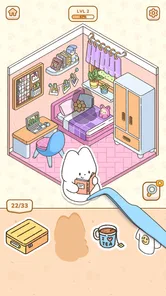
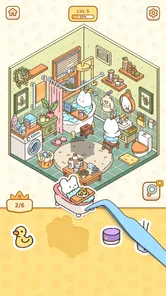
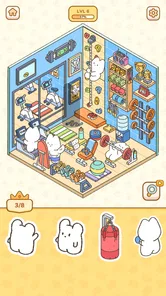

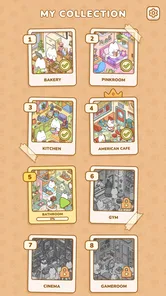
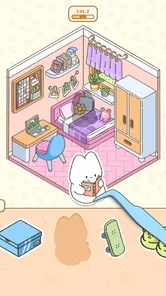
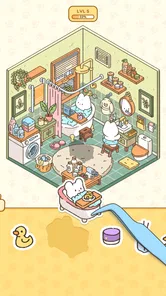
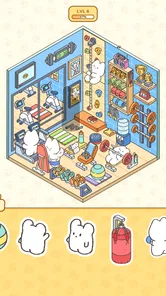
Analysis by Reviewed
I like decorating games most when they give me room to make small choices rather than asking me to manage a whole virtual household. My Sticker Room takes that focused approach: its central idea is to shape a room with stickers. That makes it an easy game to pick up when I want a light creative break, without turning interior design into a complicated project. The trade-off is just as clear: if you want detailed building tools, deep simulation, or a practical guide to decorating a real home, this is not trying to be that.
A quick way to decide whether it suits you
Before downloading, I would ask one simple question: do you enjoy arranging decorative details more than planning an entire room? If the answer is yes, this offers a clear, low-pressure activity. If what you want is to compare furniture layouts, measure proportions, or build a home around practical constraints, the sticker format is likely to feel too limited.
That distinction also helps set expectations for a first session. I would approach it as a small visual project rather than a game I need to master. The fun is in making choices and judging their effect, not in proving that I can design the most realistic or efficient room.
Making a room your own, one sticker at a time
At its heart, this is a casual home-decor simulation game built around arranging stickers to give a room its look. That single creative action sets the pace. Instead of planning a floor layout or adjusting a long list of furniture settings, I can focus on how individual decorative choices change the feel of a space.
That narrower scope is a strength when I am not in the mood for a demanding design challenge. A sticker-based room invites quick experimentation: I can try a different visual direction, see whether it feels right, and keep going without treating every decision as a permanent renovation. It is closer to making a playful collage than drafting a room plan, which makes the experience approachable even if I have no particular design vocabulary.
The game is made by SayGames Ltd, and its emphasis on simple, approachable decorating fits the sort of short-session play I expect from a mobile simulation. Its current version is 1.5.5, and it is free to download, with optional in-app purchases priced from $0.99 to $49.99 per item. That wide range is worth keeping in mind: I would approach the game as free to try, but check any purchase prompt carefully rather than assuming every decorative option comes at no cost.
Why the sticker format changes the experience
In many room-design games, the main activity is selecting furniture from menus and fitting it into a space. Here, the sticker premise makes the decorating feel more like placing visual accents than solving a furnishing puzzle. That can be more satisfying for a player who wants to create a mood quickly, and less satisfying for someone who enjoys carefully optimizing a room’s layout.
More From Our News Desk

 Gmail
GmailGmail in a Busy Inbox: Who Benefits Most?
From first account to crowded workday, Gmail earns its place through dependable search and flexible sorting—but its best fit depends on how much inbox maintenance you can tolerate.

 Prime Video
Switching to Prime Video: What Changes in Your Viewing Routine
Prime Video can make a compelling second home for streaming, but switching means learning a different catalog, rental layer, and route from browsing to playback.

 Universal TV Remote Control
Universal TV Remote Control Works Best as a Reliable Backup
A phone remote earns its place through quick setup and reliable habits. Here is how to get more from Universal TV Remote Control—and where its limits show.

 Weather - By Xiaomi
Weather by Xiaomi Review: Clear at a Glance, Less Clear Up Close
Xiaomi’s weather app makes everyday forecasts quick to scan, but its calm surface can leave useful details and recovery paths harder to find than they should be.

 X
XX Under Pressure: Can It Recover When Posting Goes Wrong?
A resilience-focused review of X, examining setup, mistaken posts, interruptions, weak connections, and the gaps that matter when recovery needs to be dependable.

 Clash of Clans
Clash of Clans Is Won Between the Battles
Its raids are quick; its community is a long-term project of coordination, teaching, rivalry, and shared responsibility—with all the friction that entails.
Latest News



The practical benefit is that the creative task stays legible. When I am deciding whether a room feels playful, cozy, or simply busy, I can judge the overall composition instead of getting caught up in a long chain of construction choices. A useful habit is to pause after each cluster of decorations and look at the room as a whole. It is easy to focus on the next sticker and miss that the space already has enough going on.
That also gives the game a natural stopping point. I can make a few choices, enjoy the visual change, and leave without needing to complete a large management cycle. For a quick break between other tasks, that light commitment is more appealing than a simulation that expects me to keep resources, schedules, or multiple systems in balance.
How I would approach a decorating session
I would start with a simple intention rather than trying to use every appealing decoration at once. For example, if I want a room to feel calm, I would avoid adding stickers just because they are available and instead judge each choice by whether it supports that mood. This is not a rule the game imposes; it is a way to make the creative process feel more deliberate and to keep the finished room from becoming visually cluttered.
A second useful approach is to work in passes. First, make the broad choices that establish the room’s character. Then add smaller details only where the space still feels empty. Because the main activity is sticker-based, the temptation is to treat every open patch as a place that needs decoration. I find it more helpful to think of empty space as part of the composition. Restraint can make the stickers I do place stand out.
It is also worth treating experimentation as the point, not as a test of design skill. If a combination does not work, the value is in seeing why: perhaps two elements compete for attention, or perhaps the room looks better with fewer accents. That makes the game useful as a low-pressure creative exercise, even for someone who would never describe themselves as artistic.
A good fit for a short, ordinary break
One realistic use case is a few minutes of downtime while waiting for a meal to finish or for a friend to arrive. I can open the game, spend that interval making a small decorating decision, and put it down when I am ready to move on. It suits that moment better than a game whose enjoyment depends on a long session or uninterrupted concentration.
There is a practical way to make that short visit feel satisfying: pick one visual question to answer, such as whether a room needs more contrast or whether a particular area looks too crowded. That gives the session a finish line without turning it into a checklist. I can stop once the room feels closer to the idea I had in mind, rather than continuing to add details simply because more choices remain.
It may also appeal to someone who likes looking at home-decor ideas but does not want the commitment of a full design simulator. The sticker approach keeps the activity playful: I am arranging a stylized room, not measuring a real one or choosing purchases for my own home. If your goal is inspiration for an actual renovation, use a dedicated design tool or reference gallery instead. This game is better treated as entertainment than as a planning aid.
Parents may also appreciate that the content rating is Everyone, and the game can be a gentle introduction to making visual choices. Still, I would not assume that every child will find the purchase options irrelevant. Since in-app purchases are available, it is sensible for a parent to review purchase settings before handing over a device. The low-pressure decorating itself is a better fit for children who enjoy arranging pictures and colors than for those who want fast action or competitive goals.
Where it sits beside other decorating games
Compared with a conventional interior-design simulator, My Sticker Room asks for less planning and offers a more focused kind of creativity. That makes it easier to approach, but it also means players looking for intricate room layouts, precise furniture placement, or a strong sense of architectural scale may prefer another game. Its appeal is not that it replaces those experiences; it offers a lighter alternative centered on visual decoration.
It differs from open-ended drawing apps, too. A drawing tool gives me a blank canvas and expects me to create the imagery myself, while this game’s sticker premise keeps the task in the realm of choosing and arranging. That structure is helpful when I want to be creative without starting from nothing. On the other hand, someone who wants to sketch original designs or control every line will get more freedom from an art app.
The same distinction applies to life simulators. Those games often combine decorating with characters, routines, or resource management. If you enjoy watching a home function as part of a larger world, this focused decorating loop may feel too narrow. If those extra systems usually distract you from the room itself, the narrower scope is precisely the point.
In everyday terms, I would choose between these options based on what I want from the session. For a quick choice-driven mood board, the sticker approach is a better fit than an open canvas. For a room I want to plan with realistic placement, a dedicated design simulator is more useful. For a world with people and ongoing routines, a life sim has the broader appeal. None is a straight upgrade over the others; each asks for a different kind of attention.
The limits I would keep in mind
The biggest trade-off is that a sticker-centered concept naturally puts the emphasis on appearance rather than on systems. Players who need a substantial simulation, a demanding progression challenge, or a sense of building a functional home should look elsewhere. This is best approached as a small creative pastime, not as a deep management game.
There is also a personal-preference question around repetition. If you enjoy tweaking a room’s visual character, the core action has a clear reason to hold your attention. If you quickly tire of arranging decorative elements, the same focused concept may leave you wanting more variety in the activity. I would choose it for the decorating itself, not on the assumption that it will become a broader home-design sandbox.
Another trade-off is that a playful arrangement should not be mistaken for a realistic design result. A room that looks pleasing as a sticker composition may not answer practical questions about storage, circulation, scale, or what would fit in a real home. I would enjoy the visual decision-making on its own terms, then switch to a more practical tool if I were planning an actual space.
The purchase range is another point to weigh. The game costs nothing to download, but optional items can reach $49.99. That does not mean spending is necessary to enjoy the basic idea, but it does mean I would pay attention to what an offer contains and avoid treating every purchase as a small add-on. For a casual game, setting a personal spending limit in advance is a sensible way to keep a relaxing pastime from becoming an impulsive one.
If a purchase prompt appears while I am simply trying to enjoy a brief session, I would take a moment to decide whether the item genuinely adds something I want. That pause matters especially when sharing a device with a child: the Everyone content rating is about age suitability, while purchase settings are a separate consideration. Keeping those two questions distinct makes it easier to decide whether the game is appropriate for a particular household.
It has a 4.3 average from around 94,000 ratings, and more than 10 million installs. Those figures suggest that plenty of players have tried it, but they cannot tell me whether its particular style will suit you. I would use them as context, not as a substitute for asking whether you actually enjoy decorating through stickers rather than through detailed room-planning tools.
Who gets the most from it
I would recommend it to players who want a friendly, low-pressure way to make rooms look different and enjoy quick visual decisions. It is especially suited to people who like decorating but do not want the learning curve of a full design simulator, and to anyone who prefers a short creative session over a long progression loop. The game is free, carries an Everyone rating, and requires Android 8.0 or later on Android devices.
It is also a sensible pick for someone who sometimes wants a creative activity but does not want to draw from scratch. The sticker format gives the session a starting point and a clear kind of decision to make, so I can focus on selection and composition instead of inventing every visual element myself. That is a useful middle ground between a blank art canvas and a detailed room-planning tool.
I would skip it if the main attraction for you is precise control over furniture, realistic interior planning, a deep simulation of home life, or action-driven gameplay. An advanced design game, a drawing app, or a broader life simulator would be a better match depending on which of those matters most. Knowing that difference before downloading is more useful than expecting one small decorating game to cover every kind of creativity.
For me, the appeal is the focused format: make a few choices, see a room take on a different character, and stop when the moment is over. The best reason to try it is that it makes decorating feel easy to start, while the best reason to pass is wanting more control or depth than sticker-based design is meant to provide. If that balance sounds right, it is a pleasant little creative break; if not, you will likely be happier with a room-design tool built for more detailed work.
My Sticker Room - Decor Game Frequently Asked Questions
What is My Sticker Room - Decor Game?
My Sticker Room - Decor Game is a casual decorating game centered on arranging stickers and decorative items to create appealing room scenes. Rather than focusing on complex building controls, it offers a lighter, more creative experience: choose from available designs, place them in a room, and adjust the composition to suit your taste. The exact selection of rooms, objects, and activities may vary with the app version.
How do you play My Sticker Room - Decor Game?
The main activity is decorating a room by selecting stickers or furnishings and placing them in the scene. You can experiment with different arrangements and combinations to make a design that feels complete and personal. It is intended to be approachable for casual play, so you generally do not need experience with design games. Check the current app listing for details about specific controls, levels, and unlock requirements.
Is My Sticker Room - Decor Game free to download and play?
The game may be available to download without an upfront purchase, but that does not necessarily mean every feature or item is free. Depending on the current release, it may include advertising, optional in-app purchases, or content that becomes available through play. Store policies and pricing can also differ between Android and iOS. Review the listing on your device before downloading, especially if you want to limit purchases or ads.
Does My Sticker Room - Decor Game work offline?
Some decorating games let you arrange content without a continuous internet connection, while other features may need connectivity for advertisements, updates, or online services. Offline availability can depend on the installed version and device, so it is best not to assume that every part of My Sticker Room - Decor Game will work without internet access. If offline play matters to you, check the app’s store description and test the game before relying on it while travelling.
Is My Sticker Room - Decor Game suitable for children?
Its sticker-based decorating concept may appeal to children and other players who enjoy creative, low-pressure games. However, suitability depends on the content and the app’s current advertising, purchase, and privacy practices, which can change between versions. Parents should review the age rating and permissions shown in the official store, and consider enabling purchase restrictions or parental controls before handing over a device. Supervision is sensible if ads or external links are present.
Pros
- Easy-to-learn decorating gameplay suits short play sessions.
- A wide range of stickers encourages creative room designs.
- Relaxing pace makes it a good casual game.
- Simple touch controls are accessible to younger players.
- Completing rooms provides a clear sense of progress.
Cons
- Decorating choices may feel limited compared with full room-design games.
- Some items or features may require watching ads or making purchases.
- Repeated decorating tasks can become predictable over time.
- Progress may rely on completing levels in a fixed order.
- Frequent ads may interrupt the relaxing gameplay.











