Garden Joy: Exterior Designer
- 12.33K
- 4.7
- Installs
- 1.00M
- Price
- Free

Screenshots
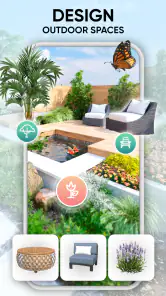
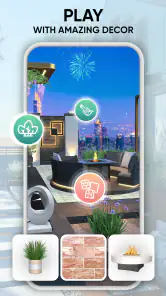
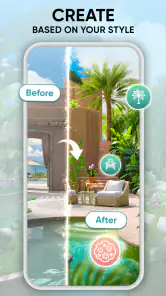
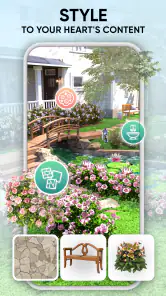


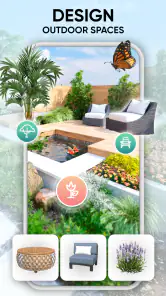
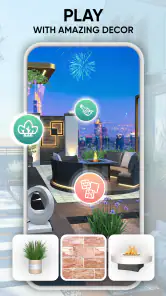
Analysis by Reviewed
I spent time with Garden Joy: Exterior Designer as a relaxing garden-design game, and its appeal became clear quickly: it gives me a quiet space to arrange outdoor scenes without demanding the speed or precision of a traditional action game. Developed by Burlingame Studios, it sits in the simulation category and is free to start, with optional purchases ranging from $0.99 to $99.99 per item. That combination makes it easy to try, although the purchase structure deserves attention if you are playing on a shared device or letting a child explore.
The basic idea is simple but pleasant. I work toward exterior-design goals, make choices about how a garden should look, and gradually turn an ordinary outdoor space into something more personal. The store short description calls it Garden Joy, while the longer summary focuses on leaving stress behind and bringing design ideas to life. In practice, I found the strongest part was not a complicated simulation model, but the gentle decision-making: choosing what feels balanced, attractive, or simply right for the scene in front of me.
It is rated for Everyone, and that broad rating matches the calm presentation better than a game built around pressure or conflict would. The game has a 4.7 average from around 45 thousand ratings, with more than a million installs, so it has clearly found a sizeable audience. I would still judge it by your own habits rather than popularity alone. If you want a focused garden-planning pastime, it is inviting. If you want a detailed professional landscape tool, it is a different kind of experience.
How comfortable is Garden Joy to use?
Readable navigation and a low-pressure layout
One of the first things I noticed was how approachable the general flow feels. A garden-design game needs to let me look at the space, understand what is available, and make a choice without burying the important action under complicated controls. Garden Joy generally supports that relaxed rhythm. I can concentrate on the visual arrangement instead of learning a large collection of commands.
That matters for players who find fast menus, crowded interfaces, or constant interruptions tiring. The design process gives me time to inspect the scene and decide what I want to do next. I do not have to react to an opponent, manage a timer, or coordinate several actions at once. For someone who prefers predictable interaction, this is a meaningful advantage over many mobile games that use speed as their main source of excitement.
At the same time, a calm interface is not automatically perfect for everyone. Decorative game elements can compete with functional ones, particularly on a smaller phone. When I am trying to compare outdoor objects or understand the next goal, the visual presentation can feel busier than a plain planning application. Players with limited vision may need a larger screen, stronger system text settings, or a comfortable viewing distance to get the most from it.
I also recommend playing in short sessions at first rather than assuming every choice will be obvious. The game is easy to approach, but design-oriented interfaces often reveal their rhythm gradually. I found it useful to pause before confirming an arrangement, especially when I was trying to create a coherent look rather than merely complete the next task. That small habit reduces accidental decisions and makes the experience feel more deliberate.
Why the visual focus helps some players
Garden Joy communicates much of its appeal through the appearance of the outdoor spaces. That is good news for people who prefer learning by seeing a result rather than reading long explanations. A visual comparison can make the effect of a design choice understandable at a glance, which is more comfortable than a text-heavy management screen for many players.
The same strength creates an important limitation: the game is fundamentally visual. Anyone who has difficulty distinguishing colors, shapes, or small decorative details may not experience the design process in the same way. I would not treat it as an accessibility-first planning tool. It is better understood as a visual creative game whose relaxed pace may be welcoming, while some of its core information still depends on seeing the scene clearly.
A practical approach is to use the largest display available and avoid playing when glare makes the garden hard to inspect. I also found that reducing distractions around the phone helped more than trying to rush through a design. The game benefits from attention, but it does not require the kind of constant concentration demanded by an action title.
Touch demands, pace, and sensory comfort
The interaction style suits players who are comfortable with ordinary touch controls and visual selection. I did not approach it as a game requiring rapid tapping, repeated swipes, or precise timing. That makes it a reasonable option for someone who wants a slower mobile activity, including a short break between errands or a quiet few minutes before bed.
For players with limited fine-motor control, the main question is not whether the game is fast, but whether selecting small objects feels dependable on their particular device. Phone sizes, screen sensitivity, and hand stability vary widely. I would try it on the intended device before recommending it as a fully comfortable experience. A larger screen can make visual selection easier, but it does not remove every challenge associated with touch accuracy.
The sensory profile is generally gentler than that of an action game because the focus is on outdoor design rather than combat or frantic competition. Still, bright colors, animated transitions, or repeated visual changes may not suit every player. If you are sensitive to visual stimulation, taking regular breaks is sensible. I also think the game works best when treated as a quiet creative activity, not something to keep open continuously for long stretches.
Sound is not the reason I would choose it. The central experience comes from arranging and viewing the garden, so players who prefer muted or silent play are not missing the main design idea by lowering the volume. That can make it useful in a waiting room, on public transport, or during a shared household moment when audio would be intrusive.
Using it in everyday situations
A realistic use case is a short evening session after work. I might have ten or fifteen minutes, want something more engaging than scrolling, but lack the energy for a strategy game with complicated planning. Garden Joy fits that gap because I can focus on one exterior-design decision at a time and stop when I feel finished. The game gives me a creative task without asking me to perform under pressure.
It can also suit someone who enjoys home decoration and wants a playful version of that interest. The important distinction is that this is not a replacement for a real landscape-design application. I cannot use it as a construction plan, cost estimate, planting guide, or accurate representation of a real property. Its value is imaginative: it lets me explore visual preferences and enjoy the satisfaction of improving a scene.
For families, the Everyone rating makes the game easier to consider, but I would still explain the purchase options before handing over a device. Free access can be appealing, yet optional items priced from $0.99 up to $99.99 mean that account and purchase controls matter. That is not a criticism of the garden concept itself; it is a practical point for parents and anyone sharing a phone or tablet.
What the game does better than usual alternatives
Compared with a professional design app, Garden Joy is much less intimidating. I do not need to understand measurements, plant compatibility, drainage, materials, or building regulations to begin. That makes it a better choice for relaxation and visual experimentation. Someone who wants to discover whether they enjoy arranging outdoor spaces may find it more inviting than a serious tool.
Compared with a standard puzzle game, it offers a different kind of reward. There is less emphasis on finding one correct answer and more on enjoying the appearance of a finished setting. That can be refreshing when I want a game that feels personal rather than competitive. However, puzzle fans who depend on clear logic, escalating difficulty, or a definite solution may find the design freedom less satisfying.
Compared with a purely decorative sandbox, the structured nature of a simulation game gives me more direction. I am not staring at an empty canvas with no idea what to do. There is a sense of progression through exterior-design tasks, which helps when I want guidance. The trade-off is that the game may not offer the unrestricted control a dedicated creative sandbox would provide.
Three useful ways to get more from the design process
My first tip is to decide on a visual mood before making individual choices. I get better results when I think in terms of a calm, bright, orderly, or playful garden rather than selecting every object independently. This prevents the space from becoming a collection of attractive pieces that do not work together. It also turns a simple mobile activity into a small exercise in composition.
Second, I recommend treating the preview of the whole scene as more important than any single decoration. An item can look appealing on its own but distract from the main area when viewed as part of the complete garden. I found that stepping back mentally and checking the overall balance produced more satisfying results than chasing the most eye-catching option each time.
Third, use the game as a preference-testing tool, not as a promise of real-world accuracy. I can learn that I like open layouts, dense greenery, or a particular decorative mood without assuming the result would work in my actual yard. This is a useful distinction for anyone interested in home improvement: the game can inspire ideas, but real decisions still need practical research.
Where the experience may become frustrating
The free entry point is helpful, but optional purchases can change how comfortable the experience feels. Players who want to avoid spending need to pay attention to what they select and how they manage the game’s available choices. I would not begin with a child’s account or a shared payment method without checking the device’s purchase protections first.
Another possible barrier is motivation. Garden Joy is intentionally gentle, and that means it may feel too slow for someone who wants constant novelty or a strong competitive loop. I enjoyed the lack of pressure, but I can also see a player opening it once, making a few design choices, and then wanting more challenge than the format provides.
Its reliance on visual judgment may also narrow its audience. Players with low vision, color-vision differences, or difficulty with small touch targets should test the game carefully rather than assume the Everyone rating guarantees a comfortable experience for every ability. The age classification describes content suitability, not universal usability. I appreciate the calm concept, but I would like any player with specific access needs to judge the interface on their own device.
People looking for a serious garden-planning workflow should skip it. A real project needs dimensions, budgets, materials, climate information, maintenance planning, and often professional advice. None of those concerns is what makes this game enjoyable. Choosing it for that purpose would lead to disappointment, while choosing it for visual relaxation is much more reasonable.
Device expectations and version context
The game supports Android devices running version 7.0 or later, which makes it available to people who are not using the newest phone. The current version is 1.54.15. Even with that broad system compatibility, the actual comfort of play will depend on screen size, touch responsiveness, battery condition, and how clearly the garden scenes appear on the device.
I would leave some storage and battery headroom for any mobile game, especially if I plan to play away from a charger. I would also keep the app updated through the normal store process so that I am using the current release available for my device. These are ordinary precautions, but they matter more for players who rely on predictable access or who use an older handset.
My inclusive verdict
After using it, I see Garden Joy as a welcoming visual simulation for people who want creativity without speed, conflict, or complicated management. Its readable general flow, gentle pace, and exterior-design focus make it a good fit for relaxed sessions. I especially recommend it to players who enjoy arranging spaces, comparing visual moods, and making gradual improvements to a scene.
I would be more cautious for anyone who needs strong accessibility guarantees, depends on very large controls, or finds decorative visual interfaces difficult to interpret. I would also steer away players who want practical landscape planning, deep simulation, or a demanding challenge. The game’s strengths come from simplicity, and simplicity naturally leaves some specialist needs unanswered.
For me, the best way to approach it is as a pocket-sized creative retreat. Try it on the device you actually plan to use, keep purchase controls in mind, and give yourself permission to design for enjoyment rather than realism. With those expectations, Garden Joy: Exterior Designer offers a pleasant alternative to faster mobile games and a more approachable starting point than professional design software. It is free to try, rated for Everyone, and backed by a 4.7 average, but its real value is personal: a few quiet minutes spent making an outdoor space look the way I want.
Pros
- Relaxing decorating gameplay with no time pressure
- Large selection of plants
- furniture
- and outdoor decorations
- Creative freedom to design gardens in different styles
- Easy controls suitable for casual players
- Regular design challenges add variety to the experience
Cons
- Some premium items require in-app purchases
- Progress can feel slow when resources run low
- Ads may interrupt gameplay between design sessions
- Limited interaction beyond decorating and completing challenges
- Requires a stable connection for some features

- Category
- Simulation
- Version
- 1.54.15