Gangs Wars: Pixel Shooter RP
- 428.00
- 4.4
- Installs
- 10.00M
- Price
- Free

Screenshots

Analysis by Reviewed
I tend to judge a mobile shooter by how quickly I can settle into a useful rhythm: move, read the situation, choose a weapon, and decide whether a fight is worth taking. Gangs Wars: Pixel Shooter RP aims at that straightforward, pick-up-and-play appeal, with blocky visuals and an action focus. It is a free game from playducky.com, rated Mature 17+, and it has attracted over ten million installs. Its average rating is 4.4 from around twenty-seven thousand ratings, so there is clearly an audience for this particular mix of pixel style and shooting.
A practical first session
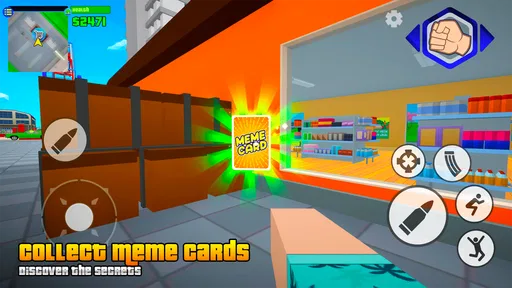
I would approach the opening session as a chance to learn the feel of movement and aiming rather than as a race to make progress. The virtual joystick and action buttons give you familiar mobile-shooter controls, but familiarity is not the same as precision: your thumbs have to cover movement, firing, reloading, and weapon changes on a relatively small screen. I find it more useful to pause between encounters and notice which actions feel awkward than to keep tapping through every fight at full speed.
That small adjustment matters especially if you play in short bursts. A quick session while waiting for a ride or during a break can be enjoyable, but it is easy to lose track of reload timing or select the wrong weapon when you rush. I would use the first few encounters to establish a repeatable sequence: move into a position where you can see the threat, fire only when your aim is settled, and reload when the immediate pressure has eased. It is a simple habit, but it can make the touch controls feel less frantic.
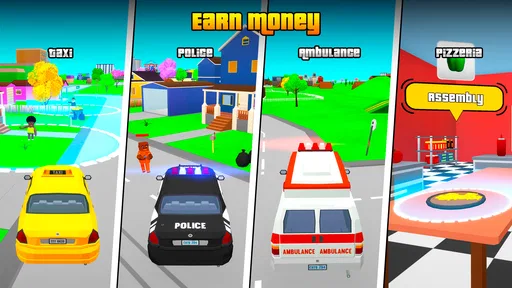
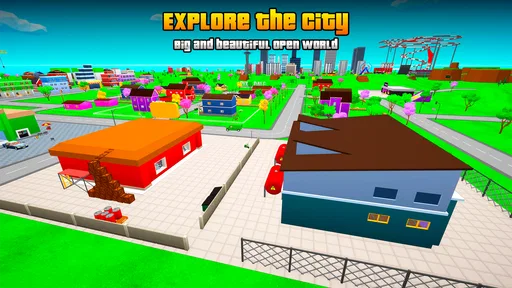
The game is built around an open-world sandbox idea, with an offline option that makes it more flexible than a shooter that depends entirely on other players being available. That is useful when I want to explore or play on my own schedule rather than organize a match. It also changes what I expect from a session: the appeal is not only chasing a competitive result, but spending time in a block-style city and choosing how actively I want to engage. I would not assume that every part of the game works the same way offline and online; I would treat solo play and multiplayer as different reasons to launch it.
Settings and controls worth checking
Before committing to a long session, I recommend checking the control layout and any available sensitivity or display options on your device. I am not suggesting that there is a secret control scheme; the useful point is to see what the game actually lets you adjust and then make one change at a time. If aiming feels too jumpy, test a slower setting if one is offered. If movement and firing compete for the same thumb, try a different grip or screen orientation only if the game supports it. A short test in a low-pressure moment is more informative than changing several things at once.
Screen size and touch comfort are real trade-offs here. On a larger phone, the controls may feel more spread out, while a compact device can make the action easier to reach but leave less room for your fingers to see the scene. I would also check whether your device is set to a comfortable brightness before playing outdoors; dark pixel environments can be harder to read in sunlight. These are ordinary setup details, not upgrades, and they can help you decide whether the game suits the way you actually use your phone.
Because the game includes shooting and carries a Mature 17+ content rating, it is not a good choice for younger players or anyone looking for a gentle, family-friendly activity. The rating is a useful first filter, but I would still consider whether a stylized gangster setting is something you want on your screen. The pixel art softens the presentation compared with realistic shooters, yet the action theme remains central. If you are choosing a game for a shared device, that distinction is worth discussing before installing it.
More From Our News Desk

 Gmail
GmailGmail in a Busy Inbox: Who Benefits Most?
From first account to crowded workday, Gmail earns its place through dependable search and flexible sorting—but its best fit depends on how much inbox maintenance you can tolerate.

 Prime Video
Switching to Prime Video: What Changes in Your Viewing Routine
Prime Video can make a compelling second home for streaming, but switching means learning a different catalog, rental layer, and route from browsing to playback.

 Universal TV Remote Control
Universal TV Remote Control Works Best as a Reliable Backup
A phone remote earns its place through quick setup and reliable habits. Here is how to get more from Universal TV Remote Control—and where its limits show.

 Weather - By Xiaomi
Weather by Xiaomi Review: Clear at a Glance, Less Clear Up Close
Xiaomi’s weather app makes everyday forecasts quick to scan, but its calm surface can leave useful details and recovery paths harder to find than they should be.

 X
XX Under Pressure: Can It Recover When Posting Goes Wrong?
A resilience-focused review of X, examining setup, mistaken posts, interruptions, weak connections, and the gaps that matter when recovery needs to be dependable.

 Clash of Clans
Clash of Clans Is Won Between the Battles
Its raids are quick; its community is a long-term project of coordination, teaching, rivalry, and shared responsibility—with all the friction that entails.
Latest News



Build a faster, steadier routine
Once the controls stop demanding all your attention, the next improvement is to avoid treating every encounter as an invitation to stand still and trade shots. Use movement deliberately: create a little space, look for a clearer angle, and then commit to firing. In a mobile shooter, constant movement can make your own aim worse, while standing in one place makes it harder to react. Alternating between repositioning and short, controlled bursts gives me a more dependable routine than holding the fire button and hoping for the best.
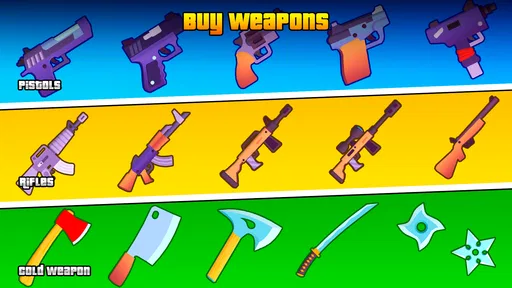
Weapon choice is another place where a repeatable habit helps. The game offers different kinds of weapons, so I would pay attention to which one feels manageable at the distance and pace of a particular fight rather than assuming the most powerful option is always best. A weapon that is hard to control can waste time if your aim is unsettled. Try one choice for a few encounters, then compare it with another in a similar situation. That kind of informal test is more useful than switching constantly and never learning how each option behaves.
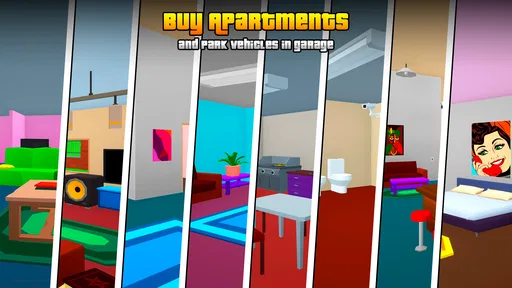
Character customization and upgrades give the role-playing side a reason to return, but I would make changes with a purpose. Instead of spending resources just because an upgrade is available, decide what currently slows you down: do you need a more comfortable weapon, or do you want to make your character feel more like your own? This is a practical way to avoid turning progression into an automatic shopping list. It also makes the game easier to enjoy if you prefer to play casually, since you can focus on a small number of choices rather than trying to optimize everything at once.
A realistic everyday session might be a few minutes at home before heading out. I would choose one clear aim for that session—practice the controls, explore at a relaxed pace, or play a multiplayer round—rather than trying to do all of it at once. If I have only a short window, I would avoid spending it browsing purchases or repeatedly changing my setup. Keeping a familiar weapon choice and a comfortable control arrangement means I can get into the action faster. When I have more time, I can experiment with character options or compare how solo play feels against competing with other people.
Enter the Pixelated Battlefield
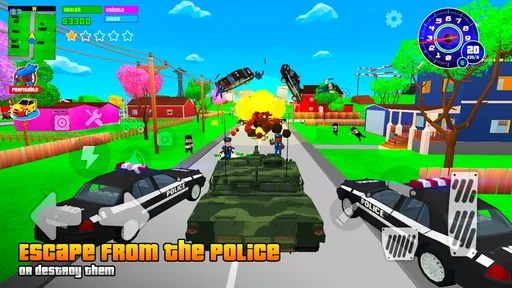
From the moment you launch Gang Wars: Pixel Shooter RP, you’re thrust into a vibrant world of pixelated mayhem. The game’s visuals may remind you of classic arcade games, but don’t let the retro look fool you. The graphics are crisp and colorful, making every shootout and street battle feel dynamic and engaging. The attention to detail in the environment design is impressive, with each level offering a unique setting that keeps the gameplay fresh and exciting.
Game Mechanics and Controls
The game mechanics in Gang Wars: Pixel Shooter RP are straightforward yet challenging. You have a variety of weapons at your disposal, ranging from pistols to machine guns, each with its distinct advantages. The controls are intuitive, with a virtual joystick for movement and buttons for shooting, reloading, and switching weapons. It’s easy to pick up and play, but mastering the controls takes practice, especially in heated battles where quick reflexes are crucial.
One of the standout features is the role-playing element. Players can customize their characters with different outfits and gear, adding a personal touch to the game. As you progress, you can upgrade your weapons and abilities, giving you an edge in tougher levels. This RPG aspect adds depth to the game, encouraging players to strategize and tailor their approach to each mission.
Multiplayer Madness
If you’re a fan of multiplayer games, you’re in for a treat. Gangs Wars offers an exhilarating multiplayer mode where you can team up with friends or challenge players from around the world. The competitive nature of the multiplayer battles keeps you on your toes, and the ranking system adds a layer of motivation to climb the leaderboards. Whether you’re playing solo or with a squad, the game ensures a seamless and thrilling experience.
That contrast between solo play and multiplayer is worth considering before you settle in. If you want a low-pressure session, the offline sandbox angle makes this a more natural fit than a game built solely around ranked matches. If you want opponents and the push to improve, multiplayer provides a different kind of motivation. I would choose the mode based on the time and mood I have rather than expecting every session to deliver the same pace. A player who dislikes competition may get more from exploring alone, while someone who wants a social or skill-focused challenge may prefer the multiplayer side.
In-Game Purchases and Fair Play
While the game is free to play, it does offer in-game purchases that can enhance your gaming experience. These purchases aren’t necessary to enjoy the game fully, but they can help you progress faster if you’re looking to gain an advantage. The developers have balanced the in-game economy well, ensuring that players who prefer not to spend money can still compete effectively.
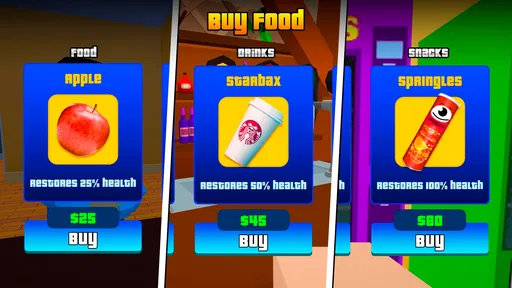
There is a practical difference between being able to play for free and being unaffected by purchase prompts. The game has optional purchases priced from $0.99 to $64.99 per item, so I would decide in advance whether I am comfortable spending anything and keep that boundary clear. If you are a parent or share a device, it is sensible to review purchase controls before handing the phone over. For a player who simply wants to try the action, the free entry point lowers the commitment; for someone who dislikes in-app spending in any form, the purchase range may be a reason to choose another game.
How it fits among mobile shooters
Compared with realistic military shooters, this game’s pixel presentation is less focused on visual realism and more on a colorful, block-built setting. That can make it easier to approach if you want action without the heavier presentation of a photorealistic battlefield. Compared with a pure arcade shooter, the character customization, upgrades, and open-world sandbox angle offer more reasons to shape a longer-running play habit. The trade-off is that it is not the obvious pick for someone seeking a tightly structured campaign or a realistic tactical simulation; its appeal is the blend of shooting, role-play elements, and free-form time in a city.
The game is developed by playducky.com, and its current version is 0.25.14. It runs on Android devices with version 6.0 or later. Those details are useful when deciding whether to install it, but I would also think about your phone’s comfort and available attention: touch shooters are simply more enjoyable when the screen gives you enough room to move and aim without constant accidental taps. The game is free to download, though the optional purchases mean I would not describe the experience as entirely free of spending decisions.
Where the experience has limits
The same features that make the game flexible can also make it a poor fit for a player who wants a very guided experience. An open-world sandbox gives you room to choose how to spend time, but someone looking for a carefully paced story with a clear sequence of missions may prefer a more narrative-focused action game. Likewise, the pixel look is part of the identity, not a temporary visual filter; if you want detailed realism, the style will not become a substitute for it.
There is also a learning curve hidden inside the simple control layout. The buttons are familiar, but getting comfortable with aiming, switching weapons, and reloading under pressure takes practice. On a small screen, that can feel like friction rather than challenge, especially if you usually play shooters with a controller. I would give it a few short sessions before deciding, but I would not keep forcing it if the touch controls never feel natural. A slower single-player game or a shooter designed around simpler inputs may be a better everyday choice.
For players who like progression, upgrades can be motivating, yet they can also distract from the basic question of whether the shooting itself feels satisfying. I recommend testing the core action before investing much time in customization. If you enjoy moving through the city and learning how different weapons suit your play, the role-playing layer has a purpose. If you only want a quick match with no progression decisions, that extra layer may feel like unnecessary management. The best way to judge it is to notice whether customization makes you eager to return or simply adds more menus between you and a fight.
Who should give it a try
I think this is best suited to players who enjoy mobile action, can tolerate touch controls, and like the combination of a sandbox setting with character development. It is also a reasonable option for someone who wants the choice between offline play and competitive multiplayer rather than a game that requires a group every time. The fact that it is free to start makes it easy to sample, while the large player audience suggests it has found a lasting audience. Its rating average of 4.4 from around twenty-seven thousand ratings is encouraging, although personal preference for the controls and pixel style matters more than any crowd score.
I would suggest skipping it if you need a realistic military shooter, a calm game without gunplay, or an experience with no purchase options. It is also not aimed at children, given its Mature 17+ rating. If you are mainly interested in tight, controller-like aiming, a console-style mobile shooter may suit you better. If your priority is a simple arcade game that gets to the point without character progression, a more stripped-down alternative may be less demanding. Those are not flaws for every player, but they are meaningful differences when choosing what to install.
Gangs Wars: Pixel Shooter RP strikes a perfect balance between fun and challenge. The game’s engaging mechanics, combined with its nostalgic graphics and robust multiplayer mode, make it a must-try for any mobile gaming enthusiast. Whether you’re a casual player or a hardcore gamer, there’s something here for everyone. So, gear up, choose your weapons, and dive into the pixelated chaos of Gangs Wars. You won’t be disappointed!
My final take
Gangs Wars: Pixel Shooter RP Frequently Asked Questions
Is Gangs Wars: Pixel Shooter RP suitable for players who prefer casual, nonviolent games?
Gangs Wars: Pixel Shooter RP is an action game built around gangster themes and shooting, so it is a better fit for players who enjoy combat than for those looking for a peaceful or nonviolent experience. Its block-city visuals give the action a pixelated style, but the theme remains mature. Consider whether that kind of gameplay suits you before downloading.
Who developed Gangs Wars: Pixel Shooter RP, and how current is the version?
Gangs Wars: Pixel Shooter RP is developed by playducky.com. The current version is 0.25.14, and the game was released on September 2, 2023. These details can help you identify the game and understand its release history when deciding whether to install it. It is an action title with a distinctive pixel-style block-city setting.
What devices and operating system versions can run Gangs Wars: Pixel Shooter RP?
Before downloading, check that your device runs Android 6.0 or later, which is the stated minimum operating system requirement. The game is an action title from playducky.com, and its pixel-style presentation gives it a distinctive block-city look. Meeting the minimum requirement is a useful first check, though your experience can also depend on your device and how you prefer to play.
What is the main objective of Gangs Wars: Pixel Shooter RP?
In Gangs Wars: Pixel Shooter RP, the primary objective is to lead your gang to victory by engaging in intense pixelated battles against rival gangs. Players must strategize, upgrade their weapons, and use their shooting skills to dominate the urban landscape. The game combines role-playing elements with action-packed shooting, offering a unique blend of strategy and combat experience.
Is Gangs Wars: Pixel Shooter RP available for both Android and iOS devices?
Yes, Gangs Wars: Pixel Shooter RP is available for download on both Android and iOS platforms. Players can easily find the game on the Google Play Store for Android devices and the App Store for iOS devices. Ensure your device meets the minimum system requirements for a smooth gaming experience.
Pros
- Engaging pixel graphics attract users.
- Multiplayer mode for global battles.
- Regular updates enhance gameplay.
- Wide variety of weapons available.
- Smooth controls for better experience.
Cons
- Contains in-app purchases.
- Advertisements can be intrusive.
- Requires internet connection.
- Limited storyline depth.
- Some bugs affect gameplay.