

DreamCraft City
- 26.00
- 3.5
- Installs
- 1.00M
- Price
- Free
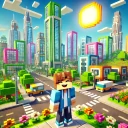
Screenshots
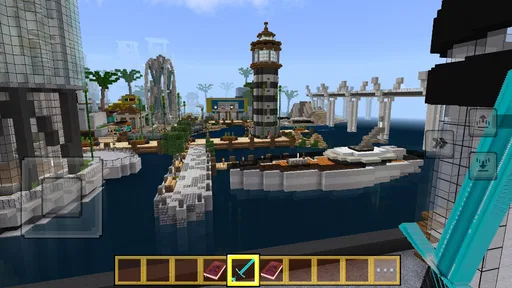
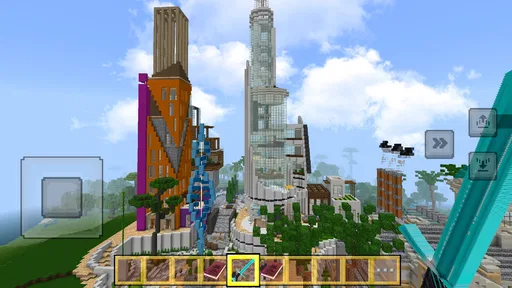
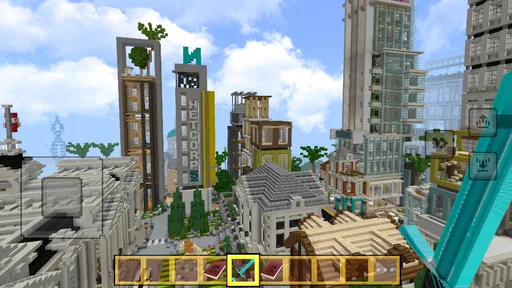
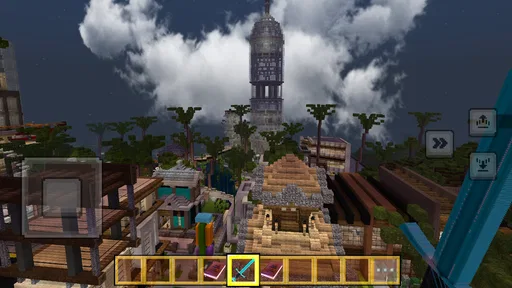
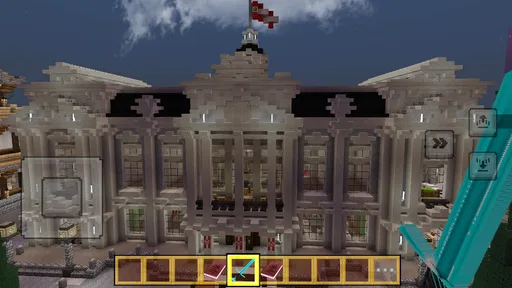
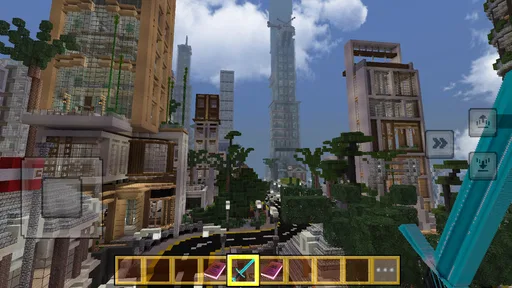
Analysis by Reviewed
I like the idea of a city-building game best when it lets me shape a place at my own pace, rather than turning every session into a race for upgrades. That is the lens I would use for DreamCraft City: it is a free simulation game from funtab999, built around making a town from blocks and deciding what kind of place it should become. It has a 3.4 average from around 550 ratings, so I would approach it with curiosity rather than assume it will suit every player. The key question is whether you want a relaxed creative project or a more demanding management game.
Start by deciding what you want from a city builder
Before settling into any mobile builder, I ask myself whether I want to manage a system or simply make a place look and feel the way I imagine it. That distinction matters here. The block-based premise makes this a natural choice for someone who likes arranging a town and refining its appearance. If the fun for you comes from detailed economic planning, competing for rankings, or following a demanding campaign, I would look at other simulation games first.
I would also think about how I usually play on a phone. A creative project works well in short visits if I can return to it without needing to remember a complicated chain of tasks. On the other hand, someone who prefers a clear objective every time they open a game may find open-ended building less satisfying. The useful question is not whether one style is better, but whether you want your next session to be about choosing a direction or executing a plan.
What building feels like in practice
I’ll focus on the practical side of building: how a small, deliberate layout choice can make a town feel coherent without turning a casual session into a major redesign. I also find it useful to judge each new area on its own before expanding, which makes experimentation easier to assess. That leads naturally to the next question: how to make those choices feel personal.
Getting Started with Your Dream City
When you first launch DreamCraft City, you're greeted with a vibrant and colorful interface that immediately draws you in. The game gives you a plot of land and the basic tools to start your urban masterpiece. The tutorial is intuitive and doesn't feel like a chore, which is a relief because, let's be honest, no one likes a boring tutorial. It’s like being handed a blank canvas with no limits, except maybe your imagination!
Building and Customizing
What I love about this game is the level of customization it offers. You're not just placing buildings; you're designing them. From the color of the rooftops to the style of the windows, everything can be tailored to your liking. It’s like playing with a digital Lego set, but on a much grander scale. The controls are smooth, and the graphics are surprisingly detailed for a mobile game. I found myself losing track of time as I meticulously planned and expanded my city.
Make a small plan before a big build
A useful way to approach a creative builder is to give each visit a modest goal: settle one corner, choose a consistent palette, or rethink the route between a few buildings. That keeps a growing town from becoming a collection of disconnected ideas. I would also take a moment before expanding to decide what the next area is for; planning a little space for a focal point can make later decoration feel intentional rather than like patching gaps. This kind of self-set brief is especially helpful when a game gives you room to experiment but you do not want to spend a whole evening deciding what to place.
More From Our News Desk

 Gmail
GmailGmail in a Busy Inbox: Who Benefits Most?
From first account to crowded workday, Gmail earns its place through dependable search and flexible sorting—but its best fit depends on how much inbox maintenance you can tolerate.

 Prime Video
Switching to Prime Video: What Changes in Your Viewing Routine
Prime Video can make a compelling second home for streaming, but switching means learning a different catalog, rental layer, and route from browsing to playback.

 Universal TV Remote Control
Universal TV Remote Control Works Best as a Reliable Backup
A phone remote earns its place through quick setup and reliable habits. Here is how to get more from Universal TV Remote Control—and where its limits show.

 Weather - By Xiaomi
Weather by Xiaomi Review: Clear at a Glance, Less Clear Up Close
Xiaomi’s weather app makes everyday forecasts quick to scan, but its calm surface can leave useful details and recovery paths harder to find than they should be.

 X
XX Under Pressure: Can It Recover When Posting Goes Wrong?
A resilience-focused review of X, examining setup, mistaken posts, interruptions, weak connections, and the gaps that matter when recovery needs to be dependable.

 Clash of Clans
Clash of Clans Is Won Between the Battles
Its raids are quick; its community is a long-term project of coordination, teaching, rivalry, and shared responsibility—with all the friction that entails.
Latest News



One practical trick is to treat a new section as a small design exercise instead of trying to improve the entire town at once. Pick one visual cue—such as a shared color or a particular shape—and use it to make that area feel connected. Then step back and check whether the buildings have enough room to read as individual choices. This is a way to get more from the customization without turning every play session into a long redesign.
Goals can help, but they also set a pace
While building is the core of the game, DreamCraft City cleverly integrates challenges and quests to keep you engaged. These tasks range from simple objectives like building a certain number of houses to more complex ones like managing resources effectively. Completing these challenges not only rewards you with in-game currency but also unlocks new features and buildings, keeping the gameplay fresh and exciting.
For me, objectives are most useful when I treat them as prompts rather than a checklist that must dictate every decision. A task can give a session a starting point, especially when I am not sure what to work on. But if I follow every goal automatically, I may end up placing things for the reward instead of building a town I actually like. I would alternate between working toward an objective and taking time to shape an area for its appearance. That balance is a good fit for players who want some direction without giving up their own ideas.
How it differs from other simulation games
If you want a strict progression ladder, extensive city economics, or a competition-first experience, I would compare other simulation games before settling in here. Those alternatives may give more emphasis to optimizing production or following long-term objectives, while this game’s draw is the personal act of shaping a city. Players who mainly want an open-ended creative space may also prefer a building sandbox with fewer management prompts. The trade-off is simple: structured goals can make progress easier to measure, but they can also leave less room to build just for the look of a place.
That comparison is useful because “city builder” can describe very different kinds of play. A strategy-focused alternative is a better choice if you want to weigh costs, plan efficient supply chains, and see measurable consequences from each decision. A pure sandbox may suit you more if you want to experiment without being nudged toward tasks. This game sits between those expectations: it gives you a creative building focus while also including objectives. I would choose it when that mix sounds appealing, not because I expect it to replace a deep management sim.
A realistic way to fit it into the day
For a practical everyday use, I can imagine opening it during a short break, completing one task, then spending a few minutes adjusting a street or building arrangement before stopping. If you are playing in brief sessions, avoid starting a large redesign unless you have time to finish the area; otherwise, it is easy to leave the city in a half-planned state and forget what you intended. That small bit of planning helps make the game feel like a continuing project instead of a string of disconnected taps.
For example, after dinner I might decide to make one corner feel more settled rather than attempt a full-town makeover. I could first choose which buildings belong together, then use the remaining time to adjust their placement and leave a note in my head about the next step. A short session can still feel complete when it has a clear boundary. If I only have a couple of minutes, I would use them for a small adjustment or a task, not begin an ambitious layout that is hard to finish before putting the phone away.
Social play is a separate reason to stay
If you're someone who enjoys social interaction, this game has something for you too. You can visit friends' cities, participate in community events, and even collaborate on projects. It's a fantastic way to gain inspiration and see how others are designing their cities. Plus, there's a certain satisfaction in showing off your hard work to others. It's like a little city-building club where everyone shares tips and tricks.
I would see those features as an optional source of ideas rather than a requirement for enjoying the building itself. Visiting another city can help when I have run out of visual inspiration: instead of copying a whole design, I can notice how someone groups buildings or handles a particular space, then adapt that thought to my own town. If you prefer to build privately, the core appeal is still the personal project. If sharing and collaborating are what you value most, it makes sense to check whether those social elements feel comfortable before you invest heavily in a long-term design.
Who is likely to enjoy it—and who may not
I would recommend it to players who enjoy visual customization, gentle creative goals, and the satisfaction of seeing a town take shape over multiple visits. It may also work well for someone new to simulation games who wants a colorful, approachable starting point rather than a dense management interface. I would skip it if you dislike building around objectives, expect every decoration choice to have a strategic consequence, or prefer a game with a clearly defined end point. The Everyone age rating makes it suitable for a broad audience, though individual preferences about screen time and online interaction still matter.
It is also a better match for people who enjoy making their own small challenges. If you can decide that today’s aim is a more coherent block or a better-looking arrangement, the creative loop has a useful sense of direction. If you need the game itself to set a precise target and steadily raise the stakes, an objective-driven alternative may hold your attention longer. Likewise, players who want a realistic city simulator should not mistake a block-based creative premise for a promise of detailed civic planning.
Keeping a project manageable
As a town grows, it can become harder to remember why you placed things in a particular way. I would take a screenshot when an area feels finished, especially before making a major change. That gives me a reference if I later want to restore the overall look, and it helps me compare a new idea with the arrangement I liked before. It is a simple habit that can prevent casual experimentation from turning into frustration.
I would also avoid changing several parts of a design at once. If I move buildings, alter the color direction, and rethink the street arrangement together, it becomes difficult to tell which change improved the result. Working one area at a time makes the creative choices easier to judge and gives each visit a visible purpose. This approach is particularly helpful if you play intermittently and want to pick up where you left off without needing a detailed plan.
Version, access, and settling in
The game is free, has reached over a million installs, and its current Android version is 1.20.1-build, with Android 5.0 as the minimum operating system. It was released on April 9, 2025. Before investing time in a long-term town, I would check that it runs comfortably on your device and decide whether the basic building loop holds your interest. Switching to another city builder later is easy in principle, but the time you spend arranging a layout is personal investment; take a few screenshots or keep a simple note of your design idea if you like preserving projects between games.
That small trial period matters more than it might in a game built around a short, fixed story. A town can become a personal project, so I would make sure the act of placing and adjusting buildings stays enjoyable after the initial novelty. The current version is 1.20.1-build, and the minimum Android requirement is 5.0; those details are useful when deciding whether to try it on an older device. Since it is free, the most meaningful cost is your time and attention, not an upfront purchase.
Its 3.4 average across around 550 ratings also suggests that I should not assume every player will find the same strengths compelling. I would use that as a reason to try the basic loop for myself rather than as a verdict. One person may value the freedom to shape a town; another may find the goals or pacing less appealing. The best test is whether I enjoy returning to my own layout, even when I am not chasing a particular task.
My recommendation
In conclusion, DreamCraft City is a delightful escape into a world where you can construct your ideal city. Whether you're a seasoned gamer or someone just looking for a fun way to pass the time, this game offers something for everyone. The combination of creative freedom, engaging challenges, and social interaction makes it a standout in the mobile gaming world. So why not give it a try? You might just find yourself becoming the mayor of your very own dream city!
My recommendation is more specific: I would try it if the thought of shaping a colorful block-built town sounds relaxing and you enjoy setting your own small design goals. I would not choose it as my first pick for intricate strategy, serious competition, or a campaign with a firm finish line. Keep sessions focused, save visual references when you like an area, and let the objectives guide rather than control your design. With those expectations, DreamCraft City is an easy game to sample and a potentially satisfying place to spend a few calm minutes at a time.
DreamCraft City Frequently Asked Questions
What devices and operating systems can run DreamCraft City?
DreamCraft City is a simulation game for Android, and it requires Android 5.0 or later. Before downloading, check the Android version on your device to make sure it meets that minimum. The game is free to download and is rated Everyone, so it is presented as suitable for a broad audience.
Who developed DreamCraft City, and how is it rated by players?
DreamCraft City was developed by funtab999. It has an average rating of 3.4 from around 550 ratings, while the small number of written reviews means there is limited detail in player comments. Those figures offer a quick snapshot, but they cannot tell you whether its building style or pace will suit you, so consider the game’s city-creation focus before installing.
What is DreamCraft City?
DreamCraft City is an innovative city-building simulation game where players can design, build, and manage their own virtual city. The game offers a wide range of customization options, allowing players to create unique cityscapes. With engaging gameplay mechanics and rich graphics, DreamCraft City provides an immersive experience for those interested in urban planning and management. Its store summary describes the experience as exploring, building, and creating a dream city from magical blocks.
Is DreamCraft City free to play?
Yes, DreamCraft City is free to download and play. However, the game may offer in-app purchases for players who wish to enhance their gaming experience. These purchases can include special items, resources, or boosts that can accelerate progress within the game. Players can enjoy the game without spending any money, though some content may be restricted to paid users.
What are the system requirements for DreamCraft City?
DreamCraft City is an Android game and requires Android 5.0 or later. Check your device’s operating system before downloading to confirm it meets this minimum. The game is a city-building simulation, so the main appeal is designing and creating a virtual city. If you are choosing a device or deciding whether to install it, the listed Android requirement is the clearest compatibility detail to use.
Pros
- Highly customizable city-building options
- Engaging and vibrant graphics
- Regular updates with new features
- User-friendly interface
- Wide variety of buildings and decorations
Cons
- In-app purchases can be expensive
- Requires constant internet connection
- May drain battery quickly
- Occasional lag on older devices
- Limited offline gameplay options











