Diamond Painting: Antistress
- 125.00
- 4.6
- Installs
- 100.00K
- Price
- Free

Screenshots
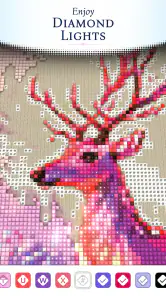

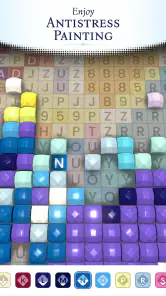
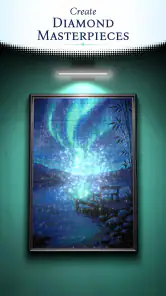

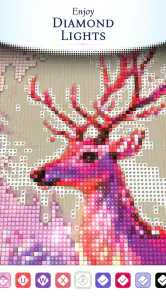

Analysis by Reviewed
I approached Diamond Painting: Antistress expecting a simple color-by-number game, and that is exactly where its appeal begins. It turns a familiar diamond-painting idea into a quiet board-game-style activity: choose a picture, match colors to marked spaces, and gradually watch the image become complete. I found the experience easy to understand within moments, but not so empty that finishing a picture felt pointless.
The game is made by Crimson Pine Games and is free to start. Its store summary describes it as Diamond Color by Numbers, while the short description calls it Diamond Painting. Those labels are accurate, although they do not fully explain why I kept returning to it. The main attraction is the steady rhythm of selecting a color, placing matching pieces, and cleaning up another small section of the board.
It is best understood as a calm digital coloring routine rather than a competitive board game. There is no need to memorize rules, plan several turns ahead, or compete against another player. That makes it suitable for short breaks, quiet evenings, or anyone who enjoys completing visual patterns without the pressure of a timer.
How the basic painting routine feels in everyday use
I find the basic painting routine works best when I treat each session as a small, self-contained pause rather than a project to finish. Choosing one nearby patch and following its color cues gives my eyes a clear path, which is especially helpful when I have only a few minutes. That simple rhythm also makes it easier to notice where the routine feels smooth—and where the board’s repeated matching can start to feel like work.
A gentle starting point for short sessions
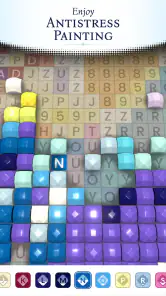
My usual session starts with a simple decision: I choose a picture and decide whether I want to work quickly or settle in for a longer stretch. The core loop is immediately readable. A picture contains spaces linked to colors or symbols, and the task is to fill those spaces with the matching diamond-like pieces. Because the objective is so direct, I never felt that I needed a tutorial before beginning.
That simplicity matters on a phone. A complicated interface would work against the relaxing purpose, while this format lets me begin almost absent-mindedly. I can complete a small area, pause, and return later without having to remember a complicated strategy. For me, that makes it more practical than a traditional puzzle that demands uninterrupted concentration.
A realistic use case is a ten-minute waiting period. Instead of opening a fast action game and ending up more stimulated than before, I can work on a few clusters of one color. The progress is visible enough to feel rewarding, but the task does not require sound, fast reactions, or a perfect memory of what happened earlier.
More From Our News Desk

Weather by Xiaomi Review: Clear at a Glance, Less Clear Up Close

X Under Pressure: Can It Recover When Posting Goes Wrong?

Clash of Clans Is Won Between the Battles

Android Auto Makes the Case for Quieter Car Software

MobiOffice: Transforming Mobile Productivity with Seamless Integration

EA SPORTS FC™ Mobile Soccer: Redefining Mobile Sports Gaming
Why the board format works better than ordinary coloring for me
Compared with a standard coloring app, this game gives each placement a clearer purpose. I am not choosing a brush size or trying to create a pleasing gradient by hand. The picture already guides me, and my job is to follow its structure. That removes creative pressure, which is useful when I want to relax rather than produce something artistic.
Compared with a conventional puzzle game, the challenge is lighter. There is no demanding deduction layer hiding underneath the artwork. The satisfaction comes from progress and completion, not from solving a difficult mystery. Players who want deep strategy, competitive scoring, or increasingly complex logic will probably find the routine too gentle. I see that as a deliberate trade-off rather than a flaw, but it is important to know before installing it.
The visual transformation also gives the activity a natural stopping point. When a section is filled, I can pause without feeling that I have abandoned an important turn. When the whole picture is finished, the reward is the completed image itself. That rhythm suits people who like checkable tasks but do not want a demanding checklist.
Habits that make the first few pictures smoother
I found it easier to begin with a broad area instead of jumping randomly around the canvas. Working in one region reduces the amount of visual searching, and it helps me notice which nearby spaces share the same color. This is a small habit, but it makes the board feel less scattered.
Another useful approach is to finish a color in a manageable cluster before switching. Constantly changing between colors can make the session feel slower because my eyes repeatedly search the entire image. Staying with one visible group creates a more predictable rhythm. I do not treat this as a strict rule, though; if a color is difficult to spot, moving to a clearer one keeps the session from becoming frustrating.
I also avoid trying to complete every tiny space in one uninterrupted sitting. The game works well when I treat a picture as a series of small visits rather than one long obligation. That is particularly helpful for people using it as an antistress activity, since turning relaxation into a completion target can defeat the purpose.
What the current build means for a new player
The current version is 1.53.0, and the game is suitable for devices running Android 9 or later. It carries an Everyone content rating, which fits the nonviolent, accessible nature of the activity. I would still recommend checking the device requirement before downloading, especially if you are using an older phone or tablet.
The game has reached over one hundred thousand installs and holds a 4.6 average from around one thousand two hundred ratings, with one hundred twenty-five written reviews. Those figures suggest that the concept has found a receptive audience, but I would not use popularity as a substitute for personal fit. The important question is whether you enjoy repetitive visual completion.
Settings I would check before settling into a routine
My first practical advice is to spend a moment looking through the available settings rather than starting immediately and accepting every default. In a color-by-number game, small presentation choices affect comfort more than they might in a typical board game. I pay attention to anything related to sound, vibration, visual feedback, or the way the board responds to taps.
If audio or vibration feels distracting, I prefer reducing those interruptions before beginning a longer session. The point of this game is often to create a calm pocket of attention, and an unexpected effect can break that mood. On the other hand, some players like confirmation after each placement, so I would not recommend disabling feedback automatically. I would choose the quietest setup that still makes mistakes easy to notice.
Display comfort is another worthwhile consideration. I use a brightness level that keeps the colored spaces visible without making the screen harsh in a dim room. A larger tablet can make small details easier to inspect, while a phone is more convenient for quick sessions. Neither is universally better: the phone wins for portability, but a larger display can reduce the need for constant zooming or close inspection.
I also look for any option that affects how the board highlights a selected color or indicates remaining spaces. When such a control is available, it can change the game from a broad search into a focused matching exercise. I would test it on an unfinished picture and keep the setting that makes the next action obvious without making the board feel visually noisy.
Building a repeatable, comfortable setup
Experienced use is less about discovering a secret mode and more about repeating a setup that removes friction. I like to begin with the same basic conditions: comfortable brightness, notifications out of the way, and a clear decision about whether I am playing for a short break or a full picture section. That preparation sounds minor, but it prevents the session from becoming a series of interruptions.
For a short break, I choose a nearby cluster and avoid opening several parts of the image at once. For a longer session, I work through one color family or one region and pause when my attention starts to wander. This keeps the activity relaxing instead of turning it into a race to finish.
One trade-off is that a highly guided setup may feel less satisfying to people who enjoy searching. If the game makes the next placement too obvious, some of the visual discovery disappears. I prefer guidance when I am tired, but I leave more of the board visible when I want the activity to feel slightly more involving.
Faster patterns that save searching time
The biggest speed improvement I noticed came from changing how I scan the board. Rather than looking everywhere for a matching space after every placement, I divide the picture mentally into zones. I finish the obvious spaces in one zone, then move to the next. This reduces repeated eye movement and makes progress easier to judge.
When several nearby spaces use the same color, I treat them as a single small task. I place them in a steady line or group instead of tapping one, searching, and tapping another far away. The game remains slow-paced, but this method removes unnecessary back-and-forth without making the experience feel rushed.
I also use a “difficult colors later” habit. If a color is hard to distinguish from another shade, I do not waste a relaxing session forcing myself to identify every instance immediately. I complete the clearer colors first, which reveals more of the image and often makes the remaining spaces easier to recognize. This is especially useful on a small phone screen.
Another practical pattern is to stop switching colors whenever the search becomes tiring. Changing colors feels productive, but it can create more mental overhead than it saves. If I have already located a useful group, I stay with it until the nearby placements are done. That approach is slower only when the group is very small; otherwise, it keeps the session organized.
Using the game as a wind-down activity
I think the strongest everyday use is as a transition between demanding tasks and rest. After work or study, I can spend a short period filling a picture without having to make many decisions. The repeated matching action gives my attention something narrow to follow, which feels different from scrolling through an endless feed.
It can also work before sleep, provided the screen itself is not a problem for you. I would keep the brightness comfortable and avoid treating completion as a target. The moment I start thinking, “I must finish this image tonight,” the activity becomes another task. The better routine is to stop while it still feels easy.
For children, the Everyone rating and straightforward rules make the concept approachable, but I would still consider the child’s patience and comfort with small on-screen targets. The game does not replace hands-on creative play, and it may not hold the attention of someone who needs constant change. For adults, that lack of intensity is often the main benefit.
Where the relaxing design reaches its limits
The same repetition that makes the game soothing can become monotonous. If you want frequent surprises, evolving mechanics, or a strong sense of progression between sessions, this may feel too narrow. The board changes through the artwork rather than through a deep ruleset, so the long-term appeal depends heavily on how much you enjoy the act of filling spaces.
There is also a precision trade-off. Small targets can be comfortable on a larger display but less pleasant on a compact phone, especially when colors are close together. If a tap does not register as expected, the interruption is minor, but repeated mis-taps can make the activity feel less peaceful. I would use a larger screen when available if fine detail starts to strain my eyes.
The game is free, which makes trying it easy, but it includes in-app purchases ranging from $1.49 to $99.99 per item. That is worth remembering before browsing optional content or purchase prompts. I recommend deciding in advance whether you want to keep the experience entirely free and resisting impulse purchases when you are simply trying to complete a relaxing session.
Who should choose this over another board game?
I would recommend it to someone who likes paint-by-number activities, repetitive sorting, or quiet visual tasks. It is particularly suitable for players who want something they can understand instantly and leave without penalty. The lack of competitive pressure is a real advantage for a commute, a waiting room, or a brief pause between responsibilities.
I would choose a traditional digital board game instead if I wanted meaningful decisions, opponents, resource management, or a clear win condition. I would choose a more open-ended coloring app if I wanted to control the palette and create my own designs. I would choose a logic puzzle if I wanted my attention challenged rather than soothed. This game occupies a specific middle ground: more structured than free coloring, and gentler than strategy or deduction.
It is less suitable for people who dislike repetition, need multiplayer interaction, or expect every session to introduce a new mechanic. It may also disappoint anyone looking for a serious artistic tool. The pictures guide the experience, so the player’s role is careful completion rather than creative composition.
My verdict after making it part of a routine
The best way to enjoy Diamond Painting: Antistress is to treat it as a small ritual, not a game you need to conquer. I get more from it when I use a comfortable display setup, work by zones, stay with visible color clusters, and stop before the activity turns into a chore. Those habits make the basic design feel more polished than the short store description suggests.
Crimson Pine Games has focused on an accessible board-style experience with a clear purpose: matching colors and gradually completing images. Its free entry, Everyone rating, and broad device support from Android 9 onward make it easy to try for many players. The strong 4.6 average and over one hundred thousand installs show that the format appeals to a substantial audience, while the current 1.53.0 version gives new users a clear starting point.
My final recommendation is simple. Install it if you want a quiet activity with visible progress, low mental pressure, and enough structure to keep your hands occupied. Skip it if you need competition, deep strategy, or creative freedom. For the right player, the pleasure is not in discovering a hidden challenge; it is in making a few careful placements, watching a messy board become an image, and leaving the phone feeling calmer than when the session began.
Diamond Painting: Antistress Frequently Asked Questions
What devices can run Diamond Painting: Antistress?
Diamond Painting: Antistress is a mobile game for Android and iOS, and its minimum operating-system requirement is version 9. Before downloading, check that your device is running a compatible system version and has enough available storage for the app and its artwork. Keeping your operating system up to date can also help ensure a smoother experience.
Who makes Diamond Painting: Antistress, and how popular is it?
The game is developed by Crimson Pine Games and has a 4.6 average rating from around 1.2 thousand ratings, with over 100 thousand installs. Those figures suggest it has attracted a sizable audience, though individual enjoyment depends on whether you like relaxing, repetitive picture-completion games. Its store summary describes the experience as “Diamond Color by Numbers.”
What is Diamond Painting: Antistress?
Diamond Painting: Antistress is a relaxing mobile game based on the popular diamond-art craft. You complete colorful pictures by placing small gems or numbered tiles onto matching sections of a canvas. The experience is designed to be simple and calming, with easy tap controls, bright artwork, and a gentle pace that makes it suitable for short breaks or longer stress-relief sessions.
How does the gameplay work?
Each picture is divided into numbered or colored areas, and the game provides the corresponding gems for you to place. Tap the correct sections to gradually fill the artwork, while tools or boosters may help with repetitive areas. The controls are straightforward, so no previous experience with diamond painting is necessary. Progress is usually saved as you complete individual illustrations.
Is Diamond Painting: Antistress free to download and play?
The game is free to download, although it offers optional in-app purchases ranging from $1.49 to $99.99 per item. You can start playing without an upfront purchase, but some optional purchases may provide access to extras. Before downloading, review the purchase options in your app store and consider using device-level purchase controls if children will be playing.
Pros
- Simple controls make it accessible for beginners of all ages.
- Large color palette supports detailed and creative artwork.
- Offline play is convenient when no internet connection is available.
- Short sessions make it suitable for quick relaxation breaks.
- Completed paintings can provide a satisfying sense of progress.
Cons
- Some artwork may feel repetitive after extended play.
- Small sections can be difficult to tap accurately on phones.
- Frequent hints may reduce the challenge for experienced players.
- The app may consume noticeable battery during longer sessions.
- Artwork variety and quality can differ between available categories.
- Category
- Board
- Version
- 1.53.0











