Cute Halloween Color
- 100.00
- 4.6
- Installs
- 50.00K
- Price
- Free

Screenshots







Analysis by Reviewed
Before downloading, I’d think about what “a quick break” means on your device. This kind of coloring is easy to understand, but a picture with many small spaces can take longer than a brief wait in a queue. I’d begin with a few minutes at home, where I can see whether the tapping feels comfortable and whether the themed artwork holds my interest, rather than expecting to finish a whole image between errands.
That first trial is useful for more than judging the art. It also lets you notice whether the game feels responsive on your phone and whether its controls suit your fingers. I wouldn’t assume it needs much power just because the activity looks simple, or assume it will run identically on every device. A short, ordinary session is the practical test; if the phone feels warm, the display is hard to use, or the game interrupts your routine, that matters more than a general expectation about coloring games.
For a family device, I’d set the spending boundary before handing it over. The free download makes trying the game straightforward, but paid items are available, so purchase settings and a clear household rule are worth checking in advance. That small bit of preparation keeps the focus on choosing colors instead of negotiating a purchase mid-session.
I’d also treat progress as something to test in a low-stakes way. Color a few sections, leave the game naturally, and return later before relying on it for a long project. This is a sensible routine for any mobile pastime you plan to play in fragments: it helps you learn how the app fits your habits without making assumptions about recovery or uninterrupted progress.
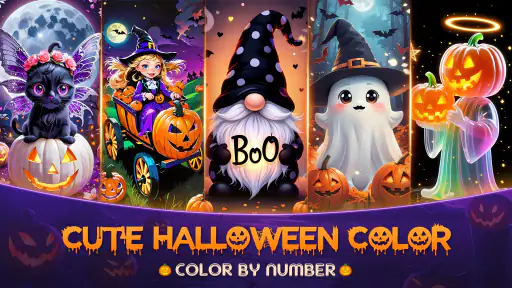
I’d reach for Cute Halloween Color when I want a quiet, low-pressure game rather than a board game that demands quick decisions or a long stretch of attention. Its Halloween theme gives the coloring-by-number idea a clear personality: the appeal is in filling pictures with pumpkins, ghosts, and witches, not in competing against another player. That makes it easy to imagine opening it for a few minutes while waiting for an appointment or winding down at home.
My main reservation is that a light, calming concept can still feel repetitive if you expect a changing challenge. The number-by-number format sets a steady pace, but it is not a substitute for a strategic board game, nor will it suit someone looking for an involved story or action. I see it as a seasonal coloring pastime with a specific visual mood, best for players who enjoy careful, incremental progress.
A gentle pace built around coloring
I’d treat the first session as a chance to find a comfortable rhythm, not a test of how quickly I can finish a picture. Working on one small area at a time can make the numbered coloring feel more satisfying and give me a natural stopping point. Once I know how that pace suits me, it’s easier to judge whether longer stretches feel relaxing or simply repetitive.
More From Our News Desk

Weather by Xiaomi Review: Clear at a Glance, Less Clear Up Close

X Under Pressure: Can It Recover When Posting Goes Wrong?

Clash of Clans Is Won Between the Battles

Android Auto Makes the Case for Quieter Car Software

MobiOffice: Transforming Mobile Productivity with Seamless Integration

EA SPORTS FC™ Mobile Soccer: Redefining Mobile Sports Gaming
Why the game feels suited to short sessions
The basic pleasure of a color-by-number game is that it turns a blank-looking picture into a sequence of manageable choices. You can focus on one area, match its number, and watch the Halloween scene take shape. That makes the game approachable even if you do not consider yourself artistic: the structure does the organizing, while you supply the attention and patience.
It also means the pace is naturally self-directed. There is no need to hurry through a picture just because the format is a game. I would use it for a short break when I want something more absorbing than scrolling but less demanding than a puzzle that requires constant planning. If I had only a few spare minutes, I could make a little progress and stop without needing to remember a complicated setup.
That relaxed rhythm is a strength, but it has a limit. The enjoyment depends on finding satisfaction in small visual changes. Someone who prefers a board game with tactical choices, opponent interaction, or a clear win condition may find the coloring loop too quiet. The “board” appeal here is more about filling a designed image than making moves on a competitive playing field.
When the pictures become a longer task
A realistic use case is settling in after dinner with the game while listening to a podcast or waiting for a family member to finish an activity. The Halloween imagery gives the pictures a coherent theme, and the steady coloring can occupy your hands without requiring the kind of concentration that makes conversation impossible. For a child and an adult sharing a device, it could also be a simple way to take turns choosing areas to fill, as long as both are happy with the same calm pace.
Longer sessions may feel different. When a picture has many small sections, the work can become more about patient tapping than creative choice. I’d treat that as a cue to pause rather than push through: stopping midway does not spoil the experience, and returning later can make the next stretch feel fresh. A useful habit is to finish a recognizable portion of the image before leaving, so the session has a satisfying endpoint even if the whole picture is not complete.
One subtle trade-off with number-led coloring is that it can be relaxing precisely because it removes some decisions. That is welcome on a tired evening, but less appealing if you want to choose every color freely or experiment with your own palette. If expressive drawing is your priority, a sketching or open-ended coloring app would be a better fit. This game’s value is in guided completion, not artistic control.
What to expect from speed and responsiveness
The concept suggests a game whose moment-to-moment demands are modest: identify a numbered space and color it. That makes it a sensible choice when you want a slower activity rather than rapid input. I would not judge it by the standards of a reflex game; the point is to settle into a picture, not react at speed.
Still, the experience can feel slower than expected if you are trying to fill many tiny sections quickly. Small targets and repeated selections naturally make progress feel deliberate, even when the game itself is behaving normally. Rather than racing through, I’d work in clusters and take a brief pause when tapping starts to feel mechanical. This is a practical way to keep the activity calming instead of turning it into a chore.
Whether it feels comfortable also depends on how you use your device. On a smaller screen, fine areas may call for more careful aiming; on a larger display, the picture may be easier to inspect at a glance. That is a general consequence of detailed coloring, not a promise that every image or control behaves identically across devices. If precision is frustrating for you in similar games, try a short session first rather than committing to a long one.
Reliability and returning to a picture
For a game designed around gradual completion, one of the most useful questions is whether it suits play in fragments. The color-by-number format is inherently easy to divide into short visits: a few areas now, a few more later. I’d make a habit of leaving the game after a natural pause instead of closing it in the middle of an active interaction, especially if I’m switching between several apps.
I can’t infer specific saving or recovery behavior just from the game’s theme or category, so I would avoid treating a long unfinished session as guaranteed to resume exactly where I left it. If you are about to update the app, restart your device, or clear storage, first check that you are comfortable with the possibility of needing to reopen the current picture. That is sensible caution for any mobile game where progress matters, not a claim that this one loses work.
For everyday reliability, short sessions are also a useful test. Open a picture, color a few areas, leave, and return later; that gives you a practical feel for how it fits your routine without investing a long stretch. If the game remains comfortable to use in that pattern, it is more likely to work as a small daily unwind than as an occasional marathon activity.
Device fit, age, and spending
Cute Halloween Color is a free board game from PIXELSPARK TECHNOLOGY LIMITED, with an Everyone age rating. The minimum operating-system requirement is Android 7.0, and the current version is 1.4.310. Those details make it straightforward to check basic compatibility before installing, particularly if you are setting it up on an older Android device or choosing a game for a family member.
The game has a 4.6 average from around 600 ratings, with 50,000+ installs. Those figures suggest it has found an audience, but they do not tell me whether its particular coloring pace will suit you. The more useful question is whether you enjoy filling guided pictures. If you do, the theme and low-pressure format may be enough; if you need variety in mechanics, popularity alone will not change the core experience.
The app is free to download, while in-app purchases range from $1.99 to $59.99 per item. I’d decide before playing whether I’m comfortable with optional spending, especially if a child will use the device. Checking purchase settings and agreeing on a simple rule beforehand can prevent an otherwise relaxing game from becoming a conversation about accidental or impulsive purchases. The presence of paid items is worth considering even if you plan to stick with the free download.
For device resources, I would keep expectations measured rather than assume that a visually themed game has no effect on battery or storage. The confirmed details establish the Android requirement, but not a specific memory footprint, battery drain, or offline behavior. If your phone is already low on space or you are trying to conserve power, test it during an ordinary short session and see how it fits alongside your usual apps. That is more useful than relying on a guess based on the simple gameplay idea.
How it compares with other coloring and board games
Compared with open-ended coloring apps, this one offers a more guided task: you are following numbered areas rather than deciding every color from scratch. That can be a relief if a blank canvas feels intimidating, and a drawback if you want to make each image your own. Compared with traditional board games, it is less about strategy and social competition and more about a calm, visual routine.
That distinction helps identify who should skip it. If you want a game to play head-to-head, a puzzle with rising difficulty, or an activity that rewards clever planning, choose something built around those goals instead. If you want a small Halloween-themed pastime that can be picked up and put down, this is a more plausible match. Its niche is not breadth; it is a specific kind of gentle engagement.
I would also keep the seasonal theme in mind. Pumpkins, ghosts, and witches are a charming fit when Halloween imagery feels fun, but the same theme may be less appealing once you are in the mood for something more neutral. That does not make the game unsuitable outside the holiday season; it simply means the visual identity is part of the experience, not a background detail you can ignore.
Who I’d recommend it to
I’d recommend it to someone who likes color-by-number activities, wants a screen-based way to unwind, and enjoys Halloween artwork enough to spend time with it. It is especially well suited to short breaks where a clear, low-stakes task is welcome. A parent considering it for a child may appreciate the Everyone rating, while still checking purchase controls and deciding whether the child is comfortable with patient, detail-focused play.
I would skip it if tapping small areas quickly frustrates you, if you want complete freedom over the art, or if your ideal board game involves meaningful decisions and an opponent. It may also be a poor choice for someone who dislikes seasonal themes or finds repetitive coloring dull. Those are not minor preferences here: they go directly to the central activity.
My verdict is that this is a focused, approachable option rather than an all-purpose game. The free entry point makes it easy to try, and the Halloween setting gives its coloring routine a recognizable character. I’d start with a short session, see whether the numbered progress feels soothing or tedious, and only continue if the slower pace works for you. For the right player, it can be a pleasant pocket-sized break; for anyone seeking strategy, speed, or creative freedom, a different kind of game will be more satisfying.
Cute Halloween Color Frequently Asked Questions
What is Cute Halloween Color?
Cute Halloween Color is a Halloween-themed coloring app centered on playful, spooky-season artwork. Depending on the version available on your device, its collection may include pumpkins, ghosts, witches, and other festive designs. It is intended for casual creative play rather than advanced illustration, making it a possible choice for relaxing coloring sessions. Check the app listing and screenshots to confirm the current artwork and features before downloading.
How do you color pictures in Cute Halloween Color?
The app is designed around coloring Halloween pictures on a touchscreen: you select an image and apply colors to its areas using the available on-screen controls. The exact tools, palette options, and interaction style can vary by release, so review the store listing for details about the version offered in your region. If you are looking for advanced drawing tools or precise layer editing, confirm that those features are included before installing.
Is Cute Halloween Color suitable for children?
Its cute Halloween theme and coloring-focused activity may appeal to children, but suitability depends on the specific app version, the child's age, and how the app handles advertisements, in-app purchases, and external links. Check the age rating and privacy information in the Google Play or Apple App Store listing, and consider trying the app together first. Adult supervision is sensible for younger children, especially when ads or purchase options are present.
Does Cute Halloween Color work offline, and is it free?
Whether Cute Halloween Color is free, includes optional purchases or advertisements, and can be used without an internet connection depends on the version and platform. Some coloring apps let users work with downloaded pictures offline, while other functions may require connectivity. Before downloading, check the current store listing for pricing, in-app purchase details, and any offline-use information. You may also need an internet connection initially to install the app or load content.
Which devices support Cute Halloween Color, and how can I download it safely?
Compatibility depends on the app's current requirements and the device you plan to use. Look up Cute Halloween Color directly in the official Google Play Store for Android or Apple App Store for iPhone and iPad, then check the listed operating-system requirements, developer name, permissions, and recent updates. Availability may differ by country or device. Downloading from an official store helps you verify the listing and reduces the risks associated with unofficial installation files.
Pros
- Simple coloring controls make it easy for children to use.
- Halloween-themed pages offer a fun seasonal activity.
- Coloring can encourage creativity and fine motor skills.
- A relaxing option for quiet time at home or while traveling.
- Suitable for users who enjoy casual
- low-pressure activities.
Cons
- The Halloween theme may feel less appealing outside the season.
- Coloring options may seem limited to users seeking detailed artwork.
- Small screen controls can make precise coloring difficult.
- The experience may become repetitive after completing several pages.
- Some features or content may require an internet connection or payment.
- Category
- Board
- Version
- 1.4.310











