Black Color - Color by Number
- 187.00
- 4.7
- Installs
- 100.00K
- Price
- Free

Screenshots






Analysis by Reviewed
I like a coloring game best when it makes starting easy and gives me a satisfying reason to keep going without demanding a long stretch of attention. Black Color takes that simple idea and puts Black beauty at the center of its numbered-coloring artwork. It is a casual trivia-category game from BrainArt Studio, though the experience is much more about filling images than answering conventional quiz questions. That distinct focus gives it a clear audience: anyone who enjoys calm, guided coloring and wants portraits and skin tones to be part of the subject matter, rather than an afterthought.
From choosing colors to seeing a portrait take shape
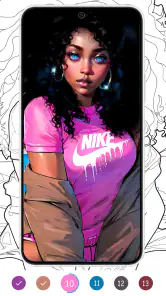
I find the appeal starts with a useful choice: rather than facing a blank canvas, I pick a portrait and let its numbered areas show me where to begin. That makes the first few taps easy to fit into a spare moment, while the subject gives the coloring a clear visual purpose. Next, I look at how each small action changes the image and whether that steady feedback makes me want to continue.
The first action is deliberately simple
The basic appeal is easy to understand: choose a picture, follow its numbered areas, and apply the matching colors. Instead of having to decide what to draw or where to begin, I can focus on one small patch at a time. That structure is useful when I want a creative break but do not feel like planning a composition or learning a complicated set of controls.
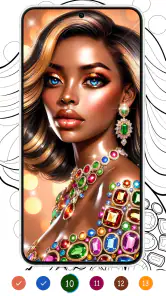
The artwork’s emphasis on Black beauty matters to the experience, not just its appearance in a description. Portraits depend on subtle differences in tone to feel expressive, and coloring with vibrant skin shades makes that part of the image an active part of the process. I find this more purposeful than a generic collection of disconnected shapes: the color choices contribute to a recognizable subject and give the finished picture a particular character.
One practical tip is to treat each image as a series of small stopping points rather than a task that must be completed at once. I can work through a few numbered areas, pause, and return later without needing to remember a complicated plan. This makes the game a reasonable fit for a short wait or a quiet moment at home. It is less suitable if I want open-ended drawing, because number-guided coloring narrows the creative decisions by design.
Feedback keeps the work moving
The satisfying part of color-by-number is the immediate connection between action and visible progress: I tap an area, its matching color appears, and the picture becomes a little more complete. That steady feedback is the game’s main rhythm. It does not ask me to prove trivia knowledge before letting me proceed; the category label is a useful way to find the game, but the hands-on appeal is the coloring itself.
There is a trade-off in that guided rhythm. Matching numbered areas is approachable, but it can feel repetitive if I am looking for puzzles with many different rules or a strong sense of challenge. The appeal depends on whether I enjoy the small satisfaction of completing sections. If I usually prefer freehand sketching, detailed paint tools, or trivia rounds with questions and answers, those alternatives are likely to hold my attention better.
More From Our News Desk

Weather by Xiaomi Review: Clear at a Glance, Less Clear Up Close

X Under Pressure: Can It Recover When Posting Goes Wrong?

Clash of Clans Is Won Between the Battles

Android Auto Makes the Case for Quieter Car Software

MobiOffice: Transforming Mobile Productivity with Seamless Integration

EA SPORTS FC™ Mobile Soccer: Redefining Mobile Sports Gaming
I also recommend approaching the task patiently when a portrait has many separate color regions. The method rewards careful tapping more than speed, and rushing through the image can make the activity feel like a checklist. Taking a moment to notice how neighboring tones work together gives the process more visual interest, even though the numbered guide still determines what belongs where.
The reward is a finished image, not a complicated score
For me, the payoff is watching a portrait emerge from scattered sections. The satisfaction is visual and gradual: each completed patch makes the overall image easier to read. That is a different reward from winning a quiz round or beating an opponent. It suits people who want a low-pressure activity and may be less compelling to players who need competition, demanding goals, or a story to pull them forward.
A useful way to make the experience feel rewarding is to pick a picture based on the mood I have time for, rather than treating every image as an obligation. If I only have a few minutes, I can make a little progress; if I want a longer break, I can stay with the same portrait and enjoy its transformation. This flexibility is one of the strongest reasons to try a coloring game over a conventional trivia app.
Black Color is free to download, and the game includes optional in-app purchases priced from $0.99 to $39.99 per item. That range is worth keeping in mind if I prefer apps with no paid extras at all. I would decide whether the core coloring loop is enjoyable before spending anything; the basic appeal should be the artwork and the act of filling it in, not a feeling that I need to buy my way into enjoying the game.
When to pause and what brings me back
The loop has a natural reset: finish an image or stop midway, then come back when I want another quiet coloring session. Unlike a trivia game built around a new question every turn, the reason to return here is the prospect of another portrait and another gradual reveal. That makes it especially suited to people who like repeatable, low-stakes activities that fit around daily routines.
For example, I might open it while waiting for someone or settling down after a busy day. I can color for a short while, put the phone away, and return later without having to keep track of a story or remember a chain of answers. The activity is also a reasonable choice for someone who enjoys visual hobbies but finds a blank canvas intimidating. The numbered structure supplies a clear next step, while the subject matter gives the finished work more identity than abstract fill-in designs.
It is not the best pick for every break. If I want to exercise general knowledge, a standard quiz app is a closer match. If I want to create an image from scratch, a drawing or painting app offers more control. And if repetitive tapping is not relaxing for me, the central mechanic may become tedious rather than soothing. Knowing that distinction helps set expectations: this is guided coloring, not a broad creative studio or a deep trivia challenge.
Who will enjoy it most
I would recommend it to people who like number-based coloring, want portraits featuring Black beauty, or need a simple activity that can be picked up in short bursts. It may also appeal to parents and families looking for an Everyone-rated game to consider, though the best fit still depends on whether the individual player enjoys this kind of careful, repetitive interaction. The game is free, with optional purchases, so it is sensible to keep that distinction in mind when deciding whether it suits a household.
The game was released on February 28, 2025, and its current version is 1.2.6. It requires Android 7.0 or later. Its 4.7 average comes from around 1.1 thousand ratings, and it has over 100 thousand installs. Those figures suggest that it has found an audience, but I would weigh them alongside the actual style of play: the strongest reason to choose it is a personal interest in its portrait-focused coloring, not popularity alone.
Black Color comes from BrainArt Studio, and its focused identity is a real strength. Rather than trying to be a quiz collection, a drawing suite, and a competitive game all at once, it offers a straightforward route from selecting an image to filling its numbered sections. The limitation is the same focus: there is little appeal here for someone who wants broad creative freedom or varied challenge in every session.
Making a short session feel worthwhile
A good everyday use is a brief pause between tasks when I want something more absorbing than scrolling but less demanding than a full game. I can choose a portrait, work on the visible areas that catch my eye, and stop when the break is over. That approach keeps the activity from turning into a completion chore. The finished image can be the goal, but I do not need to treat every open session as a promise to finish it.
There is also a small choice in how I handle attention. If I am tired, I can follow the numbers mechanically and let the tapping occupy my hands. If I have a little more focus, I can watch how the neighboring shades shape the face as each section fills. The second approach makes the same basic action feel more like observing an illustration develop, without pretending that the game gives me the freedom of a paint program.
For a shared household device, I would set expectations before handing it to someone who wants to make their own art. The Everyone content rating makes it appropriate to consider for a broad age range, but the guided format is still a matter of taste: some players enjoy a clear instruction for every move, while others may quickly ask to draw without numbered boundaries. It is best suited to the first group, and a sketching app is a better choice for the second.
How it differs from familiar alternatives
Compared with ordinary trivia games, this one replaces recall and right-or-wrong answers with visual progress. That changes the kind of attention it asks for: I am scanning sections and matching colors rather than retrieving facts under pressure. Someone browsing the trivia category should know that distinction before downloading. If the aim is a knowledge challenge, a conventional quiz is more direct; if the aim is a gentle coloring routine with a specific portrait focus, this has the clearer fit.
Against other number-coloring activities, the meaningful point is the subject matter. A general coloring collection may offer a wider mix of themes, while Black Color’s portraits and skin-tone emphasis give it a more defined identity. I would choose it when that representation is part of what I want from the artwork. If I mainly want landscapes, patterns, or a large variety of unrelated picture styles, a broader coloring app may suit me better.
It also sits between passive entertainment and making art. Watching a video requires little interaction, while drawing freely asks me to invent shapes and choose every color. Here I get an active task and a visible result, but the numbered plan removes much of the decision-making. That middle ground is precisely what makes it useful for a tired or distracted moment, though it may feel too constrained when I am in a genuinely creative mood.
Small trade-offs to consider before settling in
The strongest practical limitation is that the same clarity that makes the first move easy can also make later sessions predictable. The loop does not depend on learning new rules, so its variety comes chiefly from the image I choose and the act of revealing it. I would use it as one option in a rotation of downtime activities rather than expect it to replace every puzzle or creative app on my phone.
Another useful habit is to check whether I am enjoying the process itself, not just waiting for the completed portrait. If I find myself tapping quickly to clear sections, the game may be functioning as a simple time-filler, which is perfectly fine for a short break. If that starts to feel dull, pausing is better than forcing completion. Returning when I actually want a visual task gives the gradual reveal a better chance to feel satisfying.
For anyone weighing the optional purchases, I would keep the decision separate from the question of whether the core idea suits me. The listed items range from $0.99 to $39.99, so the upper end is a meaningful consideration for someone trying to avoid paid extras. I would first see whether I enjoy the available coloring routine, then decide whether any purchase is worth it to me rather than treating spending as part of getting started.
My verdict on the coloring loop
I see Black Color as a good fit for calm, guided coloring rather than a conventional trivia experience. The action is simple, the feedback is immediate, and the reward is a portrait that gradually comes together. When I stop, I have an easy reason to return: another small stretch of coloring can move the picture closer to completion, or start a fresh one when I am ready.
The balance is straightforward. I would try it if portrait coloring and a gentle, repeatable routine sound appealing, especially if the focus on Black beauty is something I want to see represented in the art I spend time with. I would skip it in favor of a quiz, a freehand art tool, or a more varied puzzle game if I need those experiences instead. For the right player, its narrow loop is not a weakness so much as the point: small actions add up to a vivid finished image, without requiring a major time commitment.
Overall, Black Color earns a recommendation from me for anyone who wants a simple coloring break with a clear visual focus. I would approach it as a relaxing pastime, keep the optional purchases in view, and judge it by whether completing portraits feels satisfying. If it does, the game gives each short session a tangible outcome—and a natural invitation to pick up the colors again.
Black Color - Color by Number Frequently Asked Questions
What is Black Color - Color by Number?
Black Color - Color by Number is a digital coloring app built around filling numbered areas in illustrations with matching colors. It is designed for casual, relaxing play rather than drawing freehand: choose a picture, select a color, and tap the corresponding sections to complete it. The available artwork, controls, and any extra features can vary by app version, so check the current listing and screenshots before downloading.
How do you play Black Color - Color by Number?
Choose an illustration from the app’s gallery and use its numbered palette to identify which color belongs in each outlined area. Tap the matching sections to fill them, switching colors as needed until the picture is complete. Small or tightly packed regions may require zooming or careful tapping, depending on the controls offered in your version. The basic format is straightforward and does not require artistic experience.
Is Black Color - Color by Number free to download and use?
The app may be available to download without an upfront purchase, but free access does not always mean every feature or picture is included at no cost. Some versions of coloring apps use advertisements, optional in-app purchases, subscriptions, or other restrictions. Pricing and availability can change by platform, country, and release, so review the Google Play or App Store listing and its purchase details before installing.
Does Black Color - Color by Number work offline?
Offline access depends on how the app handles its picture library and whether content has already been downloaded or loaded. Basic coloring may work without a connection in some versions, while browsing new images, watching ads for hints, synchronizing progress, or accessing online features may require internet. If offline play matters to you, check the current store listing and test the app’s available features before relying on it without a connection.
Is Black Color - Color by Number suitable for children, and what should parents check?
Number-based coloring is generally simple to understand, but suitability depends on the app’s content, advertisements, privacy practices, and purchase options—not just its gameplay. Parents should review the age rating, permissions, privacy policy, and store listing, and check whether ads or in-app purchases are present. For a child’s device, consider using the platform’s parental controls to manage spending and access to online content.
Pros
- Simple number-matching gameplay is easy to pick up.
- A relaxing activity that can help pass the time.
- Suitable for short play sessions on the go.
- Coloring offers a creative outlet without drawing skills.
- Progress is easy to follow as numbered areas are filled.
Cons
- Repetitive tapping may become monotonous over time.
- Small sections can be difficult to select on compact screens.
- Some artwork may require patience to complete.
- Color-by-number limits the freedom to choose your own palette.
- The experience may feel too simple for players seeking a challenge.
- Category
- Trivia
- Version
- 1.2.6