Color Up - Color By Number
- 1.91K
- 4.9
- Installs
- 1.00M
- Price
- Free

Screenshots







Analysis by Reviewed
For a shared tablet or a quick pause between chores, a tap-to-fill coloring game can be easier to pick up than a paper book and a box of pencils. I’d treat Color Up - Color By Number as a small, casual activity rather than a serious art tool: it gives you a clear task, and you can stop when the moment is over without having to clean anything up.
Making a shared screen work smoothly
In a household, this kind of game works best when each person takes a turn choosing and coloring an image, rather than expecting everyone to work on the same project. The simple number-and-color approach makes it approachable for someone who does not want to invent a palette or learn drawing controls. It can also fill a short wait while dinner cooks or a family member finishes an errand. I’d keep expectations modest, though: it is a digital coloring pastime, not a substitute for shared games that involve conversation, cooperation, or a common goal.
A realistic routine might be to leave the tablet in a common room, let one person color while another sets the table, then pass it along once the next person is ready. That gives the game a natural stopping point and keeps it from quietly taking over a longer stretch of shared time. If someone is waiting, they can choose whether to watch or do something else; the activity does not require a group to coordinate around a single live round.
On a shared device, the practical question is less about setup and more about who is holding the tablet and what they can see or change. I’d agree on a simple turn-taking routine before handing it over, especially if someone else has unfinished pictures they want to return to. Don’t assume a household profile or separate progress for each player; treat the device as shared unless you have checked how it behaves in your own use. That small boundary can prevent accidental interruptions without turning a relaxing activity into a complicated family system.
What it replaces—and what it does not
Compared with a traditional coloring book, the main convenience is that there is no need to gather supplies, sharpen pencils, or decide which colors belong where. Compared with a free-form drawing app, the numbered sections remove much of the creative decision-making. That is a real advantage when you want something calming and guided, but it is also the trade-off: if you enjoy sketching, experimenting with your own colors, or making a picture distinctly yours, a blank canvas or paper may be more satisfying.
It also occupies a different niche from a conventional board game, despite its board-game category. I would not pick it when a household wants a shared objective, tactical choices, or lively back-and-forth; coloring is primarily a quiet, individual activity that can be passed around. For a person who wants a gentle task without a winner or a timer, that distinction is a strength. For a family game night, a multiplayer title or a physical game is likely the better fit.
A useful way to approach a picture is to work in short passes rather than trying to finish it in one sitting. Tap the areas that are easy to spot first, then pause when you need to. This keeps the activity manageable during a busy day and makes it easier to hand the device back without rushing. If small numbered spaces become tiring to find, take that as a cue to switch tasks instead of pushing through; the relaxing value disappears when you start treating completion like a chore.
More From Our News Desk

Weather by Xiaomi Review: Clear at a Glance, Less Clear Up Close

X Under Pressure: Can It Recover When Posting Goes Wrong?

Clash of Clans Is Won Between the Battles

Android Auto Makes the Case for Quieter Car Software

MobiOffice: Transforming Mobile Productivity with Seamless Integration

EA SPORTS FC™ Mobile Soccer: Redefining Mobile Sports Gaming
The Zen of Coloring
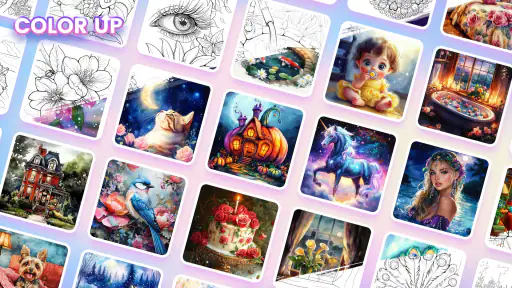
Let's dive into what makes Color Up - Color By Number so special. The app is an absolute gem for those who love a bit of tranquility in their lives. It’s a coloring book app, but with a twist - you color by numbers! This means you don’t have to worry about choosing the perfect color palette. The app does all the heavy lifting, providing you with a numbered guide to follow. Just tap on the sections and watch your masterpiece come to life. It's oddly satisfying and incredibly calming.
Features That Brighten Your Day
One of the coolest features of this app is the vast variety of illustrations available. From intricate mandalas to simple cartoons, there’s something for everyone. It’s like having an entire art studio at your fingertips. Plus, for those who are a bit more competitive or love a challenge, the app offers daily coloring challenges and the chance to unlock new images as you progress.
And let’s not forget the social aspect. You can share your finished artworks with friends or even on social media platforms. It’s a great way to show off your inner artist and maybe even inspire someone else to pick up coloring as a hobby.
A small, repeatable moment in an ordinary day
The best use case is not necessarily a long coloring session. I’d reach for it during a quiet ten-minute break, while waiting for a ride, or when I want something low-effort after finishing a task. Because the numbered areas give the session a clear focus, I can settle in without deciding what to draw. And because it is easy to stop between passes, I can put the device down when the break ends rather than feeling obliged to finish the image.
There is a practical trade-off in that same simplicity: the game’s appeal depends on enjoying the act of filling guided sections. If I want to make a personal illustration or change the colors to match a particular idea, this format is restrictive. I would choose paper or a drawing app for that. If my goal is to occupy my hands and attention without planning a composition, the guided format makes more sense.
Comfort, attention, and the people using it
For a child or an adult who prefers clear instructions, numbered coloring can make starting less intimidating than a blank page. The Everyone age rating is a helpful starting point for household decisions, but I would still preview the experience and supervise younger children as appropriate. The main household boundary I’d set is around screen turns and purchases, not a promise that every person has an isolated space inside the game.
On a smaller screen, tapping tiny areas may demand more concentration than it does on a tablet. If a user finds themselves repeatedly hunting for a section or missing taps, a larger display may be more comfortable, or it may be time to stop for a while. This is not a problem that needs solving with persistence: the point is a calm pastime, so discomfort is a sensible signal to switch activities.
User-Friendly Interface
The app’s interface is super intuitive. Everything is laid out in a way that makes sense, even if you’re not the most tech-savvy person out there. The colors are vibrant, and the app runs smoothly without any annoying lags or crashes. It’s clear that a lot of thought went into making the user experience as seamless as possible.
For a shared device, I’d make the first session a short trial rather than handing it over with assumptions. Let the next person open a picture, try a few taps, and see whether the controls feel natural to them. That simple check answers a useful practical question—whether the interaction suits that particular user and screen—without relying on anyone’s preferences being the same. It also gives the household a chance to agree on how to leave the device ready for the next turn.
Downloading and installing the app is a breeze. Whether you’re an Android or iOS user, Color Up - Color By Number is available on both platforms, ensuring that everyone can get in on the fun. Just search for it in your app store, hit download, and you’re all set for some colorful relaxation.
Purchases and household boundaries
Nuclear Game’s board game listing shows a 4.9 average from around 66 thousand ratings, with over 1 million installs. The game is free to start, is rated Everyone, and includes optional in-app purchases ranging from $1.99 to $19.99 per item. I’d check purchase prompts before letting a child use a shared device, and make sure the device’s own purchase safeguards suit your household; the age rating is useful context, not a replacement for an adult’s judgment.
That free-to-start model makes it easy to try the basic activity before deciding whether it belongs in your routine. I would not treat optional purchases as necessary to judge whether the coloring itself is enjoyable, and I would not let a child make purchase decisions alone. On a device used by several people, device-level purchase protections and a clear rule about asking an adult are more useful than assuming the game provides household account boundaries.
The average rating suggests many players have responded positively, but a high score cannot tell me whether the pace, imagery, or tapping suits a particular person. I’d use the first session as the real test: does the player settle into the numbered task, and do they want to return to it? If not, the rating is no reason to keep it installed. A simple paper coloring book can be a better choice for someone who prefers physical materials, while an open-ended art app fits someone who wants more control.
Device fit and who should pass
It was released on October 29, 2023, and version 1.4.2 supports Android 5.1 and newer. Those details make it easier to judge whether an older Android device is eligible, but they do not guarantee how comfortably it will run there. If you are installing it on a device used by several people, let each person try a picture first and see whether the tapping feels comfortable on that screen. The game’s straightforward premise is a plus for casual use, while anyone looking for deep strategy, open-ended drawing, or a shared multiplayer challenge should choose something built around those interests instead.
I’d especially recommend it to someone who likes a defined, low-pressure task and wants to dip in and out without setting up supplies. It is less suitable for a person who gets frustrated by small touch targets, dislikes numbered guidance, or expects a board game to bring players together around shared decisions. Those are not minor differences in taste: they point to different kinds of activity, and choosing the right one matters more than trying to make this game serve every purpose.
If the device is older, meeting the minimum Android requirement is only the first check; comfort and responsiveness in actual use matter too. I’d try a picture before making it the go-to activity for a household, particularly if several people will take turns. The version and operating-system details help with basic compatibility decisions, while a short hands-on test gives a better answer about whether the game suits the screen and the person using it.
Final Thoughts
In a world that’s constantly moving at breakneck speed, finding a moment of peace is invaluable. Color Up - Color By Number offers that escape, allowing you to unwind and rediscover the simple joys of coloring. Whether you're a seasoned artist or just someone looking for a new way to relax, this app is definitely worth checking out. So go ahead, color your world and let your creativity flow!
My household verdict is that it can earn a place as an easy, quiet option for short breaks, provided everyone understands it is a turn-taking activity rather than a shared project. I’d keep the expectations simple, check that the screen feels comfortable, and set purchase boundaries before handing it to a child. If those conditions suit your home, it is an approachable way to fill a spare moment; if you want collaboration, personal drawing freedom, or a more tactile experience, I’d choose a different activity.
Color Up - Color By Number Frequently Asked Questions
Who developed Color Up - Color By Number?
Color Up - Color By Number is a board game developed by Nuclear Game. Its central idea is simple: tap numbered sections to color an image, creating a calm, approachable activity rather than a complicated game with a steep learning curve. If you enjoy casual coloring games and want a straightforward way to spend a quiet moment, its tap-to-color format may be a good fit.
What is the minimum Android version needed to install Color Up - Color By Number?
Color Up - Color By Number requires Android 5.1 or later. Before downloading, check which Android version your device is running and make sure it meets that requirement. The game’s current version is 1.4.2, so keeping your device and installed apps up to date can help you get the intended experience. It is also rated Everyone, making its content suitable for a broad audience.
Is Color Up - Color By Number free to download, and are there optional purchases?
Color Up - Color By Number is free to download and play, so you can try its tap-to-color format without paying upfront. The game also offers optional in-app purchases, with prices ranging from $1.99 to $19.99 per item. These purchases are separate from the free experience, so consider your preferences before making a purchase.
What is Color Up - Color By Number and how does it work?
Color Up - Color By Number is a digital coloring book app that allows users to color images using a palette of colors provided within the app. Each image is divided into numbered sections, and users simply tap on the corresponding colors to fill these sections. It offers a relaxing and creative outlet, making it easy for people of all ages to enjoy a moment of tranquility and artistic expression.
Is Color Up - Color By Number free to use?
Color Up - Color By Number offers a free version with a variety of coloring pages and features. However, it may also include in-app purchases and subscriptions that unlock additional content, such as premium coloring pages, tools, and an ad-free experience. Users can choose to enjoy the free version or enhance their experience with these optional purchases.
Pros
- User-friendly interface for all ages.
- Vast library of images to color.
- Offers offline mode for convenience.
- Regular updates with new content.
- Encourages creativity and relaxation.
Cons
- Contains in-app ads that can be intrusive.
- Limited features without subscription.
- Occasional app crashes reported.
- Some images require internet to download.
- Color palette could be more diverse.
- Category
- Board
- Version
- 1.4.2











