Chess Online
- 2.21K
- 4.6
- Installs
- 5.00M
- Price
- Free

Screenshots
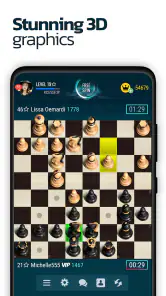
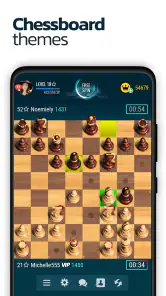
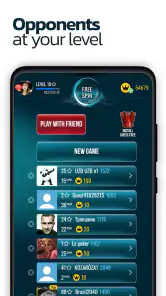
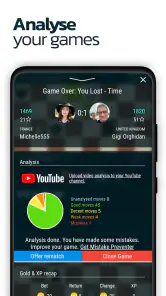
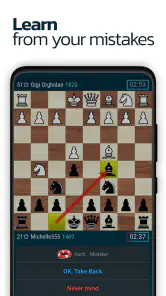
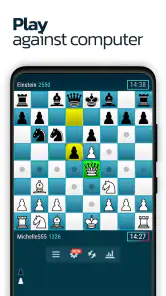
Analysis by Reviewed
I keep coming back to chess when I want a game that feels meaningful rather than merely distracting, and Chess Online fits that mood well. It is a board game from Chess Friends built around playing against real people around the world, but its value at home is a little broader than that description suggests. I can use it for a quick match alone, hand the device to someone nearby, or make it part of a shared routine where different people play at different times.
That flexibility is the main reason I would recommend it to a friend who wants chess without setting up a physical board. It is free to start, available for Android devices running version 7.0 or later, and the current version is 5.9.5. The game has been around since January 25, 2013, so it does not feel like a brand-new experiment. At the same time, it is important to approach it as an online chess game, not as a complete replacement for a dedicated chess study tool or a quiet over-the-board session.
How Chess Online Fits Into Shared Everyday Use
I find shared-device chess works best when everyone treats the game as a personal session, not an open board anyone can take over. A quick check of whose match is active and whose turn it is can prevent accidental moves and awkward handoffs. That practical routine leads naturally to a broader question: how does this online format fit alongside the familiar ways people already play chess?
A practical game for a shared phone or tablet
The most convincing household use case is simple: one person has a few minutes, another person is busy, and the device is available between other tasks. Instead of needing a physical board, pieces, and a clear table, one player can open the game and begin. A parent might play while waiting for dinner to finish, then let a teenager take a turn later, or two people in the same home might agree to play when their schedules overlap.
I like this kind of use because chess does not demand that everyone in the household enjoy the same type of entertainment. One person can treat it as a serious contest, while another can use it as a low-pressure way to practice thinking ahead. The board itself creates a natural stopping point, which makes it easier to fit a game around homework, chores, commuting, or a short break.
There is one important practical boundary with a shared device: chess is personal even when the hardware is communal. A move made by one household member can affect another person’s game, and a result can be recorded under the wrong identity if people do not coordinate first. I would not casually pass the phone around without checking which player or session is active. That small habit prevents confusion later.
Why the online format changes the experience
Playing against people worldwide gives the game a different rhythm from a local board game. A physical match depends on finding another person in the same room, while this version is useful when nobody nearby is ready to play. That makes it particularly appealing to someone who understands the basics but struggles to find a regular opponent.
More From Our News Desk

Weather by Xiaomi Review: Clear at a Glance, Less Clear Up Close

X Under Pressure: Can It Recover When Posting Goes Wrong?

Clash of Clans Is Won Between the Battles

Android Auto Makes the Case for Quieter Car Software

MobiOffice: Transforming Mobile Productivity with Seamless Integration

EA SPORTS FC™ Mobile Soccer: Redefining Mobile Sports Gaming
Online play also removes some of the social cues that help beginners. Across a table, I can see when someone is thinking, joking, or becoming frustrated. On a screen, a long pause may simply mean the other player is busy, disconnected, or considering a complicated move. For a household, that means expectations should be clear before a match begins, especially when a child and an adult are sharing access to the same device.
The game’s average rating is 4.6 from around 181 thousand ratings, and it has passed 5 million installs. Those figures suggest that it has found a substantial audience, but they should not be treated as a guarantee that every match will suit every player. Chess preferences vary sharply: some people want fast competition, some want patient learning, and others only want a local game with no online element.
Setting boundaries before anyone starts
My first recommendation for shared use is to decide whose turn it is to use the device before opening a match. This sounds obvious, but online games are less forgiving than a board left on a table. If one person starts a game and another person needs the phone immediately, the first player may feel pressured to make a move or abandon the session.
A better household routine is to reserve a predictable window for play or use a separate device for each regular player. If that is not possible, agree on whether the game is a quick personal session or something everyone is expected to follow. The distinction matters because a casual match can be interrupted, while a serious match deserves more privacy and attention.
I would also keep a clear separation between “watching” and “playing.” A younger family member may want to observe an adult game, ask questions, or suggest a move. That can be enjoyable, but the person controlling the device should remain clear. Otherwise, advice can quietly become shared control, and neither player knows who really made the decision.
Coordinating around online opponents
Coordination is more important here than it first appears. A household member may assume that an online opponent is waiting patiently, while the player has actually left the device unattended. Even without inventing a specific time control or match rule, the general principle is easy: do not begin a game unless you can give it the attention the format requires.
For a family or group of roommates, I would use a simple spoken rule: announce when a match has started, say when the device is free, and do not open another person’s active game without asking. This is especially useful when notifications or other interruptions compete for attention. Chess rewards concentration, and a shared-device environment can break that concentration quickly.
Another useful approach is to treat the game as a conversation starter rather than a silent competition. After a match, the players can discuss the turning point: perhaps someone moved the same piece too often, ignored a developing threat, or exchanged pieces too early. That discussion adds value even when the result is disappointing. It also helps a beginner learn from the game instead of simply collecting wins and losses.
Learning without turning the home into a classroom
Chess Online works best for a household when learning remains practical. I would not expect it to replace a structured lesson, but a real match gives beginners a reason to remember basic ideas. A parent can ask a child what the opponent is threatening before the child moves, or a stronger player can explain why protecting a piece matters.
One non-obvious benefit of the digital board is that it makes the consequences of a move visible immediately. On a physical board, beginners sometimes lose track of a piece hidden behind another line of attack. On a screen, the position is compact and easy to inspect. That does not automatically teach good chess, but it creates a convenient setting for short explanations.
I recommend focusing on one lesson per game. Trying to correct every move can make the experience exhausting, especially for a new player. Instead, choose one theme such as checking for threats, developing pieces, or protecting the king. The next game can focus on something else. This approach keeps the shared activity friendly while still making progress possible.
Age context and trust
The content rating is Teen, so I would not treat the game as an automatic choice for every child simply because chess itself is a traditional family activity. The rating is a reminder to consider who will use it, how online interaction fits that person’s age, and whether an adult should be nearby. The right decision depends on the household, but it should be deliberate rather than assumed.
For teenagers and adults, the game can be a useful way to practice patience and decision-making. For younger children, I would prefer starting with a supervised session and explaining that an online opponent is a stranger, not a family friend. The child should know not to share personal information and should feel comfortable stopping if an interaction becomes unpleasant.
Trust also applies between household members. If several people use one device, do not assume that everyone wants their games viewed, discussed, or altered. A player may be experimenting, losing repeatedly, or trying a new style. Respecting that private space makes the game more enjoyable and prevents a shared device from becoming a source of arguments.
The free price lowers the barrier to trying it, but the app includes in-app purchases ranging from $1.19 to $129.99 per item. That is relevant in a shared household, particularly when a device is used by more than one person. I would discuss purchases in advance and avoid treating the free download as permission for anyone to buy something. A clear household rule is more useful than assuming every player understands the same boundaries.
Where it stands beside other chess options
Compared with a physical chess set, this game is more convenient and gives access to opponents beyond the room. It is also less tactile and less social in the traditional sense. A wooden board makes it easy for two people to talk, pause, and review a position together without worrying about an online session. If that quiet, face-to-face feeling is your priority, the physical alternative may be better.
Compared with a chess clock and a club-style match, the app is easier to carry and more approachable for spontaneous play. The trade-off is that the experience depends on the digital environment and the behavior of another online player. Someone looking for formal tournament preparation may want a more specialized platform with deeper analysis or coaching tools.
Compared with a puzzle-focused chess app, Chess Online is more valuable when you want to make decisions against another person rather than solve prepared positions. Puzzles can isolate a particular tactic and deliver quick repetition, while a live game tests broader judgment. I would use this app for practical competition and another tool for concentrated training, instead of expecting one product to do both jobs equally well.
Small habits that make matches better
Before moving, I try to ask three questions: what is my opponent attacking, what changed after the last move, and which of my pieces is least protected? This routine is more useful than rushing because the board is digital and the opponent is waiting. It also gives beginners a repeatable method that works whether they are playing a friend, a family member, or someone elsewhere.
When sharing a device, I would take a quick look at the board before handing it over. Confirm whose game is open, whether it is that player’s turn, and whether the next person is only observing. This is a small but genuinely valuable workflow. It avoids accidental moves and keeps the boundaries between household players clear.
For a family challenge, keep the emphasis on improvement rather than a permanent ranking. A simple agreement to identify one good decision and one mistake after each match can be more motivating than celebrating only the winner. Chess can become discouraging when a stronger player dominates every game, so occasional handicaps or teaching positions may be preferable to repeating the same uneven contest.
I would also avoid using the game as a reward or punishment for every small household issue. That can turn a thoughtful activity into a source of pressure. It works better as an optional shared interest, especially when players are allowed to stop after a game without being criticized for the result.
Who should choose it, and who should skip it?
I think Chess Online is a good fit for people who already know the basic rules, want opponents beyond their immediate circle, and appreciate the convenience of a free board game on a compatible Android device. It is also suitable for households that can coordinate device access and are comfortable discussing online play and purchases openly.
I would be more cautious about recommending it to someone seeking a completely offline experience, a polished teaching curriculum, or a private two-person game with no account or online considerations. A physical set is better for a relaxed evening across the table, while a specialized learning app may be better for a player who wants guided lessons, tactical drills, or detailed study.
Beginners can still enjoy it, but they may need support at first. Chess is not difficult to install, yet understanding why a move fails takes time. A new player who dislikes losing to strangers may enjoy the app more after learning with a patient family member or friend. The online setting is most rewarding when the player sees losses as information rather than as a judgment.
My household verdict
After looking at it as both a chess game and a shared-device activity, I see Chess Online as a practical middle ground. It offers the convenience of digital play and the variety of real opponents, while still being simple enough to fit into everyday routines. Its strongest quality is not that it tries to be everything; it gives people a straightforward way to play chess when a physical board or nearby opponent is unavailable.
The limitations are equally clear. Shared devices require communication, online matches require attention, and the Teen rating means families should make an age-appropriate decision rather than handing it to a child without thought. The presence of optional purchases also makes a quick household conversation worthwhile. None of these points ruins the experience, but ignoring them can create avoidable friction.
Chess Friends has built a game with enough reach to appeal to casual players and regular competitors alike. I would install it for a teenager or adult who wants convenient online chess, and I would happily use it as part of a family routine where everyone respects whose game is active. The best reason to choose it is simple: it turns spare moments into real chess practice without requiring a board on the table.
My final recommendation is positive, with sensible boundaries. Try it if you want free online chess and can accept the social and practical responsibilities that come with playing against real people. Skip it if your ideal evening is a quiet, offline game with no digital account concerns. For the right household, it can become a surprisingly useful shared activity—competitive when players want that, educational when someone is learning, and easy to fit around ordinary life.
Chess Online Frequently Asked Questions
Can I play Chess Online with friends, or only with random opponents?
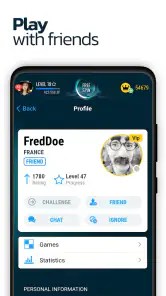
Chess Online is presented as a way to play chess with real players worldwide, so online matches are its central appeal. If you want to play with a particular friend, check the available matchmaking and invitation options after installing the game, since the way private games are arranged can depend on the app version. The game is free to download, though it offers in-app purchases.
Can I choose how long a Chess Online match lasts?
Chess players often prefer different time controls: some enjoy a relaxed game, while others like faster matches. Chess Online is focused on online chess, but the exact time-control choices can vary by version and mode. Check the match setup before starting a game to see what pace is available and choose one that suits your experience and schedule.
Does Chess Online support both Android and iOS?
Chess Online is available as a mobile game, but device requirements and features can differ between Android and iOS releases. The Android version is listed for devices running Android 7.0 or later. Before downloading, find the game in your device’s app store and check that the version offered there is compatible with your phone or tablet.
How much storage space and what device software does Chess Online need?
Chess Online is a board game from Chess Friends, and it is listed for devices running Android 7.0 or later. Before downloading, check that your device has enough free storage and that its operating system meets this minimum. Keeping the game and your device software up to date can also help you get the best experience.
What is Chess Online, and how does it work?
Chess Online is a mobile chess game that lets you play classic matches against other players over the internet or practice against computer opponents. Its store summary highlights online games with real players worldwide. After choosing a game mode, you can make moves by tapping or dragging pieces across the board. Depending on the version, the app may also include ratings, timed games, puzzles, tournaments, chat, and match history.
Pros
- Play against real opponents online at different skill levels.
- Quick matchmaking makes it easy to start a game.
- Includes multiple chess time controls for varied play styles.
- Useful statistics help track wins
- losses
- and overall progress.
- Suitable for both casual players and regular chess enthusiasts.
Cons
- A stable internet connection is required for online matches.
- Match quality can vary when opponents have very different abilities.
- Some features may require an account or in-app purchases.
- Timed games may feel stressful for players who prefer relaxed play.
- Ads or promotional prompts may interrupt the free experience.
- Category
- Board
- Version
- 5.9.5











