Cake Maker: DIY Cooking Games
- 0.00
- 0.0
- Installs
- 1.00M
- Price
- Free

Screenshots

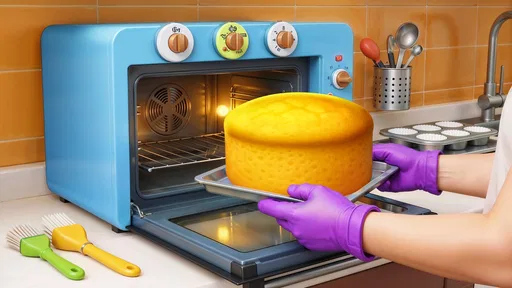

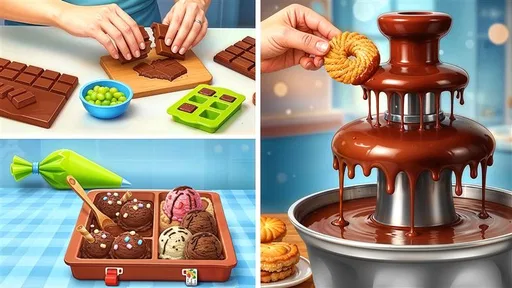


Analysis by Reviewed
Starting with a cake-making game should feel easy, and Cake Maker: DIY Cooking Games is aimed at that relaxed, creative sort of play. I’d approach it as a casual strategy game built around making and decorating cakes, rather than as a realistic baking lesson. The appeal is the chance to shape a playful creation at your own pace; the trade-off is that anyone seeking detailed, transferable cooking instruction will likely want a real recipe app instead.
What to expect from the cake-making idea
The game is developed by Game Flash Studio and is free to download, with in-app purchases listed at $5.99 per item. It is rated for Everyone, and its audience is reflected in the straightforward, approachable premise. Its average rating is currently 0.0, while its install count is over one million; those figures offer context about its store presence, but they are not a substitute for deciding whether this particular style of play suits you.
For a first-time player, the useful distinction is between making something visually pleasing and learning how baking works in a kitchen. The cake theme provides a friendly creative setting, but I would not treat taps and decorating choices as a guide to ingredient quantities, oven timing, or food safety. If your goal is to relax and make an imaginary dessert, that difference is no problem. If you want a practical recipe to follow at home, choose a cooking guide designed for that job.
Getting started without overthinking it
The game’s version is 1.2, and its minimum operating system requirement is Android 5.1. Once it is installed, I’d keep the first session simple: open the game, follow the on-screen prompts, and focus on completing one cake rather than trying to explore every possibility immediately. A small first goal makes the experience less fiddly and gives you a clear sense of whether the creative loop is enjoyable.
One helpful approach is to make deliberate choices rather than tapping through quickly. Pick a look you like, apply each decoration with care, and pause to see how the cake changes as you go. That turns the first attempt into a little design exercise, not just a sequence of screens. Because the theme is familiar, a child can also understand the basic idea quickly, while an adult can join in by suggesting colors or a birthday-cake theme.
Whip Up Delightful Creations
The core of Cake Maker: DIY Cooking Games is, as you might expect, making cakes. But it's not just about slapping on some frosting and calling it a day. Oh no, this game takes you on a culinary journey! From choosing the perfect ingredients to masterfully decorating your cake, you get to experience every step of the cake-making process. The game provides a plethora of customization options, allowing you to select different cake shapes, flavors, and toppings. Whether you want to create a traditional birthday cake or something more avant-garde, the possibilities are endless.
Gameplay That’s a Piece of Cake
One of the things I love about this game is how intuitive it is. The interface is user-friendly, making it accessible to players of all ages. The drag-and-drop mechanic simplifies the process of selecting and applying ingredients, so you can focus more on the creative aspects. Plus, the game offers a series of fun challenges that test your baking skills and keep the gameplay fresh and engaging. Whether you're trying to beat the clock or experimenting in free play mode, there's always something to do.
More From Our News Desk

Weather by Xiaomi Review: Clear at a Glance, Less Clear Up Close

X Under Pressure: Can It Recover When Posting Goes Wrong?

Clash of Clans Is Won Between the Battles

Android Auto Makes the Case for Quieter Car Software

MobiOffice: Transforming Mobile Productivity with Seamless Integration

EA SPORTS FC™ Mobile Soccer: Redefining Mobile Sports Gaming
Adding to the charm is the vibrant, colorful graphics that make each cake look almost good enough to eat. The developers have done a fantastic job of creating a visually appealing environment that draws you in from the first tap.
Sweet Sounds and Tasty Tunes
Let’s talk about the soundscape because, honestly, it’s the cherry on top. The game features upbeat music and satisfying sound effects that make the experience all the more immersive. From the sound of eggs cracking to the whoosh of frosting being applied, every auditory detail adds to the realism and enjoyment.
If you’re someone who enjoys a bit of friendly competition, you’ll appreciate the leaderboard feature. It lets you see how your creations stack up against those of other players around the world. It's a great way to get inspired and maybe pick up a few tips along the way.
Making a first cake feel like a win
My practical tip is to decide on a simple theme before you begin: a bright celebration cake, a favorite-color design, or a deliberately silly combination. That gives each selection a purpose and makes it easier to judge the finished result. If you are playing with a child, let them choose the theme and take turns deciding what to add; the shared decisions can be more enjoyable than trying to make the most elaborate cake possible.
For a quick break, a single cake is a natural stopping point. You do not need to turn every session into a long challenge, and a relaxed pace is part of the attraction. If a timed task feels stressful, focus on the creative side instead; if you prefer a goal, try a challenge and see whether its pressure makes the process more engaging for you.
Common points of confusion
The word “strategy” can suggest a game about planning, managing resources, or competing over a long campaign. Here, I would set expectations closer to casual, hands-on creation: choosing elements and assembling a cake is the central pleasure. That makes it a gentler alternative to strategy games with complex systems, but it also means players looking for deep tactical decisions may find the experience light.
Likewise, the cake-making theme should not be confused with a full cooking simulator. The playful process can introduce familiar baking ideas, but it is best enjoyed as make-believe rather than used as instruction. And while the game is suitable for Everyone, parents may still want to check how a child responds to optional purchases before handing over a device. The listed $5.99-per-item price is a reason to keep purchase choices supervised, not an indication that spending is required to enjoy the basic idea.
How it fits into an everyday routine
I can see this working well during a short wait, a quiet moment after school, or a low-key break when you want something more active than watching a video but less demanding than a competitive game. It is especially suited to players who enjoy visual choices and decorating. For a group, taking turns designing a cake around the same theme can make a simple session feel more social without requiring everyone to master complicated rules.
Compared with other casual games, its specific draw is the cake workflow: the choices revolve around building a dessert rather than matching tiles, tending a virtual farm, or navigating a story. That narrow focus is a strength if frosting and decoration are what you want, but a limitation if you need a wide range of activities or a progression-heavy strategy experience. I would choose a broader cooking or management game for more varied tasks, and a real baking app for kitchen guidance.
Choosing it for the right kind of break
A realistic first session might be a few minutes while dinner is in the oven or while a child waits for a ride. I’d suggest agreeing on one design goal before handing over the device, such as making a cake for a pretend celebration with a particular color mood. That gives the session a beginning and an end, and it helps avoid aimless tapping when the novelty of the first screen wears off. If you are playing together, asking “what would make this look like a party cake?” is more useful than trying to direct every choice.
The game is also a reasonable pick for someone who likes decorating but does not want to draw from a blank canvas. Cake shapes, flavors, and toppings give the creative task a frame, so there is enough direction to get started without needing art experience. The trade-off is that this structure may feel limiting to players who want to place every detail freely or build a larger scene around their design. I’d treat the available choices as prompts for a quick visual experiment, not as a promise of unlimited design control.
Small choices that make repeat play better
For a second or third cake, I’d avoid changing everything at once. Keep the general idea and alter one visible choice, perhaps the shape or the color contrast, so you can tell what made the result feel more appealing. This is a simple way to get more out of a short session: it turns repetition into comparison, and it gives children a chance to explain why one version feels more festive, funny, or elegant than another.
There is also a useful difference between playing for a finished-looking cake and playing for the challenge itself. When you want a calm activity, take your time with the design choices. When you want a clearer target, try a challenge and see whether it gives the session enough direction. I would not force one mode to serve both moods; choosing based on how much attention you have is likely to make the game feel better suited to the moment.
What to keep in mind before handing it to a child
The Everyone age rating and familiar dessert theme make the game approachable, but I still think adults should stay nearby for younger players, particularly around optional purchases. A practical routine is to set expectations before play: the goal is to make a cake, and any purchase prompt should be checked with an adult rather than tapped through. That is a simple boundary, not a reason to avoid the game, and it keeps the creative activity from turning into an unexpected spending decision.
For older players, the main question is not whether the subject is suitable but whether the play has enough variety for their taste. Someone who enjoys arranging colors and toppings may happily return for another design; someone who wants unlock-heavy progression, strategic planning, or a demanding score chase may find the central activity too slight. I would use the first completed cake as a quick test: if choosing and assembling it was satisfying, keep playing; if you were waiting for a larger system to appear, another genre is a better fit.
Why You Should Download It
So, why should you download it? Well, aside from the obvious fun factor, it's a great way to unwind and let your creativity run wild. The game doesn't just cater to those who love baking; it's a delightful escape for anyone looking to have a bit of fun with their spare time. Plus, it’s a safe and educational choice for kids, teaching basic cooking concepts and fostering creativity.
Overall, this app is a sweet addition to your game collection. Whether you're a seasoned gamer or a curious newbie, Cake Maker: DIY Cooking Games offers a scrumptious experience that’s hard to resist. Give it a try and see if you have what it takes to become the ultimate cake maker!
Who will enjoy it, and what to try next
I’d recommend it most to first-time players who want a colorful, low-pressure activity, especially children and adults who like choosing a design and seeing it come together. I would skip it if you mainly want realistic baking practice, substantial strategic depth, or a game whose appeal depends on a long, demanding campaign. Its current version is 1.2, so keeping expectations focused on the cake-making experience is a sensible way to start.
After your first successful cake, try changing just one part of your approach on the next attempt: use a different shape, choose a contrasting flavor, or give the decoration a clear theme. Comparing two distinct designs helps you discover what you enjoy without turning play into a checklist. My overall advice is simple: download it for a cheerful creative break, keep purchase decisions intentional, and move on to a more involved game or practical recipe resource if you want more than playful cake design.
Cake Maker: DIY Cooking Games Frequently Asked Questions
What devices can run Cake Maker: DIY Cooking Games?
Cake Maker: DIY Cooking Games is available for Android, and it requires Android 5.1 or later. Before downloading, check your device’s Android version and make sure you have enough storage for the game. It is a free game, with optional in-app purchases, so you can try the basic experience without paying upfront.
What kind of game is Cake Maker: DIY Cooking Games, and who developed it?
Cake Maker: DIY Cooking Games is a strategy game from Game Flash Studio. Its focus is on creating, baking, and decorating cakes, giving the experience a creative cooking theme rather than a realistic kitchen simulator. The game’s short description is “Cake Maker,” and its store summary presents it as a fun, creative cake-baking game.
What is Cake Maker: DIY Cooking Games?
Cake Maker: DIY Cooking Games is an engaging and interactive mobile game designed for Android, where players can unleash their creativity by designing and baking virtual cakes. The game offers a variety of ingredients, tools, and decorations, allowing users to simulate the cake-making process and explore their culinary skills in a fun and educational way.
Is Cake Maker: DIY Cooking Games suitable for kids?
Yes, Cake Maker: DIY Cooking Games is suitable for kids. It has an Everyone content rating and features a user-friendly interface and cartoonish graphics that are appealing to children. The game is designed to be both fun and educational, helping kids learn about basic cooking techniques and ingredients while fostering creativity and problem-solving skills through cake designing challenges.
Does the game require an internet connection to play?
Cake Maker: DIY Cooking Games can be played offline, making it convenient for users who do not have a constant internet connection. However, some features, such as accessing new cake designs, updates, or participating in global contests, may require an internet connection to enhance the overall gaming experience.
Pros
- Fun and interactive gameplay
- Simple controls for all ages
- Colorful and engaging graphics
- Educational for young bakers
- Variety of cake recipes to try
Cons
- In-app purchases can be frequent
- Ads may interrupt gameplay
- Limited free content
- Requires internet connection
- Repetitive tasks may bore some players