Brain Tricks: Brain Games
- 64.00
- 4.2
- Installs
- 1.00M
- Price
- Free

Screenshots
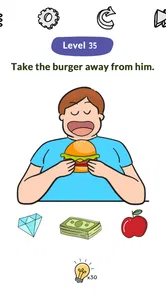
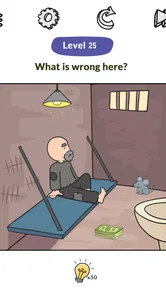



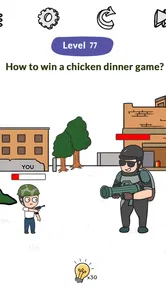
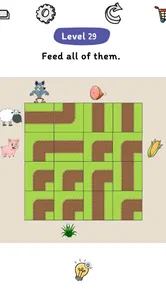
Analysis by Reviewed
I judge a quick brain-game app less by grand promises than by how easily it fits into an ordinary day. Brain Tricks: Brain Games is a trivia game from Puzzle Go built around short mental challenges, so its appeal is straightforward: open it when you have a spare moment, focus on a puzzle, and see whether you can work it out. I’d consider it for casual play rather than as a serious study tool, especially if I wanted a change from scrolling through social feeds or replaying the same familiar game.
How quickly it fits into a spare moment
The useful question for a casual player is whether a game feels easy to approach, not whether it makes dramatic claims about mental performance. Brain Tricks presents itself as a collection of puzzles and brain games, and the original experience I had was simple to get into: I could move from opening the app to trying a challenge without needing to learn a complicated system first. That makes it a reasonable choice for brief sessions, such as waiting for a coffee or taking a short break between tasks.
Speed also depends on what you expect from the word “quick.” A puzzle can be easy to start and still ask you to stop, look carefully, and rethink an obvious answer. That pause is part of the fun here, but it means this is not necessarily the best option when you need entertainment that requires no attention at all. If I’m in a hurry or splitting my focus, I’d leave a tricky question for a calmer moment rather than rush through it and turn a small game into a chore.
For anyone wondering whether this is a good fit for a commute, I’d say it can be, provided you have a safe, settled moment to look at the screen. It is more suitable for a seat on a train or a quiet wait than for walking through a busy station. The appeal is that a puzzle gives a short break a little structure; the trade-off is that solving one still asks for concentration, unlike music or a podcast that can run in the background.
What happens when you play more than one round
My experience with the interface was smooth, and I didn’t run into lag or crashes while using it. That is reassuring for a game whose main purpose is to keep attention on a puzzle instead of making the player wrestle with controls. Still, one trouble-free stretch is not a promise that every device or session will behave identically, so I’d treat performance as a practical impression rather than a guarantee.
Longer play can change the feel of a casual brain game. A single puzzle may be a pleasant reset, while a run of challenges can make a player more aware of mistakes, repetition, or the urge to beat a previous score. I’d use the progress and rewards as light motivation, not as a reason to keep playing after I’ve stopped enjoying it. If a puzzle starts to feel frustrating, taking a break is more useful than tapping through just to preserve a streak of attention.
One small but helpful way to play is to decide what you want from a session before opening the game. If I have only a minute, I’d try one challenge and stop there; if I have a quiet break, I’d give a harder riddle enough attention to test a couple of possible answers. That simple boundary makes it easier to enjoy the game without letting a casual distraction take over a work break or bedtime.
More From Our News Desk

 Gmail
GmailGmail in a Busy Inbox: Who Benefits Most?
From first account to crowded workday, Gmail earns its place through dependable search and flexible sorting—but its best fit depends on how much inbox maintenance you can tolerate.

 Prime Video
Switching to Prime Video: What Changes in Your Viewing Routine
Prime Video can make a compelling second home for streaming, but switching means learning a different catalog, rental layer, and route from browsing to playback.

 Universal TV Remote Control
Universal TV Remote Control Works Best as a Reliable Backup
A phone remote earns its place through quick setup and reliable habits. Here is how to get more from Universal TV Remote Control—and where its limits show.

 Weather - By Xiaomi
Weather by Xiaomi Review: Clear at a Glance, Less Clear Up Close
Xiaomi’s weather app makes everyday forecasts quick to scan, but its calm surface can leave useful details and recovery paths harder to find than they should be.

 X
XX Under Pressure: Can It Recover When Posting Goes Wrong?
A resilience-focused review of X, examining setup, mistaken posts, interruptions, weak connections, and the gaps that matter when recovery needs to be dependable.

 Clash of Clans
Clash of Clans Is Won Between the Battles
Its raids are quick; its community is a long-term project of coordination, teaching, rivalry, and shared responsibility—with all the friction that entails.
Latest News



Reliability, device fit, and sensible expectations
The game is free to install, with optional in-app purchases priced from $0.99 to $6.99 per item. I’d start with the free experience and only consider a purchase if I had already decided that the game suited my routine. That approach matters because a small puzzle game is most worthwhile when its basic play is enjoyable on its own, rather than when a player feels pushed to spend to make the experience worthwhile.
Brain Tricks is rated for Everyone and needs Android 7.0 or later. Its current version is 1.0.133, and it was released on February 24, 2023. Those details make it easier to check basic compatibility before installing, but they do not replace trying the game on your own device. If an app ever closes unexpectedly or feels unresponsive, I’d first close and reopen it, then check whether the device and app are up to date; I would not assume that any single troubleshooting step will solve every issue.
It has an average rating of 4.7 from around 7,700 ratings, with 55 written reviews, and has passed 1 million installs. Those figures suggest that plenty of players have tried it, but they are not a substitute for deciding whether its style suits you. A broad audience can include people who want very different things from a trivia game, so I’d focus on whether the puzzles are enjoyable for me rather than treating popularity as proof that every session will be a match.
Getting Started with Brain Tricks
Once you’ve downloaded and installed Brain Tricks: Brain Games, you’re greeted with a vibrant and user-friendly interface. The app is designed to be intuitive and easy to navigate, which is a great start for any new user. I found it really straightforward to dive into the games without any hassle, and that’s always a plus.
A Variety of Mind-Bending Games
The app offers a diverse range of games designed to test different aspects of your mental prowess. From puzzles that challenge your logical thinking to memory games that push the limits of your recall abilities, there’s something for everyone. I particularly enjoyed the speed math challenges; they really get your neurons firing!
What’s cool is that the app doesn’t just focus on one type of brain training. It’s a comprehensive suite that aims to improve various cognitive skills. Whether you’re looking to boost your memory, enhance your problem-solving abilities, or just enjoy some casual brain teasers, you’ll find a game that suits your needs.
User Experience and Design
The design of the app is sleek and modern, with bright colors that keep you engaged. The animations are smooth, and I didn’t experience any lag or crashes during my time using it, which is a huge relief. The developers have clearly put thought into ensuring a seamless user experience.
Another thing I noticed is the app’s clever use of rewards and progress tracking. It’s motivating to see your progress over time, and the little rewards along the way keep you coming back for more. Plus, it’s always satisfying to beat your previous scores!
Why You Should Give It a Try
If you’re someone who loves to challenge yourself and keep your brain active, Brain Tricks: Brain Games is definitely worth a download. It’s not just about playing games; it’s about enhancing your cognitive skills in a fun and engaging way. And let’s be honest, who doesn’t want to feel a bit smarter every day?
So, whether you’re on your daily commute or just lounging at home, this app offers a productive way to pass the time. Give it a shot, and you might just find yourself hooked on improving your brainpower!
Overall, Brain Tricks: Brain Games is a fantastic addition to anyone’s app library. It balances fun and learning perfectly, making it a must-try for anyone looking to boost their mental agility. Happy gaming, and here’s to a sharper mind!
Brain Tricks: Brain Games Frequently Asked Questions
Is Brain Tricks: Brain Games free to download and play?
Brain Tricks: Brain Games is free to download, so you can try its trivia-style puzzles without paying upfront. Optional in-app purchases are available, with items priced from $0.99 to $6.99. These purchases are worth considering if you want to explore paid content, but you can begin with the free experience and decide whether it suits you before spending anything.
What age rating does Brain Tricks: Brain Games have, and is it suitable for children?
The game is rated Everyone, making it broadly suitable for players of different ages. Its tricky puzzles and riddles can offer a playful way for families to challenge themselves, though younger players may appreciate help with questions they find difficult. As with any game that offers in-app purchases, parents may also want to review purchase settings before letting a child play independently.
What is Brain Tricks: Brain Games and how does it work?
Brain Tricks: Brain Games is an engaging application designed to boost your cognitive skills through a series of fun and challenging games. It offers a variety of puzzles and exercises that target different areas of the brain, such as memory, attention, and problem-solving. By playing these games regularly, users can enhance their mental agility and track their progress over time. The app is suitable for all age groups and adapts to your skill level to provide an optimal challenge.
Is Brain Tricks: Brain Games suitable for all age groups?
Yes, Brain Tricks: Brain Games is designed to be accessible and beneficial for users of all ages. The app features different levels of difficulty, allowing both children and adults to find games that match their cognitive abilities. The games are designed to be engaging and educational, making them a great tool for improving mental skills across various age groups. Parents can also use the app to track their children's progress and encourage healthy brain development.
Does Brain Tricks: Brain Games require an internet connection to play?
Brain Tricks: Brain Games can be played both online and offline. While an internet connection is required for downloading the app and accessing some features like leaderboards and updates, most of the games can be played without an internet connection. This makes it convenient for users who want to enjoy the games while on the go or in areas with limited connectivity. Offline mode ensures uninterrupted gameplay at any time.
Pros
- Engaging puzzles enhance cognitive skills.
- Variety of games keeps users interested.
- User-friendly interface for easy navigation.
- Regular updates with new challenges.
- Suitable for all age groups.
Cons
- Some games require in-app purchases.
- Occasional ads can disrupt gameplay.
- Limited offline functionality.
- High battery consumption during play.
- May become repetitive over time.