Boost Rider: Car Racing Games
- 291.00
- 4.5
- Installs
- 1.00M
- Price
- Free

Screenshots



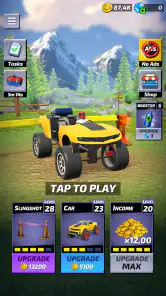


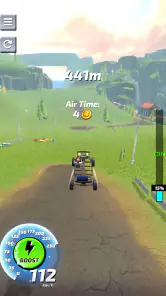
Analysis by Reviewed
I’m drawn to racing games that give me something to do besides steer around a track, and Boost Rider: Car Racing Games caught my attention for its unusual launch-focused premise. Rather than presenting itself as a conventional lap racer, it suggests a quick, physics-minded challenge built around getting a custom car moving with a burst of momentum. That makes it an appealing candidate for short play sessions, though it also means it may not satisfy someone looking for a deep simulation or a traditional championship career.
Developed by Estoty, this free racing game is listed for everyone and has reached over a million installs, with an average rating of 4.5 from around 23,000 ratings. Those figures point to broad interest, but they don’t tell me whether its particular style will suit you. I’d judge it by a more practical question: do you enjoy experimenting with a vehicle and trying to make each run work better, or do you mainly want precise wheel-to-wheel competition?
When the launch-and-racing idea feels unfamiliar
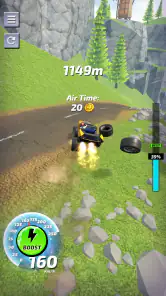
The central appeal is that getting moving is part of the challenge. You prepare a ride, use a slingshot-style launch, and then try to make the run count. That is a different rhythm from the familiar pattern of choosing a car, accelerating from a starting grid, and following a track. If you expect a standard circuit racer, the first moments may feel odd; if you like games where timing and momentum matter, the premise is easier to appreciate.
My practical advice is to treat early attempts as experiments rather than tests of driving skill. Pay attention to what changes when you alter your approach to a launch, and avoid judging the whole game by a single awkward run. With a game built around launching, a small difference in timing or setup can plausibly matter more than the instinct to hold a control continuously. That is a useful mindset even before you know which parts of a run are most important.
The custom-car angle also changes what “progress” feels like. In a conventional racer, you may focus on learning a track and hitting consistent braking points. Here, the attraction is more about preparing a vehicle and seeing how effectively it carries through a run. That gives the game a playful, trial-and-error quality, but it can be less satisfying if you want the clean, repeatable challenge of mastering a fixed circuit.
One non-obvious way to enjoy it is to set a small goal for each session: make a launch feel more controlled, compare a run with your previous attempt, or simply test whether a different setup produces a more satisfying result. This turns repetition into a process of observation instead of a grind. It is especially useful when you only have a few minutes and don’t want to commit to a long race or a complicated progression plan.
What to check before blaming the game
Before installing, check that your device meets the stated minimum operating-system requirement of version 12. A mismatch can prevent a game from installing or running as expected, and it is better to check that basic compatibility first than to spend time troubleshooting controls or performance. The current version is 1.0.18, so if the game behaves strangely after installation, make sure you are opening the current build available to your device.
Storage and connection conditions are sensible things to review for any mobile game, but I wouldn’t assume a particular download size or that a constant connection is required here. Leave enough free space for an installation and any normal device housekeeping, and use a reliable connection while downloading. If the install stalls, checking the connection and available storage is a safer first step than repeatedly tapping the install button.
It is also worth thinking about purchases before you start. The game is free to download, while optional in-app items range from $1.99 to $59.99 each. That is a wide spread, so I’d avoid treating purchases as a requirement for enjoying the basic concept. If you share a device with a child, review purchase controls on the device before handing it over; the everyone age rating does not replace sensible purchase settings.
On the first launch, give yourself a moment to learn how the game responds rather than rushing through every prompt. I’d keep the first session focused on understanding the basic loop—prepare, launch, and assess the result—before deciding whether the customization or repeated attempts are working for me. This is a practical way to separate an unfamiliar control scheme from a genuine mismatch with the game’s style.
Recovering from a run that goes wrong
If a run feels inconsistent, change one thing at a time. When several choices are altered together, it becomes difficult to tell what actually helped. A simple personal routine works better: remember the approach you used, make one adjustment on the next attempt, and compare the outcome. This isn’t a hidden mechanic; it is a way to make a launch-centered game feel less random while you learn its rhythm.
When controls seem unresponsive, first check whether the device is registering touch normally outside the game. A screen protector, damp fingers, or an accidental edge gesture can interfere with taps in many mobile games. Restarting the app after closing it normally is also a reasonable basic check if the interface stops reacting. I would not immediately reinstall or clear app data, because those steps can cost time and may remove local progress in some games.
If the game closes unexpectedly or slows down, close other demanding apps and restart the device before assuming the game itself is broken. That is general mobile troubleshooting, not a guarantee that every problem has the same cause. If an issue continues, note what you were doing when it happened and whether it repeats; a clear pattern is more useful when seeking help than a vague report that the game “doesn’t work.”
For a frustrating streak, take a short break rather than spending money to force progress. The design premise invites repeated attempts, and fatigue can make timing feel worse than it is. Returning later with one specific goal—such as a cleaner launch—can be more satisfying than trying to solve every aspect of a run at once. This is a small but useful distinction between a game that rewards practice and one that simply feels like a chore.
When the phone or expectations may be the real issue
Not every poor experience points to a software fault. Older hardware, a busy device, low available storage, or unstable touch input can all make a mobile game feel less responsive. If other games also stutter or the screen misses taps elsewhere, I would investigate the device before deciding this title is uniquely at fault. Likewise, a weak network can affect downloads or store access without saying much about the actual driving experience.
Expectations matter just as much. Someone who wants realistic handling, licensed-looking race weekends, or head-to-head track duels may find this an awkward fit even if it runs perfectly. The launch-and-customization concept suggests a more arcade-like, experiment-driven experience than the precision and long-form structure offered by many conventional racing games. If what you love is shaving time off a familiar circuit, a standard track racer is probably the better choice.
On the other hand, players who usually bounce off long races may appreciate a game that seems suited to short bursts. A realistic everyday use case is opening it during a brief break, trying a few runs, and putting it away without needing to remember a complex career plan. I would still avoid promising that every session is equally quick or smooth; the appeal depends on whether repeating and refining attempts feels entertaining to you.
Compared with endless runners that put a car on rails, this premise gives more attention to preparing a ride and making a launch. Compared with simulation racers, it appears less concerned with authentic track technique and more interested in an immediate, playful challenge. That middle ground is its strongest point, but also its limitation: it may not offer the depth or precision fans of either extreme are seeking.
Who should try it, and who should pass
I’d recommend giving it a try if you like arcade racing, enjoy seeing how small changes affect a result, and prefer experiments over long races. It is also a reasonable fit for someone who wants a car game that can be approached in short sessions. The combination of a free download and a simple central idea makes it easy to sample, while the presence of optional purchases means I’d keep spending decisions separate from the question of whether the basic game is fun.
I’d skip it if you need a detailed driving simulator, a clearly established competitive scene, or a conventional campaign with familiar race formats. I would also be cautious if repeated attempts frustrate you quickly: a launch-centered game can make trial and error feel like its main activity, and that is not enjoyable for everyone. The best measure is whether each attempt makes you curious about what to change, rather than annoyed that you have to try again.
For someone who is unsure, I’d suggest downloading it, checking that it runs comfortably on their device, and playing without making a purchase during the first session. Try to understand the basic loop, then decide whether the vehicle preparation and launch challenge have enough variety for your taste. That approach gives you a fair read without confusing early unfamiliarity with a lasting problem.
My practical verdict
The strongest reason to try Boost Rider is its distinct launch-focused take on mobile racing, not any promise that it replaces a full-featured racer. Estoty has a concept that feels easy to sample and potentially satisfying for players who like adjusting their approach and learning through attempts. Its broad audience and 4.5 average rating make it an interesting option, but personal preference matters more than popularity when the game’s rhythm is this specific.
Overall, I see it as a casual arcade choice for short sessions, especially if building and testing a ride sounds more appealing than mastering laps. Check the operating-system requirement, keep purchase settings in mind, and troubleshoot device basics before blaming the game for a bad run. If you want realistic handling or structured circuit competition, choose a different kind of racer; if you want a compact experiment in momentum and launches, this one is worth a look.
The game is free, rated for everyone, and includes optional in-app purchases, so I’d approach it as a low-commitment trial rather than a guaranteed long-term favorite. Its current version is 1.0.18, and the right question after a few attempts is simple: am I enjoying the process of improving a run? If the answer is yes, its unusual format is the point. If not, moving on to a more traditional racer is a sensible choice.
Boost Rider: Car Racing Games Frequently Asked Questions
What is Boost Rider: Car Racing Games?
Boost Rider: Car Racing Games is a mobile racing game built around fast-paced driving and competitive-style races. Players steer through tracks, avoid hazards, and use boosts to maintain speed and improve their performance. The exact selection of cars, tracks, and modes may vary by game version, so check the app listing and in-game menus to see what is currently available before downloading.
Is Boost Rider: Car Racing Games free to download and play?
The game may be available to download for free, but that does not necessarily mean every feature or item is free. Mobile racing games commonly offer optional purchases, such as currency, upgrades, or other content, and may also display advertisements. Review the store listing for current pricing and in-app purchase details, and check your device’s purchase settings if you want to prevent accidental spending.
Can I play Boost Rider: Car Racing Games offline?
Offline availability depends on how the game handles its races, progression, and any online features. Some mobile racers let players access at least part of the game without a connection, while other content may require internet access for loading, events, or updates. Check the game’s store description and test its available modes before relying on it for travel or other situations without a stable connection.
What devices are compatible with Boost Rider: Car Racing Games?
Compatibility can vary by device, operating system version, and the game’s latest update. Before installing, open the Google Play or Apple App Store listing and confirm that your phone or tablet meets the stated requirements. Also make sure you have enough free storage for the download and any additional game data. If the app is not listed as compatible, avoid installing it from unofficial sources.
Does Boost Rider: Car Racing Games require an internet connection or share personal data?
The game may need internet access for certain features, updates, advertisements, or purchases, but the requirements can differ between versions. To understand how information is handled, review the privacy information linked on the official store page and the permissions requested during installation. Grant only permissions that make sense for the game, and consult the developer’s policy if you have questions about data collection or sharing.
Pros
- Quick races make it easy to play in short sessions.
- Multiple cars offer variety as you progress.
- Arcade-style handling is accessible for casual players.
- Racing challenges give goals beyond simply finishing first.
- Bright visuals make the action easy to follow.
Cons
- Progression may require repeated races to unlock more content.
- Controls can feel imprecise during tight turns.
- Difficulty may spike as opponents become faster.
- Frequent upgrade choices can slow down the racing flow.
- The experience may feel repetitive after extended play.

- Category
- Racing
- Version
- 1.0.18