Bingo Voyage - Live Bingo Game
- 7.55K
- 4.8
- Installs
- 5.00M
- Price
- Free

Screenshots
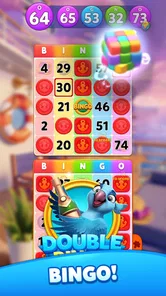
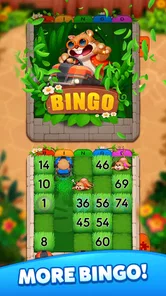




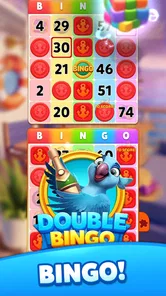
Analysis by Reviewed
I usually turn to a board game when I want something easy to pick up, but a shared phone changes the question: will a quick round fit between household routines, or will it take over the screen? Bingo Voyage - Live Bingo Game gives familiar number-matching a travel theme, so it has more color and bustle than a plain digital bingo card. I see its appeal as a casual pastime for someone who enjoys bingo and doesn’t mind a more social, event-led style of play.
A lively option for short breaks
In an everyday household, it could suit the person waiting for dinner to finish or taking a quiet break while others watch something else. The basic bingo idea is recognizable, which makes it approachable without needing to learn a complicated board game first. Still, live competition and social activity may ask for more attention than a purely solo puzzle, so I’d choose a moment when interruptions are manageable rather than starting a round in the middle of a busy chore.
Compared with a simple bingo app focused only on marking numbers, this one leans into the feeling of going somewhere and playing alongside others. That extra energy can keep a regular player interested, but it also means it may not be the best fit for someone who wants a calm, offline-feeling game with no competitive or community layer. If you prefer a game you can pause and put aside at any moment, a straightforward solo board game may be a better match.
Choosing a session that fits the moment
One useful way to decide whether to open it is to ask what kind of break you actually have. If you have a few quiet minutes and want to follow a live round, the competitive format can give that pause a clear beginning and end. If you are likely to be interrupted repeatedly, or you need to keep checking something else, a self-paced puzzle is a kinder choice. Bingo is familiar, but the live element makes attention part of the experience rather than an optional extra.
I’d also separate “easy to understand” from “effortless in every situation.” A newcomer can grasp the basic number-matching quickly, yet keeping track of a round while chatting, cooking, or sharing the phone may be less comfortable. For a first try, I’d play when the device is yours for a little while and focus on learning the rhythm before deciding whether it belongs in a regular routine.
Set Sail on a Bingo Adventure
When you first dive into Bingo Voyage - Live Bingo Game, you’re immediately greeted with vibrant graphics and a theme that screams exploration. The game takes you on a virtual journey across different locations around the world as you play Bingo. Each destination offers a unique set of challenges and Bingo boards that keep the experience fresh and exciting.
Gameplay and Features
The gameplay is simple yet engaging. As with traditional Bingo, your goal is to match numbers on your card with those called out. But what sets this game apart is its live feature. You can compete with players from around the globe in real-time, which adds a competitive edge and a sense of community. The app offers daily tournaments and events, so there’s always something new to look forward to.
More From Our News Desk

Weather by Xiaomi Review: Clear at a Glance, Less Clear Up Close

X Under Pressure: Can It Recover When Posting Goes Wrong?

Clash of Clans Is Won Between the Battles

Android Auto Makes the Case for Quieter Car Software

MobiOffice: Transforming Mobile Productivity with Seamless Integration

EA SPORTS FC™ Mobile Soccer: Redefining Mobile Sports Gaming
Another standout feature is the power-ups. These nifty tools can boost your chances of winning or give you an edge over competitors. Whether it's a hint to find the next number or a bonus that dabbles in luck, using these at the right moment can turn the tides in your favor.
Making shared play work
For a shared-device household, I’d set a simple boundary before handing over the phone: agree whose turn it is and avoid leaving an active game open for someone else to continue by accident. Live play is more suited to a focused stretch than to passing the device around mid-round. A practical tip is to treat one session as one person’s activity, then hand the phone over once they have finished, rather than trying to coordinate several players on the same screen.
Power-ups also make it worth paying attention to how you play, not just how quickly you tap. I’d save them for a moment when they can genuinely help rather than using them automatically as soon as they appear. That keeps the round from feeling like a string of impulsive decisions and makes the competitive layer more enjoyable. Since the game includes in-app purchases, it’s sensible for anyone sharing a device to discuss spending expectations beforehand; the listed purchase range runs from $0.99 to $199.99 per item.
Using one device without mixing up play
On a household phone or tablet, I’d treat the game as belonging to the person currently playing, rather than as a communal board that everyone can jump into whenever they pass by. That is a small but useful distinction: a live session may be in progress, and another person tapping around could interrupt the player’s concentration or make it unclear whose activity is on screen. Agreeing on a handover after a round is easier than trying to coordinate turns while the game is underway.
There is also a practical account-boundary question whenever people share a device: who is responsible for choices made in the game, and who should be asked before any purchase? I’d make that clear before a child or guest uses it, and I wouldn’t assume that changing users on the device automatically separates game activity. Keeping one person in charge of the session and any spending decisions avoids a lot of avoidable confusion.
Visuals and Sound
The developers have done a fantastic job with the visuals. Each location is beautifully rendered, capturing the essence of the destination. From the bustling streets of New York to the serene landscapes of Japan, each Bingo round feels like a mini-vacation. The sound effects and background music further enhance the experience, making you feel like part of an epic adventure.
Age, trust, and household fit
The game is rated Everyone, which is useful context for households deciding whether it belongs on a shared device, but an age label alone doesn’t settle whether its live and social elements suit a particular child. I’d look at those features together with the family’s own comfort level and have an adult help younger players understand the difference between playing for fun and spending money. The game is free to start, while optional purchases can change how a session feels for someone tempted by extras.
VERTEX GAMES PTE. LTD. is the developer, and the game has a 4.8 average from around 66,000 ratings, with more than a million installs. It launched on January 23, 2024, and version 1.50.0 requires Android 7.0 or later. Those details make it easier to judge whether it fits a device and whether its broad audience is reassuring, but I’d still make the decision based on how comfortable your household is with live competition and in-app purchases.
Keeping age and spending expectations clear
For a parent deciding whether to let a child try it, I’d think about the experience rather than relying on the Everyone label by itself. The recognizable bingo format may be easy to follow, but the competitive and social side can make the game feel more involving than a quiet number puzzle. A simple conversation about when it is okay to play, how to handle interactions, and when to ask an adult about purchases is more useful than assuming the age rating answers every household question.
The free starting point lowers the barrier to trying it, but optional purchases are still worth discussing before the phone is shared. I’d keep the person responsible for the device in charge of purchase decisions and avoid treating an in-game extra as necessary to enjoy a round. That boundary matters especially when different ages use the same screen and may not have the same understanding of spending.
Community and Social Features
What I really love about this app is the social aspect. You can join or create clubs with other players, chat during games, and even send gifts. It’s a great way to connect with fellow Bingo lovers and make new friends. The leaderboard keeps the competitive spirit alive, pushing you to climb higher and gain recognition among your peers.
That social side is a genuine reason to choose it over a bare-bones bingo alternative, especially if you enjoy seeing familiar names and having a shared goal. It is also the part I’d be most cautious about on a family phone: chat and clubs make the game feel more communal, but they are not the same thing as dedicated family coordination tools. I’d keep expectations clear about who is playing and what kinds of interaction feel appropriate rather than assuming a household can manage it through the game itself.
How it compares with quieter alternatives
Against a basic digital bingo card, the biggest distinction is the layer around the numbers: travel-themed presentation, live competition, events, and social activity. If those parts are what make bingo appealing to you, the added bustle gives you more to engage with than simply waiting for a number and marking it. If you mainly want a low-pressure way to pass time, however, the extra activity can feel like unnecessary noise.
It also occupies a different lane from a traditional board game played around a table. A physical game naturally gives everyone a shared setting and face-to-face conversation, while this one connects play to a screen and a live online community. I’d pick the app for a solo break or when other players are not nearby; I’d choose a tabletop game when the point is to spend time together in the same room without making a phone the center of attention.
Who will enjoy it—and who may not
I’d recommend it to bingo fans who like lively presentation, competitive rounds, and a sense of community. It can also work for someone who wants a casual game with more visual personality than a traditional digital card. I’d skip it if you dislike timed attention, prefer not to interact with other players, or want a completely quiet experience with no purchase prompts to consider. In those cases, a solo puzzle or offline board game is likely to feel more relaxing.
It may also be a poor match for a household where people need the same device at unpredictable moments. The game’s live style is easier to enjoy when the player can stay focused, and a phone that is constantly being passed around makes that harder. If shared-device use is unavoidable, a clear turn-taking habit can help, but a game that is naturally paused and resumed may still suit that household better.
For someone who likes bingo but has never tried a social version, I’d approach it as a way to see whether the live atmosphere adds fun rather than assuming that more features automatically mean a better game. Give yourself a focused session, notice whether the event and community elements are enjoyable, and decide from there. A plain bingo app remains a perfectly sensible alternative if you only want the number-matching part.
A realistic place in the daily routine
For a realistic routine, I’d use it as a planned short break rather than an always-open background game: finish a round, put the phone away, and let the next household member use the device afterward. That small habit avoids confusion around whose game is active and helps keep play from spilling into time meant for something else. It also makes the live format feel like a deliberate bit of entertainment instead of another notification competing for attention.
For example, if I had a quiet pause after lunch while someone else was using the television, I could choose a round as a small change of pace, then put the device back in its usual place when I was done. I wouldn’t start just before needing to leave or while I was responsible for something that could not wait. The useful question is not only whether a round sounds appealing, but whether I can give it the attention it asks for at that moment.
My household verdict
In conclusion, Bingo Voyage - Live Bingo Game is more than just a Bingo app. It’s an adventure wrapped in a game, offering a unique blend of excitement, strategy, and social interaction. Whether you’re a seasoned Bingo player or a newbie, this app promises a thrilling experience. So, if you're ready to embark on this Bingo journey, download it now and let the adventure begin!
My recommendation is more measured for shared use: I’d try it if the person playing already enjoys bingo and is comfortable with live competition, then decide whether the social layer feels like a benefit or a distraction. It is best treated as one person’s focused entertainment at a time, with purchase decisions kept clear and age expectations discussed at home. If you want an unhurried, offline-feeling game that can be abandoned at any second, another board or puzzle game will probably fit better; if you want bingo with a more animated, communal feel, this is the more distinctive choice.
Bingo Voyage - Live Bingo Game Frequently Asked Questions
Does Bingo Voyage - Live Bingo Game need much storage space to install?
It is sensible to check the available storage on your phone before downloading any game, especially if you keep many apps or media files on your device. The amount of space needed can depend on the device and app updates, so review the installation screen on your platform and make sure you have room for the download and normal app use.
Can children play Bingo Voyage - Live Bingo Game?
The game carries an Everyone age rating, which makes it suitable for a broad audience according to its listed content classification. Parents may still want to look over the game and its purchase options with younger players. Since the app includes optional in-app purchases, device-level purchase controls can help families manage spending while children play.
What is the latest version of Bingo Voyage - Live Bingo Game, and when was it released?
Bingo Voyage - Live Bingo Game was released on January 23, 2024, and its current version is 1.50.0. Checking the version shown on your device’s app store before installing can help you confirm that you are viewing the same release. The game is free to download, though optional in-app purchases are available.
Who develops Bingo Voyage - Live Bingo Game, and what kind of game is it?
Bingo Voyage - Live Bingo Game is a board game developed by VERTEX GAMES PTE. LTD. Its store summary describes it as Monopoly bingo live, inviting players to start a bingo bash journey. The app is rated for Everyone, so its listed age rating is suitable for a broad audience. If you enjoy bingo presented as a mobile game, this gives you a quick sense of its theme before downloading.
What is Bingo Voyage - Live Bingo Game?
Bingo Voyage - Live Bingo Game is an exciting mobile app that allows players to enjoy a thrilling bingo experience on their Android or iOS devices. The game features various bingo rooms with different themes and challenges, providing an engaging platform for both casual and competitive players. Users can interact with other bingo enthusiasts in real-time, making it a socially interactive gaming experience.
Pros
- Engaging live multiplayer sessions.
- User-friendly interface design.
- Regularly updated themes and events.
- Low data usage for online play.
- Rewards and bonuses are plentiful.
Cons
- In-app purchases can be pricey.
- Ads can be intrusive at times.
- Requires constant internet connection.
- Limited offline gameplay options.
- Some features require a premium subscription.