Aerofly FS Global
- 97.00
- 3.9
- Installs
- 10.00K
- Price
- $3.99

Screenshots


Analysis by Reviewed
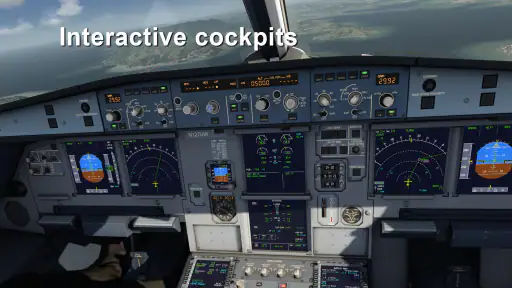
What I find most compelling about Aerofly FS Global is the cockpit: it turns a flight from a view of scenery into a hands-on attempt to manage an aircraft. That focus is what makes this paid flight-simulation game worth considering if you enjoy aviation details, though it also sets expectations. This is not the best fit if you only want a quick, arcade-style trip through the sky.
Why the cockpit changes the experience
In many mobile flying games, the main appeal is steering and watching the landscape pass by. Here, the cockpit gives the activity a more deliberate feel. Seeing controls laid out around the pilot’s seat invites you to pay attention to how you operate the aircraft, rather than treating every plane as a different skin on the same simple flight. For me, that makes the simulator more satisfying when I have time to settle in and learn.
The trade-off is that detail can make a first session feel less immediate. If you are used to tapping a direction and taking off, a cockpit-oriented simulator may ask for patience before the flight feels natural. I would approach it as a hobby to explore in short sessions, not as a game that has to explain every aviation concept instantly.
The Cockpit Experience
First things first, let's talk about the cockpit experience in Aerofly FS Global. Once you fire up the app, you're greeted with an incredibly detailed cockpit that feels like you're sitting right there in the pilot's seat. The developers have gone all out to ensure every button, switch, and dial is accurately represented. I mean, who knew virtual flying could feel this real?
Stunning Visuals
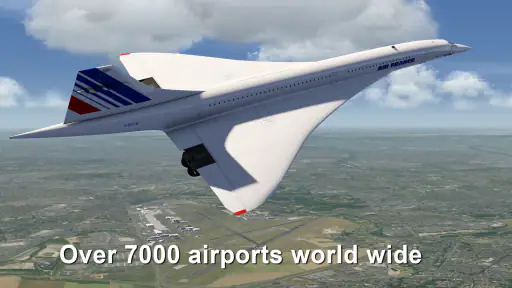
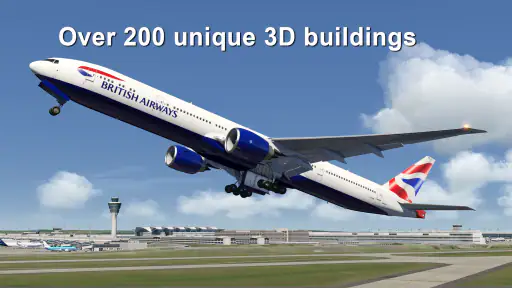
Now, let's chat about the visuals. The graphics in this app are nothing short of breathtaking. Whether you're flying over the jagged peaks of the Alps or cruising above the sprawling cityscapes, every detail is rendered in crisp, high-definition glory. It's almost like having a window seat on a real plane, minus the turbulence (and screaming babies!).
The visual side matters beyond scenery: it helps me stay oriented while following the cockpit view. I can use the landscape as a reference between moments of checking the panel, which gives the flight a more grounded rhythm. On a small phone screen, though, it is worth treating the display as part of the challenge; if reading controls comfortably is a priority, a larger screen may suit you better.
Flight Physics and Realism
One of the standout features of Aerofly FS Global is its commitment to realism. The flight physics are spot-on, giving you a true-to-life flying experience. From the way the aircraft responds to your controls to the realistic weather patterns that can affect your flight, it's clear that the developers have put a lot of effort into making this as authentic as possible. You'll find yourself adjusting flaps, managing fuel, and navigating like a pro in no time.
More From Our News Desk

Weather by Xiaomi Review: Clear at a Glance, Less Clear Up Close

X Under Pressure: Can It Recover When Posting Goes Wrong?

Clash of Clans Is Won Between the Battles

Android Auto Makes the Case for Quieter Car Software

MobiOffice: Transforming Mobile Productivity with Seamless Integration

EA SPORTS FC™ Mobile Soccer: Redefining Mobile Sports Gaming
For a more rewarding first run, I would resist the urge to change several controls at once. Make one adjustment, watch how the aircraft responds, then decide what to do next. That simple habit makes it easier to understand the connection between input and outcome, and it is more useful than treating the simulator like an arcade game where constant steering is the answer.
Variety of Aircraft
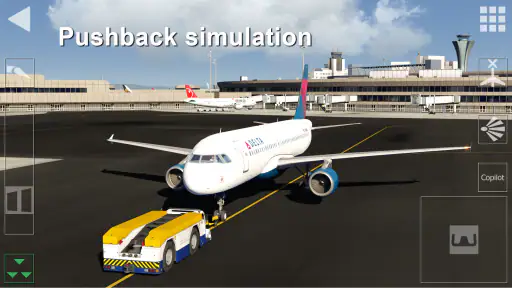
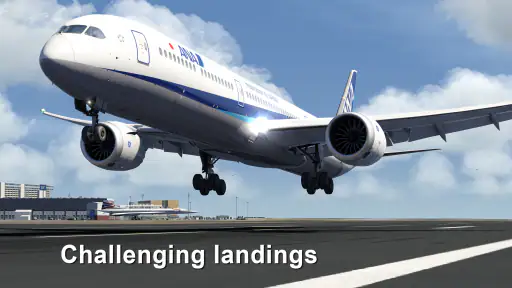
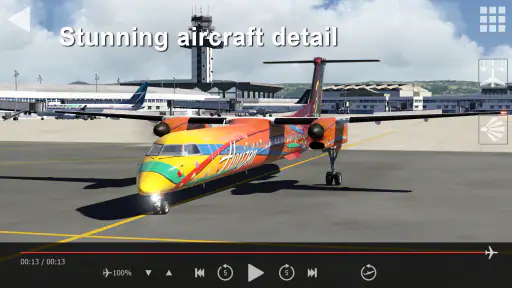
Let's not forget the impressive lineup of aircraft you can choose from. Whether you're a fan of sleek commercial jets or prefer the nimble agility of smaller planes, Aerofly FS Global has got you covered. Each aircraft comes with its own unique characteristics, so there's always something new to master. And let's be honest, who doesn't love the thrill of trying to land a jumbo jet in a crosswind?
That variety also gives the game a natural way to keep practice interesting: repeat a familiar kind of flight in a different aircraft and pay attention to what feels different, rather than changing every variable at once. I would use that approach if I wanted to learn gradually. If your main interest is collecting planes or unlocking a long progression, check the available options in the game before buying; the simulator’s appeal is the flying itself, not a promise of a particular reward loop.
Getting comfortable with the controls
The mobile format makes the cockpit easier to carry around, but it does not make every session equally comfortable. I would try a short flight first, find a control layout and viewing position that work for my hands, then keep those choices steady while learning. On a commute or in a noisy waiting room, interruptions can break concentration, so I would save cockpit practice for a calmer moment and use casual scenery viewing when I have less attention to spare.
That is one place where Aerofly FS Global differs from simpler flight games: the usual arcade alternative is quicker to understand and better for brief bursts, while this simulator rewards deliberate attention to aircraft handling and cockpit detail. It is also not a substitute for real pilot instruction; I would treat the realism as an engaging simulation, not as training or a source of operational guidance.
A realistic way to fit it into a day
Imagine having twenty quiet minutes at home after dinner. I would choose one aircraft, make a modest goal for the session, and focus on the takeoff or landing rather than trying to master the whole simulator at once. If the controls feel awkward, that is useful feedback: switch to a more comfortable setup or take a break instead of blaming yourself for not flying smoothly straight away. A short, focused session makes more sense here than opening the app for a few distracted seconds.
Before installing, it is sensible to check that your device runs Android 10 or later and to consider the purchase structure. The game costs $3.99, with optional in-app purchases ranging from $0.99 to $14.99 per item, so I would look at what is offered before spending beyond the initial price. It is rated Everyone. Aerofly FS Global is a simulation game from Aerofly FS (IPACS); its current version is 01.04.01.02. It has a 3.9 average from around 1,600 ratings, with over 10,000 installs.
Who will get the most out of it
I would recommend this to someone who enjoys aircraft, wants a cockpit-centered mobile simulator, and is happy to learn by trying things rather than expecting instant mastery. The scenery and range of aircraft help keep that interest alive, while the flight model gives each session a purpose beyond sightseeing. If you want a quick game with simple controls, dislike paying up front, or have little patience for a learning curve, a more casual flying game is probably the better choice.
Overall, Aerofly FS Global is a fantastic flight simulator that offers an unparalleled virtual aviation experience. With its stunning graphics, realistic flight physics, and an impressive array of aircraft, it's a must-have for any aviation enthusiast. So, if you're ready to spread your wings and take to the skies, this app is your ticket to a thrilling adventure. Happy flying!
Making practice more useful
One way I would get more from a session is to give it a narrow purpose: for example, spend the flight paying attention to how the controls respond, then use another session to work on a landing. That keeps the cockpit from becoming a wall of unfamiliar details. It also makes it easier to notice progress without needing a score or a checklist to tell me whether the flight was worthwhile.
I would also avoid switching aircraft simply because one flight felt difficult. Since aircraft have distinct characteristics, changing models while still learning basic control makes it harder to tell whether a new result comes from the aircraft or from a change in technique. Keeping the same choice for a few tries gives a clearer comparison; once the handling feels familiar, another plane becomes a more meaningful experiment.
Choosing a session that suits the moment
This is a better choice for a planned break than for a tiny gap between errands. A quiet evening gives me room to look between the panel and the view, make a correction, and see what follows. If I have only a minute or two, a simple mobile game is more likely to deliver an immediately satisfying burst. The distinction is not about one type being better in every situation: it is about whether I want to concentrate or just pass time.
For a longer, relaxed session, I would keep the goal modest and stop once attention starts to fade. Flight simulation asks me to notice details that can blur together when I am tired or distracted. Taking a break is more useful than making hurried inputs and then deciding that the whole experience feels confusing. That small adjustment to expectations makes the learning curve feel fairer.
What the purchase means for different players
The upfront cost makes the decision more deliberate than downloading a free arcade flyer and seeing whether it sticks. I would buy it because the cockpit and aircraft handling sound appealing, not because I expect a large progression system or a stream of quick rewards. Optional purchases are another reason to decide in advance what I am comfortable spending; the base price is only part of the buying question if I am tempted by extras.
For someone who already enjoys aviation videos, aircraft spotting, or patient simulation games, that focused premise may justify the price. For a player who mainly wants immediate action, a free-to-start casual alternative may be a safer fit, even if it offers less cockpit depth. The right comparison is not just graphics against graphics; it is whether I want to learn the feel of a flight or simply steer through a sky-themed game.
Practical expectations before you start
A common question is whether this is suitable for a complete newcomer. I think it can be, provided that “newcomer” means willing to experiment rather than expecting every control to make sense at once. I would start by observing what is on screen, choose a manageable goal, and make small changes instead of trying to operate everything immediately. That approach makes the cockpit less intimidating without pretending the simulator is effortless.
Another useful consideration is where you plan to play. The mobile format is convenient, but the cockpit view asks for enough screen space and attention to make its detail readable. If your usual play happens while walking, commuting, or sharing a noisy room, the interruptions may undermine the very part that makes the game distinctive. I would reserve it for a stable, comfortable spot rather than treating it as a background activity.
There is also a difference between enjoying realism and relying on it as instruction. The simulation can make aircraft operation feel more involving, but I would not use it to prepare for real-world flying or to learn procedures for actual aircraft. People looking for professional instruction need a proper training route; people looking for an absorbing mobile hobby can enjoy the simulation on its own terms.
My recommendation
My recommendation is fairly specific: choose this if the cockpit is the reason you want a flight game, and you are happy to spend time getting comfortable with it. The combination of aircraft variety, detailed controls, and scenery gives patient players several ways to stay interested without turning every session into a competition. Its strongest moments come when I can focus on a flight rather than rush through one.
Skip it if you need instant, low-effort entertainment, dislike an upfront purchase, or would rather have a game built around clear missions and rewards. Those preferences are not a flaw; they simply point toward a different kind of flying game. For me, the appeal here is the process of paying attention to the aircraft and the view together, and that makes the simulator a thoughtful choice for an aviation-minded player.
Aerofly FS Global Frequently Asked Questions
How much does Aerofly FS Global cost, and what should I know about optional purchases?
Aerofly FS Global is a paid flight simulation game, so you should expect to purchase it before playing. Optional in-app purchases are also available, with items priced from $0.99 to $14.99. These can add to the experience, but they are separate from the initial cost; consider whether you want extra content before deciding how much to spend.
What is Aerofly FS Global?
Aerofly FS Global is a comprehensive flight simulation app designed for aviation enthusiasts. It offers a realistic flying experience with high-quality graphics, a wide range of aircraft, and global scenery. This app allows users to explore the world from the comfort of their mobile device, making it one of the most immersive flight simulators available for Android and iOS. It is a simulation game developed by Aerofly FS (IPACS), and its central appeal is the chance to fly around the world.
Is Aerofly FS Global suitable for beginners in flight simulation?
Yes, Aerofly FS Global caters to both beginners and experienced pilots. The app includes user-friendly tutorials and adjustable difficulty levels, enabling new users to gradually learn the basics of flying and navigation. At the same time, it offers advanced features and realistic flight dynamics that can challenge even seasoned pilots. Its Everyone content rating also makes it suitable for a broad audience, though younger players may still benefit from guidance as they learn the controls.
What devices are compatible with Aerofly FS Global?
Aerofly FS Global is available for both Android and iOS devices. However, due to its high-quality graphics and detailed simulations, it requires a device with relatively good processing power and memory. Users should ensure their device meets the app's minimum requirements for optimal performance and to avoid any lag or crashes during gameplay. On Android, the minimum operating-system requirement is version 10, so check your device settings before downloading.
Are there any in-app purchases in Aerofly FS Global?
Yes, Aerofly FS Global offers a range of in-app purchases. These may include additional aircraft, enhanced scenery packs, or other premium features that can enhance the overall flying experience. While the base app provides a substantial amount of content, purchasing additional features can offer a more enriched and customized experience for enthusiasts. The available purchases range from $0.99 to $14.99 per item, so optional spending can vary.
Pros
- Immersive flight simulation experience
- High-quality aircraft models
- Realistic flight physics
- Extensive global flight maps
- User-friendly interface
Cons
- Requires high-performance devices
- Large storage space needed
- Limited free content
- Occasional app crashes
- Steep learning curve for beginners
- Category
- Simulation
- Version
- 01.04.01.02