YoYa Time: Build, Share & Play
- 1.31K
- 3.8
- Installs
- 10.00M
- Price
- Free

Screenshots


Analysis by Reviewed
YoYa Time: Build, Share & Play is a free simulation game from YoYa World that puts character creation and everyday storytelling at the center. I approached it less like a game with a fixed objective and more like a digital playroom: I could shape people, place them in a city setting, and decide what kind of small story I wanted to tell. That makes the experience immediately approachable, especially if you enjoy imaginative play rather than competition, timed challenges, or complex progression.
The important thing to understand before installing it is that the fun comes from making your own situations. You are not entering a traditional campaign with a clear finish line. Instead, you experiment with characters and scenes, then use those pieces to act out routines, friendships, family moments, or completely silly scenarios. This is a creativity-first simulation, not an achievement-driven game. That distinction explains both its charm and its limitations.
YoYa World has released the game for Android, with a minimum operating system of Android 7.0. It is rated for Everyone, so it is presented as an accessible choice for a broad audience. The game is free to start, although optional in-app purchases range from $0.99 to $79.99 per item. I would keep that in mind before handing the device to a child, because the creative experience is easy to explore without spending, while the presence of paid items can still affect how freely someone wants to browse.
What the first session with YoYa Time feels like
My first impression was that the game asks me to make decisions rather than follow instructions. The central appeal is the relationship between a character and the world around them. I can think about who a character is, how that person should look, where they belong, and what kind of scene would make sense for the story I have in mind. That open structure is friendly to beginners because there is no wrong opening move, but it can also feel slightly directionless if I expect a checklist.
The city-life setting gives the imagination a useful frame. Instead of creating a character in isolation, I can picture a daily routine: getting ready, meeting someone, visiting a location, or arranging a scene that looks like a snapshot from an invented life. Even when I am not trying to tell a serious story, the setting helps me choose a reason for each character to exist. A character becomes more interesting when I give them a place, a relationship, and a small problem to solve.
That is where the game differs from many conventional simulation titles. In a management simulator, I usually optimize resources, unlock systems, or keep a schedule running. Here, the reward is more personal. I decide whether a scene is funny, calm, dramatic, or simply decorative. Players who enjoy making avatars and arranging virtual spaces will probably understand the appeal quickly. Players who need goals, scores, battles, or visible progress may wonder what they are supposed to do after the initial novelty.
I also found that the game works well in short sessions. I can open it with one small idea, make a character change, arrange a scene, and stop without feeling that I have abandoned a mission. That makes it suitable for casual play after school, during a quiet break, or whenever I want a low-pressure creative activity. It is less convincing as a game for someone searching for a deep strategy system or a long-form narrative that unfolds on its own.
More From Our News Desk

Weather by Xiaomi Review: Clear at a Glance, Less Clear Up Close

X Under Pressure: Can It Recover When Posting Goes Wrong?

Clash of Clans Is Won Between the Battles

Android Auto Makes the Case for Quieter Car Software

MobiOffice: Transforming Mobile Productivity with Seamless Integration

EA SPORTS FC™ Mobile Soccer: Redefining Mobile Sports Gaming
Setting up a first character without overthinking it
For a first-time user, my advice is to avoid trying to design an entire cast immediately. Start with one character and give that person a simple role. A student, neighbor, shop worker, parent, or friend is enough. The point is not to create the perfect appearance; it is to create someone you can use in a scene within a few minutes. Once the character has a purpose, later choices become easier because I can judge them against the story rather than choosing randomly.
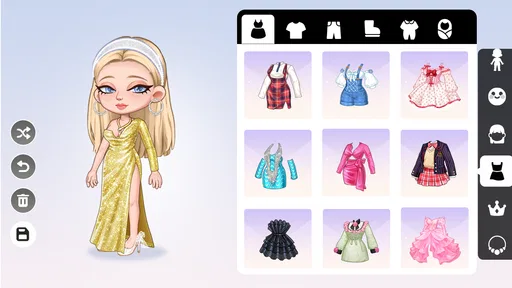
Character creation is most useful when I treat it as visual storytelling. A hairstyle, outfit, or general look can suggest personality before the character does anything. I might make one character look organized and another look relaxed, then place them together to create an immediate contrast. This is a more productive approach than changing every available detail repeatedly, because it gives each decision a job.
A practical setup routine is to create a main character, add one person connected to them, and then imagine one location where they can meet. That small triangle gives me enough material for a meaningful first scene. If I build too many characters before deciding how they relate, the world can become a collection of attractive pieces with no reason to interact. The game becomes easier to understand when I build outward from a situation instead of collecting everything first.
I would also suggest taking a moment to notice how the game presents its available choices before making purchases. The free starting experience is enough to learn the basic rhythm of creating and arranging. Paid content may be tempting when I want a particular look or a more complete-feeling world, but I would first test whether the game’s open-ended style suits me. Buying more items cannot solve the problem of not knowing what kind of story I want to make.
The first meaningful success is a tiny story
The first successful action is not simply finishing a character. For me, it is placing that character into a scene with a clear beginning, a small event, and an ending. For example, I might create a character who is preparing for a meeting, add a friend who arrives with a different plan, and arrange the setting so the two have an obvious reason to interact. That is enough to turn customization into play.
This approach is helpful because it gives the open-ended design a gentle structure. I can ask three simple questions: who is here, what does each person want, and what changes by the end? The answers do not need to be complicated. A character wants to be on time, another wants to surprise them, and the scene ends with both adjusting their plans. The game’s strength is that I can express that idea visually without needing a formal script.
Another useful workflow is to build a scene around a daily routine. I might begin with a morning preparation, move to a meeting with another character, and finish with a relaxed moment afterward. Even if I do not preserve the sequence as a formal story, thinking in stages helps me decide what belongs in each location. It also prevents the common beginner problem of placing objects and characters without understanding how they connect.
If I am playing with a child, this is a good point to join in rather than simply watching. Asking “what happens next?” encourages the child to explain choices, while asking “why does this character need that?” turns decoration into narrative thinking. The game can support imaginative conversation, but the quality of that experience depends heavily on the person playing. It is a tool for storytelling, not a substitute for interaction.
The game’s store summary describes it as a character creator and world builder focused on sharing stories of city life. I think that description is most useful when interpreted as an invitation to make scenes, not as a promise of a conventional city simulation. The city provides context, while the player supplies the purpose. Once I accepted that, the lack of a fixed objective felt less like a missing feature and more like the basic design choice.
Where new players can become confused
The biggest source of confusion is expecting the game to tell me what counts as progress. In many simulation games, I can identify success through money, levels, missions, or unlocked areas. Here, I have to define the success condition myself. If I open the game without an idea, I may spend time browsing choices and still feel that I have not played. A small prompt from myself, such as “create a scene about an unexpected visit,” makes the experience much more satisfying.
Another point of friction is the difference between customization and storytelling. It is easy to spend a long time making a character look polished and then discover that I have no scene prepared for them. I now try to pair every major customization session with a practical test: where will this character go, who will they meet, and what can they do there? If I cannot answer those questions, I pause the design work and create a simple setting first.
New users may also assume that every attractive option is necessary for a complete experience. I do not think that is true. A small cast and a modest scene can produce a better story than a crowded world where nobody has a role. This is especially important for families managing spending. Since the game is free to download but includes optional purchases, I would establish a clear rule before playing: explore the basic creative loop first, and treat purchases as extras rather than requirements.
The age rating of Everyone makes the game approachable, but a broad age rating does not remove the need for adult guidance around purchases or screen time. If a younger player is using it, I would sit with them during the first session, explain that some items cost money, and encourage them to make a scene from what is already available. That turns a potential source of frustration into a useful lesson about choosing tools instead of automatically collecting them.
There is also a creative limitation that becomes clearer with time: open-ended play depends on the player’s willingness to invent. Someone who wants the game to generate a steady stream of challenges may find the experience quiet. In that case, a mission-based life simulator or a management game would probably be a better match. YoYa Time is strongest when I want control over the story, not when I want the game to surprise me with a structured one.
How it compares with familiar alternatives
Compared with traditional life-simulation games, this one feels lighter and more immediately visual. I spend less energy maintaining systems and more time deciding how a character should appear and what a scene should communicate. That makes it easier to share with a younger player or someone who has never played a simulation game, but it also means there is less pressure and less measurable development for players who enjoy long-term planning.
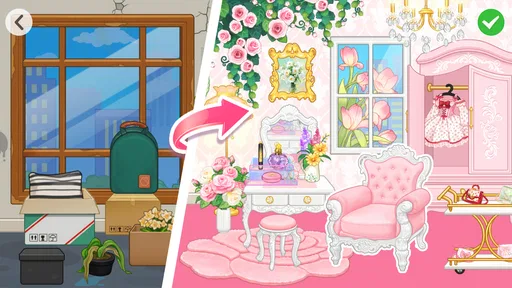
Compared with avatar dress-up apps, the city setting gives customization a stronger reason to exist. I am not only choosing an outfit for a portrait; I can use the character in a broader situation. The trade-off is that the experience asks me to provide more imagination. A dress-up app can feel complete after creating one pleasing image, while this game becomes more rewarding when I continue into relationships, locations, and small events.
Compared with building games that focus on construction, YoYa Time is more concerned with the people inside the world than with engineering a complex environment. I would choose it when my main interest is arranging personalities and everyday scenes. I would choose a construction-focused alternative when I want detailed building systems, resource decisions, or a sense that the environment itself is the main puzzle.
That comparison also explains who should skip it. If you want competitive play, a clear campaign, or a simulation where every decision affects a measurable economy, this will probably feel too loose. If you enjoy role-play, visual organization, and making short stories from ordinary situations, the lack of pressure becomes an advantage rather than a weakness.
Practical ways to keep the experience fresh
One technique that worked well for me was giving each session a single theme. I might focus on a new friendship, a family routine, a misunderstanding, or a character trying something unfamiliar. The theme keeps me from endlessly adjusting details and gives every choice a purpose. It also makes the game easier to return to because I can begin with a question instead of a blank screen.
A second technique is to reuse a character in a completely different role. A character designed as quiet and careful can become the person who has to solve a sudden problem. That contrast creates more story than simply adding another character with a different appearance. It also helps me get more value from the creative work I have already done.
A third technique is to build scenes that can be understood without explanation. I arrange the characters so their positions, expressions, or surrounding objects suggest what is happening. This is useful if I want to share a story visually with someone who was not present while I created it. The scene should communicate enough that another person can guess the situation and ask questions.
I would keep the world organized rather than filling every available space. A clear location makes it easier to remember where characters belong and easier to continue a story later. When I create too much at once, the result can feel busy but not meaningful. In this game, restraint is a genuine creative advantage: fewer elements often make the central event easier to see.
Who will enjoy it, and who should look elsewhere
I can recommend this game to players who like avatar creation, gentle role-play, and everyday storytelling. It is particularly approachable for a first-time simulation player because there is no need to learn a complicated economic system before making something recognizable. The Everyone rating also makes it a reasonable family-oriented choice, provided an adult handles expectations around optional purchases and play time.
It is also a good fit for someone who wants a relaxing creative break rather than a demanding game. I can use it for a few minutes to make a character or spend longer arranging a connected story. That flexibility is one of its most practical strengths. The game does not require me to be highly skilled, but it does reward attention to small relationships and visual details.
I would not recommend it as the main choice for players who need constant novelty supplied by the game itself. If you do not enjoy inventing situations, the open structure may feel empty after the initial customization. I would also point strategy fans toward a more systems-heavy simulation, and players seeking narrative discovery toward an adventure game with authored events. This title gives me the stage and the props; I have to bring the script.
My recommendation after spending time with it
YoYa Time: Build, Share & Play succeeds when I treat it as a flexible storytelling kit. The developer, YoYa World, has positioned it as a simulation experience built around characters, city life, and personal stories, and that focus is clear in the way the game encourages me to create rather than compete. Its average rating is 3.9 from around 61 thousand ratings, while its reach has passed 10 million installs, suggesting that the concept has found a substantial audience even though it will not suit every play style.
The current version is 2.34, and the game was released on April 16, 2024. Those details are useful when checking compatibility and deciding whether an Android device meets the minimum requirement. I would not install it expecting a traditional campaign or a deep management challenge. I would install it when I wanted a calm space to make characters, arrange a city-life scene, and turn a small everyday idea into something I could share.
My clearest advice for a first session is simple: create one character, give them one relationship, and build one short situation. Do not begin by trying to complete the whole world. That path gets you to the first meaningful success faster and shows whether the game’s open-ended style matches your taste. If that small story makes you want to add another scene, the game has probably found its audience in you.
For me, the best part is the freedom to make ordinary moments feel worth staging. The main weakness is the same freedom, because it can leave an unprepared player wondering what to do. I still recommend giving it a try because the entry cost is free, the controls and premise are approachable, and the creative loop becomes clearer once I stop searching for a traditional win condition. If you enjoy making the story as much as playing it, this is a welcoming place to start.
YoYa Time: Build, Share & Play Frequently Asked Questions
Can I create my own characters and stories in YoYa Time?
Yes. Creating characters and building worlds are central to YoYa Time: Build, Share & Play. You can customize characters, arrange spaces, and combine different elements to make scenes for your own city-life stories. The game is designed for open-ended pretend play rather than a fixed campaign, so it suits players who enjoy choosing their own scenarios and deciding what happens next.
What kind of creative activities can I do in YoYa Time?
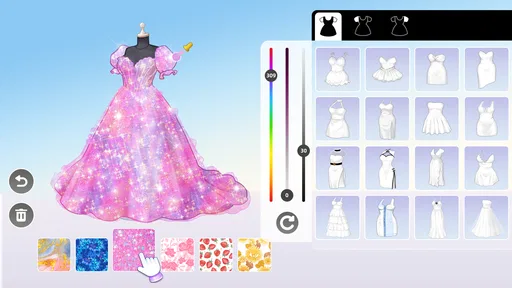
YoYa Time brings character customization, decorating, world-building, and role-play together in a simulation game. You can mix outfits, accessories, furniture, and characters to set up scenes and act out everyday situations. Its appeal is less about completing a prescribed set of missions and more about experimenting with designs and stories at your own pace.
Can I play YoYa Time with friends or share what I create?
The game’s title and description emphasize building, sharing, and playing, with a focus on stories about city life. Sharing-related features may depend on the version and how the game is accessed, so it is worth checking the options available in the app before planning a particular kind of interaction. For younger players, an adult should review any sharing tools and help decide how they should be used.
Who developed YoYa Time, and what kind of game is it?
YoYa Time: Build, Share & Play is developed by YoYa World and falls into the simulation genre. Its focus is on creating characters and worlds, then using them to shape stories about city life. If you enjoy imaginative play, decorating spaces, and making up scenarios rather than working through a traditional campaign, its creative approach may be a good fit.
What is YoYa Time: Build, Share & Play?
YoYa Time: Build, Share & Play is a creative social game where players can explore colorful locations, customize characters, decorate spaces, and create their own stories. Rather than following a fixed adventure, you can freely combine outfits, furniture, accessories, and characters to design scenes and role-play different situations. It is aimed mainly at children and casual players who enjoy open-ended creativity and virtual world-building.
Pros
- Creative building tools encourage imaginative play.
- Large selection of outfits and accessories for customization.
- Social sharing makes it easy to showcase creations.
- Colorful visuals are appealing to younger players.
- Frequent activities provide new ways to explore the world.
Cons
- Some content and items may require in-app purchases.
- The interface can feel overwhelming for younger children.
- Social features may require parental supervision.
- Progress can feel limited without unlocking premium content.
- Performance may vary on older phones and tablets.











